How to Develop an ALV Program
Referenec: ABAP ALV Development Guide
The implementation steps for developing an ALV arise from its purpose. ALV is a tool provided by SAP for interaction between users and the SAP GUI, enabling visualization and management of enterprise data. The development steps can be divided into three main parts:
- Fetching required data
- Data visualization
- Data management operations
Step 1: Fetch Required Data
Assume the user wants to view procurement data for March 2022. Purchase order header data is retrieved from table EKKO, and line item data from table EKPO.
SELECT ekko~ebeln,  " Purchase Order Number
       ekko~bukrs,  " Company Code
       ekko~ekorg,  " Purchasing Organization
       ekko~aedat,  " Order Creation Date
       ekko~ernam,  " Order Creator

       ekpo~ebelp,  " Purchase Order Item Number
       ekpo~matnr,  " Material Number
       ekpo~menge,  " Quantity
       ekpo~meins,  " Unit of Measure
       ekpo~werks,  " Plant
       ekpo~lgort   " Storage Location
  INTO TABLE @DATA(lt_po)
  FROM ekko
 INNER JOIN ekpo ON ekko~ebeln = ekpo~ebeln
 WHERE ekko~aedat BETWEEN '20220301' AND '20220331'.
Step 2: Display Data Using Function Modules
SAP ECC proivdes two function modules for generating ALV displays: REUSE_ALV_GRID_DISPLAY and REUSE_ALV_GRID_DISPLAY_LVC (the latter is recommended). The function is called via CALL FUNCTION 'REUSE_ALV_GRID_DISPLAY_LVC'. Alternatively, you can use the quick method in SE80: pattern -> enter function name -> confirm.
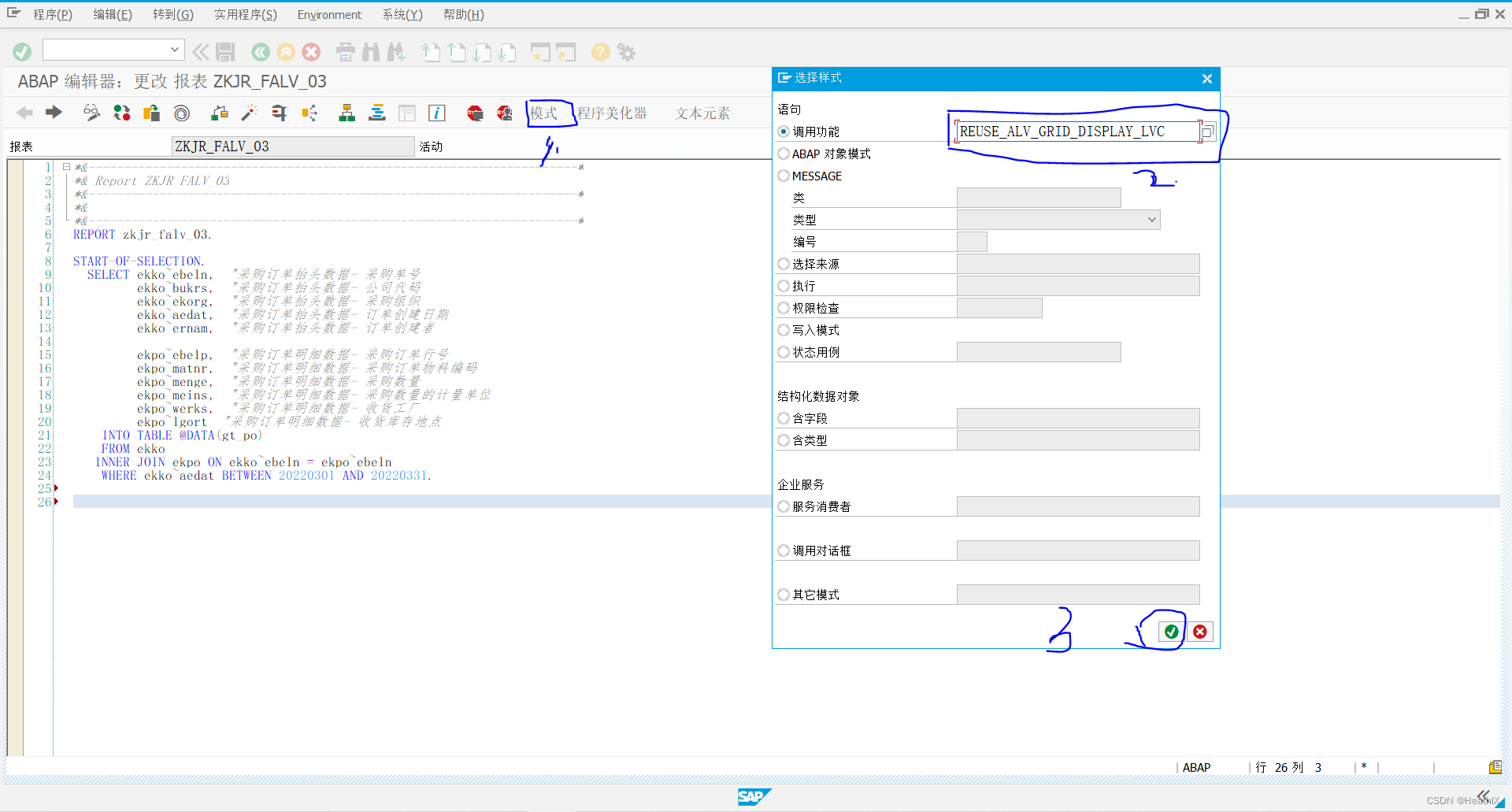
Key import parameters:
I_CALLBACK_PF_STATUS_SET: Important for defining ALV toolbar buttons; without it, buttons may not work.I_CALLBACK_USER_COMMAND: Important for implementing custom button functionality.IS_LAYOUT_LVC: Controls ALV layout.IT_FIELDCAT_LVC: Controls ALV field display.
CALL FUNCTION 'REUSE_ALV_GRID_DISPLAY_LVC'
* EXPORTING
*   I_INTERFACE_CHECK                 = ' '
*   I_BYPASSING_BUFFER                =
*   I_BUFFER_ACTIVE                   =
*   I_CALLBACK_PROGRAM                = sy-repid
*   I_CALLBACK_PF_STATUS_SET          = ' '
*   I_CALLBACK_USER_COMMAND           = ' '
*   I_CALLBACK_TOP_OF_PAGE            = ' '
*   I_CALLBACK_HTML_TOP_OF_PAGE       = ' '
*   I_CALLBACK_HTML_END_OF_LIST       = ' '
*   I_STRUCTURE_NAME                  =
*   I_BACKGROUND_ID                   = ' '
*   I_GRID_TITLE                      =
*   I_GRID_SETTINGS                   =
*   IS_LAYOUT_LVC                     =
*   IT_FIELDCAT_LVC                   =
*   IT_EXCLUDING                      =
*   IT_SPECIAL_GROUPS_LVC             =
*   IT_SORT_LVC                       =
*   IT_FILTER_LVC                     =
*   IT_HYPERLINK                      =
*   IS_SEL_HIDE                       =
*   I_DEFAULT                         = 'X'
*   I_SAVE                            = ' '
*   IS_VARIANT                        =
*   IT_EVENTS                         =
*   IT_EVENT_EXIT                     =
*   IS_PRINT_LVC                      =
*   IS_REPREP_ID_LVC                  =
*   I_SCREEN_START_COLUMN             = 0
*   I_SCREEN_START_LINE               = 0
*   I_SCREEN_END_COLUMN               = 0
*   I_SCREEN_END_LINE                 = 0
*   I_HTML_HEIGHT_TOP                 =
*   I_HTML_HEIGHT_END                 =
*   IT_ALV_GRAPHICS                   =
*   IT_EXCEPT_QINFO_LVC               =
*   IR_SALV_FULLSCREEN_ADAPTER        =
* IMPORTING
*   E_EXIT_CAUSED_BY_CALLER           =
*   ES_EXIT_CAUSED_BY_USER            =
  TABLES
    t_outtab                          = lt_po[]
* EXCEPTIONS
*   PROGRAM_ERROR                     = 1
*   OTHERS                            = 2
          .
IF sy-subrc <> 0.
*   Implement suitable error handling here
ENDIF.
Preparing Field Catalog
Define variables matching the parameter types and populate them.
DATA: lt_fieldcat TYPE lvc_t_fcat,
      ls_fieldcat LIKE LINE OF lt_fieldcat.

DATA lv_pos TYPE i.
DEFINE %%add_fieldcat.
  lv_pos = lv_pos + 1.
  ls_fieldcat-col_pos = lv_pos.
  ls_fieldcat-fieldname = &1.
  ls_fieldcat-scrtext_m = &2.
  APPEND ls_fieldcat TO lt_fieldcat.
  CLEAR ls_fieldcat.
END-OF-DEFINITION.

%%add_fieldcat: 'EBELN'    'Purchase Order',
               'EBELP'    'Item',
               'EKORG'    'Purch. Organization',
               'BUKRS'    'Company Code',
               'AEDAT'    'Creation Date',
               'ERNAM'    'Created By',
               'MATNR'    'Material',
               'MENGE'    'Quantity',
               'MEINS'    'UoM',
               'WERKS'    'Plant',
               'LGORT'    'Storage Loc'.
Preparing Layout
DATA: gs_layout TYPE lvc_s_layo.

* Layout settings
gs_layout-cwidth_opt = 'X'.   " Optimize column width
gs_layout-zebra = 'X'.        " Zebra pattern
Preparing Status
Usually, copy a standard status (e.g., 'STANDARD') from another program. Define a subroutine to set it.
CALL FUNCTION 'REUSE_ALV_GRID_DISPLAY_LVC'
  EXPORTING
    i_callback_pf_status_set = 'FRM_SET_STATUS'
  TABLES
    t_outtab                 = lt_po[]
  EXCEPTIONS
    program_error            = 1
    OTHERS                   = 2.

FORM frm_set_status USING p_extab TYPE slis_t_extab.
  SET PF-STATUS 'STANDARD'.
ENDFORM.
Step 3: Data Display
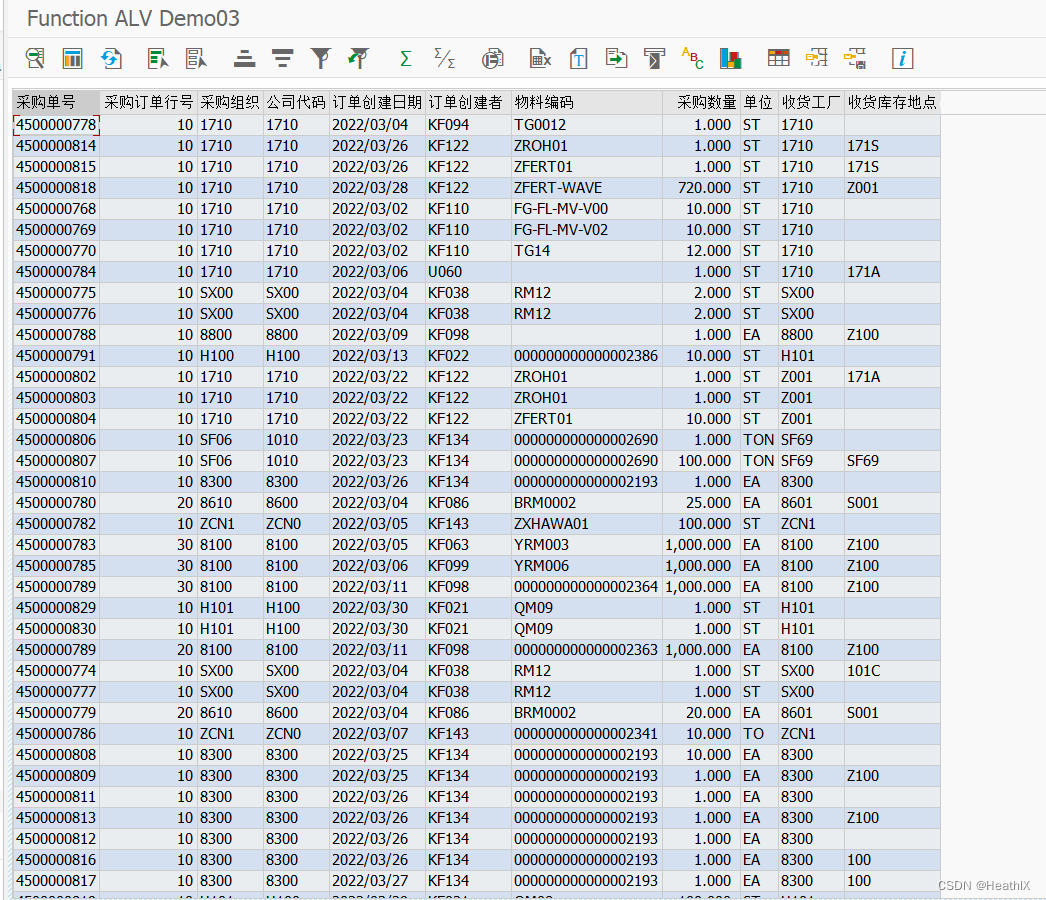
Complete Code Example
*&---------------------------------------------------------------------*
*& Report ZALV_DEMO_03
*&---------------------------------------------------------------------*
REPORT zalv_demo_03.

* Layout variable
DATA: gs_layout TYPE lvc_s_layo.

* Field catalog variables
DATA: lt_fieldcat TYPE lvc_t_fcat,
      ls_fieldcat LIKE LINE OF lt_fieldcat.

* Macro for field catalog
DATA lv_pos TYPE i.
DEFINE %%add_fieldcat.
  lv_pos = lv_pos + 1.
  ls_fieldcat-col_pos = lv_pos.
  ls_fieldcat-fieldname = &1.
  ls_fieldcat-scrtext_m = &2.
  APPEND ls_fieldcat TO lt_fieldcat.
  CLEAR ls_fieldcat.
END-OF-DEFINITION.

START-OF-SELECTION.

  SELECT ekko~ebeln,
         ekko~bukrs,
         ekko~ekorg,
         ekko~aedat,
         ekko~ernam,

         ekpo~ebelp,
         ekpo~matnr,
         ekpo~menge,
         ekpo~meins,
         ekpo~werks,
         ekpo~lgort
    INTO TABLE @DATA(lt_po)
    FROM ekko
   INNER JOIN ekpo ON ekko~ebeln = ekpo~ebeln
   WHERE ekko~aedat BETWEEN '20220301' AND '20220331'.

* Build field catalog
  %%add_fieldcat: 'EBELN'    'Purchase Order',
                 'EBELP'    'Item',
                 'EKORG'    'Purch. Organization',
                 'BUKRS'    'Company Code',
                 'AEDAT'    'Creation Date',
                 'ERNAM'    'Created By',
                 'MATNR'    'Material',
                 'MENGE'    'Quantity',
                 'MEINS'    'UoM',
                 'WERKS'    'Plant',
                 'LGORT'    'Storage Loc'.

* Layout settings
  gs_layout-cwidth_opt = 'X'.
  gs_layout-zebra = 'X'.

* Call ALV display
  CALL FUNCTION 'REUSE_ALV_GRID_DISPLAY_LVC'
    EXPORTING
      i_callback_program       = sy-repid
      i_callback_pf_status_set = 'FRM_SET_STATUS'
      is_layout_lvc            = gs_layout
      it_fieldcat_lvc          = lt_fieldcat
    TABLES
      t_outtab                 = lt_po[]
    EXCEPTIONS
      program_error            = 1
      OTHERS                   = 2.

*&---------------------------------------------------------------------*
*& Form FRM_SET_STATUS
*&---------------------------------------------------------------------*
FORM frm_set_status USING p_extab TYPE slis_t_extab.
  SET PF-STATUS 'STANDARD'.
ENDFORM.