Accessing an Application via Pod IP
We can reach the deployed website using the Pod IP, but first we need to know that address. The -o wide flag with kubectl get shows extra details, including the Pod IP:
kubectl get pods -l app=my-app -o wide

If the network path is open, we can access our application from any node in the cluster:
curl --head http://10.0.2.12

A 200 OK response confirms that the Demo application is reachable. You can also verify through a browser on a CentOS node that has a graphical interface:
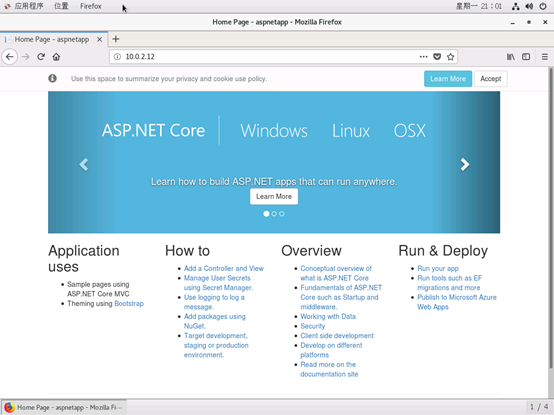
Although we successfully accessed the applicasion via Pod IP, Pods are ephemeral. What happens if a Pod dies? Let’s test whether the Deployment recreates them:
kubectl delete pods -l app=my-app
kubectl get pods -l app=my-app -o wide
As the screenshot shows, the Pod IP changes after eviction or restart. This makes Pod IPs unreliable for direct acess, and it also makes scaling across multiple Pods meaningless if we rely on individual IP addresses. So how should we reliably reach our application?
Internal Access through a ClusterIP Service
Kubernetes Services are designed to solve this problem by providing a stable access point.
A Service is a logical abstraction that defines a set of Pods and a policy for accessing them (often referred to as a microservice). It uses label selectors to associate with a group of Pods, and the corresponding Endpoints object tracks the actual Pod IPs. When a Pod’s IP changes, the Endpoints are updated automatically. When the Service receives a request, it uses the Endpoints list to forward traffic to one of the available Pods. In other words, the Service defines a stable cluster IP and port, while the Endpoints maintain the dynamic list of Pod IPs and ports.
Let’s create a ClusterIP Service to expose the Demo application. ClusterIP is the default Service type; it exposes the Service on an internal cluster IP and is therefore reachable only from within the cluster—ideal for databases and internal components.
Here is a simple ClusterIP Service definition:
apiVersion: v1
kind: Service
metadata:
  name: web-svc
spec:
  type: ClusterIP
  selector:
    app: my-app
  ports:
  - protocol: TCP
    port: 80
    targetPort: 80
Now create the Service and inspect both the Service and the associated Endpoints:
kubectl create -f clusterIPService.yaml
kubectl get services web-svc -o wide
kubectl get endpoints web-svc -o wide
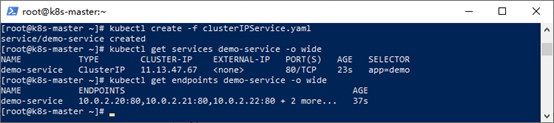
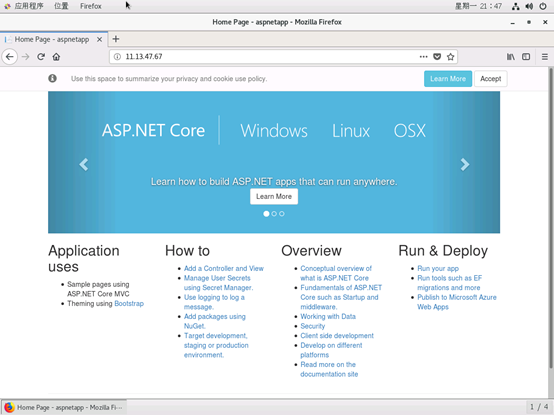
The output shows a ClusterIP 11.13.47.67 for the Service on port 80 (typically port and targetPort are set to the same value). The Endpoints list automatically includes the IPs of the five matching Pods. We can now test internal access from any node in the cluster:
If you need to assign a fixed ClusterIP during creation, use the spec.clusterIP field, ensuring the value falls within the Service IP range configured for the cluster.
The Demo application now appears proper in the browser, but the ClusterIP Service only allows internal access. To expose the application to external users, a different Service type is required.