As network environments become increasingly complex and regulatory requirements more stringent, ensuring the reliability and security of enterprise networks has become a primary task for organizations. Controlling internal employee access to resources is particularly crucial to prevent incidents such as sensitive data leaks and malware propagation.
Importance of Auditing and Compliance Assessment
Effective security monitoring and auditing methods can identify potential security threats or violations, while also raising employee awareness and strengthening behavioral norms.
For industries such as finance and law, relevant regulations and standards mandate regular execution of such activities to protect clients and companies from losses or legal disputes. Therefore, auditing user behavior and enterprise data, along with compliance detection, becomes especially critical and important.
Firewall Policy Management
Developing appropriate firewall policies tailored to different enterprises and application scenarios is essential. This involves the following aspects:
1) Identify Resource Types Requiring Protection
Examples include file servers, email systems, web applications, etc.
2) Design Suitable Access Control and Permission Allocation Mechanisms
Ensure each user can only access resources according to their role and responsibilities, avoiding over-authorization that could lead to security issues.
3) Regularly Update and Maintain Policies
Adapt to business development and changing needs.
4) Develop Personalized Rules for Different Users and Business Scenarios
Ensure optimal network security protection.
How to Implement Effective Auditing and Analysis?
Here are some recommendations for implementing effective auditing and data leak prevention analysis methods:
1) Establish Logging and Processing Mechanisms
Collect detailed information about user requests and resource usage, and perform appropriate classification for subsequent data mining and analysis.
2) Use Professional Security Information and Event Management (SIEM) Systems
Monitor collected data in real-time and trigger alerts to relevant operations personnel and administrators based on predefined rules and conditions.
3) Employ Data Visualization Techniques
Display alert data and trends for quick understanding and decision-making.
4) Conduct In-Depth Investigation and Analysis of Past Security Incidents
Propose improvement plans to prevent recurrence of similar events.
5) Regularly Review and Adjust Existing Security and Audit Policies
Adapt to changing business needs and technological developments.
In summary, effective enterprise-level network security protection relies on reasonable policy formulation and continuous auditing and analysis. Only in this way can enterprises better ensure normal operations and development when facing various risks and uncertainties.
Using Autmoated Management Tools
Unified Management of Multi-Brand Heterogeneous Firewalls
- Unified management of multiple brands and models of firewalls.
- Ensure all devices are configured to the same standards, enhancing security.
- Centralized management simplifies deployment and reduces repetitive operations.
- Unified processes minimize configuration differences and human errors.
- Quickly locate issues and improve response speed.
- Centralized management reduces manpower and time investment, optimizing costs.
Automated Policy Deployment
- Reduce manual operations and accelerate policy deployment.
- Automatically select firewalls to avoid omissions or configuration errors.
- Automatically adapt to network changes or security requirements.
- Reduce over-configuration to avoid resource waste.
- Centralized management simplifies troubleshooting processes.
One-Click Blocking of Attack IPs
- Quickly implement blocking in response to security threats to reduce risks.
- No complex steps required, improving operational efficiency.
- Automation reduces human errors.
- Full traceability for post-incident analysis and review.
- Ensure immediate response to potential threats to prevent loss escalation.
Hit Rate Analysis
- Identify and remove unused policies to improve matching speed.
- Ensure policy effectiveness by adjusting rarely hit policies.
- Streamline rules to reduce device burden and performance requirements.
- Refine policy sets for easier maintenance and updates.
- Understand network traffic patterns to help adjust policy configurations.
- Ensure all policies are effectively executed to meet compliance requirements.
Policy Optimization
- Reduce potential attack risks through refined policies.
- Decrease rule count for more intuitive management and review.
- Streamline rules to accelerate policy matching and processing.
- Ensure policy clarity to avoid potential policy conflicts.
- Reduce configuration error risks by eliminating redundancy.
- Clear policy sets are easier to monitor, review, and maintain.
- Optimize policies to reduce device load and extend hardware lifespan.
- Refine policies to lower the likelihood of mistakenly blocking legitimate traffic.
Policy Convergence
- Eliminate redundant and broad policies to reduce potential risks.
- Centralize and optimize rules for more intuitive maintenance and updates.
- Simplify policy structure to lower configuration error probability.
- More specific policies are more precise and easier to analyze.
- Meet audit requirements and industry compliance standards.
Policy Compliance Checking
- Ensure policies align with industry security standards and best practices.
- Meet regulatory requirements to reduce legal disputes and fine risks.
- Demonstrate good security management to clients and partners.
- Standardized policies simplify maintenance and updates.
- Detect and correct potential policy configuration issues.
- Continuously optimize and improve security policies through regular compliance checks.
Automated Installation Method
This installation guide is only applicable to fresh installations on CentOS 7.9. For other operating systems, please refer to the corresponding version installation instructions in the official documentation.
Online Installation of Policy Center System
"If the server or virtual machine to be installed can connect to the internet, automatic installation can be performed using the following command. For offline installation instructions, see below."
Execute the following command in the server or virtual machine to complete automatic installation.
curl -O https://d.tuhuan.cn/install.sh && sh install.sh
Note: Must be installed on a CentOS 7.9 operating system without other applications pre-installed.
- After installation, the system will automatically restart.
- After system restart, wait approximately 5 minutes before accessing via browser.
- Access method:
https://IP
Offline Installation of Policy Center System
"For servers or virtual machines that cannot connect to the internet, offline installation can be performed. Download the offline installation package via the following link."
https://d.tuhuan.cn/pqm_centos.tar.gz
After downloading, upload the installation package to the server and execute the following command in the directory containing the package:
tar -zxvf pqm_centos.tar.gz && cd pqm_centos && sh install.sh
Note: Must be installed on a CentOS 7.9 operating system without other applications pre-installed.
- After installation, the system will automatically restart.
- After system restart, wait approximately 5 minutes before accessing via browser.
- Access method:
https://IP
Activation Method
After installing the Policy Center System, accessing the system will prompt for activation, as shown below:
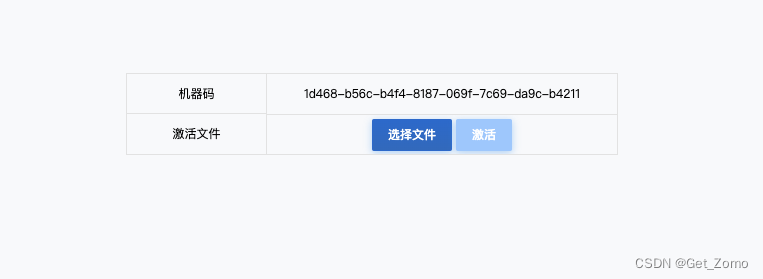
To activate the Policy Center, visit the following address:
https://pqm.yunche.io/community

After approval, the activation file will be sent to the email address you provided.
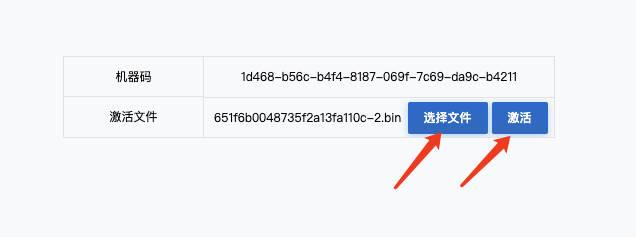
After obtaining the activation file, upload it to the system and click the activation button.
Activation Successful

After successful activation, the system will automatically redirect to the login interface. Use the default credentials to log in and begin using the system.
"Default username: fwadmin Default password: fwadmin1"