Introduction
This section continues from the previous one, completing the appointment approval end—the final part of this project. Below is the mind map:
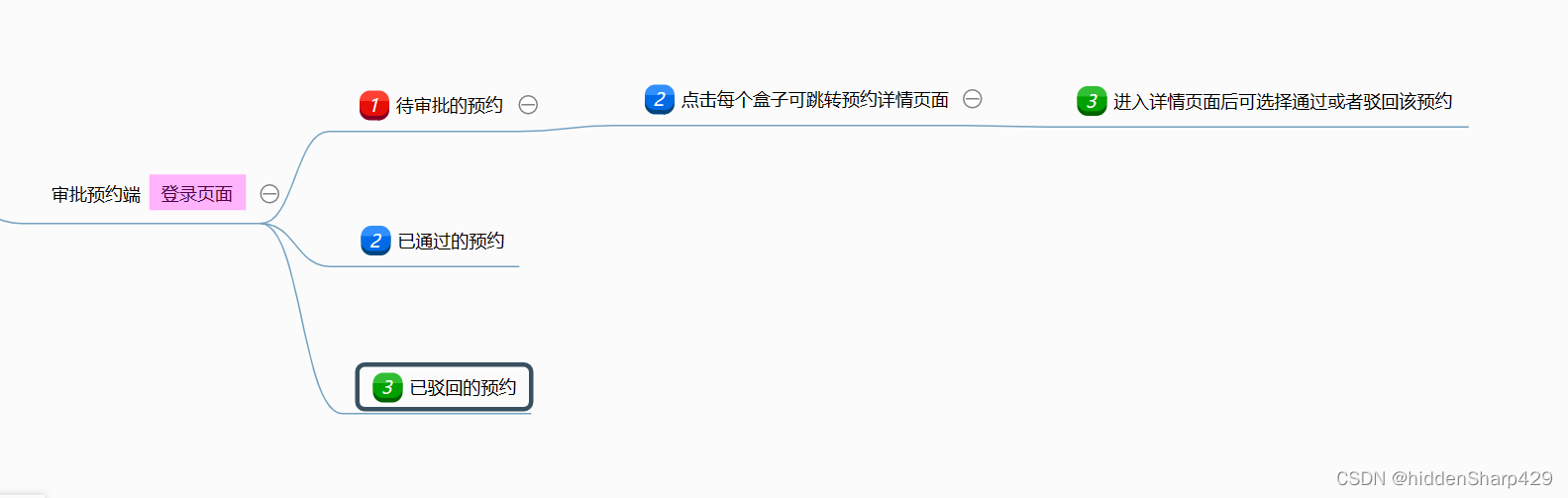
Similarly to the activity approval end, we need to create the relevant pages in the app.json file.
"pages/appointmentApproval/appointmentApproval",
"pages/appointmentApproval2/appointmentApproval2",
"pages/appointmentApproval3/appointmentApproval3",
"pages/appointmentDetail/appointmentDetail"
Once the above preparations are done, let's start building!
Final Result
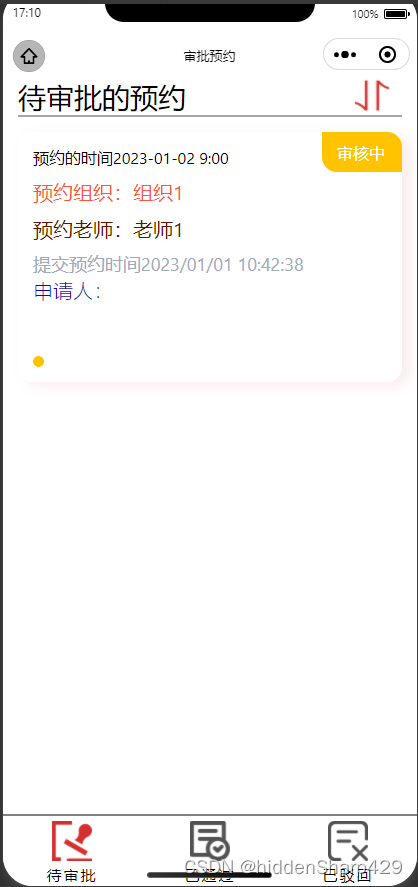
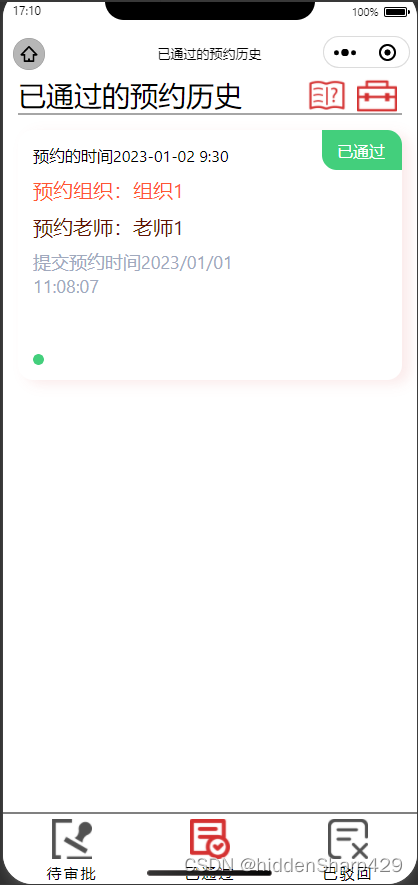
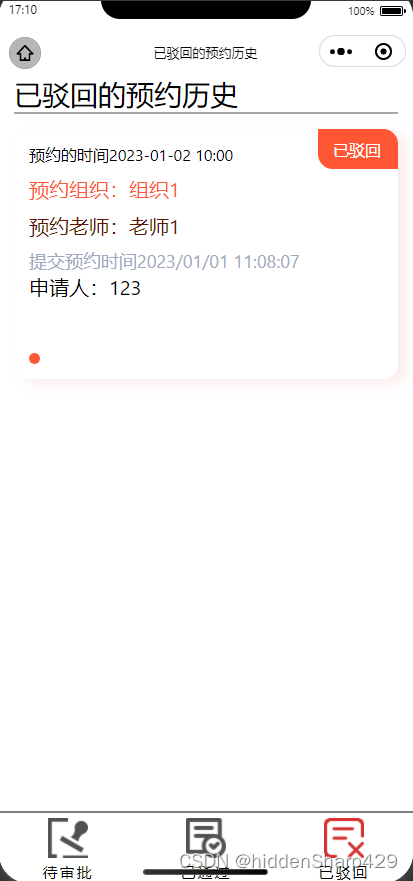
Core Concepts
- Basic styles refer to the "My" page.
- Navigation bar references the activity approval end.
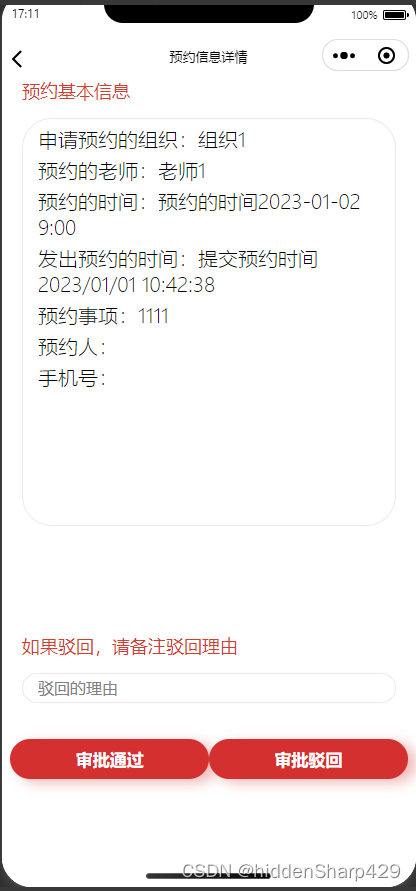
- A teacher's version of the appointment detail page is needed.
- Use cloud development to implement appointment approval (update).
- Clicking the toolbox allows one-click export of appointment information to an Excel file.
Implementation Steps
The difficulty in this part lies in how to export appointment information to an Excel file with one click. Node.js supports this feature, and we only need to make slight modifications. Here I'll provide the code directly. If you have any questions about the code, feel free to leave a comment below.
We'll build in the order of the mind map: Pending Approval → Approved → Rejected.
appointmentApproval.wxml
<view class="container">
<view class="container_content">
<view class="box">
<view class="mine_application">
<!-- Title -->
<view class="mine_application_title">
<view>Pending Appointments</view>
<image src="../../icon/rank.png" style="width: 50px;height: 35px;position: absolute; right: 20px; top: 0px;" bindtap="up"></image>
</view>
<!-- Loop through list -->
<view class="mine_application_content" wx:for="{{list}}">
<view class="event" bindtap="goDetail" data-id="{{item._id}}">
<view class="appointmentTime">{{item.appointment}}</view>
<view class="appointmentInstitute">Organization: {{item.g1_orderInstitute}}</view>
<view class="appointmentTeacher">Teacher: {{item.g1_orderTeacher}}</view>
<view class="time">{{item.time}}</view>
<view class="subscriber">Applicant: {{item.subscriber}}</view>
</view>
<!-- Status badge -->
<block wx:if="{{item.state==0}}">
<view class="state_0">
<view class="state_content">Pending</view>
</view>
<image src="../../icon/yellow.png" style="width: 11px;height: 11px;position: absolute;left: 15px;bottom: 15px;"></image>
</block>
<block wx:if="{{item.state==1}}">
<view class="state_1">
<view class="state_content">Approved</view>
</view>
<image src="../../icon/green.png" style="width: 11px;height: 11px;position: absolute;left: 15px;bottom: 15px;"></image>
<view class="next_location">
<button class="button_detail" size="mini" bindtap="goNext" data-id="{{item._id}}">Next ></button>
</view>
</block>
<block wx:if="{{item.state==2}}">
<view class="state_2">
<view class="state_content">Rejected</view>
</view>
<image src="../../icon/red.png" style="width: 11px;height: 11px;position: absolute;left: 15px;bottom: 15px;"></image>
<view class="reject_location">
<button class="button_detail" size="mini">Reject Details ></button>
</view>
</block>
</view>
</view>
</view>
<!-- Bottom navigation bar -->
<view class="tabbar">
<view class="goApprovalButton" bindtap="goApprovalPage">
<image src="../../icon/approval.png" style="width: 40px; height: 40px; margin-top: 5px;"></image>
<view class="button_content">Pending</view>
</view>
<view class="goPassButton" bindtap="goPassPage">
<image src="../../icon/pass(1).png" style="width: 40px; height: 40px; margin-top: 5px;"></image>
<view class="button_content">Approved</view>
</view>
<view class="goRejectButton" bindtap="goRejectPage">
<image src="../../icon/reject(1).png" style="width: 40px; height: 40px; margin-top: 5px;"></image>
<view class="button_content">Rejected</view>
</view>
</view>
</view>
</view>
appointmentApproval.wxss
.mine_application {
    margin-left: 15px;
    margin-right: 15px;
}
.mine_application_title {
    border-bottom: 5rpx solid #A6A6A6;
    font-size: 28px;
    font-family: 'Segoe UI', Tahoma, Geneva, Verdana, sans-serif;
}
.mine_application_content {
    height: 250px;
    width: 100%;
    display: flex;
    position: relative;
    box-shadow: 16rpx 8rpx 24rpx rgba(212,48,48, 0.1);
    margin-top: 15px;
    border-radius: 15px;
}
.event {
    font-size: 20px;
    font-family: 'Segoe UI', Tahoma, Geneva, Verdana, sans-serif;
    position: relative;
    margin:15px;
    width: 90%;
    flex: 1;
}
.appointmentTime {
    margin-top: 0px;
    font-size: 16px;
    color: black;
}
.state_0 {
    float: right;
    width: 80px;
    height: 40px;
    background-color:#FFC300;
    border-radius: 0 15px 0 15px;
}
.state_content {
    position: relative;
    margin-top:10px ;
    margin-left: 15px;
    font-size: 12;
    color: white;
}
.appointmentInstitute {
    font-size: 20px;
    color:#FF5733;
    margin-top: 10px;
}
.appointmentTeacher {
    font-size: 20px;
    color:#611504;
    margin-top: 10px;
}
.time {
    margin-top: 10px;
    font-size: 18px;
    color: #A0A9BD;
}
.goApprovalButton {
    position: absolute;
    bottom:0px ;
    left: 0%;
    color:#FFFFFF;
    background-color:#FFFFFF;
    border-top: 2px solid grey;
    width: 33.333%;
    height: 70px;
    text-align:center;
    margin-top: 10px;
}
.goPassButton {
    position: absolute;
    bottom:0px ;
    left: 33.333%;
    color:#FFFFFF;
    background-color:#FFFFFF;
    border-top: 2px solid grey;
    width: 33.333%;
    height: 70px;
    text-align:center;
    margin-top: 10px;
}
.goRejectButton {
    position: absolute;
    bottom:0px ;
    left: 66.666%;
    color:#FFFFFF;
    background-color:#FFFFFF;
    border-top: 2px solid grey;
    width: 33.333%;
    height: 70px;
    text-align:center;
    margin-top: 10px;
}
.button_content {
    font-size: 15px;
    color: black;
}
.box {
    margin-bottom: 50px;
}
.container {
    position: relative;
}
.container_content {
    position: relative;
    min-height: 100vh;
    box-sizing: border-box;
    padding-bottom: 60rpx;
    padding-top: 0rpx;
}
.subscriber {
    font-size: 20px;
    font-weight: 100;
    color: rgb(23, 6, 175);
}
.tabbar {
    width: 100%;
    text-align: center;
    letter-spacing: 4rpx;
    position: absolute;
    bottom: 0;
}
appointmentApproval.js
const db = wx.cloud.database()
Page({
    data: {
        list: []
    },
    onLoad(options) {
        console.log("List value:", options)
        db.collection("appointment")
            .where({
                state: 0,
            })
            .get()
            .then(res => {
                console.log('Query success:', res.data)
                this.setData({
                    list: res.data,
                })
                console.log("list:", this.data.list)
            })
    },
    up() {
        db.collection("appointment")
            .where({
                state: 0,
            })
            .orderBy('rank', 'asc')
            .get()
            .then(res => {
                console.log('Sort success:', res.data)
                this.setData({
                    list: res.data
                })
            })
            .catch(err => {
                console.log('Sort failed')
            })
    },
    onPullDownRefresh() {},
    onReachBottom() {},
    goDetail(e) {
        console.log("Go detail page with id:", e)
        wx.navigateTo({
            url: '/pages/appointmentDetail/appointmentDetail?id=' + e.currentTarget.dataset.id
        })
    },
    goApprovalPage() {
        wx.showToast({
            title: 'You are already on this page',
            icon: 'none'
        })
    },
    goPassPage() {
        wx.redirectTo({
            url: '../appointmentApproval3/appointmentApproval3',
        })
    },
    goRejectPage() {
        wx.redirectTo({
            url: '../appointmentApproval2/appointmentApproval2',
        })
    },
})
appointmentApproval3.wxml
<view class="container">
    <view class="container_content">
        <view class="box">
            <view class="mine_application">
                <!-- Title -->
                <view class="mine_application_title">
                    <view>Approved Appointment History</view>
                    <image src="../../icon/work-box.png" style="width: 40px;height: 40px;position: absolute; right: 20px; top: 0px;" bindtap="download"></image>
                    <image src="../../icon/guide.png" style="width: 40px;height:40px;position: absolute; right: 70px; top:0px;" bindtap="lookAll"></image>
                </view>
                <view class="mine_application_content" wx:for="{{list}}">
                    <view class="event" bindtap="goDetail" data-id="{{item._id}}">
                        <view class="appointmentTime">{{item.appointment}}</view>
                        <view class="appointmentInstitute">Organization: {{item.g1_orderInstitute}}</view>
                        <view class="appointmentTeacher">Teacher: {{item.g1_orderTeacher}}</view>
                        <view class="time">{{item.time}}</view>
                    </view>
                    <block wx:if="{{item.state==1}}">
                        <view class="state_1">
                            <view class="state_content">Approved</view>
                        </view>
                        <image src="../../icon/green.png" style="width: 11px;height: 11px;position: absolute;left: 15px;bottom: 15px;"></image>
                    </block>
                    <block wx:if="{{item.state==2}}">
                        <view class="state_2">
                            <view class="state_content">Rejected</view>
                        </view>
                        <image src="../../icon/red.png" style="width: 11px;height: 11px;position: absolute;left: 15px;bottom: 15px;"></image>
                    </block>
                </view>
            </view>
        </view>
        <view class="tabbar">
            <view class="goApprovalButton" bindtap="goApprovalPage">
                <image src="../../icon/approval(1).png" style="width: 40px; height: 40px; margin-top: 5px;"></image>
                <view class="button_content">Pending</view>
            </view>
            <view class="goPassButton" bindtap="goPassPage">
                <image src="../../icon/pass.png" style="width: 40px; height: 40px; margin-top: 5px;"></image>
                <view class="button_content">Approved</view>
            </view>
            <view class="goRejectButton" bindtap="goRejectPage">
                <image src="../../icon/reject(1).png" style="width: 40px; height: 40px; margin-top: 5px;"></image>
                <view class="button_content">Rejected</view>
            </view>
        </view>
    </view>
</view>
appointmentApproval3.wxss
.mine_application {
    margin-left: 15px;
    margin-right: 15px;
}
.mine_application_title {
    border-bottom: 5rpx solid #A6A6A6;
    font-size: 28px;
    font-family: 'Segoe UI', Tahoma, Geneva, Verdana, sans-serif;
}
.mine_application_content {
    height: 250px;
    width: 100%;
    display: flex;
    position: relative;
    box-shadow: 16rpx 8rpx 24rpx rgba(212,48,48, 0.1);
    margin-top: 15px;
    border-radius: 15px;
}
.event {
    font-size: 20px;
    font-family: 'Segoe UI', Tahoma, Geneva, Verdana, sans-serif;
    position: relative;
    margin:15px;
    width: 90%;
    flex: 1;
}
.appointmentTime {
    margin-top: 0px;
    font-size: 16px;
    color: black;
}
.state_1 {
    width: 80px;
    height: 40px;
    background-color:#43CF7C;
    border-radius: 0 15px 0 15px;
    z-index: 2;
    flex-direction: row;
    position: relative;
    margin-left: 20px;
}
.state_content {
    position: relative;
    margin-top:10px ;
    margin-left: 15px;
    font-size: 12;
    color: white;
}
.appointmentInstitute {
    font-size: 20px;
    color:#FF5733;
    margin-top: 10px;
}
.appointmentTeacher {
    font-size: 20px;
    color:#611504;
    margin-top: 10px;
}
.time {
    margin-top: 10px;
    font-size: 18px;
    color: #A0A9BD;
}
.goApprovalButton {
    position: absolute;
    bottom:0px ;
    left: 0%;
    color:#FFFFFF;
    background-color:#FFFFFF;
    border-top: 2px solid grey;
    width: 33.333%;
    height: 70px;
    text-align:center;
    margin-top: 10px;
}
.goPassButton {
    position: absolute;
    bottom:0px ;
    left: 33.333%;
    color:#FFFFFF;
    background-color:#FFFFFF;
    border-top: 2px solid grey;
    width: 33.333%;
    height: 70px;
    text-align:center;
    margin-top: 10px;
}
.goRejectButton {
    position: absolute;
    bottom:0px ;
    left: 66.666%;
    color:#FFFFFF;
    background-color:#FFFFFF;
    border-top: 2px solid grey;
    width: 33.333%;
    height: 70px;
    text-align:center;
    margin-top: 10px;
}
.button_content {
    font-size: 15px;
    color: black;
}
.box {
    margin-bottom: 50px;
}
.container {
    position: relative;
}
.container_content {
    position: relative;
    min-height: 100vh;
    box-sizing: border-box;
    padding-bottom: 60rpx;
    padding-top: 0rpx;
}
.tabbar {
    width: 100%;
    text-align: center;
    letter-spacing: 4rpx;
    position: absolute;
    bottom: 0;
}
appointmentApproval3.js
const db = wx.cloud.database()
const _ = db.command
const t = new Date().getTime().toString().slice(0, -3);
Page({
    data: {
        list: [],
    },
    onLoad(options) {
        // Call cloud function to bypass the 20-record limit
        wx.cloud.callFunction({
            name: 'getAll2'
        })
            .then(res => {
                console.log('Success:', res)
                this.setData({
                    list: res.result.data,
                })
            })
            .catch(res => {
                console.log("Failed:", res);
            })
    },
    onPullDownRefresh() {},
    onReachBottom() {},
    goDetail(e) {
        console.log("Go detail page with id:", e)
        wx.navigateTo({
            url: '/pages/appointmentDetail/appointmentDetail?id=' + e.currentTarget.dataset.id
        })
    },
    goApprovalPage() {
        wx.redirectTo({
            url: '../appointmentApproval/appointmentApproval',
        })
    },
    goPassPage() {
        wx.showToast({
            title: 'You are already on this page',
            icon: 'none'
        })
    },
    goRejectPage() {
        wx.redirectTo({
            url: '../appointmentApproval2/appointmentApproval2',
        })
    },
    // One-click export to Excel
    download() {
        let that = this
        wx.showModal({
            title: 'Do you want to export approved appointments?',
            content: '',
            success(res) {
                if (res.confirm) {
                    console.log('One-click export to Excel')
                    wx.cloud.callFunction({
                        name: 'excel',
                        success(res) {
                            console.log("Read success:", res.result.data)
                            that.saveExcel(res.result.data)
                        },
                    })
                } else if (res.cancel) {
                    // Cancel
                }
            }
        })
    },
    // Save data to Excel and upload to cloud storage
    saveExcel(userdata) {
        let that = this
        wx.cloud.callFunction({
            name: "getExcel",
            data: {
                userdata: userdata
            },
            success(res) {
                console.log("Save success:", res)
                that.getFileUrl(res.result.fileID)
            },
            fail(res) {
                console.log("Save failed:", res)
            }
        })
    },
    // Get cloud storage file download URL (valid for one day)
    getFileUrl(fileID) {
        let that = this;
        wx.cloud.getTempFileURL({
            fileList: [fileID],
            success: res => {
                console.log("File download URL:", res.fileList[0].tempFileURL)
                // Append timestamp to get real-time file
                const finalUrl = `${res.fileList[0].tempFileURL}?${t}`
                console.log("Real-time file download URL:", finalUrl)
                that.setData({
                    fileUrl: finalUrl
                })
                wx.showModal({
                    title: 'Export success',
                    content: finalUrl,
                    showCancel: true,
                    confirmText: 'Copy address',
                    success(res) {
                        if (res.confirm) {
                            wx.setClipboardData({
                                data: that.data.fileUrl,
                                success(res) {
                                    wx.getClipboardData({
                                        success(res) {
                                            console.log(res.data)
                                        }
                                    })
                                }
                            })
                        }
                    }
                })
            },
        })
    },
})
Three cloud functions are used in the JS: getAll2, excel, and getExcel.
getAll2.js
// Cloud function entry file
// Get all approved activities
const cloud = require('wx-server-sdk')
cloud.init({ env: 'cloud1-0glmim4o153108f5' })
const db = cloud.database()
const _ = db.command
exports.main = async (event, context) => {
    try {
        return await db.collection('appointment')
            .where({ state: 1 })
            .orderBy('rank', 'asc')
            .get()
    } catch (e) {
        console.error(e)
    }
}
excel.js
// This function fetches data from the appointment collection, not yet stored in Excel
const cloud = require('wx-server-sdk')
cloud.init({ env: 'cloud1-0glmim4o153108f5' })
exports.main = async (event, context) => {
    return await cloud.database().collection('appointment')
        .where({ state: 1 })
        .orderBy('rank', 'asc')
        .get()
}
getExcel.js
const cloud = require('wx-server-sdk')
cloud.init({ env: "cloud1-0glmim4o153108f5" })
const xlsx = require('node-xlsx');

exports.main = async (event, context) => {
    try {
        let { userdata } = event
        let dataCVS = 'appointment.xlsx'
        let alldata = [];
        let row = ['Date', 'Time Slot', 'Organization', 'Teacher', 'Matter', 'Applicant', 'Phone'];
        alldata.push(row);

        for (let key in userdata) {
            let arr = [];
            arr.push(userdata[key].day);
            arr.push(userdata[key].hour);
            arr.push(userdata[key].g1_orderInstitute);
            arr.push(userdata[key].g1_orderTeacher);
            arr.push(userdata[key].content);
            arr.push(userdata[key].subscriber);
            arr.push(userdata[key].subscriberPhone);
            alldata.push(arr)
        }
        var buffer = await xlsx.build([{
            name: "mySheetName",
            data: alldata
        }]);
        return await cloud.uploadFile({
            cloudPath: dataCVS,
            fileContent: buffer,
        })
    } catch (e) {
        console.error(e)
        return e
    }
}
appointmentApproval2.wxml
<view class="container">
    <view class="container_content">
        <view class="box">
            <view class="mine_application">
                <!-- Title -->
                <view class="mine_application_title">
                    <view>Rejected Appointment History</view>
                </view>
                <view class="mine_application_content" wx:for="{{list}}">
                    <view class="event" bindtap="goDetail" data-id="{{item._id}}">
                        <view class="appointmentTime">{{item.appointment}}</view>
                        <view class="appointmentInstitute">Organization: {{item.g1_orderInstitute}}</view>
                        <view class="appointmentTeacher">Teacher: {{item.g1_orderTeacher}}</view>
                        <view class="time">{{item.time}}</view>
                        <view class="subscriber">Applicant: {{item.subscriber}}</view>
                    </view>
                    <block wx:if="{{item.state==2}}">
                        <view class="state_2">
                            <view class="state_content">Rejected</view>
                        </view>
                        <image src="../../icon/red.png" style="width: 11px;height: 11px;position: absolute;left: 15px;bottom: 15px;"></image>
                    </block>
                </view>
            </view>
        </view>
        <view class="tabbar">
            <view class="goApprovalButton" bindtap="goApprovalPage">
                <image src="../../icon/approval(1).png" style="width: 40px; height: 40px; margin-top: 5px;"></image>
                <view class="button_content">Pending</view>
            </view>
            <view class="goPassButton" bindtap="goPassPage">
                <image src="../../icon/pass(1).png" style="width: 40px; height: 40px; margin-top: 5px;"></image>
                <view class="button_content">Approved</view>
            </view>
            <view class="goRejectButton" bindtap="goRejectPage">
                <image src="../../icon/reject.png" style="width: 40px; height: 40px; margin-top: 5px;"></image>
                <view class="button_content">Rejected</view>
            </view>
        </view>
    </view>
</view>
appointmentApproval2.wxss
.mine_application {
    margin-left: 15px;
    margin-right: 15px;
}
.mine_application_title {
    border-bottom: 5rpx solid #A6A6A6;
    font-size: 28px;
    font-family: 'Segoe UI', Tahoma, Geneva, Verdana, sans-serif;
}
.mine_application_content {
    height: 250px;
    width: 100%;
    display: flex;
    position: relative;
    box-shadow: 16rpx 8rpx 24rpx rgba(212,48,48, 0.1);
    margin-top: 15px;
    border-radius: 15px;
}
.event {
    font-size: 20px;
    font-family: 'Segoe UI', Tahoma, Geneva, Verdana, sans-serif;
    position: relative;
    margin:15px;
    width: 90%;
    flex: 1;
}
.appointmentTime {
    margin-top: 0px;
    font-size: 16px;
    color: black;
}
.state_2 {
    width: 80px;
    height: 40px;
    background-color:#FF5733;
    border-radius: 0 15px 0 15px;
    z-index: 2;
}
.state_content {
    position: relative;
    margin-top:10px ;
    margin-left: 15px;
    font-size: 12;
    color: white;
}
.appointmentInstitute {
    font-size: 20px;
    color:#FF5733;
    margin-top: 10px;
}
.appointmentTeacher {
    font-size: 20px;
    color:#611504;
    margin-top: 10px;
}
.time {
    margin-top: 10px;
    font-size: 18px;
    color: #A0A9BD;
}
.goApprovalButton {
    position: absolute;
    bottom:0px ;
    left: 0%;
    color:#FFFFFF;
    background-color:#FFFFFF;
    border-top: 2px solid grey;
    width: 33.333%;
    height: 70px;
    text-align:center;
    margin-top: 10px;
}
.goPassButton {
    position: absolute;
    bottom:0px ;
    left: 33.333%;
    color:#FFFFFF;
    background-color:#FFFFFF;
    border-top: 2px solid grey;
    width: 33.333%;
    height: 70px;
    text-align:center;
    margin-top: 10px;
}
.goRejectButton {
    position: absolute;
    bottom:0px ;
    left: 66.666%;
    color:#FFFFFF;
    background-color:#FFFFFF;
    border-top: 2px solid grey;
    width: 33.333%;
    height: 70px;
    text-align:center;
    margin-top: 10px;
}
.button_content {
    font-size: 15px;
    color: black;
}
.box {
    margin-bottom: 50px;
}
.container {
    position: relative;
}
.container_content {
    position: relative;
    min-height: 100vh;
    box-sizing: border-box;
    padding-bottom: 60rpx;
    padding-top: 0rpx;
}
.tabbar {
    width: 100%;
    text-align: center;
    letter-spacing: 4rpx;
    position: absolute;
    bottom: 0;
}
appointmentApproval2.js
const db = wx.cloud.database()
const _ = db.command
Page({
    data: {
        list: [],
    },
    onLoad(options) {
        console.log("List value:", options)
        db.collection("appointment")
            .where({ state: 2 })
            .get()
            .then(res => {
                console.log('Query success:', res.data)
                this.setData({
                    list: res.data,
                })
                console.log("list:", this.data.list)
            })
    },
    onPullDownRefresh() {},
    onReachBottom() {},
    goDetail(e) {
        console.log("Go detail page with id:", e)
        wx.navigateTo({
            url: '/pages/appointmentDetail/appointmentDetail?id=' + e.currentTarget.dataset.id
        })
    },
    goApprovalPage() {
        wx.redirectTo({
            url: '../appointmentApproval/appointmentApproval',
        })
    },
    goPassPage() {
        wx.redirectTo({
            url: '../appointmentApproval3/appointmentApproval3',
        })
    },
    goRejectPage() {
        wx.showToast({
            title: 'You are already on this page',
            icon: 'none'
        })
    },
})
appointmentDetail.wxml
<view class="container">
    <view>
        <!-- Appointment information -->
        <view>
            <view class="subtitle_font">Basic Appointment Info</view>
            <view class="message">
                <view class="font">Organization: {{list.g1_orderInstitute}}</view>
                <view class="font">Teacher: {{list.g1_orderTeacher}}</view>
                <view class="font">Appointment Time: {{list.appointment}}</view>
                <view class="font">Submission Time: {{list.time}}</view>
                <view class="font">Matter: {{list.content}}</view>
                <view class="font">Applicant: {{list.subscriber}}</view>
                <view class="font">Phone: {{list.subscriberPhone}}</view>
                <block wx:if="{{list.state==2}}">
                    <view class="font">Rejection Reason: {{list.rejectReason}}</view>
                </block>
            </view>
        </view>
    </view>
    <!-- Conditionally show approval buttons only for pending appointments -->
    <view>
        <block wx:if="{{list.state==0}}">
            <view class="subtitle_font">If rejected, provide a reason</view>
            <input bindinput="rejectReason" class="rejectReason" placeholder="Rejection reason"></input>
            <button bindtap="pass" class="button_location1" style="margin-left:2%; width: 48%;">Approve</button>
            <button bindtap="reject" class="button_location2" style="margin-right:2%;width:48%">Reject</button>
        </block>
    </view>
</view>
appointmentDetail.wxss
.rejectReason {
    margin-top: 15px;
    margin-left: 20px;
    margin-right:20px;
    margin-bottom: 15px;
    padding-top: 3px;
    padding-bottom: 3px;
    padding-left: 15px;
    padding-right:15px;
    border-radius: 30px;
    border: 1px solid #F2E6E6;
}
.message {
    margin-top: 15px;
    margin-left: 20px;
    margin-right:20px;
    margin-bottom: 15px;
    padding-top: 3px;
    padding-bottom: 3px;
    padding-left: 15px;
    padding-right:15px;
    border-radius: 30px;
    border: 1px solid #F2E6E6;
    height: 400px;
}
.font {
    margin-top: 5px;
    font-size: 20px;
    font-weight: 100;
}
.subtitle_font {
    font-size: large;
    font-weight: 400;
    color: #D43C33;
    margin-left: 20px;
}
.button_location1 {
    border-radius: 80rpx;
    margin-top: 5%;
    color:#FFFFFF;
    background-color: #D43030;
    box-shadow: 16rpx 8rpx 24rpx rgba(212,48,48, 0.35);
    float: left;
}
.button_location2 {
    border-radius: 80rpx;
    margin-top: 5%;
    color:#FFFFFF;
    background-color: #D43030;
    box-shadow: 16rpx 8rpx 24rpx rgba(212,48,48, 0.35);
    float: right;
}
.container {
    display: flex;
    width: 100%;
    height:700px;
    flex-direction: column;
    justify-content: space-between;
}
appointmentDetail.js
let eventid = ''
const DB = wx.cloud.database().collection("appointment")
Page({
    data: {
        list: [],
        id: "",
        rejectReason: ""
    },
    onLoad(option) {
        console.log("List value:", option)
        var id = option.id
        this.setData({
            id: option.id
        })
        DB.doc(id)
            .get()
            .then(res => {
                this.setData({
                    list: res.data
                })
            })
            .catch(res => {
                console.log("Detail page request failed:", res)
            })
    },
    pass() {
        let that = this;
        wx.showLoading({
            title: 'Uploading...',
            mask: true
        })
        DB.doc(this.data.id)
            .update({
                data: {
                    state: 1
                },
            }).then(res => {
                console.log("Upload success:", res)
                wx.showToast({
                    title: 'Success',
                })
                wx.navigateTo({
                    url: '../appointmentApproval/appointmentApproval',
                })
                    .then(() => {
                        wx.startPullDownRefresh()
                    })
            })
            .catch(err => {
                console.log("Upload failed:", err)
                wx.showToast({
                    title: 'Failed',
                    icon: "none"
                })
            })
    },
    reject() {
        let that = this;
        wx.showLoading({
            title: 'Uploading...',
            mask: true
        })
        DB.doc(this.data.id)
            .update({
                data: {
                    state: 2,
                    rejectReason: this.data.rejectReason
                },
            }).then(res => {
                console.log("Upload success:", res)
                wx.showToast({
                    title: 'Success',
                })
                wx.navigateTo({
                    url: '../appointmentApproval/appointmentApproval',
                })
                    .then(() => {
                        wx.startPullDownRefresh()
                    })
            })
            .catch(err => {
                console.log("Upload failed:", err)
                wx.showToast({
                    title: 'Failed',
                    icon: "none"
                })
            })
    },
    rejectReason(event) {
        console.log("Rejection reason input:", event.detail.value)
        this.setData({
            rejectReason: event.detail.value
        })
    }
})
Closing Remarks
This series of articles will continue to be updated, teaching you how to build a mini-program project from scratch! Source code is provided freely. If you have any questions, feel free to leave a comment below. You're likes and collections are my greatest motivation!