Last week, I mentioned that major internet companies would gradually launch early autumn recruitment in July. Unexpectedly, Baidu started yesterday.
On Baidu's official campus recruitment website, positions for the 2025 early autumn recruitment are already open for application.
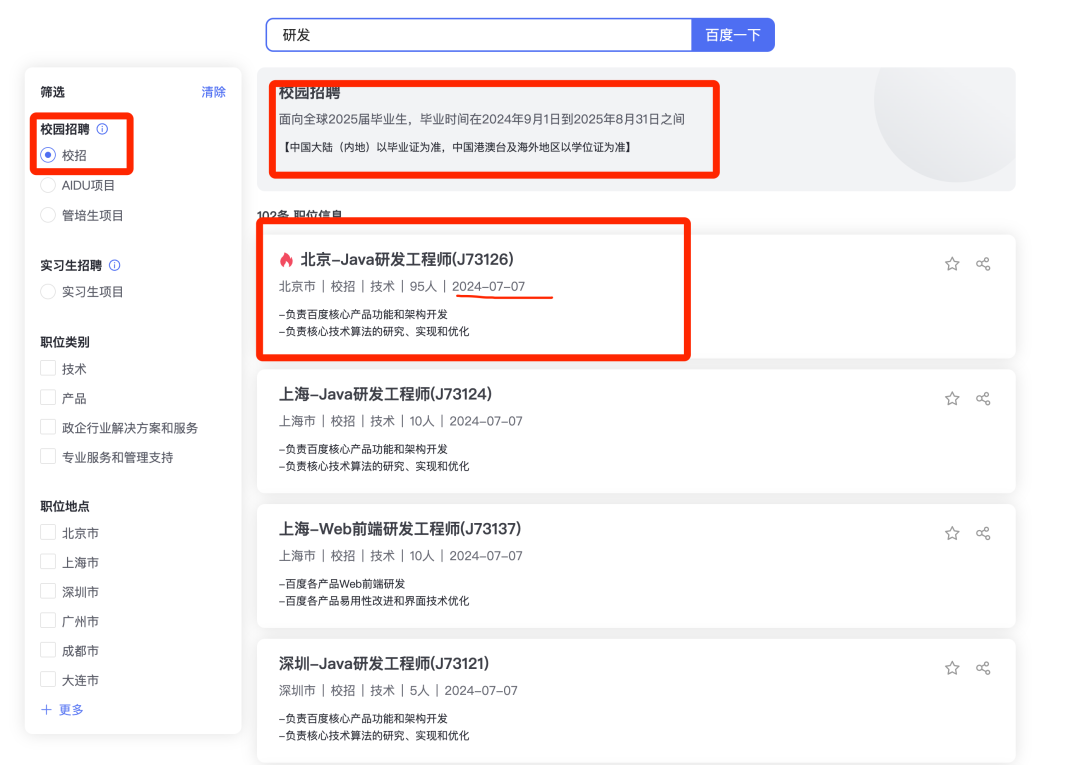
It is recommended that applicants prioritize the company's headquarters base, such as Beijing Baidu, because there will be more headcount (HC) there, increasing the chance of getting an interview opportunity. Do not first consider the base you want; first get the offer, then consider the base issue.
The salary for this year's Baidu campus recruitment will likely be known around October. Let's first take a look at last year's 2024 campus recruitment salary for Baidu.
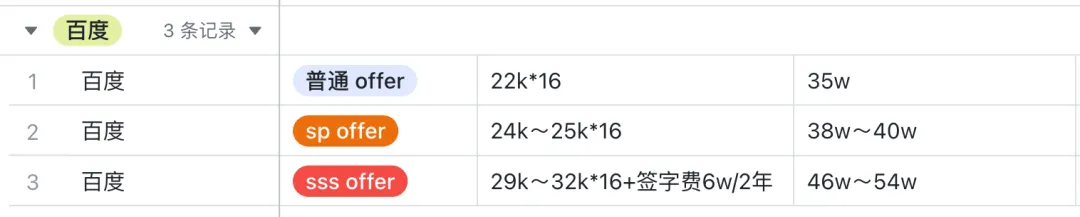
Baidu annual total compensation = monthly salary x 16
- Regular offer: 22k*16, annual package: 35w
- SP offer: 24k~25k*16, annual package: 38w~40w
- SSP offer: 29k~32k*16 + signing bonus 6w/2 years, 46w~54w (Baidu's signing bonus seems to be only for SSP offers, totaling 6w, distributed over 2 years, with 3w available in the first year)
Since Baidu's early campus recruitment has started,
Today, I will share the interview experience for Baidu's early recruitment Java backend development from last year to serve as a reference for students preparing to apply.
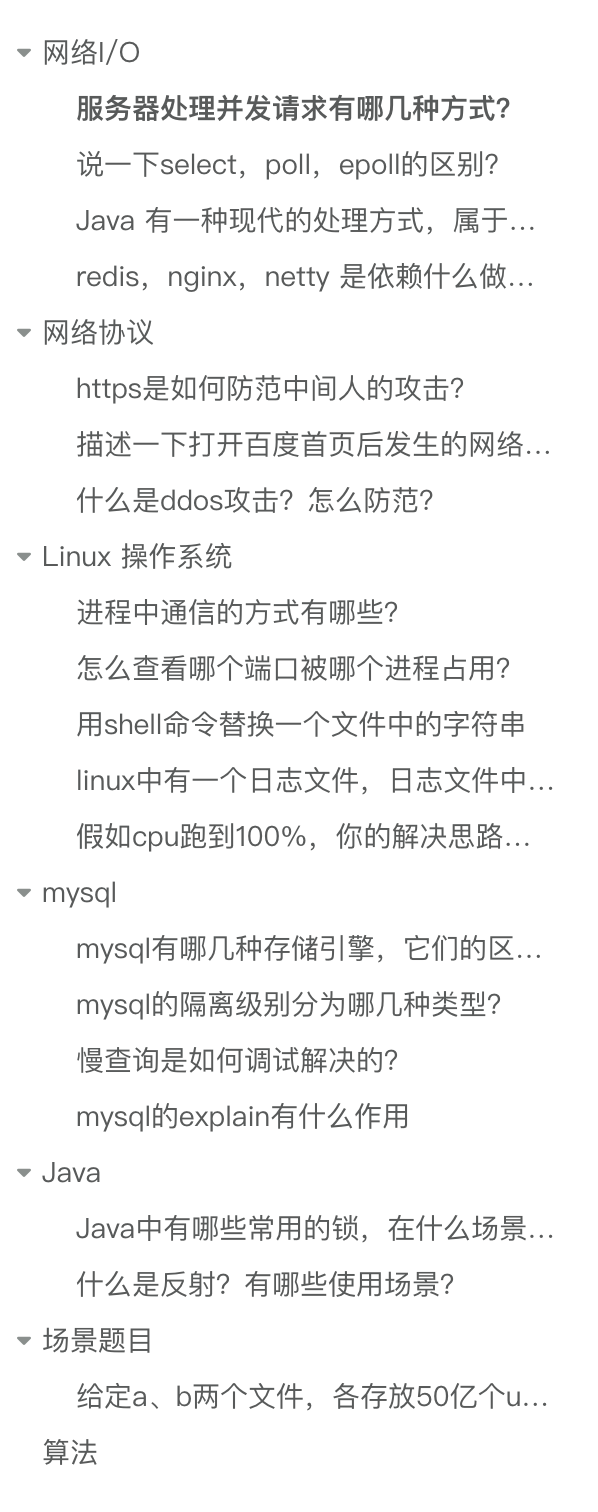
This interview broadly covered many points, mainly focusing on network I/O, network protocols, Linux systems, and MySQL. Java-related questions were not many, possibly because Baidu's backend development language is not primarily Java, so the focus was on assessing whether the candidate has a solid foundation in computer science.
In addition to the knowledge points mentioned above, there was also 1 big data scenario question and 1 algorithm question.
Let's see how many you can handle.
Network I/O
What are the methods for a server to handle concurrent requests?
- Single-threaded web server method: The web server processes one request at a time, then reads and processes the next request after completion. Performance is low; only one request can be handlled at a time.
- Multi-process/multi-threaded web server: The web server generates multiple processes or threads to handle multiple user requests in parallel. Processes or threads can be created on demand or in advance. Some web server applications create a separate process or thread for each user request. However, once the number of concurrent requests reaches thousands, multiple simultaneously running processes or threads will consume a lot of system resources (i.e., each process can only respond to one request, and one process corresponds to one thread).
- I/O multiplexing web server: The web server can use I/O multiplexing to monitor and handle I/O events for multiple clients with a single thread.
- Multiplexing multi-threaded web server: A web server architecture that combines the functions of multi-process and multi-plexing. It avoids having one process serve too many user requests and can fully utilize the computing power provided by multi-CPU hosts (this architecture can be understood as having multiple processes, each generating multiple threads, with each thread handling one request).
Describe the differences between select, poll, and epoll.
Select and poll internally use a linear structure to store the set of sockets that a process is interested in.
When using them, the set of interested sockets must first be copied from user space to kernel space via the select/poll system call. The kernel then detects events. When a network event occurs, the kernel must traverse the set of sockets the process is interested in, find the corresponding socket, set its state to readable/writable, and then copy the entire socket set from kernel space back to user space. The user space must then traverse the entire socket set again to find the readable/writable sockets and handle them.
It is obvious that the drawback of select and poll is that as the number of clients increases (i.e., the socket set becomes larger), the traversal and copying of the socket set incur significant overhead, making it difficult to handle C10K.
Epoll is a powerful tool for solving the C10K problem. It addresses the issues of select/poll in two ways:
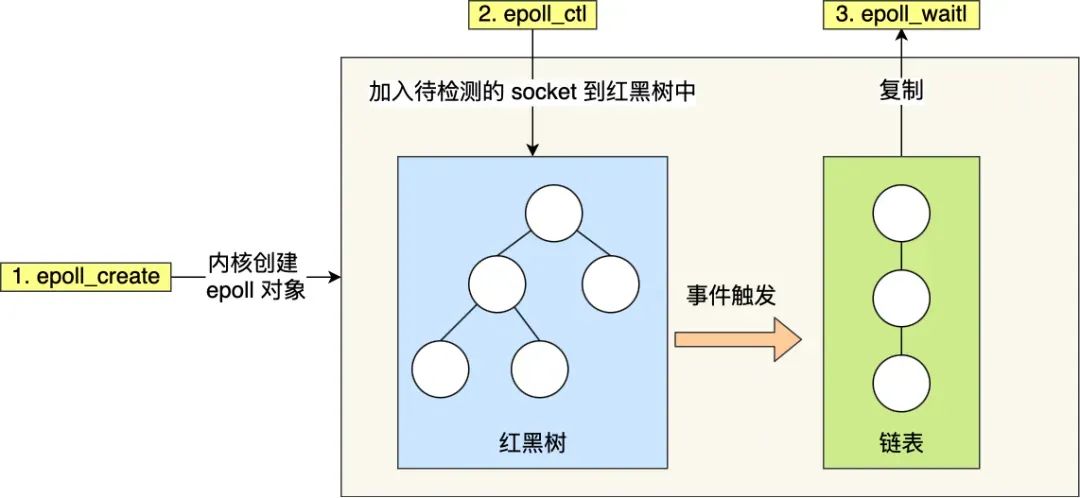
- Epoll uses a
red-black treein the kernel to track all sockets the process is monitoring. A red-black tree is an efficient data structure; the time complexity for insertions, deletions, and lookups is generally O(log n). By managing this red-black tree, epoll does not need to pass the entire socket set with each operation like select/poll, reducing a large amount of data copying and memory allocation between kernel and user space. - Epoll uses an event-driven mechanism. The kernel maintains a
linked listto record ready events, passing only the set of sockets that have events to the application. This eliminates the need to poll and scan the entire set (including sockets with and without events) as required by select/poll, significantly improving detection efficiency.
Java has a modern processing method that belongs to asynchronous I/O. What is it?
Asynchronous I/O in Java is abbreviated as AIO, where A stands for Asynchronous. AIO was introduced in JDK 1.7 and is based on the asynchronous I/O communication model provided by the operating system. It encapsulates some APIs for asynchronous I/O operations. Before learning about Java I/O operations, one should understand the underlying I/O model. Java's typical stream-based file operations and network communication are based on the synchronous blocking I/O model. NIO, introduced in JDK 1.4, is based on the multiplexed I/O model, while AIO is based on the asynchronous I/O model. In the Linux operating system, the process of reading data from an I/O device using the asynchronous model is as follows:
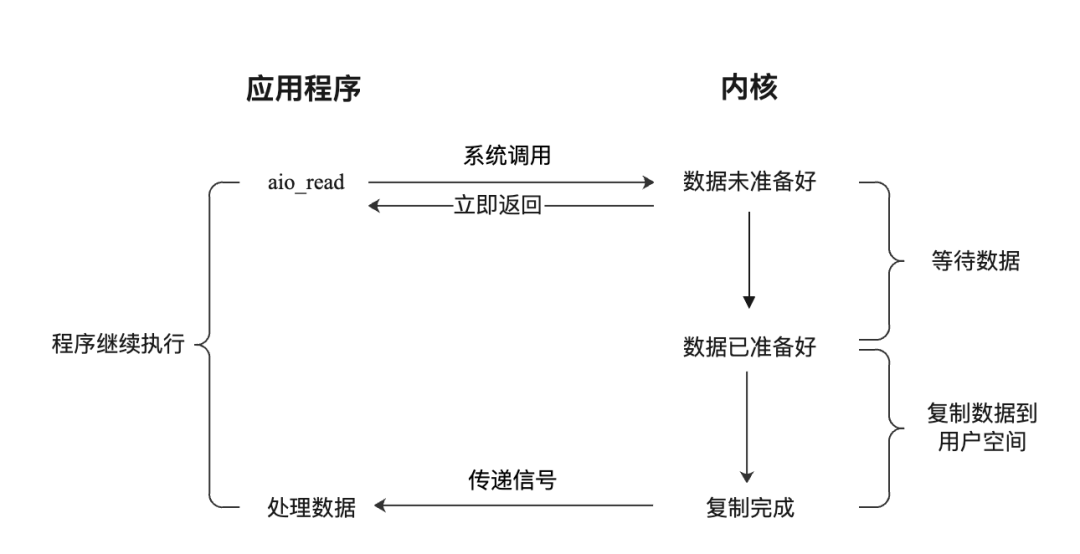
- The application initiates an
aio_readsystem call to the kernel, passing buffer information and file read information. - The kernel returns immediately after receiving the request; the application is not blocked.
- The kernel waits for the CPU or DMA device to copy data from the I/O device to the kernel buffer.
- The kernel copies the data to the user space buffer.
- The kernel sends a signal to the user program, informing that the data copy is complete.
- The application processes the data in the user space buffer.
Based on the asynchronous I/O model, JDK provides APIs for channel and buffer programming. In fact, Java also provides channel and buffer APIs for the old I/O based on the synchronous blocking I/O model and the new I/O based on the multiplexed I/O model. The core interface for Java asynchronous I/O is AsynchronousChannel, which has implementations for file I/O and network I/O.
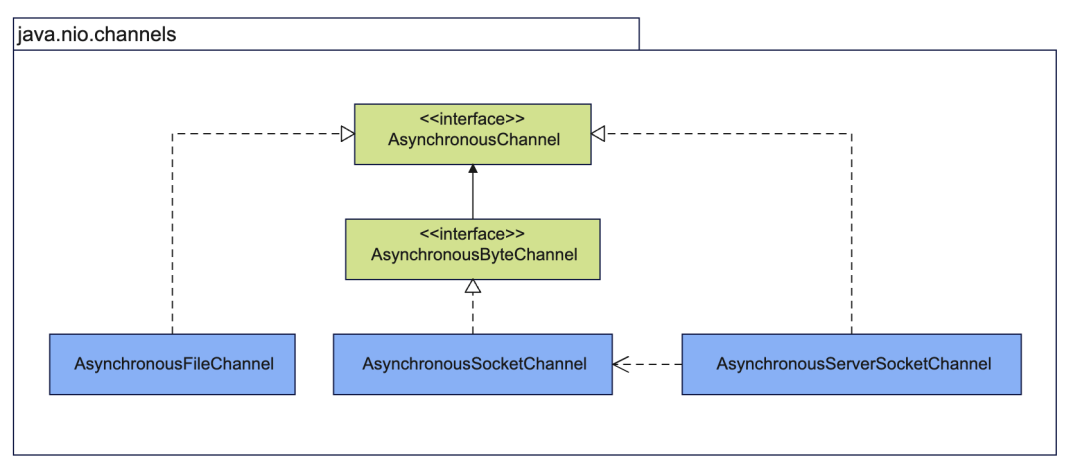
AsynchronousFileChannel: asynchronous file channel, used for asynchronous file operations.AsynchronousSocketChannel: asynchronous socket channel, used for TCP communication.AsynchronousServerSocketChannel: asynchronous server socket channel, acts as a server, accepts TCP connections, and createsAsynchronousSocketChannel.
What do Redis, Nginx, and Netty rely on to achieve such high performance?
They primarily rely on the Reactor pattern to implement high-performance network models. This network model is built on top of the I/O multiplexing interface. Reactor translates to reactor, where reaction means response to events, i.e., when an event comes, the Reactor has a corresponding reaction/response.
The Reactor pattern mainly consists of two core components: the Reactor and the processing resource pool. Their responsibilities are as follows:
- The Reactor is responsible for monitoring and dispatching events. Event types include connection events and read/write events.
- The processing resource pool is responsible for processing events, such as read -> business logic -> send.
The Reactor pattern is flexible and can adapt to different business scenarios. The flexibility lies in:
- There can be one Reactor or multiple Reactors.
- The processing resource pool can be a single process/thread or multiple processes/threads.
Before Redis 6.0, the Reactor model used was the single Reactor single process model. The single Reactor single process approach is relatively simple to implement because all work is done within the same process, eliminating the need for inter-process communication and concerns about multi-process contention.
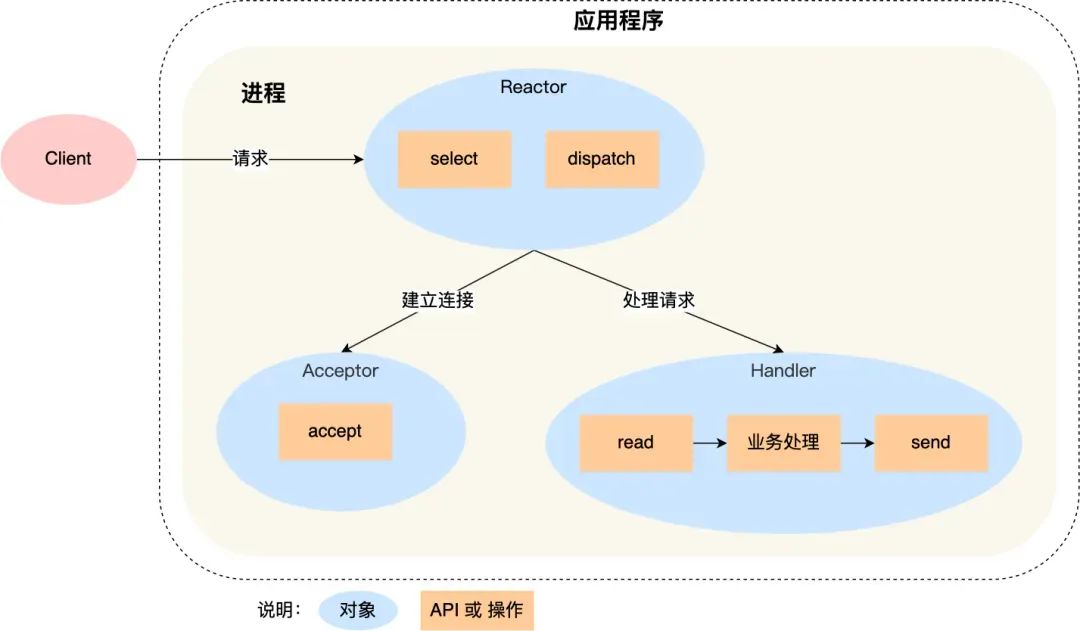
However, this approach has two drawbacks:
- First, because there is only one process, it cannot fully utilize the performance of multi-core CPUs.
- Second, when the Handler object is processing business logic, the entire process cannot handle events from other connections. If the business processing takes a long time, it will cause response delays.
Therefore, the single Reactor single process approach is not suitable for CPU-intensive scenarios; it is only suitable for scenarios where business processing is very fast. Redis is implemented in C. Before version 6.0, Redis used the single Reactor single process approach because Redis business processing is mainly done in memory, operations are very fast, and the performance bottleneck is not the CPU. So Redis uses a single-process approach for command processing. Netty uses a multi-Reactor multi-thread approach, as shown below:
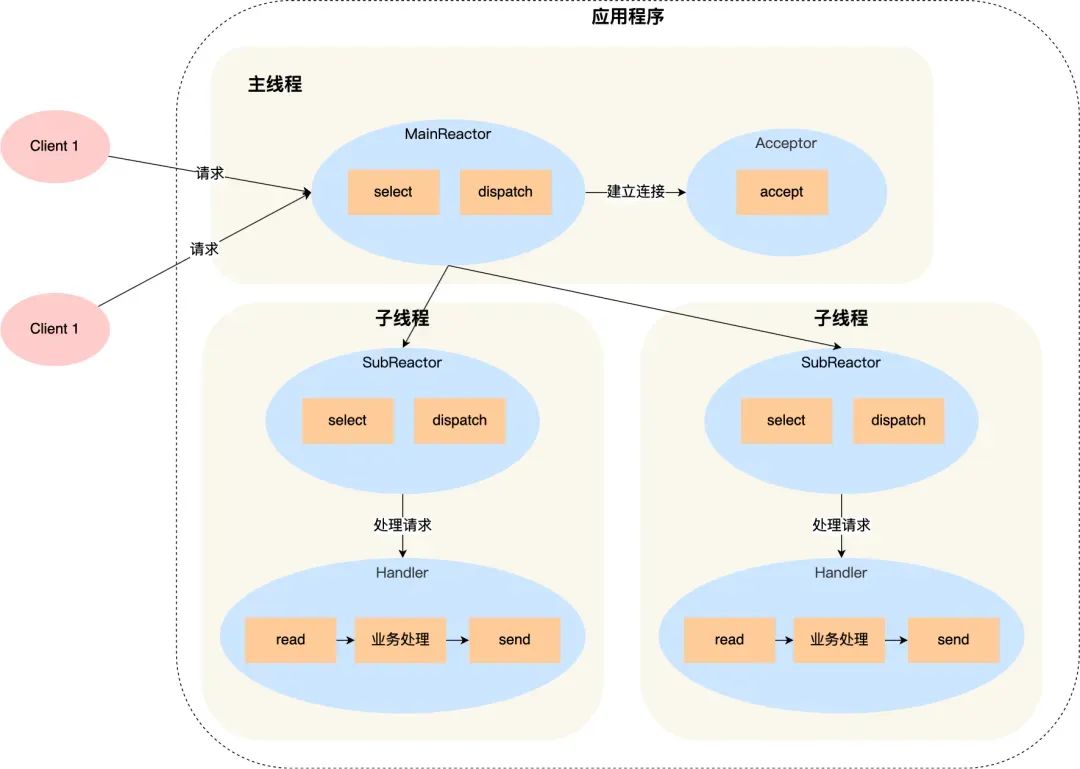
Advantages of the multi-Reactor multi-thread approach:
- The main thread and sub-threads have clear division of labor. The main thread is only responsible for accepting new connections, while sub-threads are responsible for subsequent business processing.
- The interaction between the main thread and sub-threads is simple. The main thread only needs to pass the new connection to the sub-thread. The sub-thread does not need to return data; it can directly send the processing result to the client.
Netty uses a multi-Reactor multi-process approach, but it differs slightly from the standard multi-Reactor multi-process approach.
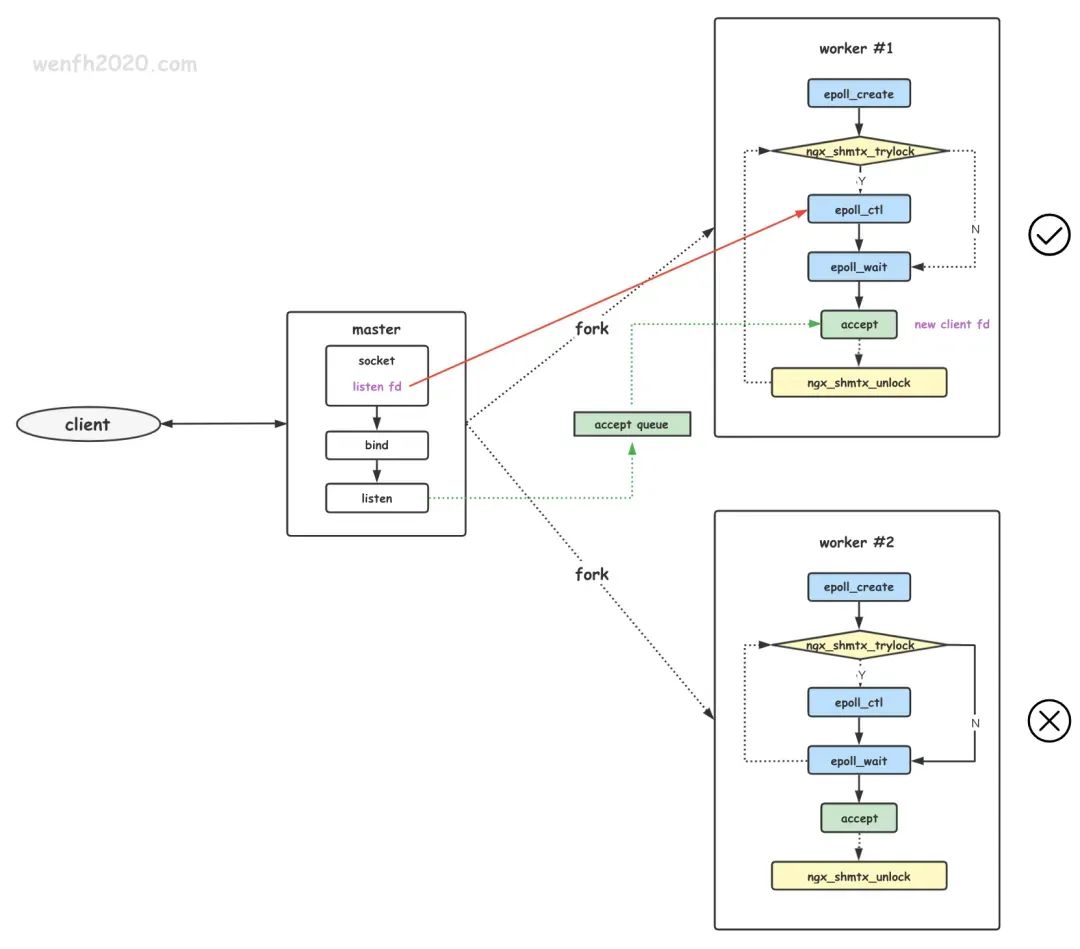
The specific difference is that the main process is only used to initialize the socket; it does not create a mainReactor to accept connections. Instead, the Reactor in the sub-process handles the accept of connections. A lock controls that only one sub-process performs accept at a time (to prevent the thundering herd problem). After a sub-process accepts a new connection, it puts it into its own Reactor for processing and does not assign it to other sub-processes.
Network Protocols
How does HTTPS prevent man-in-the-middle attacks?
It primarily uses encryption and identity verification mechanisms to prevent man-in-the-middle attacks.
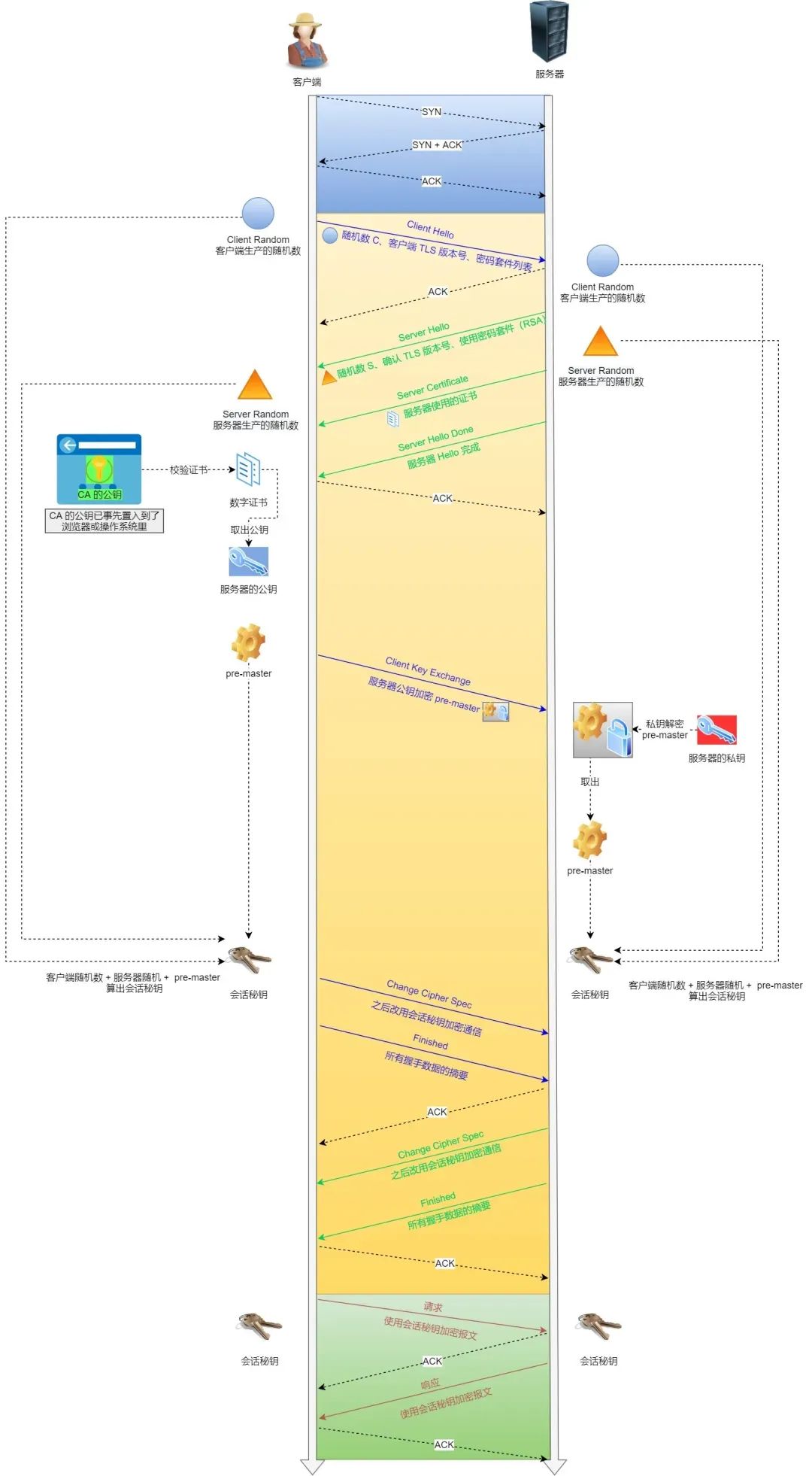
- Encryption: During the HTTPS handshake, non-symmetric encryption is used to negotiate a symmetric encryption key.
- Identity verification: The server applies for a digital certificate from a certificate authority (CA). The certificate contains the server's public key and other relevant information. When a client establishes a connection with the server, the server sends the certificate to the client. The client verifies the certificate's validity, including checking the certificate's validity period and the trustworthiness of the issuing authority. If the verification passes, the client uses the public key in the certificate to encrypt communication data and sends the encrypted data to the server. The server then decrypts it with its private key.
The key to a man-in-the-middle attack is that the attacker impersonates the server to establish a connection with the client while simultaneously establishing a connection with the server.
However, because the attacker cannot obtain the server's private key, they cannot correctly decrypt the encrypted data sent by the client. At the same time, the client verifies the server's certificate when establishing a connection. If the certificate verification fails or has issues, the client will issue a warning or abort the connection.
Describe the network process that occurs when you open the Baidu homepage.
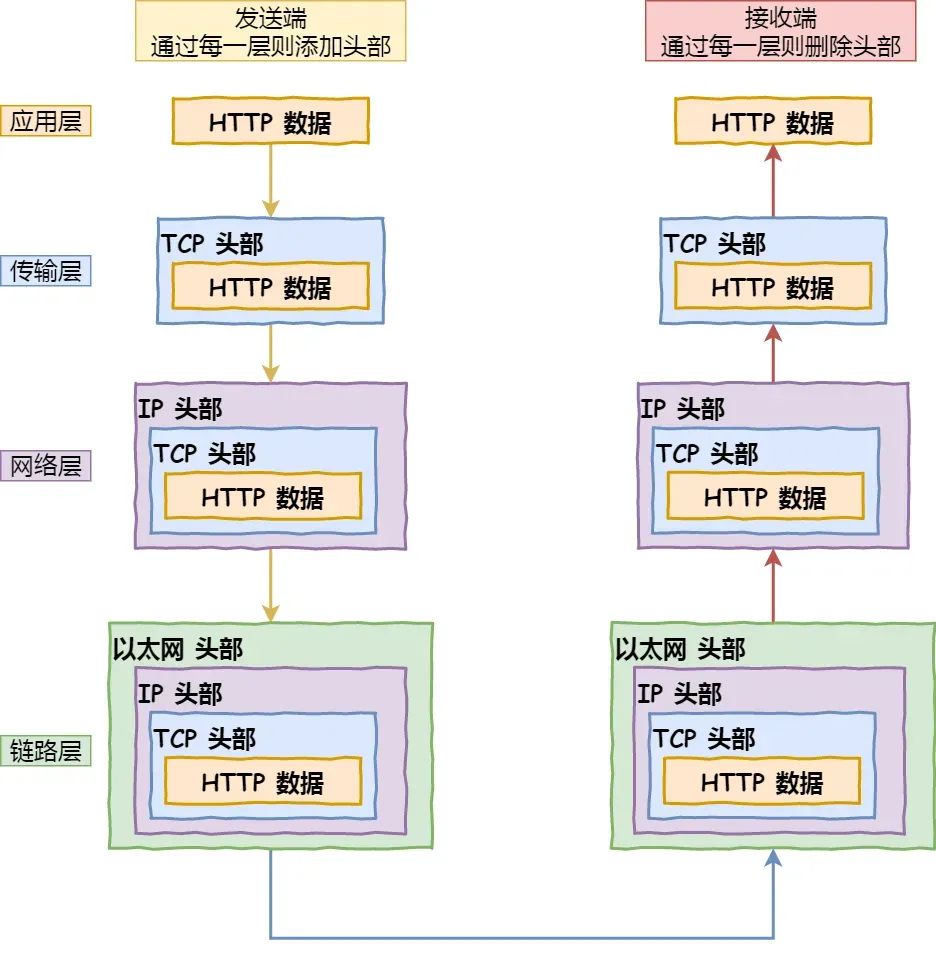
- Parse the URL: Parse out the domain name, method, resource, etc., and then generate an HTTP request message.
- DNS resolution of the domain name: First, check if the browser and operating system have DNS resolution caches. If not, proceed with DNS resolution. The DNS resolution process:
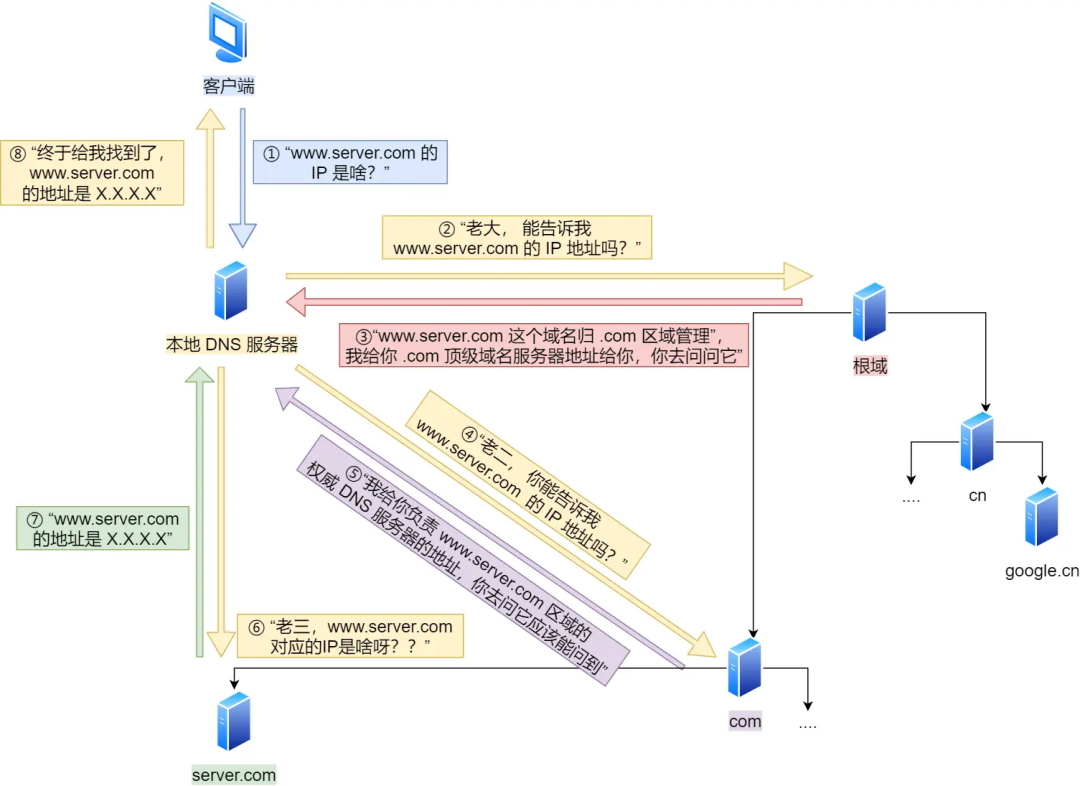
- Initiate DNS query: After the user enters a domain name (e.g.,
www.baidu.com) in the browser, the operating system first checks the local DNS cachee. If there is a corresponding IP address, the result is returned directly. If not found in the cache, the operating system sends a DNS query request to the local DNS server. - Local DNS server query: The local DNS server receives the DNS query request, first checks its own cache, and if there is a corresponding IP address, returns the result directly to the operating system. If the local DNS server does not have the cached IP address, it sends an iterative query request to the root DNS server.
- Root DNS server query: The root DNS server is a top-level DNS server that stores information about global top-level domain servers. Upon receiving the iterative query request, the root DNS server returns the IP address of the corresponding top-level domain server (e.g., for
.com) to the local DNS server. - Top-level domain server query: The local DNS server receives the IP address of the top-level domain server from the root DNS server and sends a query request to the top-level domain server. The top-level domain server, based on the requested domain (e.g.,
baidu.com), returns the IP address of the authoritative DNS server for that domain. - Authoritative DNS server query: The local DNS server receives the IP address of the authoritative DNS server from the top-level domain server and sends a query request to the authoritative DNS server. The authoritative DNS server is responsible for managing all host records under this domain and returns the IP address of the corresponding host record based on the requested domain.
- Return result: The local DNS server receives the IP address of the host record from the authoritative DNS server and returns the result to the operating system. The operating system returns the IP address to the browser. The browser establishes a TCP connection with the server based on the IP address and initiates an HTTP request.
- Establish TCP connection: The browser establishes a connection with the Baidu server using HTTP over TCP/IP. It sends a SYN (synchronize) packet to the Baidu server and waits for a confirmation response.
- Three-way handshake: The Baidu server, upon receiving the SYN packet from the browser, sends an SYN+ACK (synchronize-acknowledge) packet to the browser, indicating acceptance of the connection request. The browser, upon receiving the response, sends an ACK (acknowledge) packet to the server, completing the three-way handshake and establishing a reliable connection.
- Send HTTP request: The browser sends an HTTP request to the Baidu server, requesting the HTML document of the Baidu homepage. The request includes the request method, headers, and other relevant information.
- Server processes the request: The Baidu server, upon receiving the HTTP request, processes it according to the content. It may read from a database, execute relevant business logic, and generate a response.
- Send HTTP response: The Baidu server encapsulates the generated response data into an HTTP response message and sends it back to the browser. The response message includes the status code, response headers, response body, etc.
- Receive response and render page: The browser, upon receiving the HTTP response, parses the response message, extracts the HTML document and other related resources. Based on the structure of the HTML document and CSS styles, the browser renders the visual effect of the page.
- Close TCP connection: When the browser completes page rendering, it closes the TCP connection with the Baidu server. It sends a FIN (finish) packet to the server, indicating a request to close the connection. The Baidu server sends an ACK packet to the browser, indicating acceptance of the close request. Eventually, both the browser and server close the TCP connection.
What is a DDoS attack? How to prevent it?
A distributed denial-of-service (DDoS) attack is a malicious attempt to disrupt the normal traffic of a targeted server, service, or network by overwhelming the target or its surrounding infrastructure with a flood of internet traffic.
DDoS attacks are carried out through networks of internet-connected computers. These networks consist of computers and other devices (e.g., IoT devices) infected with malware, allowing them to be controlled remotely by an attacker. These individual devices are called bots (or zombies), and a group of bots is called a botnet.
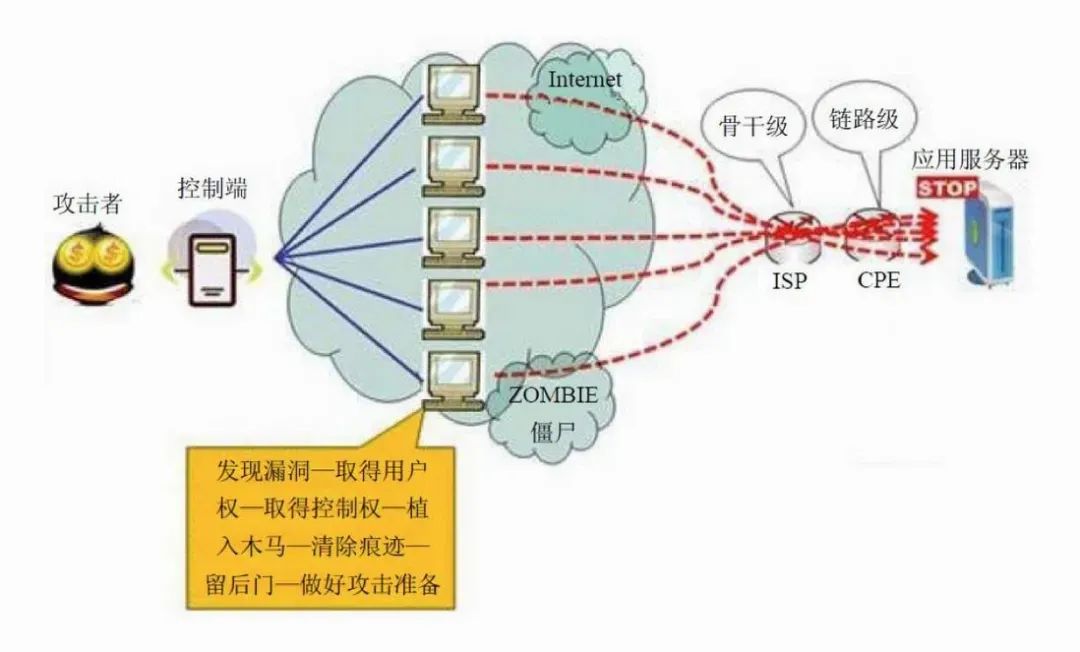
Once a botnet is established, the attacker can launch an attack by sending remote instructions to each bot. When the botnet targets a victim's server or network, each bot sends requests to the target's IP address, potentially overwhelming the server or network, leading to denial of service for normal traffic. Since each bot is a legitimate internet device, it can be difficult to distinguish attack traffic from normal traffic.
Common types of DDoS attacks include:
- Network layer attacks: A typical example is UDP reflection attacks, such as NTP Flood attacks. These attacks mainly use high traffic to congest the target's network bandwidth, preventing the target's services from responding normally to customer access.
- Transport layer attacks: Typical examples include SYN Flood attacks and connection number attacks. These attacks aim to cause denial of service by occupying the server's connection pool resources.
- Session layer attacks: A typical example is SSL connection attacks, which occupy the server's SSL session resources, leading to denial of service.
- Application layer attacks: Typical examples include DNS flood attacks, HTTP flood attacks, and fake player attacks in games. These attacks consume the server's application processing resources, heavily reducing server processing performance and causing denial of service.
To prevent DDoS attacks, the following measures can be taken:
- Strengthen network infrastructure: Increase network bandwidth, server processing capacity, and carrying capacity to withstand attacks by enhancing infrastructure capabilities.
- Use firewalls and intrusion detection systems: Configure firewall rules to restrict unnecessary network traffic and block traffic from suspicious IP addresses. Intrusion detection systems can help promptly detect and respond to DDoS attacks.
- Traffic scrubbing and load balancing: Use professional DDoS protection service providers to filter out malicious traffic using traffic scrubbing technology and forward legitimate traffic to the target server. Load balancing can distribute traffic evenly across multiple servers, reducing the pressure on a single server.
- Configure access control policies: Restrict access from specific IP addresses or IP ranges, set access frequency limits to prevent excessive requests from being concentrated on a single IP.
Linux Operating System
What are the methods for inter-process communication (IPC)?
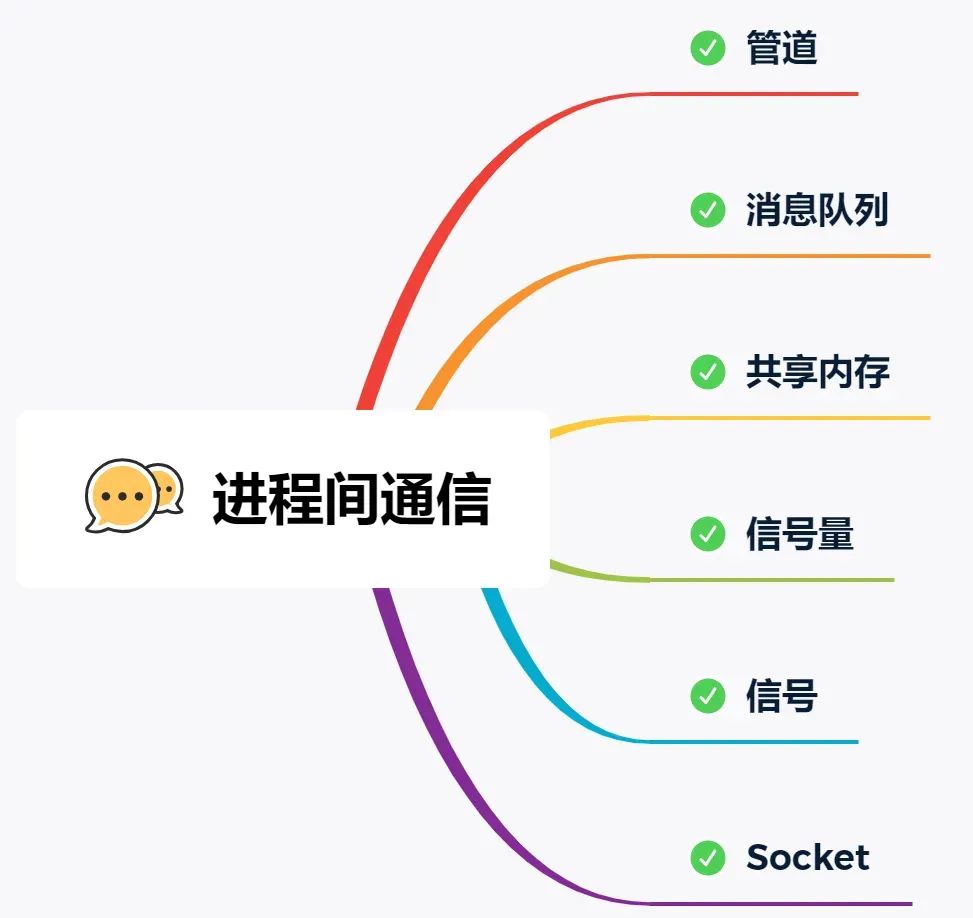
The Linux kernel provides several IPC methods. The simplest is pipes. Pipes are divided into anonymous pipes and named pipes.
Anonymous pipes, as the name suggests, have no name identifier. They are special files that only exist in memory, not in the file system. The | symbol in shell commands represents an anonymous pipe. The data communicated is unformatted streams with limited size, and communication is unidirectional; data can only flow in one direction. For bidirectional communication, two pipes need to be created. Additionally, anonymous pipes can only be used for communication between processes with a parent-child relationship. The lifecycle of an anonymous pipe is tied to the processes: created when the processes are created and disappears when they terminate.
Named pipes overcome the limitation of anonymous pipes that they can only be used for communication between related processes. To use a named pipe, a device file of type p must be created in the file system. This allows unrelated processes to communicate through this device file. However, for both anonymous and named pipes, the data written by a process is cached in the kernel, and another process reads the data from the kernel. The communication data follows the first-in, first-out (FIFO) principle and does not support file positioning operations like lseek.
Message queues overcome the problem of pipes communicating data as unformatted byte streams. Message queues are essentially linked lists of messages stored in the kernel. The message body in a message queue can be a user-defined data type. When sending data, it is divided into individual message bodies. When receiving data, the data type must be consistent with the one used by the sender to ensure correct data reading. The speed of message queue communication is not the most timely because each data write and read requires a copy operation between user space and kernel space.
Shared memory solves the overhead of data copying between user space and kernel space in message queue communication. It directly allocates a shared space that each process can access directly, as conveniently and quickly as accessing its own space. It does not require entering kernel space or making system calls, significantly increasing communication speed. It is considered the fastest IPC method. However, the convenient and efficient shared memory communication brings a new problem: multi-process competition for the same shared resource can lead to data corruption.
Therefore, semaphores are needed to protect shared resources, ensuring that only one process can access the shared resource at any time—this is called mutual exclusion access. Semaphores not only achieve mutual exclusion but also synchronization between processes. A semaphore is essentially a counter representing the number of resources. Its value can be controlled through two atomic operations: the P operation (proberen, test) and the V operation (verhogen, increment).
Something with a similar name is signals. Although the names are similar, their functions are entirely different. Signals are an asynchronous communication mechanism. Signals can interact directly between application processes and the kernel. The kernel can also use signals to notify user space processes of system events. The sources of signal events mainly include hardware sources (e.g., keyboard Ctrl+C) and software sources (e.g., kill command). When a signal occurs, the process can respond in three ways: 1. Execute the default action, 2. Catch the signal, 3. Ignore the signal. Two signals that application processes cannot catch or ignore are SIGKILL and SIGSTOP. This is to allow us to terminate or stop any process at any time.
The communication mechanisms mentioned above all work on the same host. If we need IPC between different hosts, we need socket communication. Sockets are not only used for IPC between different hosts but can also be used for IPC on the same local host. Depending on the type of socket created, there are three common communication methods: one based on the TCP protocol, one based on the UDP protocol, and one for local IPC.
How can you check which port is occupied by which process?
You can use the lsof or netstat command. For example, to check port 80.
Using lsof:
[root@xiaolin ~]# lsof -i :80
COMMAND     PID  USER   FD   TYPE   DEVICE SIZE/OFF NODE NAME
nginx       929  root    6u  IPv4    15249      0t0  TCP *:http (LISTEN)
nginx       929  root    7u  IPv6    15250      0t0  TCP *:http (LISTEN)
nginx       934  nginx   6u  IPv4    15249      0t0  TCP *:http (LISTEN)
nginx       934  nginx   7u  IPv6    15250      0t0  TCP *:http (LISTEN)
AliYunDun 16507  root   10u  IPv4 40212783      0t0  TCP xiaolin:41830->100.100.30.26:http (ESTABLISHED)
Using netstat:
[root@xiaolin ~]# netstat -napt | grep 80
tcp        0      0 0.0.0.0:80              0.0.0.0:*               LISTEN      929/nginx: master p
How to replace a string in a file using a shell command?
You can use the sed command. Here is an example:
sed -i 's/old_string/new_string/g' filename
In the above command, the -i option indicates modifying the file in place, rather than outputting to standard output.
The pattern s/old_string/new_string/g is for the replacement operation, where old_string is the string to be replaced, new_string is the replacement string, and g means global replacement (all occurrences in a line are replaced).
Please note that this directly modifies the original file. If you need to back up the original file, you can specify a backup file extension after the -i option, e.g., -i.bak, which will back up the original file before replacement.
For example, to replace the string Hello with Hi in example.txt, run:
sed -i 's/Hello/Hi/g' example.txt
There is a log file in Linux that records access request information. The first column is the access date, the second is the request IP, and the third is the request duration. Write a shell command to query the top 10 records with the highest request duration.
To find the top 10 records with the highest request duration, you can use the following shell command:
sort -k3 -nr logfile | head -n 10
In the above command, sort -k3 -nr sorts in descending order by the third column (request duration). -k3 means sort by the third column, -n means numeric sort, and -r means reverse (descending) order. Then, head -n 10 gets the first 10 lines after sorting, i.e., the 10 records with the highest duration. Replace logfile with the actual log file path.
If the CPU usage reaches 100%, what is your troubleshooting approach?
The approach is as follows:
- First, use the
topcommand to identify the process with high CPU usage. - Then, use the
ps -T -p <process_id>command to find the thread with high CPU usage within that process. - Then, use the
jstackcommand to view the stack trace of that thread. - Based on the output stack trace, locate the corresponding code in the project to check if there is an infinite loop causing the CPU to reach 100%.
MySQL
What are the different storage engines in MySQL, and what are their differences?
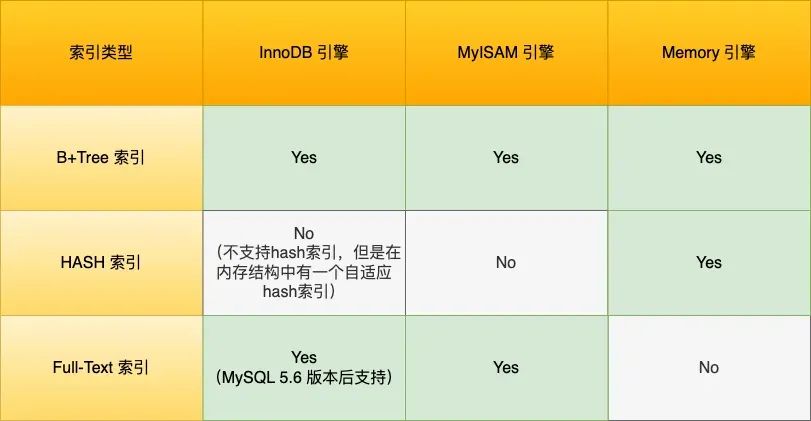
- InnoDB: The default storage engine in MySQL. It supports transactions, row-level locking, and foreign key constraints. It uses a clustered index approach for data organization and offers good concurrency performance and data integrity. Suitable for most application scenarios.
- MyISAM: An older storage engine in MySQL. It does not support transactions or row-level locking but offers high insert and query speeds. It uses table-level locking. Suitable for read-intensive applications such as data warehouses and logs.
- Memory: Also known as the Heap storage engine. It stores data in memory, resulting in very fast read and write speeds, but data is lost when the server shuts down. Suitable for scenarios requiring fast read and write access, such as temporary tables and caches.
What are the isolation levels in MySQL?
- Read Uncommitted: Changes made by a transaction can be seen by other transactions even before the transaction is committed.
- Read Committed: Changes made by a transaction can only be seen by other transactions after the transaction is committed.
- Repeatable Read: The data seen by a transaction during its execution is consistent with the data seen when the transaction started. This is the default isolation level of MySQL InnoDB engine.
- Serializable: Read and write locks are placed on records. When multiple transactions perform read and write operations on the same record, if a read-write conflict occurs, the later transaction must wait for the earlier transaction to complete before it can continue.
Let's illustrate these four isolation levels with a concrete example. Suppose there is an account balance table with a row showing an account balance of 1 million. There are two concurrent transactions: Transaction A only queries the balance, while Transaction B changes the balance to 2 million. The following is the sequence of actions for the two transactions over time:
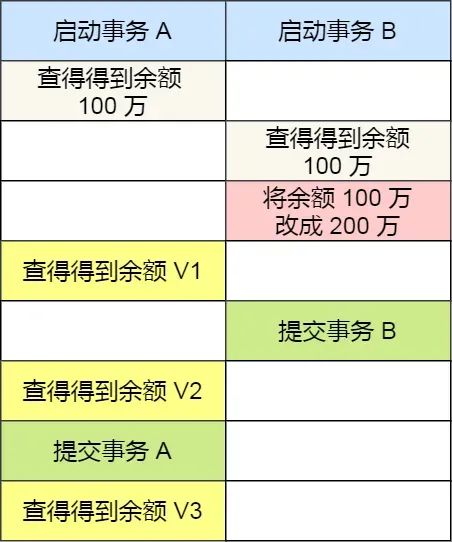
Under different isolation levels, the balance queried by Transaction A during its execution may differ:
- Under
Read Uncommittedisolation, after Transaction B modifies the balance but before committing the transaction, the balance is already visible to Transaction A. So, the values queried by Transaction A for balance V1 is 2 million, and balances V2 and V3 are also 2 million. - Under
Read Committedisolation, after Transaction B modifies the balance but before committing, the balance V1 seen by Transaction A is still 1 million. After Transaction B commits, the latest balance data becomes visible to Transaction A, so balances V2 and V3 are both 2 million. - Under
Repeatable Readisolation, Transaction A can only see the data as it was when it started. Therefore, balances V1 and V2 are both 1 million. Only after Transaction A commits can it see the latest balance data, so balance V3 is 2 million. - Under
Serializableisolation, when Transaction B attempts to change the balance from 1 million to 2 million, since Transaction A performed a read operation earlier, a read-write conflict occurs, and Transaction B gets locked until Transaction A commits. From Transaction A's perspective, balances V1 and V2 are 1 million, and balance V3 is 2 million.
How are these four isolation levels implemented?
- For the
Read Uncommittedisolation level, since uncommitted changes from a transaction can be read, the latest data is directly read. - For the
Serializableisolation level, parallel access is avoided by adding read and write locks. - For the
Read CommittedandRepeatable Readisolation levels, they are implemented usingRead View. The difference is in the timing of creating a Read View. TheRead Committedisolation level generates a new Read View before each statement executes. TheRepeatable Readisolation level generates a Read View when the transaction starts and uses it throughout the entire transaction.
How to debug and resolve slow queries?
- Use
EXPLAINto analyze the query execution plan and check if the SQL uses an index. If not, consider adding an index. - Create composite indexes to implement covered indexes, reducing back-to-table lookups. When using composite indexes, follow the leftmost prefix matching rule; otherwise, the index may become invalid.
- Avoid index invalidation, such as using left wildcard matching (
LIKE '%...'), function calculations, or expression calculations on indexed columns. - For joining tables, it's best to drive with the smaller table and ensure the driven table's join column is indexed. Ideally, avoid joins by using redundant column design.
- For optimizing
LIMIT n, ydeep pagination queries, convert the limit query to a positional query:SELECT * FROM tb_sku WHERE id > 20000 LIMIT 10. This approach is suitable for tables with auto-incrementing primary keys. - Decompose tables with many columns. Some columns are used more frequently than others. With large data volumes, performance may degrade due to infrequently used columns. Consider separating them.
What is the purpose of EXPLAIN in MySQL?
EXPLAIN is used to view the execution plan of a SQL statement. It primarily analyzes the execution process of a SQL statement, such as whether an index is used, whether external sorting occurs, and whether an index-only scan is used. The following example shows a query that does not use an index and performs a full table scan.

For the execution plan, the key parameters include:
possible_keys: Indicates which indexes might be used.key: Indicates the index actually used. If this isNULL, no index is used.key_len: Indicates the length of the index.rows: The number of data rows scanned.type: Describes the scan type for data retrieval. This is a critical column to examine.
The type column describes the scan method used to find the required data. The execution efficiency of common scan types from low to high is:
- ALL (Full Table Scan): This is the worst case, as it scans the entire table.
- index (Full Index Scan): Similar to ALL, but scans the index table. The advantage is that data sorting is not required, but the overhead is still significant. Full table scans and full index scans should be avoided.
- range (Index Range Scan): Indicates a range scan on an index. Typically seen in
WHEREclauses using operators like<,>,IN,BETWEEN, etc. It retrieves rows within a given range. Starting from this level, the benefits of indexing become more apparent. We should strive to achieve at leastrangelevel type access for SQL queries. - ref (Non-Unique Index Scan): Indicates the use of a non-unique index or a non-unique prefix of a unique index. The result may contain multiple rows. This is because even though an index is used, the indexed column values are not unique. After quickly finding the first matching row, a small range scan around the target value is still required. However, it does not require a full table scan because the index is ordered. Even with duplicates, the scan is within a very small range.
- eq_ref (Unique Index Scan): Occurs when using a primary key or unique index, typically in multi-table joins. For example, joining two tables on the condition that
user_idis equal anduser_idis a unique index. UsingEXPLAINwill showtypeaseq_ref. - const (Primary Key or Unique Index Scan Returning a Single Row): Indicates the use of a primary key or unique index compared with a constant value, e.g.,
SELECT name FROM product WHERE id=1. Note that bothconstandeq_refuse primary keys or unique indexes. However,constinvolves comparison with a constant, resulting in faster query performance, whileeq_refis typically used in multi-table joins.
The Extra column also provides important information. Here are a few key indicators:
- Using filesort: Occurs when a query includes a
GROUP BYoperation and the index cannot be used for sorting. MySQL must resort to a sorting algorithm, possibly using file sorting, which is very inefficient. This should be avoided. - Using temporary: Indicates the use of a temporary table to store intermediate results. MySQL uses a temporary table when sorting query results, commonly seen with
ORDER BYandGROUP BY. It is inefficient and should be avoided. - Using index: Indicates that the required data can be obtained entirely from the index without needing to access the table. This is a covering index, which avoids back-to-table lookups and is quite efficient.
Java
What are the commonly used locks in Java, and in what scenarios are they used?
- synchronized: A built-in keyword in Java used to implement mutual exclusive locks. In a multi-threaded environment, adding the
synchronizedkeyword to a code block or method ensures that only one thread can execute that code block or method at a time. Suitable for synchronizing access to shared resources. - ReentrantLock: A reentrant lock implementation provided by
java.util.concurrent. Compared tosynchronized,ReentrantLockoffers more flexible locking mechanisms, such as manual control over lock acquisition and release and support for fair locks. Suitable for scenarios requiring more advanced control. - ReadWriteLock: An interface for read-write locks provided by
java.util.concurrent. Read-write locks allow multiple threads to read a shared resource simultaneously but require exclusive locks for write operations. Suitable for read-heavy, write-light scenarios to improve concurrency performance. - StampedLock: An optimistic read-write lock provided by
java.util.concurrent. Compared toReadWriteLock,StampedLockoffers higher concurrency performance but is more complex to use. Suitable for read-heavy, write-light scenarios with frequent read operations. - AtomicInteger: An atomic integer class provided by
java.util.concurrent.atomic. UsingAtomicIntegerallows atomic operations on integer values in multi-threaded environments, avoiding thread safety issues. Suitable for scenarios requiring atomic operations on integer values.
What is reflection, and what are its use cases?
Java reflection mechanism allows a program to inspect and manipulate the properties and methods of any class at runtime. For any object, it can call any of its methods and access any of its properties. This ability to dynamically obtain information and dynamically call object methods is called the Java reflection mechanism.
Reflection has the following characteristics:
- Runtime Class Information Access: Reflection allows the program to obtain the complete structure information of a class at runtime, including class name, package name, superclass, implemented interfaces, constructors, methods, and fields.
- Dynamic Object Creation: You can use the reflection API to create object instances dynamically, even if the class name is not known at compile time. This is done using the
newInstance()method of theClassclass or thenewInstance()method of theConstructorobject. - Dynamic Method Invocation: You can dynamically invoke methods of an object, including private methods, at runtime. This is achieved through the
invoke()method of theMethodclass, which allows passing the object instance and parameter values to execute the method. - Access and Modify Field Values: Reflection also allows the program to access and modify the field values of an object at runtime, even private ones. This is done using the
get()andset()methods of theFieldclass.
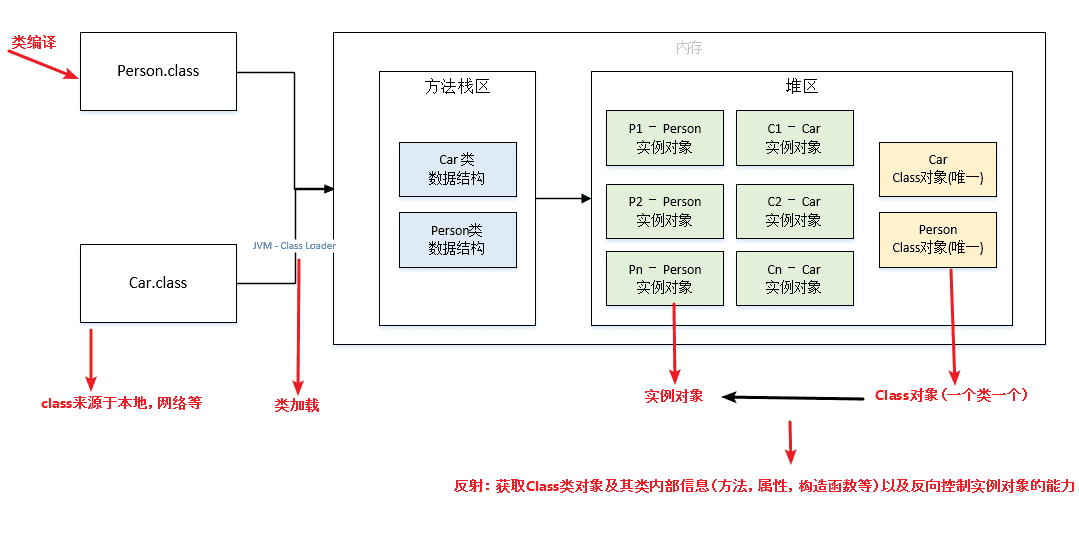
The Java reflection mechanism is used extensively in the Spring framework. Let's see how Spring's IoC and AOP use reflection technology.
Spring Framework's Dependency Injection (DI) and Inversion of Control (IoC)
Spring uses reflection to implement its core feature: dependency injection.
In Spring, developers can declare dependencies between components via XML configuration files or annotations. When the application starts, the Spring container scans these configurations or annotations, uses reflection to instantiate Beans (i.e., Java objects), and automatically wires their dependencies based on the configuration.
For example, when a Service class needs to depend on a DAO class, the developer can use the @Autowired annotation on the Service class without writing the code to create the DAO instance. The Spring container parses this annotation at runtime, uses reflection to find the corresponding DAO class, instantiates it, and injects it into the Service class.
This not only reduces coupling between components but also significantly enhances code maintainability and testability.
Implementation of Dynamic Proxies
In scenarios where intercepting method calls of existing classes, logging, access control, or transaction management is required, reflection combined with dynamic proxy technology is widely used.
A typical example is the implementation of Spring AOP (Aspect-Oriented Programming). Spring AOP allows developers to define aspects that can cross-cut concerns (such as logging, transaction management) and insert them into business logic without modifying the business logic code.
For example, to add logging functionality to all service layer methods, you can define an aspect. In this aspect, Spring uses JDK dynamic proxy or CGLIB (if the target class does not implement an interface) to create a proxy object of the target class.
This proxy object, before or after calling any method, executes the code logic defined in the aspect (e.g., logging). All of this is dynamically constructed and executed at runtime through reflection, without hardcoding into each method call.
These two examples demonstrate how the reflection mechanism promotes loose coupling and high cohesion in practical engineering, provides dynamic and flexible programming capabilities, especially at the framework level and when solving cross-cutting concerns.
Scenario Questions
Given two files, a and b, each containing 5 billion URLs, each URL occupying 64 bytes, with a memory limit of 4G, how would you find the common URLs between the two files?
Method: Divide and Conquer + HashMap
- Traverse file
a. For each URL, computehash(url) % 1000and store the URLs into 1000 small files based on the result (e.g.,a0,a1, …,a999). Each small file will be approximately 300 MB. - Traverse file
busing the same method, storing URLs into 1000 small files (e.g.,b0,b1, …,b999). After this, all potentially common URLs will be in corresponding small files (e.g.,a0-b0,a1-b1, …,a999-b999). Non-corresponding small files cannot have common URLs. Then, we only need to find common URLs within each of the 1000 pairs. - To find common URLs in each pair of small files, store the URLs of one small file into a
HashSet. Then, iterate through each URL in the other small file, checking if it exists in theHashSet. If it does, it is a common URL and should be saved to a file.
Algorithm
- Algorithm Problem: Given an array of length
n, find the largestmnumbers.