This section only discusses Bluetooth BLE advertising.
For reference, see Bluetooth Core Specification V5.3, Volume 3, Host Part C. While advertising parameters relate to the controller layer, its sufficient to understand the meaning and configuration of advertising parameters; controller details are more complex.
Main Goals
- Advertising parameters (advertising interval, TX power, channels, and PHY).
- Advertising types (connectable vs. non-connectable, scannable vs. non-scannable, etc.).
- Bluetooth LE address types (public, random, static, resolvable, etc.).
- Including data in BLE advertising and UUIDs.
Role of Advertising
LE devices periodically announce their presence to allow others to connect. The period is called the "advertising interval."
Parameters on the Advertiser Side
Advertising Interval: The interval between sending advertising packets. Range: 20 ms to 10.24 s, step size 0.625 ms.
A shorter advertising interval means higher packet transmission frequency and thus higher power consumption. Therefore, a trade-off exists between power consumption and discoverability (how quickly a scanner receives advertiser packets). To avoid packet collisions, a random delay of 0–10 ms is added before each advertising packet. This ensures devices with the same advertising intreval do not persistently collide.
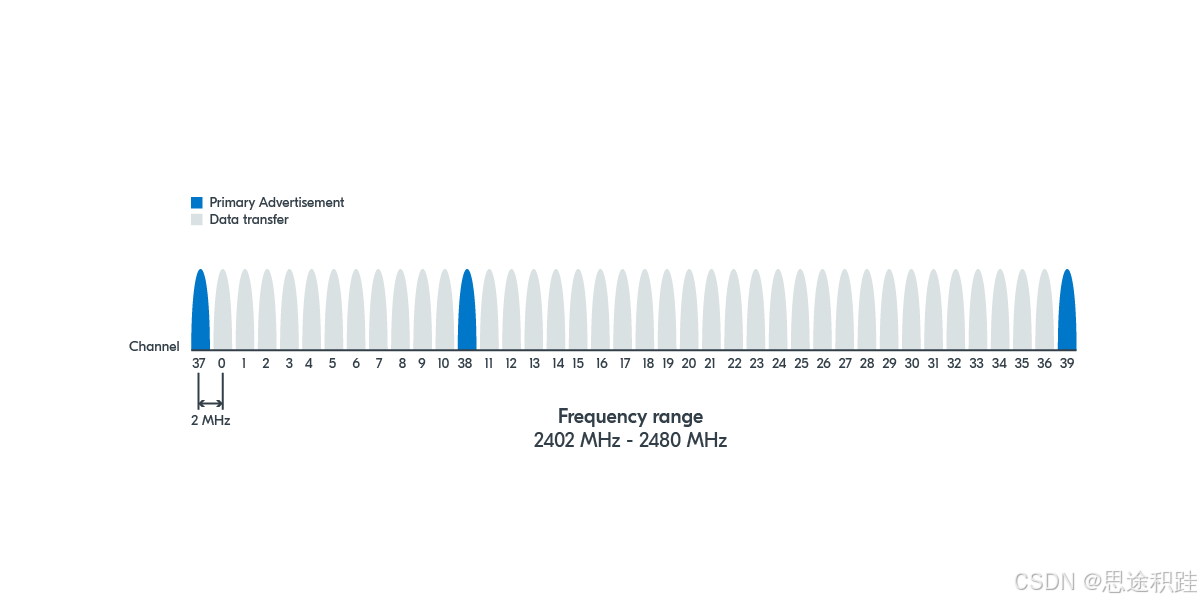
Advertising Channels: Wireless communication uses specific radio channels. BLE devices communicate over 40 channels, divided into 3 primary advertising channels and 37 secondary advertising channels.
Parameters on the Scanner Side
Similar to the advertising interval, scanners (e.g., phones) have a "scan interval" and "scan window."
Scan Interval: The interval at which the device scans for advertising packets.
Scan Window: The duration within each scan interval that the device listens for packets.
Both range from 2.5 ms to 10.24 s, step size 0.625 ms.
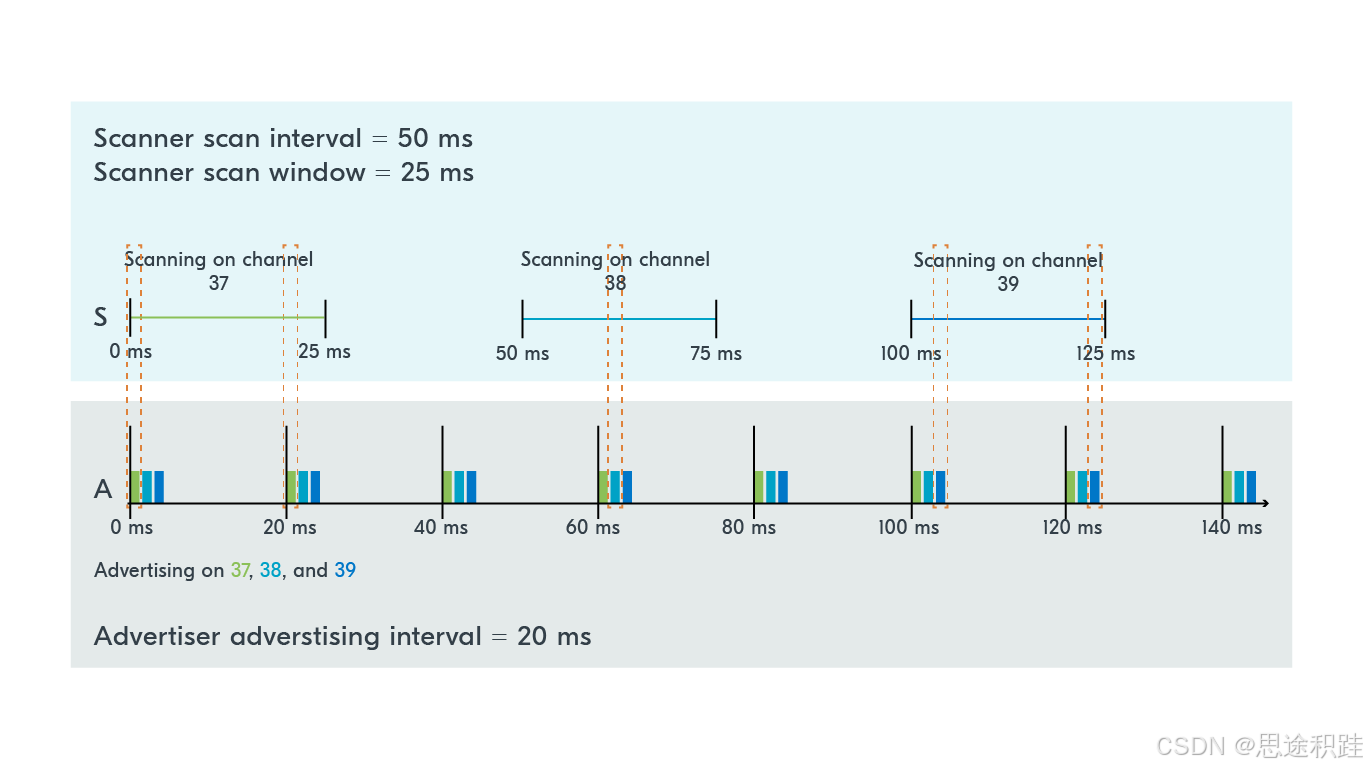
The advertiser transmits on three advertising channels (37, 38, 39), and the scanner sequentially switches among these channels to receive.
In the diagram, green = channel 37, light blue = channel 38, dark blue = channel 39.
Advertising Requests
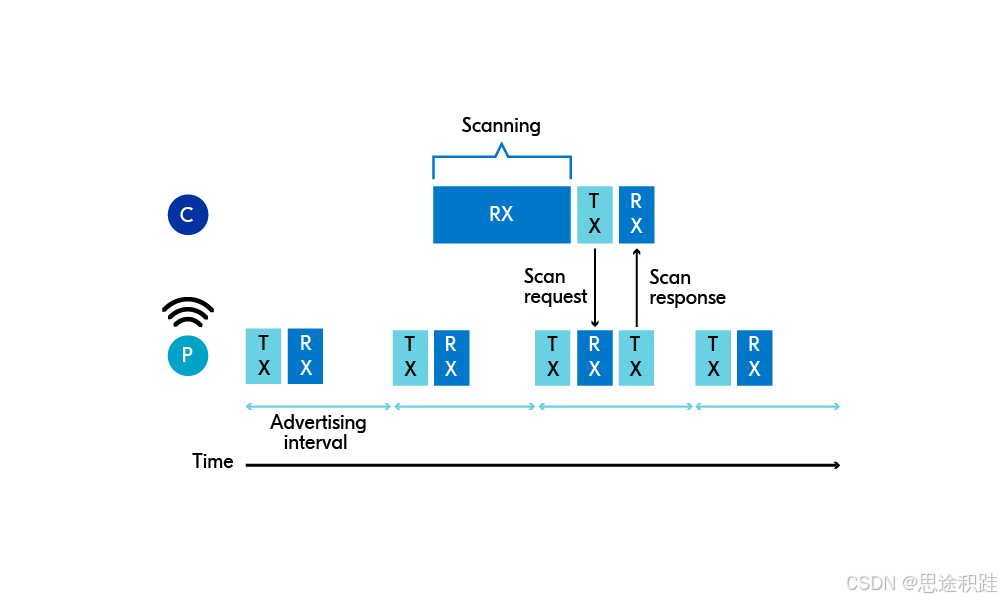
To obtain more information about a device (e.g., additional service UUIDs, extended device name, manufacturer data), a "scan request" and "scan response" are used.
Process:
- The peripheral (e.g., a watch) sends advertising packets, allowing the central (e.g., a phone) to scan.
- The central sends a "scan request."
- The peripheral responds with a "scan response" containing additional information.
Scan Request: A message from the central to the peripheral requesting additional data not present in the advertising packet.
Scan Response: The reply containing extra user data.
Purpose:
- Scan requests/responses enable unidirectional communication between two devices before connection.
- Because advertising packets have limited length, scan responses can provide more device information.
Advertising Types
Peripheral devices can advertise in several ways.
Purpose:
Sometimes a device (e.g., a beacon) should indicate that it cannot be connected. The central, seeing the type, will not initiate a scan request.
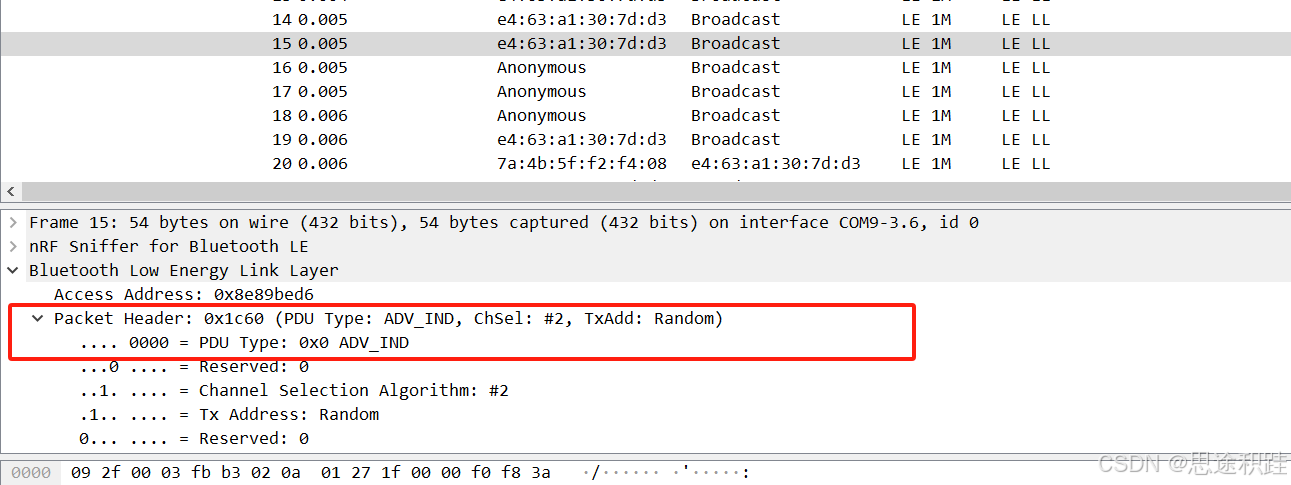
Advertising types are indicated in the packet header.
Advertising Types:
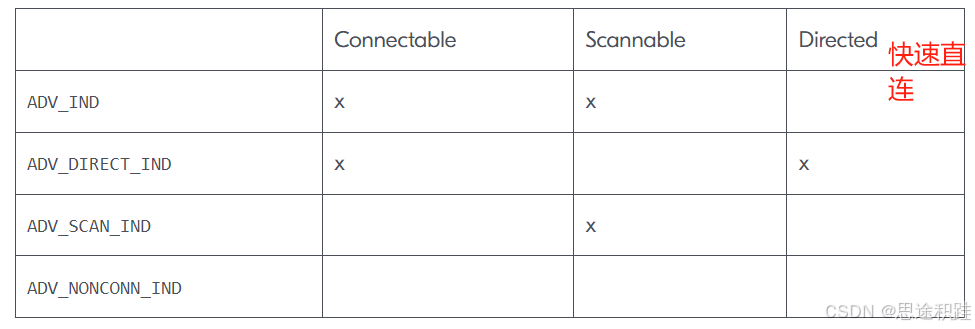
1. Scannable and Connectable (ADV_IND): Most common. Allows scan requests, responses, and connection setup.
2. Directed Connectable (ADV_DIRECT_IND): Does not accept scan requests but allows fast connection by a specific central. Example: A Bluetooth mouse reconnecting to a PC without needing a scan request.
3. Non-Connectable but Scannable (ADV_SCAN_IND): Accepts scan requests but does not allow connection.
4. Non-Connectable and Non-Scannable (ADV_NONCONN_IND): No scan requests and no connection.
Meaning of Connectable, Scannable, Directed:
- Connectable vs. Non-Connectable: Determines if a central can connect to the peripheral.
- Scannable vs. Non-Scannable: Determines if the peripheral accepts scan requests.
- Directed vs. Non-Directed: Determines if the advertising packet targets a specific central.
Bluetooth Addresses
Similar to Ethernet and Wi-Fi MAC addresses, Bluetooth has its own "MAC" address called the "Bluetooth address."
- Each BLE device is identified by a unique 48-bit address.
- Bluetooth addresses are divided into public and random addresses. Random addresses can be static or private, with private addresses further divided into resolvable and non-resolvable.
Public Address
Requires registration with the IEEE and is globally unique. Removing it is not possible. Obtaining such an address involves a fee. Not all devices have a public address; it depends on the manufacturer.
Address Structure:
High 24 bits: Organizationally Unique Identifier (OUI) assigned by IEEE to the manufacturer.
Low 24 bits: Assigned by the manufacturer to uniquely identify each device.
Random Address
Random addresses are more common because they do not require IEEE registration and can be configured manually. They are programmed into the device or generated at runtime. Random addresses are further subdivided into:
- Random static address
- Random private address (resolvable or non-resolvable)
Thus, there are three types of random addresses: static, resolvable private, and non-resolvable private.
Random Static Address
Remains fixed for the device's lifetime. It can change at startup but not during runtime.
Address Structure:
High 2 bits fixed to '11' (static random address).
Remaining 46 bits randomly generated at startup and remain unchanged until next restart.
Format example: 11XXXXXX:YYYYYYYY:YYYYYYYY:YYYYYYYY
Resolvable Random Private Address
Because the intended listener has a pre-shared key, they can resolve the address when it changes. The pre-shared key is the Identity Resolving Key (IRK), used to generate and resolve random addresses.
Address Structure:
High 2 bits fixed to '01' (resolvable private address).
Remaining 46 bits generated using a key; the central can resolve the device identity using the IRK.
Format example: 01XXXXXX:YYYYYYYY:YYYYYYYY:YYYYYYYY
Non-Resolvable Random Private Address
Cannot be resolved by other devices. Used to prevent tracking, but less common.
Address Structure:
High 2 bits fixed to '00' (non-resolvable private address).
Remaining 46 bits randomly generated; cannot be resolved to reveal device identity.
Format example: 00XXXXXX:YYYYYYYY:YYYYYYYY:YYYYYYYY
In summary, Bluetooth addresses have four types: public, random static, resolvable private, and non-resolvable private.
Advertising Packet Frame Format
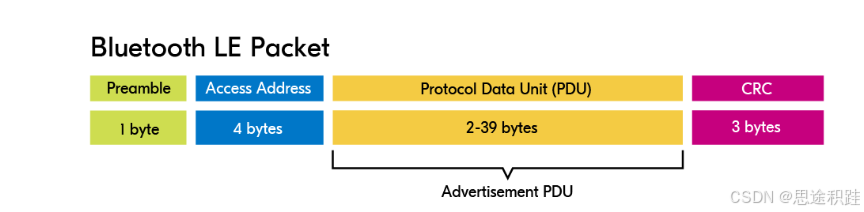
The preamble, access address, and CRC are automatically computed and filled by the protocol stack. Next, we examine the Advertisement PDU.
Advertisement PDU
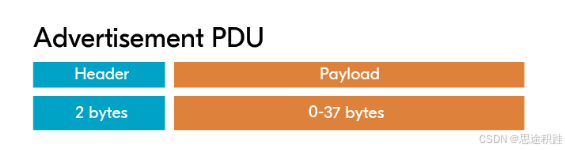
Header
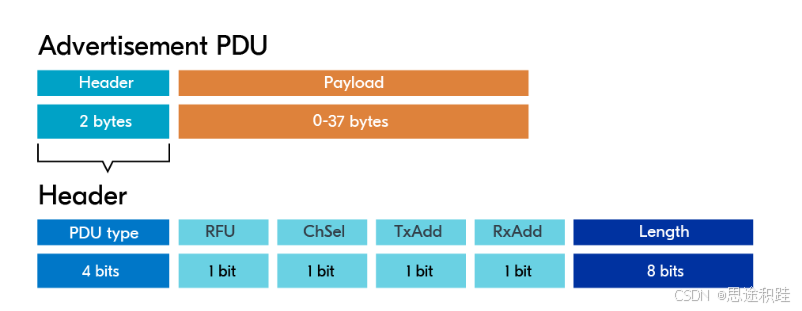
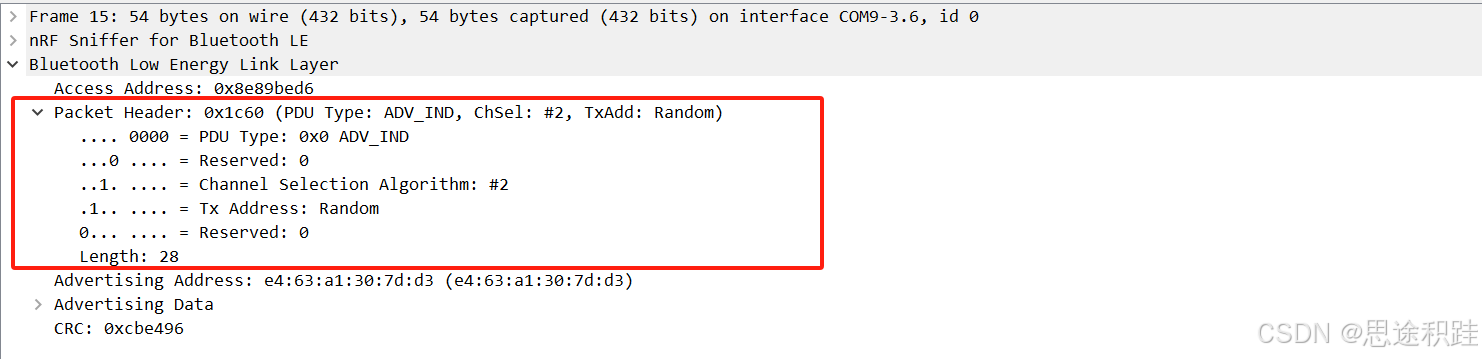
- PDU type: Advertising type.
- RFU: Reserved.
- ChSel: Channel selection algorithm for frequency hopping.
- TxAdd: 0 or 1, indicating whether the transmitter address is public or random.
- RxAdd: 0 or 1, indicating whether the receiver address is public or random.
- Length: Payload length. Maximum payload length is 256 bytes.
Payload
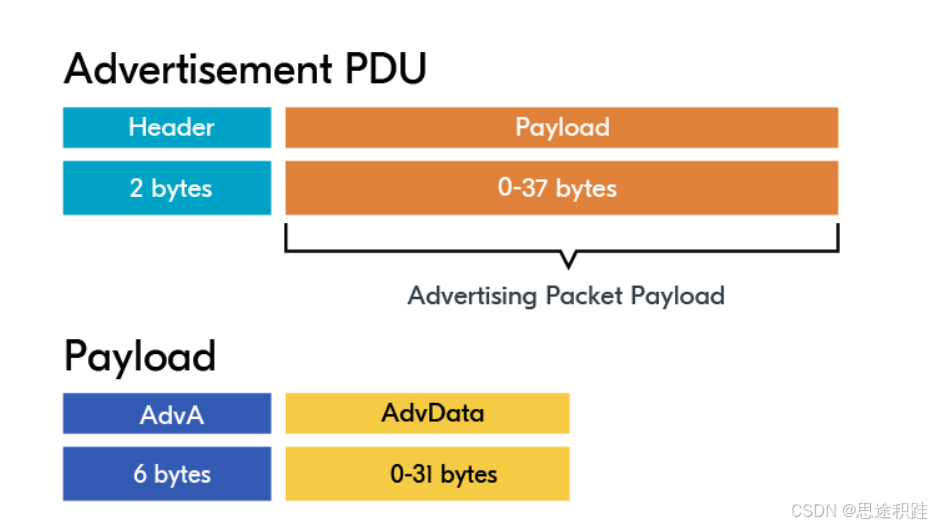
- AdvA: Bluetooth address of the advertiser.
- AdvData: Advertising data.
AdvData: Advertising Data
The content of advertising data depends on the advertising type. Directed advertising (ADV_DIRECT_IND) is special and handled separately. The remaining three types share the same data structure, as shown below.
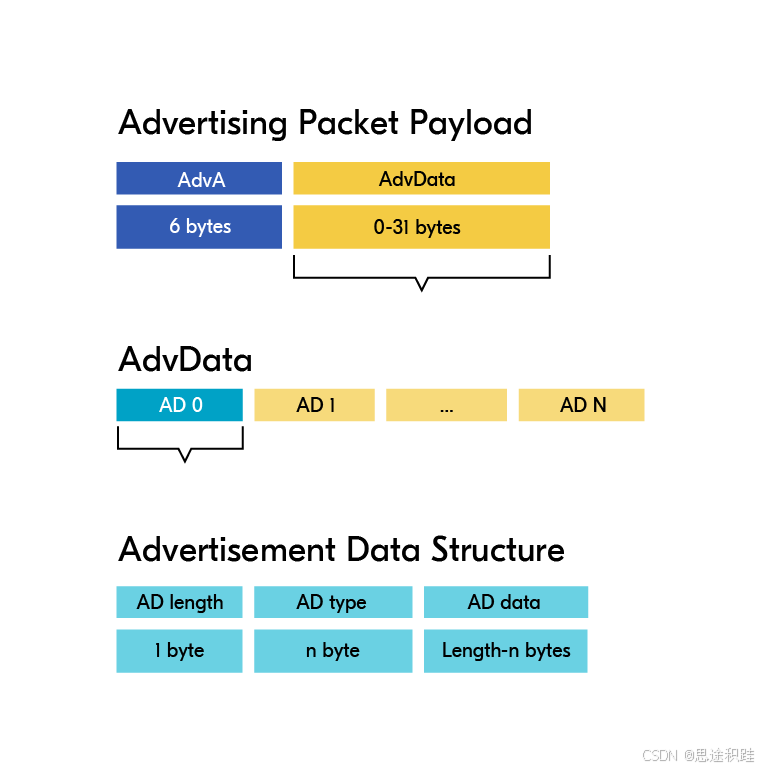
Advertising data consists of multiple AD segments: AD0, AD1, ..., ADn. Each segment has a fixed format (light blue in the diagram).
Why segment? To save space, each segment represents a distinct piece of data.
Example:
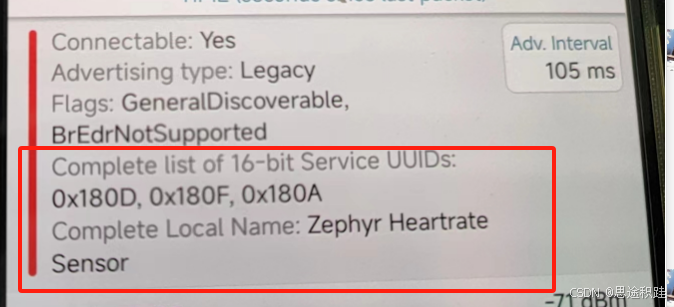
Suppose we want to include the following in an advertising packet:
- Complete list of 16-bit Service UUIDs: 0x180D, 0x180F, 0x180A
- Complete Local Name: Zephyr HeartrateSensor
These are intuitive, but the label text consumes many bytes. Since BLE advertising packets have limited payload (dozens of bytes), the standard predefines advertising data types (defined in Generic Access Profile.pdf) represented by numbers. For example, Complete Local Name uses type 0x09, and Complete list of 16-bit Service UUIDs uses type 0x03. Thus, only two bytes are needed to represent what originally required dozens of bytes.
The diagram below shows the raw data of an advertising packet as transmitted and the parsed segments.
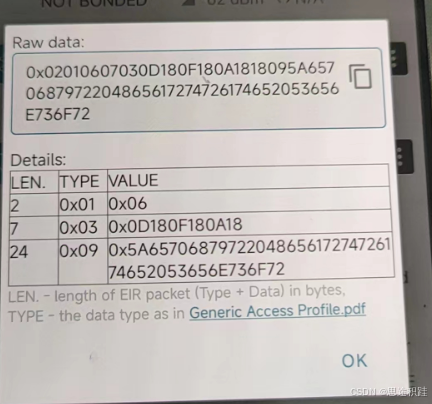
Zephyr's AD types are defined in this header file: https://docs.nordicsemi.com/bundle/ncs-latest/page/zephyr/connectivity/bluetooth/api/gap.html#c.BT_DATA_FLAGS
In summary, to interpret an advertising packet's content:
- Extract the entire ADV data.
- Separate the first AD segment using its length field; repeat for subsequent segments.
- Use each AD type to interpret the data.
BLE Example Program
This will be covered in a separate article.