1. Rename File
In VB.NET, there is a method My.Computer.FileSystem.RenameFile. How to use it in C#? It's simple, just follow these steps:
- Add reference:
Microsoft.VisualBasic, then addusing Microsoft.VisualBasic.Devices; - Use these two lines:
Computer myComputer = new Computer();
myComputer.FileSystem.RenameFile(fileName, newFileName);
Where fileName is the full path of the file to rename, and newFileName is just the target file name.
2. Get File Name and Extension
Path.GetFileName(path);  // Get file name
Path.GetExtension(path); // Get extension (includes dot, e.g., ".doc")
3. Confirmation Dialog for Deletion
if (MessageBox.Show("Are you sure you want to delete?", "Confirmation", MessageBoxButtons.OKCancel) == DialogResult.OK)
4. Copy All Files Including Subdirectories to Another Folder
/// <summary>
/// Copies all files from source directory to target directory recursively.
/// </summary>
private void CopyAll(DirectoryInfo source, DirectoryInfo target)
{
    if (source.FullName.Equals(target.FullName, StringComparison.OrdinalIgnoreCase))
        return;

    if (!Directory.Exists(target.FullName))
        Directory.CreateDirectory(target.FullName);

    foreach (FileInfo file in source.GetFiles())
    {
        file.CopyTo(Path.Combine(target.FullName, file.Name), overwrite: true);
    }

    foreach (DirectoryInfo subDir in source.GetDirectories())
    {
        DirectoryInfo nextTarget = target.CreateSubdirectory(subDir.Name);
        CopyAll(subDir, nextTarget);
    }
}
Calling it:
DirectoryInfo source = new DirectoryInfo(@"c:\Template");
DirectoryInfo target = new DirectoryInfo(@"c:\Done");
CopyAll(source, target);
5. Change GroupBox Border and Font Color
private void groupBox1_Paint(object sender, PaintEventArgs e)
{
    e.Graphics.Clear(groupBox1.BackColor);
    e.Graphics.DrawString(groupBox1.Text, groupBox1.Font, Brushes.Black, 10, 1);
    e.Graphics.DrawLine(Pens.Black, 1, 7, 8, 7);
    float textWidth = e.Graphics.MeasureString(groupBox1.Text, groupBox1.Font).Width;
    e.Graphics.DrawLine(Pens.Black, textWidth + 8, 7, groupBox1.Width - 2, 7);
    e.Graphics.DrawLine(Pens.Black, 1, 7, 1, groupBox1.Height - 2);
    e.Graphics.DrawLine(Pens.Black, 1, groupBox1.Height - 2, groupBox1.Width - 2, groupBox1.Height - 2);
    e.Graphics.DrawLine(Pens.Black, groupBox1.Width - 2, 7, groupBox1.Width - 2, groupBox1.Height - 2);
}
6. Pad String with Leading Zeros
int i = 10;
Console.WriteLine(i.ToString("D5"));            // "00010"
Console.WriteLine(i.ToString().PadLeft(5, '0')); // "00010" (recommended)
Console.WriteLine(i.ToString("00000"));         // "00010"
In C#, you can use PadLeft and PadRight to pad strings.
PadLeft(int totalWidth, char paddingChar)pads on the left.PadRight(int totalWidth, char paddingChar)pads on the right.
Example: h = h.PadLeft(2, '0');
Note: The second parameter is char, use single quotes. To convert string to char, use Convert.ToChar() or str.ToCharArray()[index].
7. MDI Child Form Blocked by Parent Controls
using System.Runtime.InteropServices;

[DllImport("user32")]
public static extern int SetParent(int hWndChild, int hWndNewParent);

Form2 f2 = new Form2();
f2.MdiParent = this;
f2.Show();
SetParent((int)f2.Handle, (int)this.Handle);
This has a side affect: child form's Activated and Deactivate events may not work.
8. MessageBox Dialogs
if (MessageBox.Show("Are you sure you want to delete?", "Prompt", MessageBoxButtons.OKCancel) == DialogResult.OK)
MessageBox.Show("This item already exists in the database.", "Error", MessageBoxButtons.OK, MessageBoxIcon.Error);
9. Hexadecimal and Decimal Conversion
To hex:
string material = cboMaterial.SelectedIndex.ToString("x2"); // x for hex, 2 for two digits
To decimal:
string hexPart = EPC.Substring(0, 2);
int value = Convert.ToInt32(hexPart, 16);
txtWarehouse.Text = value.ToString();
10. DateTime.Now.ToString() Formats
/*
 * y: year (number of y's controls digits: 4+ -> 2017, 3 -> 017, 2 -> 17, 1 -> 7)
 * M: month; m: minute (number of M's controls: 3 -> Jul, 4+ -> July)
 * d: day; no uppercase D meaning; number of d's controls: 1-2 -> number, 3 -> Wed, 4+ -> Wednesday
 * h: hour (12-hour); H: hour (24-hour)
 * s: seconds; f: milliseconds (more f's = more precision, usually 3)
 */
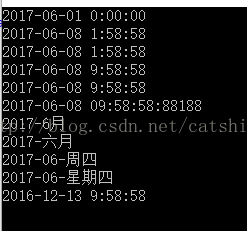
DateTime datetime = new DateTime(DateTime.Now.Year, DateTime.Now.Month, 1);
Console.WriteLine(datetime);
Console.WriteLine(DateTime.UtcNow);
Console.WriteLine(DateTime.Now.ToUniversalTime());
Console.WriteLine(DateTime.Now.ToLocalTime());
Console.WriteLine(DateTime.Now);
Console.WriteLine(DateTime.Now.ToString("yyyy-MM-dd HH:mm:ss:fffff"));
Console.WriteLine(DateTime.Now.ToString("yyyy-MMM"));          // e.g., 2017-Jul
Console.WriteLine(DateTime.Now.ToString("yyyy-MMMMM"));        // e.g., 2017-July
Console.WriteLine(DateTime.Now.ToString("yyyy-MM-ddd"));       // e.g., 2017-07-Wed
Console.WriteLine(DateTime.Now.ToString("yyyy-MM-dddd"));      // e.g., 2017-07-Wednesday
Console.WriteLine(DateTime.Now.AddDays(-177).ToString());      // 177 days ago
Output:
12. Allow Only Numeric Input in TextBox
In the KeyPress event:
private void txtWarnValue_KeyPress(object sender, KeyPressEventArgs e)
{
    if (!char.IsNumber(e.KeyChar) && e.KeyChar != (char)8)  // Backspace
    {
        e.Handled = true;  // Reject input
    }
}
13. Open File and Get File Info
private void button1_Click(object sender, EventArgs e)
{
    OpenFileDialog ofd = new OpenFileDialog();
    ofd.Multiselect = false;
    ofd.Filter = "Image files|*.jpg;*.jpeg;*.bmp;*.png;*.gif;*.ico";

    if (ofd.ShowDialog(this) == DialogResult.OK)
    {
        string file = ofd.FileName;
        txtIntroduPath.Text = file;
        txtIntroduPath.Tag = Path.GetExtension(txtIntroduPath.Text);  // store extension
    }

    UploadHelper upload = new UploadHelper();
    if (upload.Upload(txtIntroduPath.Text))
    {
        MessageBox.Show("Success");
    }
    else
    {
        MessageBox.Show("Failed");
    }
}
Web service code:
public class Service1 : WebService
{
    public byte[] ConvertStreamToByteBuffer(Stream s)
    {
        using (MemoryStream ms = new MemoryStream())
        {
            int b;
            while ((b = s.ReadByte()) != -1)
                ms.WriteByte((byte)b);
            return ms.ToArray();
        }
    }

    [WebMethod]
    public bool Up(byte[] data, string filename)
    {
        try
        {
            string path = Server.MapPath("/UploadFiles/") + filename;
            File.WriteAllBytes(path, data);
            return true;
        }
        catch
        {
            return false;
        }
    }

    [WebMethod]
    public byte[] Down(string filename)
    {
        string path = Server.MapPath("/UploadFiles/") + filename;
        if (File.Exists(path))
        {
            return File.ReadAllBytes(path);
        }
        return new byte[0];
    }
}
14. Compare Two DateTime Values
int result = DateTime.Compare(t1, t2);
// result < 0 if t1 is earlier than t2
// result = 0 if equal
// result > 0 if t1 is later
15. Delete Files with Specific Name Pattern in a Folder
string path = @"D:\Test";
DirectoryInfo folder = new DirectoryInfo(path);

foreach (FileInfo file in folder.GetFiles())
{
    if (file.Name.Contains("database table"))
    {
        File.Delete(file.FullName);
    }
}
Console.WriteLine("Deletion complete.");
16. Get Current Executable Path
Assembly.GetExecutingAssembly().LocationAppDomain.CurrentDomain.BaseDirectory(preferred)
Avoid Directory.GetCurrentDirectory() as it can change.
17. Read/Write app.config in WinForms
Add reference to System.Configuration.
Write:
Configuration config = ConfigurationManager.OpenExeConfiguration(ConfigurationUserLevel.None);
config.AppSettings.Settings["namespace"].Value = txtNameSpace.Text;
config.AppSettings.Settings["savepath"].Value = txtOutPutDir.Text;
config.Save();
Read:
txtNameSpace.Text = ConfigurationManager.AppSettings["namespace"];
txtOutPutDir.Text = ConfigurationManager.AppSettings["savepath"];
18. Cross-Thread Communication (Without UI Invoke)
In WPF/WinForms, Invoke is available for UI threads. For non-UI threads, use SynchronizationContext:
// In Thread A:
SynchronizationContext mainThreadContext = SynchronizationContext.Current;

// In Thread B:
mainThreadContext.Post(new SendOrPostCallback(MethodName), stateObject);
Where MethodName is defined in Thread A, and stateObject can pass parameters.
19. Format a Drive
bool FormatDrive(string driveLetter, string label = "", string fileSystem = "NTFS", bool quickFormat = true, int? clusterSize = 8192, bool enableCompression = false)
{
    if (driveLetter.Length != 2 || driveLetter[1] != ':' || !char.IsLetter(driveLetter[0]))
        return false;

    try
    {
        ProcessStartInfo psi = new ProcessStartInfo
        {
            FileName = "format.com",
            WorkingDirectory = Environment.SystemDirectory,
            Arguments = $"/FS:{fileSystem} /Y /V:{label} {(quickFormat ? "/Q" : "")} {(fileSystem == "NTFS" && enableCompression ? "/C" : "")} {(clusterSize.HasValue ? $"/A:{clusterSize.Value}" : "")} {driveLetter}",
            UseShellExecute = false,
            CreateNoWindow = true,
            RedirectStandardOutput = true,
            RedirectStandardInput = true
        };
        using (Process process = Process.Start(psi))
        {
            process.StandardInput.WriteLine();
            process.WaitForExit();
        }
        return true;
    }
    catch
    {
        return false;
    }
}
20. DesignMode Bug in WinForms
DesignMode is always false in the constructor. Override OnLoad (for Form/UserControl) or OnCreateControl (for Control) and check !DesignMode.
21. Command Runner Helper
public class CommandRunner
{
    public string ExecutablePath { get; }
    public string WorkingDirectory { get; }

    public CommandRunner(string executablePath, string workingDirectory = null)
    {
        ExecutablePath = executablePath ?? throw new ArgumentNullException(nameof(executablePath));
        WorkingDirectory = workingDirectory ?? Path.GetDirectoryName(executablePath);
    }

    public string Run(string arguments)
    {
        ProcessStartInfo info = new ProcessStartInfo(ExecutablePath, arguments)
        {
            CreateNoWindow = true,
            RedirectStandardOutput = true,
            UseShellExecute = false,
            WorkingDirectory = WorkingDirectory
        };
        using (Process process = new Process { StartInfo = info })
        {
            process.Start();
            string output = process.StandardOutput.ReadToEnd();
            process.WaitForExit();
            return output;
        }
    }
}
22. Singleton Pattern Using Lazy<T>
public class Singleton
{
    private static readonly Lazy<Singleton> lazy = new Lazy<Singleton>(() => new Singleton());
    public static Singleton Instance => lazy.Value;

    private Singleton() { }
}
23. Determine Installed .NET Framework Versions
Check Microsoft documentation: Determine which .NET Framework versions are installed
24. Tuples and Deconstruction
// Create a tuple
var person = ("Alice", 25);

// Deconstruction
var (name, age) = person;
Console.WriteLine($"Name: {name}, Age: {age}");

// Named tuple
var employee = (Name: "Bob", Age: 30);
Console.WriteLine($"Name: {employee.Name}, Age: {employee.Age}");
25. Change Build Output Path
In .csproj file:
<PropertyGroup>
  <OutputType>Exe</OutputType>
  <TargetFramework>net8.0-windows</TargetFramework>
  <ImplicitUsings>enable</ImplicitUsings>
  <Nullable>enable</Nullable>
  <AppendTargetFrameworkToOutputPath>false</AppendTargetFrameworkToOutputPath>
  <AppendRuntimeIdentifierToOutputPath>false</AppendRuntimeIdentifierToOutputPath>
  <OutputPath>$(SolutionDir)Dist</OutputPath>
</PropertyGroup>
AppendTargetFrameworkToOutputPath: Removes framework folder (e.g.,net8.0-windows).AppendRuntimeIdentifierToOutputPath: Removes runtime identifier (e.g.,linux-x64).OutputPath: Overrides default (includingDebug/Release) when set directly (notBaseOutputPath).