HTTP Protocol Request and Response Process
Perform a simple HTTP request to observe the process:
curl -v www.baidu.com
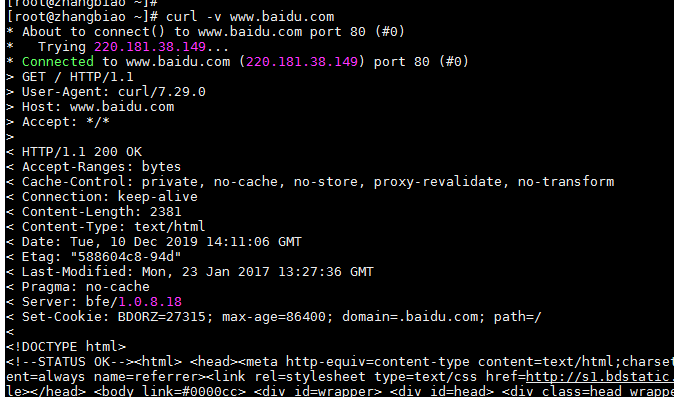
HTTP Request Message
-
Request Line
- Request Method:
GET(read/retrieve) orPOST(write/submit) - Request Resource: e.g.,
index.html,oldboy.jpg - Protocol Version:
HTTP/1.0(short-lived TCP connections),HTTP/1.1(persistent TCP connections),HTTP/2.0(optimized persistent connections for higher concurrency)
- Request Method:
-
Request Headers – Contains host information and other metadata.
-
Empty Line – Separates headers from body.
-
Request Body
- Not present in GET requests.
- Present in POST requests containing submitted data.
HTTP Response Message
-
Status Line – Contains the HTTP status code indicating success or failure.
-
Response Headers – Provide metadata about the response.
-
Empty Line – Separates headers from body.
-
Response Body – The actual content (e.g., HTML, JSON).
HTTP Resource Identification
- URL (Uniform Resource Locator) – Full address like
docs.ansible.com. - URI (Uniform Resource Identifier) – Path after the domain, e.g.,
/ansible/latest/user_guide/playbooks_reuse_roles.html.
Website Performance Metrics
- PV (Page View) – Counts each page load.
- UV (Unique Visitor) – Counts distinct visitors using cookies and sessions.
- Cookie: Stored on client to identify users.
- Session: Server-side storage for user state (e.g., login status).
Concurrency Concepts
- A: Maximum number of requests a server can receive per second.
- B: Maximum number of requests a server can respond to per second.
- C: Maximum connections the server can handle within a time unit.
Introduction to Nginx
Common Web Server Software
| Software | Official Site |
|---|---|
| Apache | http://apache.org/ |
| Nginx | http://nginx.org |
Official Documentation
Key Features of Nginx
- High concurrency with low memory consumption.
- Multiple roles:
- Web server (like Apache)
- Load balancer (like LVS)
- Cache server (like Squid)
- Cross-platform deployment.
- Uses epoll I/O model (asynchronous), unlike Apache's select model.
Installing Nginx via Official YUM Repository
- Add the official Nginx YUM repository by creating
/etc/yum.repos.d/nginx.repo:
[nginx-stable]
name=nginx stable repo
baseurl=http://nginx.org/packages/centos/$releasever/$basearch/
gpgcheck=1
enabled=1
gpgkey=https://nginx.org/keys/nginx_signing.key
- Install Nginx:
yum install -y nginx
- Start and enable Nginx:
systemctl start nginx
systemctl enable nginx
Log Rotation Configuration (logrotate)
Edit /etc/logrotate.conf or files in /etc/logrotate.d/:
# Rotate log files weekly
weekly
# Keep 4 weeks of backups
rotate 4
# Create new (empty) log file after rotation
create
# Use date as suffix for rotated files
dateext
# Optionally compress rotated files
#compress

# Include additional configurations
include /etc/logrotate.d

# Example for specific logs
/var/log/wtmp {
    monthly
    create 0664 root utmp
    minsize 1M    # Minimum size before rotation
    rotate 1
}

/var/log/btmp {
    missingok
    monthly
    create 0600 root utmp
    rotate 1
}
Nginx Configuration File Structure
Main configuration file: /etc/nginx/nginx.conf
Part 1: Global/Process Configuration
user  www;                        # User for worker processes
# Nginx process structure:
# master process:  manages the service (boss)
# worker process:  handles client requests (employees)
worker_processes  2;              # Number of workers (usually = CPU cores or double)
error_log  /var/log/nginx/error.log warn;
pid        /var/run/nginx.pid;
Part 2: Events Configuration
events {
    worker_connections  1024;     # Max connections per worker
}
Part 3: HTTP Configuration
http {
    include       /etc/nginx/mime.types;      # Include MIME types
    default_type  application/octet-stream;   # Default MIME type

    log_format  oldboy  '$remote_addr - $remote_user [$time_local] "$request" '
                        '$status $body_bytes_sent "$http_referer" '
                        '"$http_user_agent" "$http_x_forwarded_for"';
    access_log  /var/log/nginx/access.log  oldboy;

    sendfile        on;
    #tcp_nopush     on;
    keepalive_timeout  65;       # Connection timeout
    #gzip  on;

    include /etc/nginx/conf.d/*.conf;  # Include virtual host configs
}
A typical virtual host configuration in /etc/nginx/conf.d/default.conf:
server {
    listen       8080;
    server_name  www.oldboy.com;
    root   /usr/share/nginx/html;
    index  index.html index.htm;
    error_page   500 502 503 504  /50x.html;
    location = /50x.html {
        root   /usr/share/nginx/html;
    }
}
Enterprise Use Cases
Hosting a Single Website (www)
- Create a virtual host configuration file
/etc/nginx/conf.d/www.conf:
server {
    listen        80;
    server_name   www.oldboy.com;
    location  /oldboy {
        root  /usr/share/nginx/html;
        index oldboy.html;
    }
}
- Place the website code (e.g.,
index.html) in the document root. Exampleoldboy.html:
<!DOCTYPE html>
<html>
  <meta charset="utf-8">
  <head>
    <title>Old Boy Education</title>
  </head>
  <body>
    <h1>Welcome to Old Boy Education</h1>
    <table border=1>
      <tr> <td>1</td> <td>oldboy</td> </tr>
      <tr> <td>2</td> <td>oldgirl</td> </tr>
      <tr> <td>3</td> <td>olddog</td> </tr>
    </table>
    <a href="http://blog.oldboyedu.com">
      <img src="oldboy.jpg" alt="Old Boy Logo">
    </a>
  </body>
</html>
- Reload Nginx gracefully:
nginx -t          # Test configuration
systemctl reload nginx   # or: nginx -s reload
-
Configure DNS by editing the local hosts file on the client:
- Windows:
C:\Windows\System32\drivers\etc\hosts - Linux/Mac:
/etc/hosts
- Windows:
-
Access the site:
http://www.oldboy.com
Hosting Multiple Websites (www, bbs, blog)
- Create separate configuration files:
bbs.conf:
server {
    listen        80;
    server_name   bbs.oldboy.com;
    location / {
        root  /html/bbs;
        index index.html;
    }
}
blog.conf:
server {
    listen        80;
    server_name   blog.oldboy.com;
    location / {
        root  /html/blog;
        index index.html;
    }
}
server {
    listen        80;
    server_name   www.oldboy.com;
    location / {
        root  /html/www;
        index index.html;
    }
}
- Create document roots and index files:
mkdir -p /html/{www,bbs,blog}
for name in {www,bbs,blog}; do echo "10.0.0.7 $name.oldboy.com" > /html/$name/index.html; done
- Update the hosts file:
10.0.0.7 www.oldboy.com bbs.oldboy.com blog.oldboy.com
- Test with curl:
curl www.oldboy.com   # Output: 10.0.0.7 www.oldboy.com
curl bbs.oldboy.com   # Output: 10.0.0.7 bbs.oldboy.com
curl blog.oldboy.com  # Output: 10.0.0.7 blog.oldboy.com
Access Control Methods
Address-based Access Control
Useful for load balanced or high-availability setups:
server {
    listen        10.0.0.7:80;
    server_name   www.oldboy.com;
    location / {
        root  /html/www;
        index index.html;
    }
}
Port-based Access Control
Useful when multiple services share a host (e.g., Zabbix on Apache port 80 and web on Nginx port 8080):
server {
    listen        8080;
    server_name   www.oldboy.com;
    location / {
        root  /html/www;
        index index.html;
    }
}
Enterprise Security Configurations
Restrict Access Based on Client IP (ngx_http_access_module)
Syntax: deny address | CIDR | unix: | all;
Context: http, server, location, limit_except
Example: Block users from 10.0.0.0/24 but allow 172.16.1.0/24 for path /AV:
server {
    listen        80;
    server_name   www.oldboy.com;
    location / {
        root  /html/www;
        index index.html;
    }
    location /AV {
        deny   10.0.0.0/24;
        allow  172.16.1.0/24;
        root   /html/www;
        index  index.html;
    }
}
Note: deny and allow directives inside a location override the outer server context for that specific location.
HTTP Basic Authentication (ngx_http_auth_basic_module)
Create a password file with encrypted passwords using htpasswd:
htpasswd -bc /path/to/htpasswd oldboy 123456
Then configure in the virtual host:
server {
    listen        80;
    server_name   www.oldboy.com;
    location / {
        root  /html/www;
        index index.html;
        auth_basic "Restricted Area";
        auth_basic_user_file /path/to/htpasswd;
    }
}
Test authentication:
curl -u oldboy:123456 www.oldboy.com
File Directory Listing (ngx_http_autoindex_module)
Enable directory listing by setting autoindex on:
server {
    listen        80;
    server_name   www.oldboy.com;
    location / {
        root  /html/www;
        autoindex on;
        charset utf-8;  # Prevent Chinese character encoding issues
    }
}
Note: Remove any index directive to prevent automatic load of index files.
Media Types and Download Behavior
- Files with extensions listed in
mime.typesare displayed inline. - Files with unknown extensions are downloaded automatically.
Server Alias
Configure multiple domain names to point to the same site:
server {
    server_name   www.oldboy.com old.com;
    ...
}
Useful for:
- Testing site access.
- Directing clients to the correct server.
Monitoring with Status Module (ngx_http_stub_status_module)
Create a separate status endpoint:
server {
    listen       80;
    server_name  state.oldboy.com;
    stub_status;
}
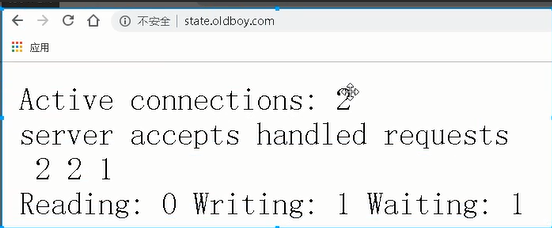
Fields explained:
- Active connections: Current active connections (e.g., 3500 out of 4000 users).
- accepts: Total TCP connections accepted.
- handled: Total TCP connections handled.
- requests: Total HTTP requests (since server start).
- Reading: Number of requests being read.
- Writing: Number of responses being written.
- Waiting: Requests waiting in the queue (idle keep-alive connections).
Common Nginx Variables
| Variable | Description |
|---|---|
$remote_addr |
Client IP address |
$remote_user |
HTTP basic authentication username |
$time_local |
Local time of the request |
$request |
Full request line |
$status |
HTTP status code |
$body_bytes_sent |
Size of the response body |
$http_referer |
Referrer URL (anti-hotlinking) |
$http_user_agent |
Client software (e.g., Chrome, Firefox, mobile) |
$http_x_forwarded_for |
Original client IP behind a reverse proxy |
Location Directive Deep-Dive
Error Page Handling
location /oldboy {
    root /html/www;
    error_page 404 /oldboy.jpg;
}
This returns /oldboy.jpg when accessing a non-existent URI like www.oldboy.com/oldboy/1111.
Location Matching Rules
Syntax: location [ = | ~ | ~* | ^~ ] uri { ... }
Priority order (from highest to lowest):
- Exact match (
= /): Highest priority= / - Prefix match with
^~: Prioritizes prefix matching, ignoring regex symbols in the URI. - Regex match (
~*or~): Case-insensitive (~*) or case-sensitive (~) regex. - Normal prefix match (
/): Lowest priority.
Example:
location = / {
    # Exact match for root - highest priority
    [ config A ]
}

location / {
    # Default prefix match - lowest priority
    [ config B ]
}

location /documents/ {
    # Prefix match for specific directory - medium priority
    [ config C ]
}

location ^~ /images/ {
    # Prefix match with higher priority, ignores regex for images
    [ config D ]
}

location ~* \.(gif|jpg|jpeg)$ {
    # Case-insensitive regex match for image files - medium priority
    [ config E ]
}
URL Rewriting and Redirection
The rewrite directive (from module ngx_http_rewrite_module):
rewrite regex replacement [flag];
Context: server, location, if
Redirect Flags
permanent(301): Cached by browsers.redirect(302): Not cached.
Example: Force Redirect from non-www to www
Method 1: Using a separate server block:
server {
    listen 80;
    server_name oldboy.com;
    rewrite ^/(.*) http://www.oldboy.com/$1 permanent;
}
Method 2: Using if condition:
if ($host ~* "^oldboy.com$") {
    rewrite ^/(.*) http://www.oldboy.com/$1 permanent;
}
Integration with External REST APIs or PHP
server {
    listen       80;
    server_name  www.oldboy.com;
    stub_status;

    location ~ \.php$ {
        root /www;
        fastcgi_index index.php;
        fastcgi_param SCRIPT_FILENAME $document_root$fastcgi_script_name;
        fastcgi_pass 127.0.0.1:9000;
        include fastcgi_params;
    }
}
fastcgi_param tells Nginx what file is requested and passes it back.
Load Balancing Setup
location / {
    proxy_pass http://default;
    proxy_set_header Host $host;
    proxy_set_header X-Forwarded-For $remote_addr;
    proxy_next_upstream error timeout http_404 http_502 http_403;
}
The proxy_next_upstream directive forwards the request to the next server in case of specified errors (e.g., timeout, 404, 502, 403).