Nginx modules are categorized into official and third-party modules.
To list the modules loaded via an RPM-based Nginx installation, you can use the command nginx -V. Typical default modules include:
--with-compat--with-file-aio--with-threads--with-http_addition_module--with-http_auth_request_module--with-http_dav_module--with-http_flv_module--with-http_gunzip_module--with-http_gzip_static_module--with-http_mp4_module--with-http_random_index_module--with-http_realip_module--with-http_secure_link_module--with-http_slice_module--with-http_ssl_module--with-http_stub_status_module--with-http_sub_module--with-http_v2_module--with-mail--with-mail_ssl_module--with-stream--with-stream_realip_module--with-stream_ssl_module--with-stream_ssl_preread_module
http_stub_status_module Module
The ngx_http_stub_status_module provides access to basic server status information, which is useful for monitoring current connections.
This module is not built by default; it must be enabled with the configuration parameter --with-http_stub_status_module.
Configuration
Build option:
--with-http_stub_status_module
Purpose:
Expose Nginx client connection status
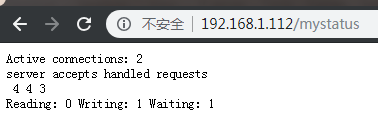
It is mainly used to display the status of currently processed links for monitoring connection information.
Syntax:
Syntax: stub_status;Default: —Context: server, location
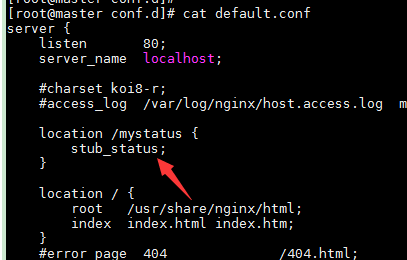
Example: Edit the default configuration file at /etc/nginx/conf.d/default.conf
    location /check_status {
        stub_status;
    }
Verify the configuration syntax:
nginx -tc /etc/nginx/nginx.conf

Reload the Nginx service:
nginx -s reload -c /etc/nginx/nginx.conf
Access the status page:
http_random_index_module Module
ngx_http_random_index_module processes requests ending with a slash character ('/') and picks a random file in a directory to serve as the index file.ngx_http_index_module.--with-http_random_index_module configuration parameter.Build option:
--with-http_random_index_module
Purpose:
Select a random home page from the directory
Syntax:
Syntax: random_index on | off;Default: random_index off;Context: location
Example: Serve random pages
Edit the default configuration file /etc/nginx/nginx.conf:
    location / {
        #root   /usr/share/nginx/html;
        #index  index.html index.htm;
        root    /var/www/files;
        random_index on;
    }
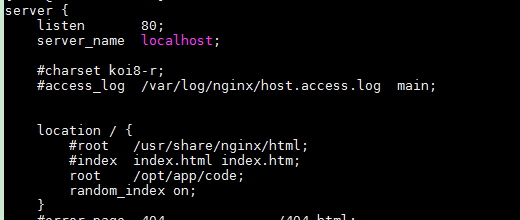
After updating the root directory and placing sample HTML files inside:

Check syntax and reload:
nginx -tc /etc/nginx/nginx.conf
systemctl reload nginx

Refreshing the page multiple times will serve different files.
Note: Nginx ignores hidden files (those starting with a dot) when picking a random index.
http_sub_module Module
Build option:
--with-http_sub_module
Purpose:
HTTP content replacement in responses
This module allows Nginx to replace text in the HTTP response body before sending it to the client.
Syntax:
Syntax: sub_filter search_text replacement;(search_text is the string to find, replacement is the new text)Default: —Context: http, server, location
Syntax: sub_filter_last_modified on | off;
Default: sub_filter_last_modified off;Context: http, server, location
This directive controls whether the original Last-Modified header is preserved. It is useful in caching scenarios to determine if content has changed.
Syntax: sub_filter_once on | off;
Default: sub_filter_once on;
Context: http, server, location
Controls whether to replace only the first occurrence or all occurrences of the search text. By default, only the first match is replaced.
Example HTML file placed at /var/www/files/sample.html:
<head>
    <meta charset="utf-8">
    <title>Content Demo</title>
</head>
<body>
    <a>alpha</a>
    <a>at</a>
    <a>beta</a>
    <a>alpha</a>
    <a>beta</a>
</body>
</html>
Default configuration (/etc/nginx/conf.d/default.conf):
    location / {
        root   /var/www/files;
        index  sample.html;
        sub_filter '<a>beta' '<a>BETA';
    }
Reload Nginx:
systemctl reload nginx
Access the page:
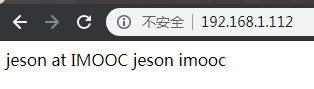
Only the first matching occurrence is replaced because sub_filter_once is on by default.
To replace all matches, update the configuration:
    location / {
        root   /var/www/files;
        index  sample.html;
        sub_filter '<a>beta' '<a>BETA';
        sub_filter_once off;
    }
After reloading, the page will show all occurrences replaced: