But turning these two capabilities into actual technology can be a daunting task for many.
How to achieve the "boundary"
Imagine you need to write a small program that adds numbers. The program reads input from a file and writes the computed result to another file.
Since computers only understand 0s and 1s, regardless of the language you use, the code ultimately must be translated into a binary executable image that can run on the operating system.
To run that code, you also need to provide data — the input file for our addition program. The data plus the binary file on disk is what we normally call a "program," also known as an executable image.
Now we can run it.
First, the operating system detects that the input data resides in a file, so it loads the data into memory. It then reads the addition instructions and directs the CPU to perform the addition. The CPU and memory cooperate, using registers to hold values and stacks to store commands and variables. Meanwhile, open files and various I/O devices continuously change their states.
Once the "program" starts executing, it transforms from a binary file on disk into a collection of data in memory, values in registers, instructions in the stack, open files, and the states of various devices. This sum of the computer’s execution environment when a program is running is what we call a process.
For a process, its static representation is the program sitting quietly on disk; once running, it becomes the dynamic sum of data and states inside the computer.
The core function of container technology is to create a "boundary" for a process by constraining and modifying its dynamic behavior.
In most Linux containers like Docker, Cgroups are the primary mechanism for imposing constraints, while Namespaces are the primary method for altering the process’s view.
These concepts may sound abstract, but a hands-on practice will make them clear.
Assume you have Docker running on Linux. My environment is Ubuntu 16.04 with Docker CE 17.03.
Let’s start by creating a container:
In plain English: start a container, run /bin/sh inside it, and give me a command terminal to interact with it.
Now my Ubuntu machine acts as the host, and a container running /bin/sh runs inside that host.
If you’ve played with Docker, you will be familiar with the example and the principle. Now, if we run ps inside the container, something interesting appears:
How is this achieved?
Normally, when we run a /bin/sh program on the host, the OS assigns it a process number — say PID=100. This number uniquely identifies the process, like an employee badge. So PID 100 is employee #100, and PID 1 would be the big boss (like Bill Gates).
Now, Docker runs /bin/sh inside a container. Docker plays a trick on employee #100 the moment it joins: it hides all the other 99 employees from view, including the boss. Thus, the process mistakenly believes it is employee #1.
This mechanism manipulates the process’s namespace so that processes only see recalculated PIDs, like PID 1. In reality, on the host OS, it is still process #100.
This trick is the Linux Namespace mechanism. Its usage is interesting: it’s simply an optional argument when creating a new process. In Linux, processes are spawned using the clone() system call, for example:
We can call clone() multiple times to create multiple PID namespaces. Each namespace’s application process thinks it is PID 1, unable to see the real host process space or other PID namespaces.
Besides PID Namespace, Linux offers Mount, UTS, IPC, Network, and User namespaces to create illusions for different process contexts.
For instance, Mount Namespace allows the isolated process to see only mount points within its namespace; Network Namespace lets it see only the namespace’s network devices and configurations.
This is the fundamental principle behind Linux containers.
Therefore, the seemingly mysterious Docker container is actually a process created with a set of Namespace arguments. The container "sees" only the resources, files, devices, states, or configurations limited by its namespaces. The host and irrelevant programs remain entirely invisible.
In essence, a container is just a special process.
When you think about "isolating a process into its own space," you naturally think of virtual machines. You’ve probably seen a comparison diagram between VMs and containers.
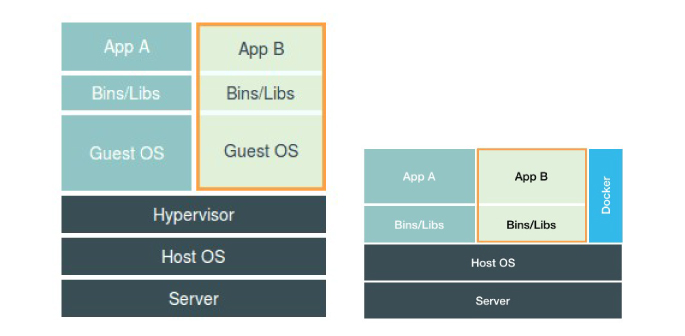
In this diagram, we should place Docker at the same level as the applications, off to the side. This indicates that the process running inside the container is just like any other process on the host, managed by the host OS — except these isolated processes have extra Namespace settings. Docker here plays more of a sidecar role for assistance and management.
Future discussions on CRI and container runtimes will show that even Docker can be removed from the picture.
This architecture explains why Docker is more popular than virtual machines.
When using virtualization as the sandbox, a Hypervisor must create a real virtual machine that runs a full Guest OS to execute the application. This inevitably brings extra resource consumption.
Experiments show that a KVM virtual machine running CentOS, without optimization, consumes around 100–200 MB of memory just for itself. Moreover, guest application calls to the host OS must be intercepted and handled by the virtualization layer, introducing further performance overhead, especially for computing, network, and disk I/O.
By contrast, a containerized application is still an ordinary process on the host, so those virtualization performance costs are nonexistent. Additionally, containers using Namespaces don’t need a separate Guest OS, making the extra resource footprint almost negligible.
Thus, "agility" and "high performance" are the container’s greatest advantages over VMs, and the reason they thrive in fine‑grained resource management platforms like PaaS.
However, there are trade‑offs. The Linux Namespace isolation mechanism has shortcomings compared to virtualization, the most critical being: isolation is not thorough.
First, since a container is merely a special process on the host, multiple containers share the same host OS kernel.
Even though you can mount different operating system files (e.g., CentOS or Ubuntu) in side a container via Mount Namespace, this doesn’t change the fact that the kernel is shared. This means you cannot run a Linux container on a Winndows host, nor can you run a higher‑version Linux container on a lower‑version Linux host.
In contrast, virtual machines with hardware virtualization and independent Guest OSes are far more flexible. An extreme example: Microsoft Azure runs on Windows server clusters, yet you can easily spin up countless Linux VMs on it.
Second, many Linux kernel resources and objects cannot be namespaced. The typical example is: time.
If a program inside a container modifies the system time using the settimeofday() syscall, the entire host’s time changes — clearly not what the user expects. Compared to the freedom of a VM, container deployments force developers to ask, "What can we do, and what can’t we do?"
Moreover, due to the shared host kernel, the attack surface exposed by containers is significantly larger, and breaking out of a container is far easier than escaping a VM.
Even more challenging: while we can use technologies like Seccomp to filter and scrutinize all system calls from within the container for security hardening, this filtering adds overhead and degrades performance. And by default, nobody knows exactly which syscalls to allow or deny.
Therefore, in production environments, no one dares expose a physical‑machine Linux container directly to the public internet. (Later we’ll explore container implementations based on virtualization or independent kernels that better balance isolation and performance.)
After covering isolation, let’s examine "limitation."
You might wonder: why do we need restrictions when we’ve already created a "container" using Linux Namespaces?
Using PID Namespace as an example: although the container’s process #1 sees only its own world, on the host it remains process #100 competing equally with all other processes for resources. Process #100 can consume all available CPU or memory, and other processes or containers can starve it. This is definitely not the proper behavior of a sandbox.
Linux Cgroups (Control Groups) is the kernel feature for setting resource constraints on processes.
Interestingly, when Google engineers initiated this feature in 2006, they called it "process containers." Inside Google, the term "container" has long referred to a process group restricted by Cgroups. They even say their KVM VMs run inside "containers" managed by Borg — meaning Cgroup containers — which is quite different from today’s Docker containers.
The primary role of Linux Cgroups is to limit the maximum resources a process group can use, including CPU, memory, disk, network bandwidth, and more.
Additionally, Cgroups can set priorities, perform accounting, and suspend/resume processes. For now, we’ll focus on the "limitation" capability most relevant to containers, and walk through a practical exploration.
In Linux, Cgroups exposes its interface as a filesystem under /sys/fs/cgroup. On my Ubuntu 16.04, I can list them with:
Under /sys/fs/cgroup there are subsystems like cpuset, cpu, memory. Each represents a resource type that Cgroups can control. Inside each subsystem, you’ll find configuration files that define how the resource can be limited. For the CPU subsystem:
How do we use these files?
We create a directory under the desired subsystem. For example, inside /sys/fs/cgroup/cpu:
Now, let’s run a script in the background:
We can confirm CPU usage with top:
Checking the container control group shows no CPU quota limit yet (value is -1), and the default period is 100 ms (100000 µs):
Besides the CPU subsystem, other Cgroups subsystems provide their own resource limiting capabilities:
- blkio – sets I/O limits for block devices (typically disks).
- cpuset – assigns individual CPU cores and corresponding memory nodes to a process.
- memory – sets memory usage limits.
Linux Cgroups is designed to be straightforward. You can think of it simply as a subsystem directory plus a set of resource limit files. For Docker and similar container projects, they just create a control group (a new directory) under each subsystem for each container, and then, after launching the container process, write its PID into the corresponding tasks file.
The values written into the resource limit files under each control group come from the parameters specified during docker run, for example: