1. Strings
1.1 Using the format() Method to Format Strings
Use the format() method to format strings with the following syntax:
string_to_format.format(real_data1, real_data2, ...)
Description:
- The string to be formatted uses
{}as placeholders for the actual data.
Example 1:
name = 'Alice'
template = 'Name: {}'
print(template.format(name))
Output:
Name: Alice
Example 2:
name = 'Alice'
age = 30
template = 'Name: {}\nAge: {}'
print(template.format(name, age))
Output:
Name: Alice
Age: 30
Note: Placeholders can include indices to refer to arguments by position, starting from 0.
name = 'Alice'
age = 30
template = 'Name: {0}\nAge: {1}'
print(template.format(name, age))
Output:
Name: Alice
Age: 30
Note: Placeholders can also be named, and the values are passed as keyword arguments. For Python 3.6+, f-strings are recommended for cleaner syntax.
name = 'Alice'
age = 30
weight = 55
template = 'Name: {name}\nAge: {age}\nWeight: {weight}kg'
print(template.format(name=name, age=age, weight=weight))
Output:
Name: Alice
Age: 30
Weight: 55kg
You can also specify precision for floating-point numbers.
score = 18
total = 20
print("Percentage: {:.2%}".format(score / total))  # Two decimal places
Output:
Percentage: 90.00%
1.2 Using f-strings to Format Strings
f-strings provide a more concise way to format strings.
Syntax: Prefix the string with f or F and use {variable_name} to embed variables.
Example:
age = 25
gender = 'Male'
print(f"Age: {age}, Gender: {gender}")
Output:
Age: 25, Gender: Male
2. Common String Operations
Python provides many built-in methods for string manipulation. Unless specified (like join()), these methods are called on the string object.
2.1 String Search
Use the find() method to search for substrings.
str.find(sub[, start[, end]])
Purpose: Returns the lowest index where the substring sub is found, or -1 if not found.
Parameters:
sub: The substring to search for.start(optional): Starting index for the search (default 0).end(optional): Ending index for the search (default string length).
Example:
text = 'python'
sub = 'th'
index = text.find(sub)
print(index)  # Output: 2
2.2 String Replacement
Use the replace() method to replace substrings.
str.replace(old, new[, count])
Purpose: Returns a new string where all occurrences of old are replaced by new.
Parameters:
old: The substring to replace.new: The replacement substring.count(optional): Maximum number of replacements (default all).
Example:
sentence = "All things Are difficult before they Are easy."
new_sentence = sentence.replace('Are', 'are')
print(new_sentence)
Output:
All things are difficult before they are easy.
2.3 String Splitting
Use the split() method to split a string into a list.
str.split(sep=None, maxsplit=-1)
Purpose: Returns a list of substrings split by sep.
Parameters:
sep(optional): Delimiter (default any whitespace).maxsplit(optional): Maximum number of splits (default -1, unlimited).
Example:
sentence = "All things Are difficult before they Are easy."
words = sentence.split()
print(words)
Output:
['All', 'things', 'Are', 'difficult', 'before', 'they', 'Are', 'easy.']
2.4 Removing Characters from Strings
Methods like strip(), lstrip(), and rstrip() remove specified characters from the begining and/or end of a string. By default, they remove whitespace.
Note: These methods return a new string; they do not modify the original.
Example:
text = "  Life is short, Use Python !"
print(text.strip())   # Remove leading and trailing whitespace
print(text.lstrip())  # Remove leading whitespace
print(text.rstrip())  # Remove trailing whitespace
Output:
Life is short, Use Python !
Life is short, Use Python !
  Life is short, Use Python !
2.5 Changing String Case
Methods like upper(), lower(), capitalize(), and title() change the case of letters in a string.
Example:
text = "hello woRld"
print(text.upper())       # 'HELLO WORLD'
print(text.lower())       # 'hello world'
print(text.capitalize())  # 'Hello world'
print(text.title())       # 'Hello World'
Output:
HELLO WORLD
hello world
Hello world
Hello World
2.6 String Alignment
center(width, fillchar=' '): Centers the string and pads withfillcharto reachwidth.ljust(width, fillchar=' '): Left-aligns and pads on the right.rjust(width, fillchar=' '): Right-aligns and pads on the left.
Example:
text = "Python"
print(text.center(10, '*'))  # '**Python**'
print(text.ljust(10, '-'))   # 'Python----'
print(text.rjust(10, '+'))   # '++++Python'
Output:
**Python**
Python----
++++Python
2.7 String Joining
Use the join() method to join a sequence of strings with a specified separator. Note that this method is called on the separator string, not the sequence.
separator.join(iterable)
Example:
separator = '*'
word = 'python'
print(separator.join(word))  # 'p*y*t*h*o*n'
Output:
p*y*t*h*o*n
2.8 Concatenating Strings
Strings can be concatenated using the + operator.
Example:
start = 'py'
end = 'thon'
print(start + end)  # 'python'
Output:
python
3. Composite Data Types
3.1 Overview of Composite Data Types
Composite data types group multiple values, which may be of the same or different types, into a single unit. Python has three main categories:
- Sequence types: Ordered collections with index-based access.
- Set types: Unordered collections of unique, immutable elements.
- Mapping types: Collections of key-value pairs.
3.1.1 Sequence Types
Sequences store data in a specific order and support both positive and negative indexing.
- Positive indexing: 0, 1, 2, ... (left to right)
- Negative indexing: -1, -2, -3, ... (right to left)
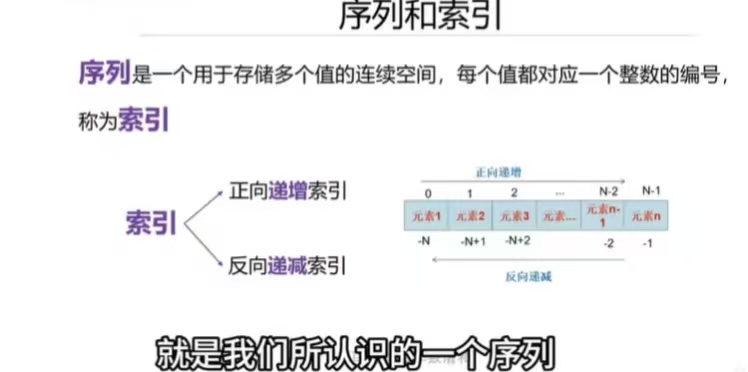
Common sequence types: str, list, tuple.
3.1.2 Set Types
Sets in Python correspond to mathematical sets: deterministic, unique, and unordered.
- Elements must be immutable (e.g., numbers, strings, tuples). Lists, dictionaries, and sets themselves are mutable and cannot be set elements.
3.1.3 Mapping Types
Mappings store elements as key-value pairs. The only built-in mapping type is dict.
- Keys must be unique and immutable.
- Each key maps to exactly one value.