Core of Java: Object-Oriented Programming
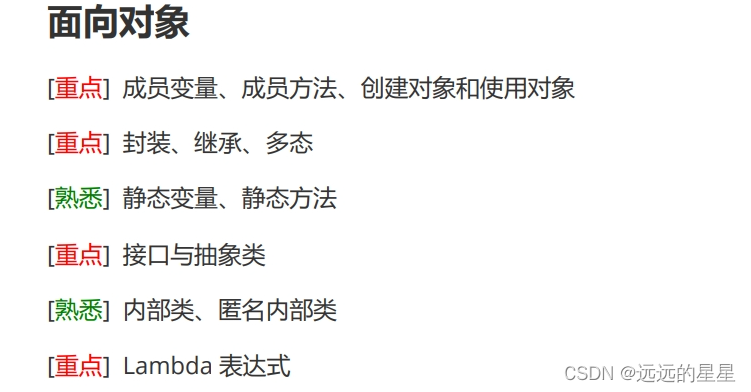
1. Java Object-Oriented Programming (OOP)
-
OOP stands for object-oriented programming, which involves writing procedures and methods that operate on data, and creating objects that contain both data and methods.
-
Three Pillars
Java OOP has three main pillars: encapsulation, inheritance, and polymorphism.
-
Encapsulation: Wrapping a class to only expose desired method interfaces without revealing implementation details, making the program more robust. For example, if a project changes hands midway, encapsulation allows you to ignore poorly written code from predecessors and focus on your own implementation by providing only necessary interface methods.
-
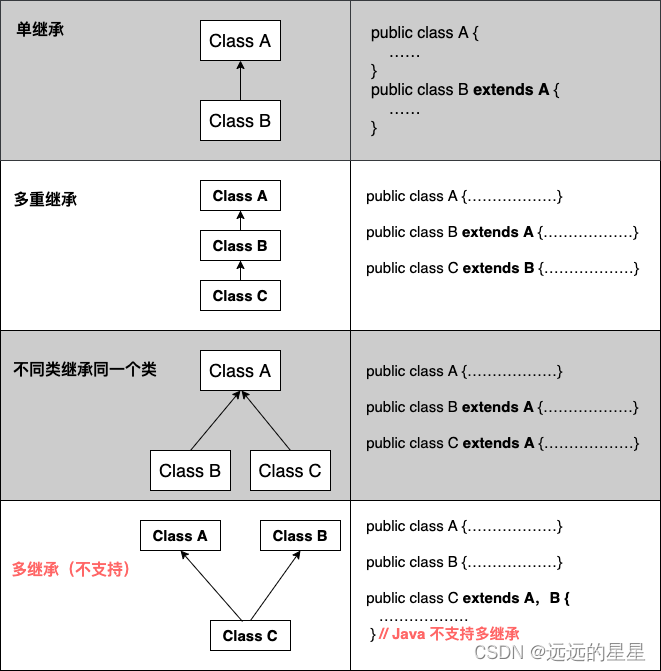
Inheritance: A mechanism where a class derives properties and behaviors from another class, promoting code reuse. The class being inherited from is called the parent or superclass, and the inheriting class is the child or subclass. All Java classes are subclasses of
Object. Java supports single inheritance to avoid excessive coupling, but multiple interfaces can be implemented for extension. -
Polymorphism: Allows a child object to be assigned to a parent variable, yet the runtime behavior reflects the child class. This means the same method can exhibit different behaviors based on the actual object type. Simply put, it allows different methods with the same name.
2. Java Classes and Objects
-
Java is an object-oriented language. A class is a blueprint for objects, defining data fields and methods. An object is an instance of a class. A class can have many instances; creating an instance is called instantiation. Instances are also referred to as objects.
Class Objects Dog Husky, Golden Retriever, Poodle Fruit Apple, Banana, Strawberry -
Declaring a Class: Use the
classkeyword.public class MyClass { int x = 5; // x is a field of MyClass }Note: Class names should start with an uppercase letter, and the file name must match the class name.
-
Declaring Objects: Use the
newkeyword. Multiple objects can be created.public class MyClass { int x = 5; public static void main(String[] args) { MyClass obj1 = new MyClass(); // Object 1 MyClass obj2 = new MyClass(); // Object 2 System.out.println(obj1.x); // Access field System.out.println(obj2.x); obj1.x = 10; // Modify field System.out.println("After change: " + obj1.x); } } -
To prevent overwriting, declare the field as
final. Atempting to modify it will cause a compilation error. -
Static vs Non-Static Methods
- Static methods can be called without creating an object, while public methods require an object.
- Static methods can only access static members, while non-static methods can access both.
- Static methods cannot be overridden (but can be hidden).
- Static members are initialized when first used; non-static members are initialized upon object creation. Static allocation is contiguous in memory, while non-static is discrete, but the speed difference is negligible.
public class MyClass { // Static method static void myStaticMethod() { System.out.println("Static methods can be called without creating an object"); } // Public method public void myPublicMethod() { System.out.println("Public methods must be called by creating an object"); } // Main method public static void main(String[] args) { myStaticMethod(); // Call static method // myPublicMethod(); // This would cause a compilation error MyClass myObj = new MyClass(); // Create an object myObj.myPublicMethod(); // Call public method on the object } } -
Using Multiple Classes: Two files in the same directory:
Main.javaMyClass.java
// Main.java public class Main { public static void main(String[] args) { MyClass mc = new MyClass(); mc.say(); mc.eat("banana"); } } // MyClass.java class MyClass { public void say() { System.out.println("Hello!"); } public void eat(String food) { System.out.println("Eating: " + food); } } -
Constructors: Constructors must have the same name as the class and no return type (not even
void). They are called when an object is created. If no constructor is defined, Java provides a default one that doesn't initialize fields.public class Main { int x; // No-argument constructor public Main() { x = 1; } // Parameterized constructor public Main(int y) { x = y; } public static void main(String[] args) { Main obj1 = new Main(); System.out.println(obj1.x); // 1 Main obj2 = new Main(5); System.out.println(obj2.x); // 5 } }- Differences between constructors and regular methods:
- Regular methods define behavior; constructors initialize the object when created.
- Constructors are invoked by JVM during object creation; regular methods are called after object creation.
- Regular methods can be called multiple times; constructors are called only once during creation.
- Constructor name must match class name; method name follows identifier rules.
- Constructors have no return type.
- Differences between constructors and regular methods:
3. Encapsulation
- Encapsulation is a protective barrier that prevents external code from accessing internal data directly. Access is controlled through strict interface methods.
-
Main benefit: You can modify internal implementation without affecting code that uses your class.
-
To achieve good encapsulation:
- Hide fields and implementation details by making them
private. - Expose public methods to safely access and modify the fields.
- Hide fields and implementation details by making them
-
Getter and Setter Methods:
- In IDEs like IntelliJ, you can generate getters/setters via
Alt+Insert. - Always use getters/setters to access private fields, not direct field access.
// Person.java public class Person { private String name; public String getName() { return name; } public void setName(String newName) { this.name = newName; } } // Main.java public class Main { public static void main(String[] args) { Person person = new Person(); person.setName("Alice"); System.out.println(person.getName()); } } - In IDEs like IntelliJ, you can generate getters/setters via
-
4. Packages
-
Purposes of packages:
- Organize related classes/interfaces together for easier search and use.
- Use tree-like directory structure to avoid naming conflicts. Different packages can have classes with the same name.
- Restrict access: only classes with package-level access can access classes within the package.
-
Two types of packages:
- Built-in packages (from Java API)
- User-defined packages
-
Built-in Packages: Java API is a library of pre-written classes. Import a single class or a whole package using
import.import package.name.Class; // Import a single class import package.name.*; // Import the whole package
5. Inheritance
-
Java inheritance allows a class to inherit attributes and methods from another class.
- Subclass (child) – the class that inherits.
- Superclass (parent) – the class being inherited from.
- Use
extendskeyword.
class Parent { }

class Child extends Parent { }
Example:
class Person { protected String name = "Unknown"; public void study() { System.out.println("Studying..."); } } class Student extends Person { private String major = "Computer Science"; public static void main(String[] args) { Student s = new Student(); s.study(); System.out.println(s.name + " " + s.major); } }protectedallows access in subclasses. Ifprivate, the child cannot access.
-
Characteristics of inheritance:
- Subclass inherits non-private fields and methods.
- Subclass can have its own fields and methods.
- Subclass can override methods.
- Java supports single inheritance (one parent) but allows multiple levels (e.g., A -> B -> C).
- Increases coupling (a downside).
-
finalkeyword: Prevents inheritance (for classes) or overriding (for methods).final class FinalClass { } // Cannot be extended class Parent { final void display() { } // Cannot be overridden } -
Java does not support multiple inheritance (a class cannot extend multiple classes).
6. Polymorphism
-
Polymorphism means "many forms". It allows objects of different classes to be treated as objects of a common parent class.
-
Reference Polymorphism:
- A parent reference can point to a parent object:
Parent p = new Parent(); - A parent reference can point to a child object:
Parent p = new Child(); - A child reference cannot point to a parent object.
- A parent reference can point to a parent object:
-
Method Polymorphism:
- When calling a method via a parent reference, the overridden method in the child is executed (if the method exists in the parent).
- The referenced object's actual type determines which method is called.
Example:
class Animal { public void eat() { System.out.println("Eating"); } } class Cat extends Animal { @Override public void eat() { System.out.println("Eating fish"); } public void catchMouse() { System.out.println("Catching mouse"); } } class Dog extends Animal { @Override public void eat() { System.out.println("Eating bones"); } public void guard() { System.out.println("Guarding house"); } } public class Main { public static void main(String[] args) { Animal a1 = new Animal(); Animal a2 = new Cat(); Animal a3 = new Dog(); a1.eat(); // Eating a2.eat(); // Eating fish a3.eat(); // Eating bones } }Note: A parent reference cannot call child-specific methods unless you cast it.
Polymorphism improves code extensibility and allows generic handling of objects.
7. Inner Classes
-
Member Inner Class: A class inside another class. To access it, create an outer object then an inner object.
class OuterClass { int x = 10; class InnerClass { int y = 5; } } OuterClass outer = new OuterClass(); OuterClass.InnerClass inner = outer.new InnerClass(); System.out.println(inner.y + outer.x); -
Private Inner Class: Use
privateorprotectedto restrict access from outside. -
Static Inner Class: Declared with
static; can be accessed without creating an outer object. -
Inner classes can access outer class members.
-
Local Inner Class: Defined within a method or block; accessible only within that scope.
class Man { public People getWoman() { class Woman extends People { int age = 0; } return new Woman(); } } class People { } -
Anonymous Inner Class: Used frequently for event listeners and quick overrides.
button.addActionListener(new ActionListener() { @Override public void actionPerformed(ActionEvent e) { // Do something } }); -
Benefits:
- Each inner class can independently inherit an interface, enabling a form of multiple inheritance.
- Groups logically related classes together and hides them from outside.
- Facilitates event-driven programming.
- Useful for threading.
8. Abstract Classes
-
An abstract class is a restricted class that cannot be instantiated. It is meant to be subclassed.
-
An abstract method has no implementation and must be overridden by concrete subclasses.
-
An abstract class can have both abstract and regular methods.
abstract class Animal { abstract void eat(); // abstract method public void sleep() { System.out.println("Zzz"); } } -
Using abstraction (abstract classes or interfaces) promotes loose coupling and standardized development.
9. Interfaces
-
An interface is a collection of abstract methods and constants. It is a special abstract class containing only abstract methods (before Java 8). Java doesn't support multiple inheritance, but interfaces allow achieving that effect.
-
A class that implements an interface must implement all its methods, unless its abstract.
-
Use
implementskeyword.interface Animal { void eat(); void sleep(); } class Cat implements Animal { public void eat() { System.out.println("Eating fish"); } public void sleep() { System.out.println("Zzz"); } } -
Interface methods are implicitly
public abstract. -
Interface fields are implicitly
public static final. -
Interfaces cannot have constructors.
-
A class can implement multiple interfaces.
interface FirstInterface {
    void myMethod();
}

interface SecondInterface {
    void myOtherMethod();
}

class DemoClass implements FirstInterface, SecondInterface {
    public void myMethod() {
        System.out.println("myMethod");
    }
    public void myOtherMethod() {
        System.out.println("myOtherMethod");
    }
}
10. Override vs Overload
-
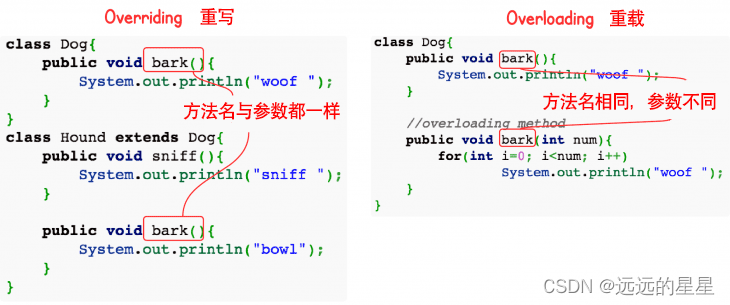
Override (Method Overriding): Subclass redefines a method inherited from superclass. The method signature must be the same (name, parameter list, and return type must be compatible).
- Rules:
- Parameter list must match.
- Return type can be a subtype (covariant return).
- Access modifier cannot be more restrictive.
finalmethods cannot be overridden.staticmethods cannot be overridden (they are hidden).- Constructors cannot be overridden.
- Use
superto call the superclass method.
- Rules:
-
Overload (Method Overloading): Multiple methods in the same class with the same name but different parameter lists. Return types can differ.
- Rules:
- Parameter lists must differ (number or type).
- Return type can change.
- Access modifier can change.
- Can be in the same class or in a subclass.
Aspect Overloading Overriding Parameters Must change Must not change Return type Can change Cannot change (or covariant) Exceptions Can change Can reduce/remove; cannot throw new or broader checked exceptions Access Can change Cannot be more restrictive Both are forms of polymorphism: overloading is compile-time (static), overriding is runtime (dynamic).
- Rules:
11. Enums
-
enumis a special class representing a set of constants. Enums can have fields and methods. -
Constants are separated by commas and typically uppercase.
enum Level { LOW, MEDIUM, HIGH } -
Commonly used in
switchstatements.Level level = Level.MEDIUM; switch(level) { case LOW: System.out.println("Low level"); break; case MEDIUM: System.out.println("Medium level"); break; case HIGH: System.out.println("High level"); break; } -
values()returns an array of all constants.for (Level l : Level.values()) { System.out.println(l); } -
Methods:
ordinal()returns index,valueOf(String)returns enum constant by name.Example of advanced enum:
enum Color {
    RED { public String getColor() { return "Red"; } },
    GREEN { public String getColor() { return "Green"; } };
    public abstract String getColor();
}

enum Day {
    MONDAY("Monday"),
    TUESDAY("Tuesday"),
    WEDNESDAY("Wednesday"),
    THURSDAY("Thursday"),
    FRIDAY("Friday"),
    SATURDAY("Saturday"),
    SUNDAY("Sunday");

    private final String name;

    private Day(String name) {
        this.name = name;
    }

    public String getName() {
        return name;
    }

    public boolean isWeekend() {
        return this == SATURDAY || this == SUNDAY;
    }
}
12. Getting User Input (Scanner)
-
Scannerclass injava.utilpackage.import java.util.Scanner; public class Main { public static void main(String[] args) { Scanner scanner = new Scanner(System.in); System.out.println("Enter username:"); String userName = scanner.nextLine(); System.out.println("Username: " + userName); } } -
next()vsnextLine():next()reads a token (stops at whitespace).nextLine()reads the entire line (including spaces, stops at newline).
-
Methods for other types:
nextInt(),nextDouble(), etc.Scanner sc = new Scanner(System.in); System.out.println("Enter name, age, weight:"); String name = sc.nextLine(); int age = sc.nextInt(); double weight = sc.nextDouble(); System.out.println("Name: " + name); System.out.println("Age: " + age); System.out.println("Weight: " + weight);
13. Lambda Expressions
-
Lambdas are a concise way to represent anonymous functions. They are used primarily to implement functional interfaces (interfaces with a single abstract method).
-
Syntax:
parameter -> expression (param1, param2) -> { statements } -
Example with
ArrayList:ArrayList<Integer> numbers = new ArrayList<>(); numbers.add(5); numbers.add(4); numbers.add(7); numbers.forEach( n -> System.out.println(n) ); -
Storing lambda in a functional interface variable:
import java.util.function.Consumer; Consumer<Integer> print = n -> System.out.println(n); numbers.forEach(print); -
Using lambda as a parameter:
@FunctionalInterface interface StringFunction { String run(String str); } public class Main { public static void main(String[] args) { StringFunction exclaim = s -> s + "!"; StringFunction ask = s -> s + "?"; printFormatted("Hello", exclaim); printFormatted("Hello", ask); } public static void printFormatted(String str, StringFunction func) { System.out.println(func.run(str)); } } -
Variable scope: Lambda can only reference effectively final local variables (i.e., variables that are not modified after initialization within the lambda or externally).