In Elasticsearch, index templates define presets for index creation, including mappings, settings, and aliases.
Elasticsearch provides two types of index templates: legacy templates and composable templates.
Understanding how to use these templates and how they interact with each other is crucial for effective index management.
1. Overview of Index Templates
1.1 Legacy Templates
Legacy templates refer primarily to templates in Elasticsearch 7.7 (inclusive) and earlier versions.
They are created using an API and are mainly used in earlier versions of Elasticsearch. Here is an example configuration:
PUT _template/t1
{
  "order": 1,
  "index_patterns": ["my-logs-*"],
  "settings": {
    "number_of_shards": 1
  },
  "mappings": {
    "properties": {
      "timestamp": {"type": "date"},
      "message": {"type": "text"}
    }
  },
  "aliases": {
    "logs": {}
  }
}
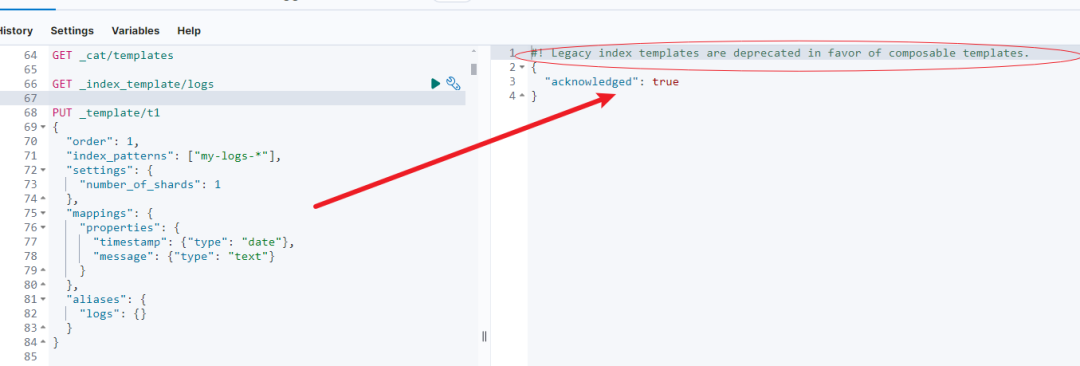
More detailed prompt information:

1.2 Component Templates
Introduced in Elasticsearch 7.8, these provide more flexible configuration options for modern index templates.
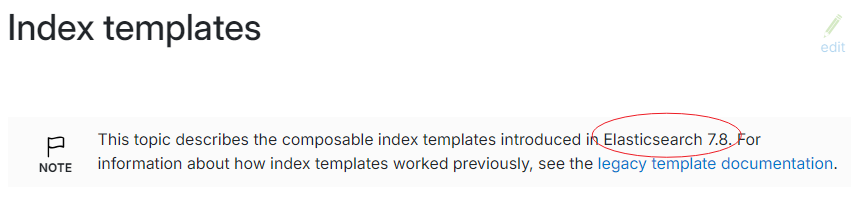
They are used to manage multiple templates with similar structures, typically including common settings, mappings, and aliases.
Suppose we need to create a component template that contains some basic settings and mappings suitable for processing log data. This template will define the number of shards for log indices, mapping types, and an alias.
Here is an example creation:
PUT _component_template/template_logs_base
{
  "template": {
    "settings": {
      "number_of_shards": 2,
      "number_of_replicas": 1
    },
    "mappings": {
      "properties": {
        "timestamp": {
          "type": "date",
          "format": "epoch_millis"
        },
        "log_level": {
          "type": "keyword"
        },
        "message": {
          "type": "text",
          "fields": {
            "keyword": {
              "type": "keyword",
              "ignore_above": 256
            }
          }
        }
      }
    },
    "aliases": {
      "logs_all": {}
    }
  }
}
1.3 Composable Templates
Same as section 1.2, introduced in Elasticsearch 7.8, providing more flexible configuration options for modern index templates.
Creation method:
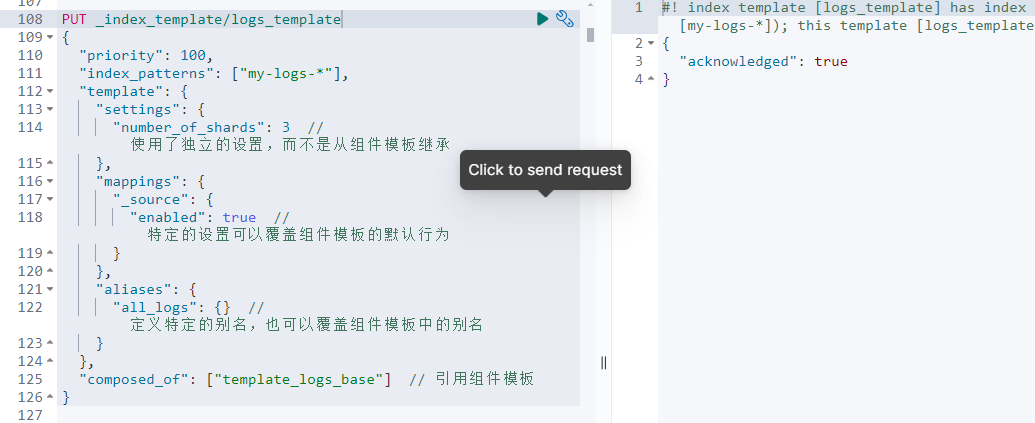
Prompt information:

PUT _index_template/logs_template
{
  "priority": 100,
  "index_patterns": ["my-logs-*"],
  "template": {
    "settings": {
      "number_of_shards": 3  // Uses independent settings instead of inheriting from component templates
    },
    "mappings": {
      "_source": {
        "enabled": true  // Specific settings can override default behavior of component templates
      }
    },
    "aliases": {
      "all_logs": {}  // Defines specific aliases, can also override aliases from component templates
    }
  },
  "composed_of": ["template_logs_base"]  // References the component template
}
2. Template Conflicts and Priority
When multiple templates match the same index pattern, Elasticsearch decides which template to use based on the template type and priority:
- If both legacy and composable templates exist and match the same index pattern, the legacy template will be ignored.
- For composable templates, the one with higher priority will be used.
- For legacy templates, they are merged based on the order value; templates with a higher order value will override settings from those with lower order values.
Example: Suppose both the legacy template t1 and the composable template logs_template exist, and both apply to the my-logs-* index pattern. logs_template will override the legacy template t1. A detailed example is provided below:
3. What is the Difference Between order in Legacy Templates and priority in Composable Templates?
In Elasticsearch, the order in legacy templates and priority in composable templates are both mechanisms for resolving template conflicts, but they differ in behavior and application scenarios.
3.1 order in Legacy Templates
In legacy templates, the order attribute determines which template takes precedence when multiple templates match the same index. The value of order is an integer. When two or more templates apply to an index:
- A higher
ordervalue means higher priority – a template with a higherordervalue is applied later, so its configuration overrides corresponding configurations in templates with lowerordervalues. - Merging behavior – if multiple templates have the same
ordervalue, Elasticsearch merges them in dictionary order based on template name. Later-loaded templates (appearing later in dictionary order) can override earlier settings.
3.2 priority in Composable Templates
For composable templates, priority is used to resolve conflicts in a similar way to order in legacy templates, but it is designed specifically for composable templates:
- A higher
priorityindicates higher priority: when multiple templates match the same index pattern, the template with the highestpriorityvalue will be used, and its settings will override those of templates with lowerpriorityvalues. This is similar to theordermechanism in legacy templates. - Single selection – unlike the merging behavior of legacy templates, when two composable templates conflict, Elasticsearch only applies the template with the highest
priority. Merging does not occur; only one template is selected and applied.
3.3 Key Differences
Difference 1: Merging vs. Selection
Legacy templates can merge settings from multiple templates (if order is the same), whereas composable templates only select one based on priority when conflicts occur.
Difference 2: Different Design Intent
priority is designed for modern Elasticsearch environments, where templates can be very complex and variable, emphasizing clear configuration overrides rather than configuration merging.
Choosing between order and priority depends on your Elasticsearch version and you're template management needs.
As Elasticsearch transitions to composable templates, understanding and adapting to using priority will help better manage index templates, especially in complex or highly customized environments.
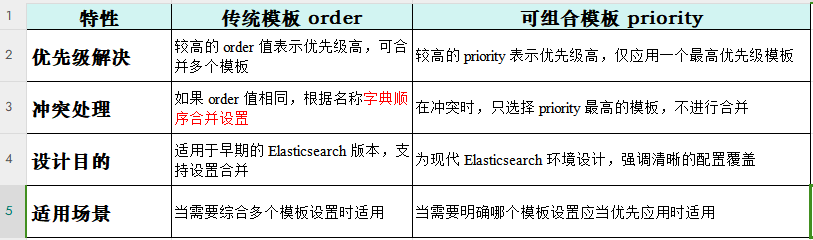
| Feature | Legacy Template order |
Composable Template priority |
|---|---|---|
| Priority Resolution | Higher order value means higher priority; can merge multiple templates |
Higher priority means higher priority; only one template with the highest priority is applied |
| Conflict Handling | If order values are the same, settings are merged in dictionary order based on name |
In case of conflict, only the template with the highest priority is selected; no merging |
| Design Purpose | Suitable for early Elasticsearch versions; supports settings merging | Designed for modern Elasticsearch environments; emphasizes clear configuration overrides |
| Applicable Scenarios | Suitable when a combination of multiple template settings is needed | Suitable when a specific template should clearly take precedence |
The so-called "dictionary order merging" is illustrated with an example:
PUT _template/template_a
{
  "order": 1,
  "index_patterns": ["mingyi-logs-*"],
  "settings": {
    "number_of_shards": 1
  },
  "mappings": {
    "properties": {
      "message": {
        "type": "text",
        "analyzer": "standard"
      }
    }
  }
}

PUT _template/template_b
{
  "order": 1,
  "index_patterns": ["mingyi-logs-*"],
  "settings": {
    "number_of_shards": 3
  },
  "mappings": {
    "properties": {
      "message": {
        "type": "text",
        "analyzer": "whitespace"
      }
    }
  }
}

PUT mingyi-logs-01
GET mingyi-logs-01
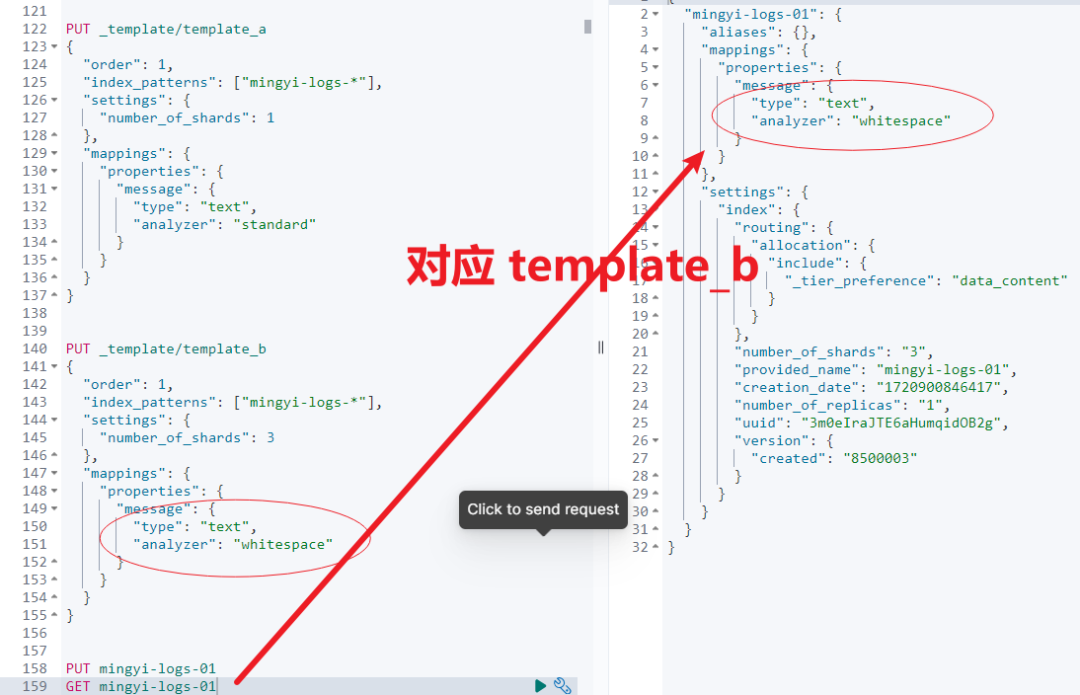
When two or more legacy templates have the same order value, Elasticsearch typically determines the merge order based on the dictionary order (alphabetical order) of the template names.
This means that if the template names are template_a and template_b, both with the same order value, template_a (because 'a' comes before 'b') will be applied first, and its settings may be overridden by template_b which is applied later.
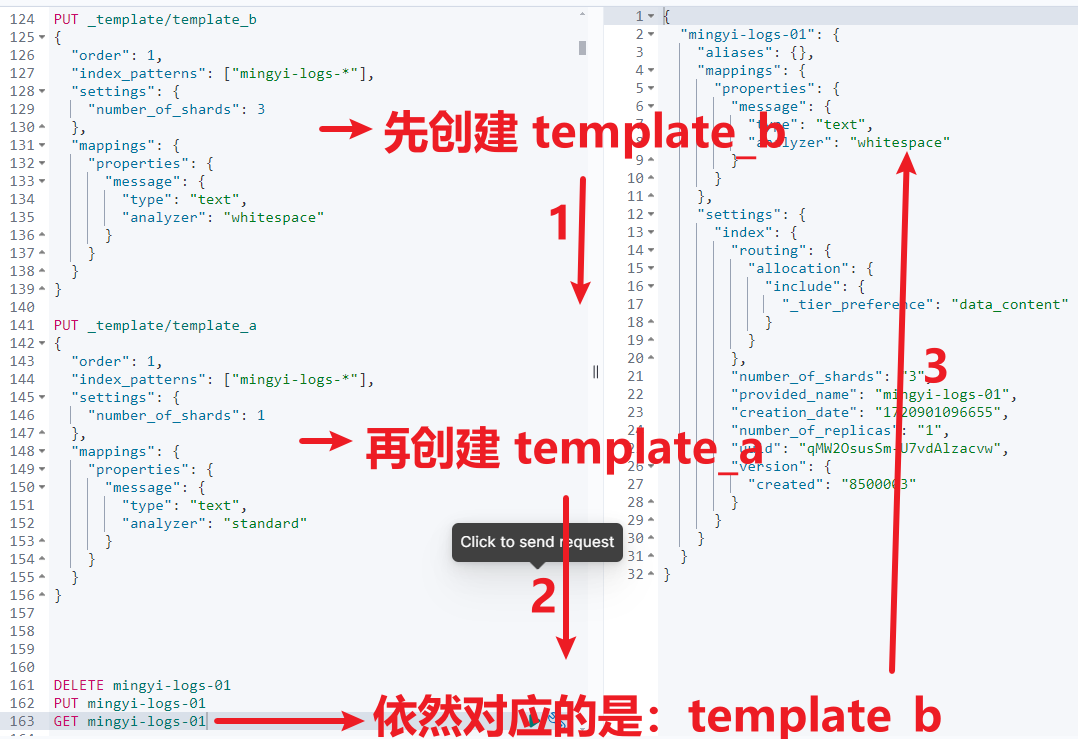
The following example further clarifies this: creating template_b first and then template_a also results in template_b overriding template_a.
4. How to Predict Which Template Will Be Used When Creating an Index
To determine which template will be used when creating an index, you can use the _simulate_index API. This API returns the template information that will be applied to a new index. The example command is as follows:
POST _index_template/_simulate_index/logs-2023
If the API returns an empty result, you may need to create a dummy index and check the main node's logs to determine the template being used.
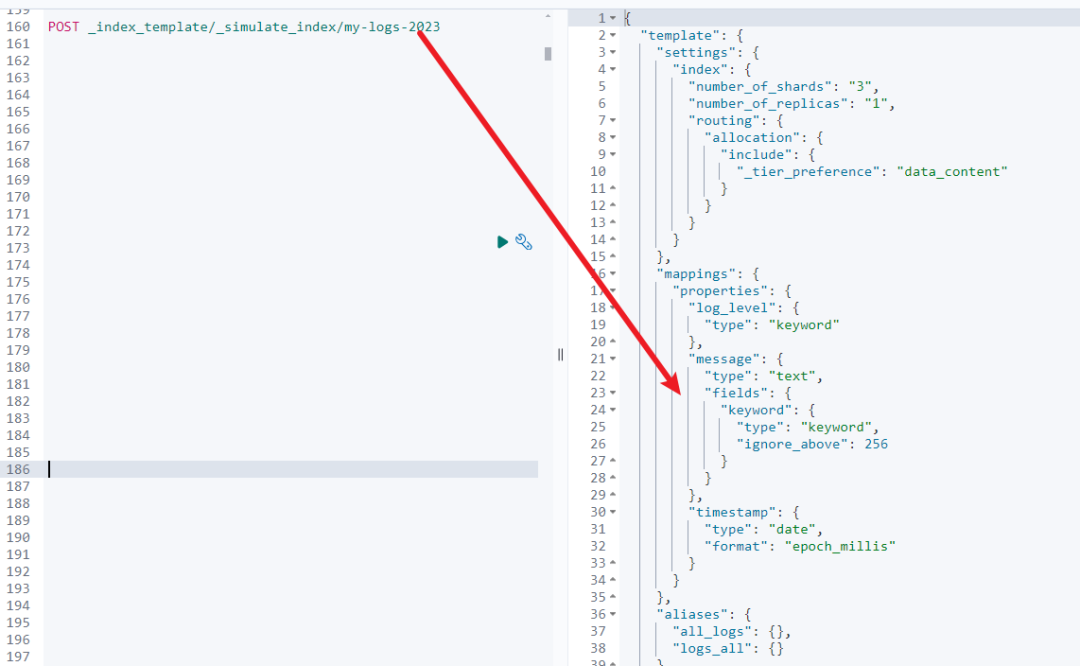
The above image shows that the corresponding template is the logs_template composable template we created earlier.
5. Further Operational Examples
If you want to create a new log index and ensure latest template settings are applied, follow these steps:
Create an index:
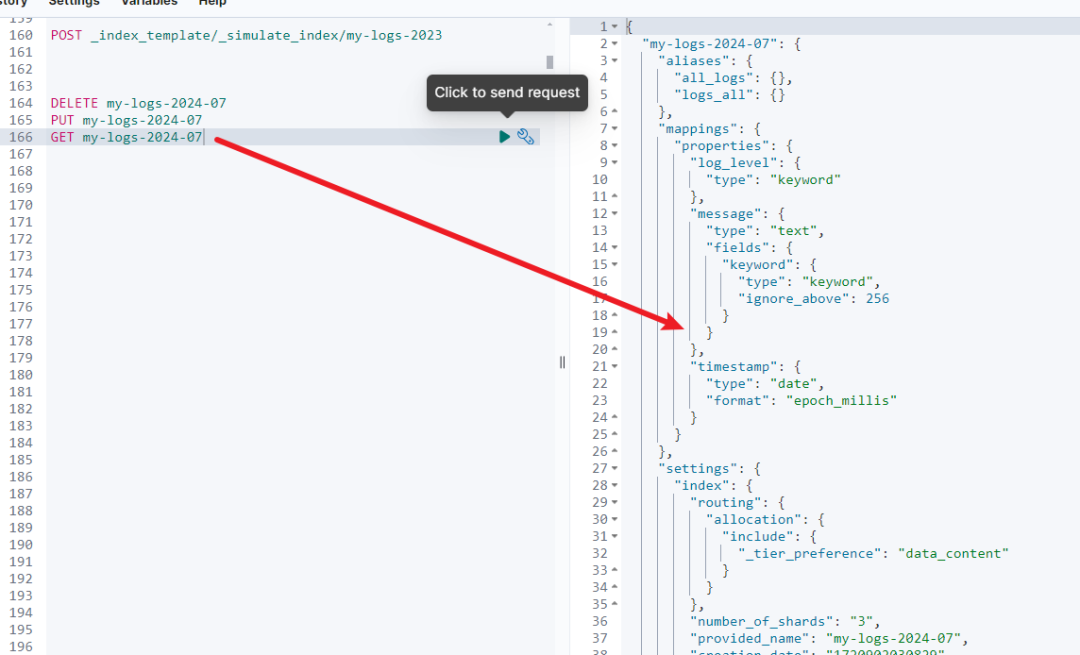
PUT my-logs-2024-07

Query the index information to confirm template application:
GET my-logs-2024-07
By creating an index, you can also see which template is being applied!
6. Practical Application Scenarios and Considerations
- Log Management Scenario:
If your log management system (such as Logstash) is upgraded to Elasticsearch 8 or higher, it will use composable templates by default. This means all old legacy templates will be overridden by the new templates.
- Template Conflicts:
When template conflicts exist, they can cause application issues. It is recommended to migrate from legacy templates to composable templates, especially when using Elasticsearch 7 or higher.
7. Summary
Understanding and mastering Elasticsearch's index template functionality is crucial for ensuring correct index creation. By using the _simulate_index API, you can check and adjust template settings in advance, avoiding unexpected errors in production environments.
This guide aims to help you better manage and optimize Elasticsearch index templates, thereby improving the efficiency and accuracy of data operations.
Also, if your enterprise application environment uses Elasticsearch 7.8+ or higher, it is recommended to use composable templates!
References: