Creating Tables
To build a table, use the standard CREATE TABLE syntax. Separate column definitions with commas, and designate a primary key to uniquely identify each row.
CREATE TABLE table_name(
    column_name data_type,
    column_name data_type,
    column_name data_type,
    column_name data_type,
    column_name data_type
) ENGINE = storage_engine;
Naming conventions: use PascalCase for table names (e.g., Students, StudentResult) and camelCase for column names (e.g., studentName, resultDate).
Physical Storage Layout
MySQL supports storage engines like MyISAM and the default InnoDB. The .frm file describes the table structure. When using a shared tablespace, data and indexes reside in ibdata1. With file-per-table mode, individual .ibd files store data and indexes; partitioned tables may also include a .par file.
Data Types
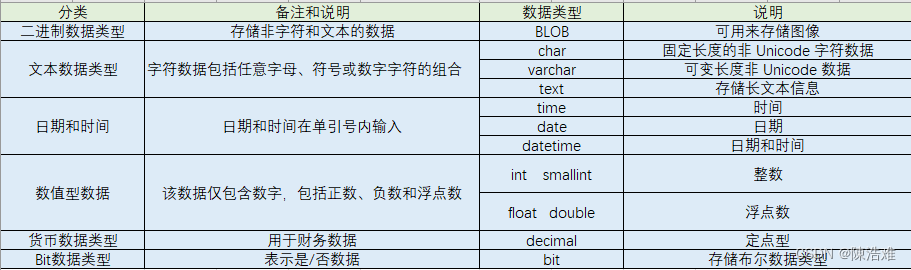
Common types fall into three categories: text, numeric, and temporal.
Text Types
| Data Type | Description |
|---|---|
CHAR(size) |
Fixed‑length string up to 255 chars. |
VARCHAR(size) |
Variable‑length string; automatically converts to TEXT if size > 255. |
TEXT |
Up to 65,535 chars. |
TINYTEXT |
Up to 255 chars. |
MEDIUMTEXT |
Up to 16,777,215 chars. |
LONGTEXT |
Up to 4,294,967,295 chars. |
BLOB |
Binary data up to 65,535 bytes. |
MEDIUMBLOB |
Binary data up to 16,777,215 bytes. |
LONGBLOB |
Binary data up to 4,294,967,294 bytes. |
ENUM |
Enumeration of allowed values. |
Numeric Types
| Data Type | Description |
|---|---|
TINYINT(size) |
-128 to 127 (signed), 0 to 255 (unsigned). |
SMALLINT(size) |
-32768 to 32767 (signed), 0 to 65535 (unsigned). |
MEDIUMINT(size) |
-8388608 to 8388607 (signed), 0 to 16777215 (unsigned). |
INT(size) |
-2147483648 to 2147483647 (signed). |
BIGINT(size) |
-9223372036854775808 to 9223372036854775807 (signed). |
FLOAT(size,d) |
Floating‑point. size = total digits, d = decimals. |
DOUBLE(size,d) |
Double‑precision floating‑point. |
DECIMAL(size,d) |
Fixed‑point stored as a string. |
Temporal Types
| Data Type | Description |
|---|---|
DATE |
'YYYY‑MM‑DD' (range '1000‑01‑01' to '9999‑12‑31'). |
DATETIME |
'YYYY‑MM‑DD HH:MM:SS'. |
TIMESTAMP |
Unix epoch‑based, '1970‑01‑01 00:00:01' UTC to '2038‑01‑09 03:14:07' UTC. |
TIME |
'HH:MM:SS' (range '-838:59:59' to '838:59:59'). |
YEAR |
2- or 4‑digit year (1901‑2155 for 4‑digit). |
Viewing Tables
List tables in the current database or filter with a pattern:
SHOW TABLES [FROM database_name] [LIKE wild];
Inspect a table’s column definitions:
SHOW COLUMNS FROM table_name;
Deleting Tables
DROP TABLE [IF EXISTS] table_name;
Example that creates and then deletes a students table:
CREATE TABLE Students(
    studentNo INT(5),
    studentName VARCHAR(50),
    studentBirth DATE,
    studentAddress VARCHAR(100),
    studentTel VARCHAR(11),
    studentEmail VARCHAR(50)
) ENGINE = InnoDB;

SHOW COLUMNS FROM Students;

DROP TABLE IF EXISTS Students;
Modifying Tables
Change a column’s data type:
ALTER TABLE table_name MODIFY column_name new_type;
-- Example
ALTER TABLE Students MODIFY studentEmail TEXT;
Add a new column:
ALTER TABLE table_name ADD column_name type;
-- Example
ALTER TABLE Students ADD studentGender CHAR(2);
Remove a column (mind data integrity):
ALTER TABLE table_name DROP column_name;
-- Example
ALTER TABLE Students DROP studentGender;
Rename a column:
ALTER TABLE table_name CHANGE old_name new_name type;
-- Example
ALTER TABLE Students CHANGE studentEmail studentEma VARCHAR(50);
Rename a table:
ALTER TABLE old_name RENAME new_name;
-- or
ALTER TABLE old_name TO new_name;
Copying Table Structure
Method 1 – LIKE (copies only the structure):
CREATE TABLE new_table LIKE source_table;
-- Example
CREATE TABLE Students1 LIKE Students;
Method 2 – SELECT (copies structure and data if available):
CREATE TABLE new_table SELECT * FROM source_table;
-- Example
CREATE TABLE Students2 SELECT * FROM Students;
Method 3 – Insert from an existing table with the same structure:
INSERT INTO target_table SELECT * FROM source_table;
The Data Dictionary
The information_schema database maintains the database metadata. Key tables include:
| Table | Contents |
|---|---|
tables |
All tables and their owning databases. |
schemata |
Database information. |
views |
View definitions. |
columns |
Column information. |
triggers |
Triggers. |
routines |
Stored procedures and functions. |
key_column_usage |
Primary and foreign key columns. |
table_constraints |
All constraints. |
statistics |
Index information. |
Table Constraints
Constraints enforce data integrity. Supported types:
| Constraint | Keyword |
|---|---|
| Not Null | NOT NULL |
| Unique | UNIQUE KEY |
| Primary Key | PRIMARY KEY (NOT NULL + UNIQUE) |
| Foreign Key | FOREIGN KEY |
| Check | CHECK |
| Default | DEFAULT |
Constraints can be defined at column level or table level, either during table creation or afterwards via ALTER TABLE.
Naming Convention
Use the pattern table_column_constraint.
Constraint Examples
1. NOT NULL (column‑level only)
CREATE TABLE Students(
    studentNo INT PRIMARY KEY AUTO_INCREMENT,
    studentName VARCHAR(50) NOT NULL
);
2. UNIQUE – allows multiple NULL values; MySQL automatically creates an index.
CREATE TABLE Students(
    studentNo INT PRIMARY KEY AUTO_INCREMENT,
    studentName VARCHAR(18) UNIQUE NOT NULL
);
3. PRIMARY KEY – implicitly NOT NULL and UNIQUE. Constraint name is always PRIMARY.
CREATE TABLE tb_student(
    studentNo INT PRIMARY KEY AUTO_INCREMENT,
    studentName VARCHAR(18)
);
4. FOREIGN KEY – ensures referential integrity between a child (secondary) table and a parent (primary) table. The parent column must be a primary key or a unique key.
FOREIGN KEY (foreign_column) REFERENCES parent_table(referenced_column)
5. CHECK – fully enforced from MySQL 8.0 onward.
CREATE TABLE t3(
    id INT,
    age INT CHECK(age > 18),
    gender CHAR(1) CHECK(gender IN ('M','F'))
);
6. AUTO_INCREMENT – generates unique integer values. Only one auto‑increment colum is allowed per table, and it must be part of a key.
auto_increment
7. DEFAULT – specifies a fallback value when no value is supplied.
CREATE TABLE User(
  id INT(11) NOT NULL AUTO_INCREMENT COMMENT 'user id',
  name VARCHAR(225) COMMENT 'full name',
  sex TINYINT(1) DEFAULT 1 COMMENT 'gender 1=male 0=female',
  PRIMARY KEY (id)
) ENGINE=INNODB CHARSET=utf8mb4 COLLATE=utf8mb4_general_ci;
Adding Constraints After Table Creation
ALTER TABLE table_name ADD CONSTRAINT constraint_name constraint_type(column_name);