Spring MVC
Spring Controller
Before diving into Spring controllers, let's look at a high-level view of what a Java web service does:
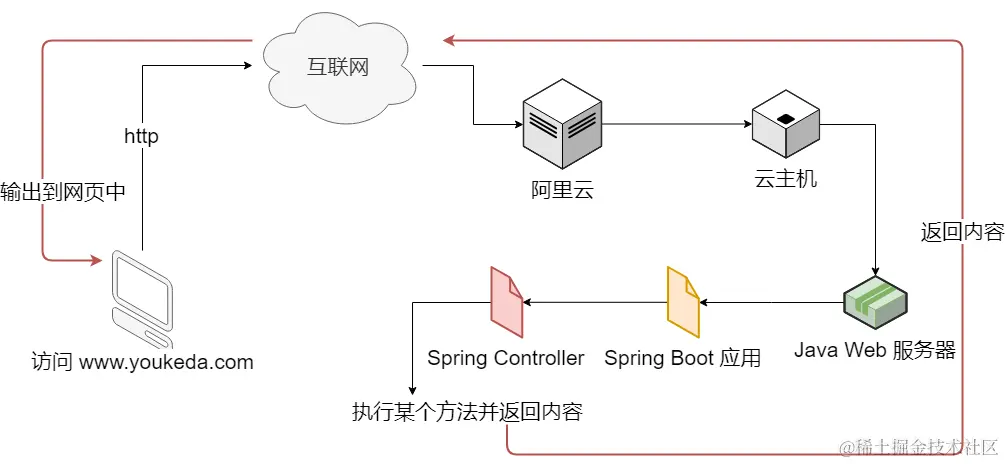
A Spring controller has three key responsibilities:
- Bean configuration: applying controller annotations and managing beans
- Loading web resources: essentially serving web pages
- URL routing configuration: using the
RequestMappingannotation
1. Using Controller Annotations
As discussed in the Spring dependency injection article, adding a @Controller annotation lets Spring manage those beans:
import org.springframework.stereotype.Controller

@Controller
class PageController {
}
2. Serving Web Pages
Serving a page typically means returning the view name from a method:
import org.springframework.stereotype.Controller

@Controller
class PageController {
    fun home(): String {
        return "homepage.html"
    }
}
Since Spring Boot automatically configures static resource loading, the full path might be src/main/resources/static/homepage.html, but we only need to specify the path relative to the static folder. If the file is inside a subfolder named views under static, the code would be:
import org.springframework.stereotype.Controller

@Controller
class PageController {
    fun home(): String {
        return "views/homepage.html"
    }
}
3. Using @RequestMapping
Routing is the process of parsing a URL and returning a web resource. Spring MVC fully supports routing via the @RequestMapping annotation:
import org.springframework.stereotype.Controller
import org.springframework.web.bind.annotation.RequestMapping

@Controller
class PageController {
    @RequestMapping("/home")
    fun home(): String {
        return "views/homepage.html"
    }
}
Note:
@RequestMappingis flexible but potentially less safe.@GetMappingand@PostMappingare more explicit and secure.
Handling GET Requests
Here is the standard URL format:
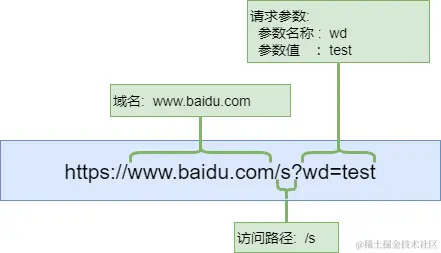
When you access a local server with 127.0.0.1:8080/home?id=xxx, the browser and server prepend the protocol, making the full URL http://localhost:8080/home?id=xxx. For a URL like https://www.example.com/home?id=xxx, port 443 is implied by the HTTPS protocol.
1. Defining Parameters
To receive request parameters in Spring:
import org.springframework.stereotype.Controller
import org.springframework.web.bind.annotation.*

@Controller
class ItemController {
    @RequestMapping("/items")
    fun list(@RequestParam("id") id: String): String {
        return "html/items.html"
    }
}
For multiple parameters:
import org.springframework.stereotype.Controller
import org.springframework.web.bind.annotation.*

@Controller
class ItemController {
    @RequestMapping("/items")
    fun list(
        @RequestParam("id") id: String,
        @RequestParam("pageNum") pageNum: Int
    ): String {
        return "html/items.html"
    }
}
The corresponding URL would be http://xxxx/items?id=xxx&pageNum=1.
Optional Parameters
@GetMapping("/items")
fun list(
    @RequestParam(name = "pageNum", required = false) pageNum: Int,
    @RequestParam("id") id: String
): String {
    return "html/items.html"
}
Returning JSON
Add the @ResponseBody annotation:
import org.springframework.stereotype.Controller
import org.springframework.web.bind.annotation.*

@Controller
class ItemController {
    @GetMapping("/api/entries")
    @ResponseBody
    fun getEntries(@RequestParam("id") id: String): String {
        return "ID: $id"
    }
}
Spring MVC automatically converts the Java object to JSON. Methods returning JSON in this way are commonly called APIs.
Using
@RestControlleris an alternative that eliminates the need to@ResponseBodyon every method:import org.springframework.web.bind.annotation.* @RestController class ItemController { @GetMapping("/api/entries") fun getEntries(@RequestParam("id") id: String): String { return "ID: $id" } }
Spring Boot
If you recall from the dependency injection article, the IOC container scanned only beans annotated under the fm.douban package. Services or interfaces from other packages would not be scanned and instantiated automatically. The solution is @ComponentScan.
1. Component Scanning
- The main class annotated with
@SpringBootApplicationcan specify base packages viascanBasePackages:
@SpringBootApplication(scanBasePackages = ["fm.douban.app", "fm.douban.service"])
class Application {
    companion object {
        @JvmStatic
        fun main(args: Array<String>) {
            SpringApplication.run(Application::class.java, *args)
        }
    }
}
- You can also create a configuration class with
@ComponentScan:
@ComponentScan("fm.service", "fm.app")
class ProjectConfiguration {
    // ...
}
2. Using the Logger
The @PostConstruct annotation marks a method to run automatically after the system starts:
@PostConstruct
fun setup() {
    println("ItemController started")
    if (dataService != null) {
        println("dataService injected successfully.")
    } else {
        println("dataService injection failed.")
    }
}
However, System.out.println is unreliable in large Spring applications and can overwhelm the system. Logging is the proper approach.
1. Configuration
Add a log level configuration in application.properties:
logging.level.root=info
Or configure per package:
logging.level.fm.douban.app=info
The main log levels are:
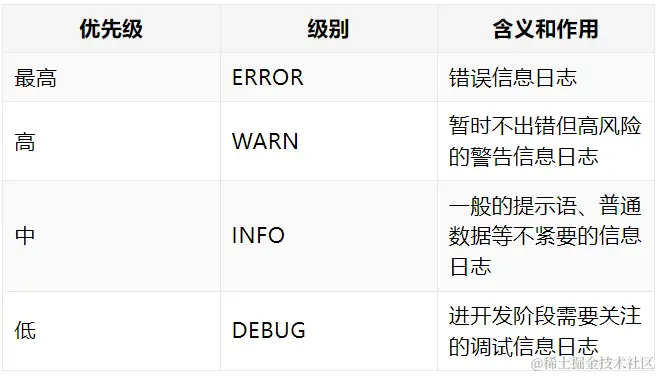
Setting info means debug messages are not printed.
2. Coding
Instantiate the logger and use it:
import org.slf4j.LoggerFactory
import org.springframework.web.bind.annotation.RestController
import javax.annotation.PostConstruct

@RestController
class ItemController {
    private val logger = LoggerFactory.getLogger(ItemController::class.java)

    @PostConstruct
    fun init() {
        logger.info("ItemController started")
    }
}
Besides info(), there are warn(), error(), and debug() methods.
3. Configuration Properties
Place custom properties in application.properties. Group related items and separate different prefixes with a blank line for readability.
The main benefit of configuration files is decoupling: changing a value doesn't require code modification.
Define a custom property:
track.title=My Favorite Track
Inject it using @Value:
import org.springframework.beans.factory.ennotation.Value

class ItemController {
    @Value("\${track.title}")
    private lateinit var trackTitle: String
}
Missing properties will cause startup errors.
Spring Session
1. Cookies
A cookie is a text snippet stored in the browser in key=value format, separated by ;. Browser limits on cookie size and quantity mean cookies are mainly used for login data, and optionally for small flags like isLoggedIn=true, userName=John.
Reading Cookies
Add an HttpServletRequest parameter to a controller method and call getCookies():
import jakarta.servlet.http.Cookie;
import jakarta.servlet.http.HttpServletRequest;
import org.springframework.stereotype.Controller;
import org.springframework.web.bind.annotation.GetMapping;
import org.springframework.web.bind.annotation.ResponseBody;
import java.util.Map;
import java.util.HashMap;

@Controller
public class ItemController {
    @GetMapping("/featured")
    @ResponseBody
    public Map<String, Object> jsonResponse(HttpServletRequest request) {
        Map<String, Object> data = new HashMap<>();
        data.put("status", "ok");
        Cookie[] cookies = request.getCookies();
        data.put("cookies", cookies);
        return data;
    }
}
You can also use
@CookieValue, but it requires knowing the exact cookie name:import org.springframework.web.bind.annotation.CookieValue; @RequestMapping("/items") fun list(@CookieValue("JSESSIONID") sessionId: String): Map<String, Any> { val result = mutableMapOf<String, Any>("result" to "item list") result["JSESSIONID"] = sessionId return result }
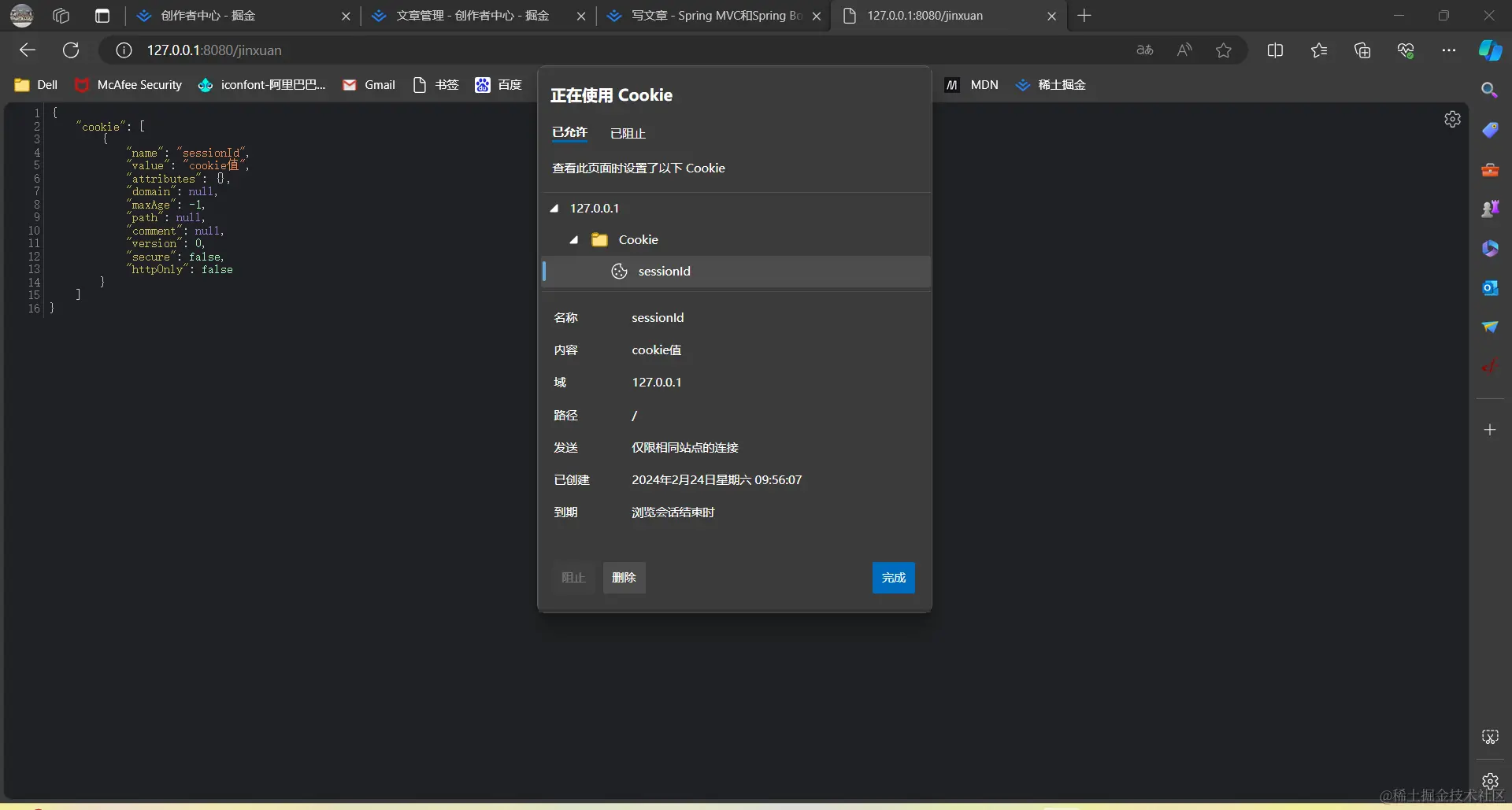
Writing Cookies
Use HttpServletResponse.addCookie():
import jakarta.servlet.http.Cookie;
import jakarta.servlet.http.HttpServletResponse;
import org.springframework.stereotype.Controller;
import org.springframework.web.bind.annotation.GetMapping;
import org.springframework.web.bind.annotation.ResponseBody;
import java.util.Map;
import java.util.HashMap;

@Controller
public class ItemController {
    @GetMapping("/featured")
    @ResponseBody
    public Map<String, Object> jsonResponse(
            HttpServletRequest request,
            HttpServletResponse response) {
        Map<String, Object> map = new HashMap<>();
        Cookie sessionCookie = new Cookie("JSESSIONID", "session");
        sessionCookie.setDomain("127.0.0.1");
        sessionCookie.setPath("/");
        sessionCookie.setMaxAge(-1);   // browser session lifetime
        sessionCookie.setHttpOnly(false);
        response.addCookie(sessionCookie);

        Cookie[] cookies = request.getCookies();
        map.put("cookies", cookies);
        return map;
    }
}
Spring Session API
Storing login information directly in cookies is insecure. Sessions solve this: the cookie carries only the session ID. The session data stays on the server.
import com.example.exercise.model.User;
import jakarta.servlet.http.HttpServletRequest;
import jakarta.servlet.http.HttpServletResponse;
import jakarta.servlet.http.HttpSession;
import org.springframework.stereotype.Controller;
import org.springframework.web.bind.annotation.GetMapping;
import org.springframework.web.bind.annotation.ResponseBody;
import java.util.Map;
import java.util.HashMap;

@Controller
public class ItemController {
    @GetMapping("/featured")
    @ResponseBody
    public Map<String, Object> jsonResponse(
            HttpServletRequest request,
            HttpServletResponse response) {
        Map<String, Object> map = new HashMap<>();
        User currentUser = new User("User", "123456");

        HttpSession session = request.getSession();
        session.setAttribute("UserMessage", currentUser);

        User storedUser = (User) session.getAttribute("UserMessage");
        map.put("user", storedUser);
        return map;
    }
}
Even though we didn't explicitly create a cookie, the container sets the JSESSIONID cookie to track the session. The session ID is typically encrypted, so the client cannot read the actual session content.
Cookies are stored on the client and usually limited to 4KB. Sessions are stored on the server; while there is no hard size limit, storing too much impacts performance.
Spring Session Configuration
The system automatically places JSESSIONID in a default cookie, but you can customize cookie properties.
Add the dependency:
<dependency>
    <groupId>org.springframework.session</groupId>
    <artifactId>spring-session-core</artifactId>
</dependency>
Then configure session management:
import org.springframework.context.annotation.Bean;
import org.springframework.context.annotation.Configuration;
import org.springframework.session.MapSessionRepository;
import org.springframework.session.config.annotation.web.http.EnableSpringHttpSession;
import org.springframework.session.web.http.CookieSerializer;
import org.springframework.session.web.http.DefaultCookieSerializer;
import java.util.concurrent.ConcurrentHashMap;

@Configuration
@EnableSpringHttpSession
public class SessionConfiguration {

    @Bean
    public CookieSerializer cookieSerializer() {
        DefaultCookieSerializer serializer = new DefaultCookieSerializer();
        serializer.setCookieName("JSESSIONID");
        serializer.setDomainNamePattern("^.+?\\.(\\w+\\.[a-z]+)$");
        serializer.setCookiePath("/");
        serializer.setUseHttpOnlyCookie(false);
        serializer.setCookieMaxAge(24 * 60 * 60);
        return serializer;
    }

    @Bean
    public MapSessionRepository sessionRepository() {
        return new MapSessionRepository(new ConcurrentHashMap<>());
    }
}
Spring Request Interceptor
Interceptors can redirect unauthenticated users to a login page. Spring provides the HandlerInterceptor interface.
Creating an Interceptor
Create a class implementing HandlerInterceptor:
import jakarta.servlet.http.HttpServletRequest;
import jakarta.servlet.http.HttpServletResponse;
import org.springframework.web.servlet.HandlerInterceptor;
import org.springframework.web.servlet.ModelAndView;

public class AuthInterceptor implements HandlerInterceptor {
    @Override
    public boolean preHandle(HttpServletRequest request,
                             HttpServletResponse resposne,
                             Object handler) throws Exception {
        // pre-processing logic, e.g., checking session login
        return true; // must return true to proceed
    }

    @Override
    public void postHandle(HttpServletRequest request,
                           HttpServletResponse response,
                           Object handler,
                           ModelAndView modelAndView) throws Exception {
        // post-processing, e.g., logging
    }

    @Override
    public void afterCompletion(HttpServletRequest request,
                                HttpServletResponse response,
                                Object handler,
                                Exception ex) throws Exception {
        // after view rendering
    }
}
Configuring the Interceptor
Implement WebMvcConfigurer and register the interceptor:
import com.example.exercise.intercepter.AuthInterceptor;
import org.springframework.context.annotation.Configuration;
import org.springframework.web.servlet.config.annotation.InterceptorRegistry;
import org.springframework.web.servlet.config.annotation.WebMvcConfigurer;

@Configuration
public class WebConfig implements WebMvcConfigurer {
    @Override
    public void addInterceptors(InterceptorRegistry registry) {
        registry.addInterceptor(new AuthInterceptor())
                .addPathPatterns("/**");
    }
}