Introduction
In Java, JNI (Java Native Interface) functions allow interaction between Java code and native code (typically written in C or C++). These functions enable Java aplications to call native libraries and also allow native code to access Java objects and invoke Java methods.
Getting Started
1. Creating a JNI Function
First, create a cpp folder under the main directory:
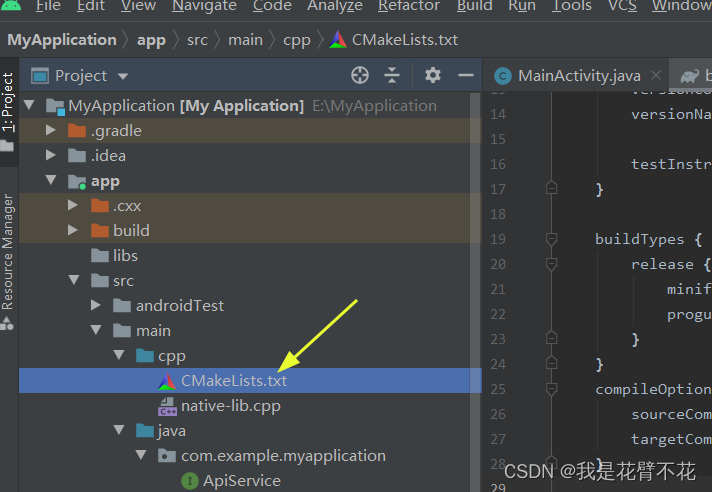
Inside the cpp folder, add a CMakeLists.txt file with the folllowing content:
# For more information about using CMake with Android Studio, read the
# documentation: https://d.android.com/studio/projects/add-native-code.html
# Sets the minimum version of CMake required to build the native library.
cmake_minimum_required(VERSION 3.10.2)
# Declares and names the project.
project("native-lib")
# Creates and names a library, sets it as either STATIC
# or SHARED, and provides the relative paths to its source code.
# You can define multiple libraries, and CMake builds them for you.
# Gradle automatically packages shared libraries with your APK.
add_library(
        # Sets the name of the library.
        native-lib
        # Sets the library as a shared library.
        SHARED
        # Provides a relative path to your source file(s).
        native-lib.cpp
)
# Searches for a specified prebuilt library and stores the path as a
# variable. Because CMake includes system libraries in the search path by
# default, you only need to specify the name of the public NDK library
# you want to add. CMake verifies that the library exists before
# completing its build.
find_library( # Sets the name of the path variable.
        log-lib
        # Specifies the name of the NDK library that
        # you want CMake to locate.
        log)
# Specifies libraries CMake should link to your target library. You
# can link multiple libraries, such as libraries you define in this
# build script, prebuilt third-party libraries, or system libraries.
target_link_libraries( # Specifies the target library.
        native-lib
        # Links the target library to the log library
        # included in the NDK.
        ${log-lib})
Also inside the cpp folder, create a native-lib.cpp file:
#include <jni.h>
#include <string>

extern "C"
JNIEXPORT jstring JNICALL
Java_com_example_myapplication_NativeLib_nativeMethod(JNIEnv *env, jobject thiz) {
    // TODO: implement nativeMethod()
    std::string message = "I am a native function";
    return env->NewStringUTF(message.c_str());
}
This code demonstrates how to implement a native method in C++ using JNI to interact with Java.
Key points:
#include <jni.h>includes the JNI header with necessary declarations and data types.#include <string>is for usingstd::string.extern "C" JNIEXPORT jstring JNICALLdeclares the function as a C function for JNI compatibility.JNIEXPORTandJNICALLare macros defining calling conventions.Java_com_example_myapplication_NativeLib_nativeMethodmatches the Java method signaturepublic native String nativeMethod(). The naming follows the pattern:Java_<package>_<class>_<method>.JNIEnv *envprovides JNI functions for communication between native and Java code.jobject thizis a reference to the Java object that invoked this native method.std::string message = "I am a native function";creates a C++ string.return env->NewStringUTF(message.c_str());converts the C++ string to a JNIjstringand returns it to the Java caller.
Add the CMake configuration in your app-level build.gradle file:
    externalNativeBuild {
        cmake {
            path "src/main/cpp/CMakeLists.txt"
            version "3.10.2"
        }
    }
Create a NativeLib.java class to load and declare the native method:
package com.example.myapplication;

public class NativeLib {
    static {
        System.loadLibrary("native-lib");
    }

    public native String nativeMethod();
}
Use the native method in your main activity (MainActivity.java):
// Calling the native method
public void GetNative(){
    NativeLib nativeLib = new NativeLib();
    String res = nativeLib.nativeMethod();
    tvContent.setText(res);
}
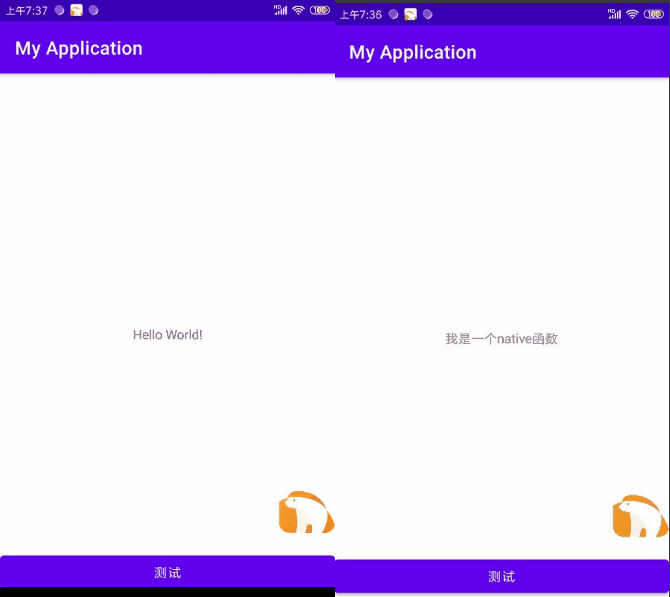
Build and install the app. The result should display the string returned by the native method:
2. Hooking the JNI Function
Using the Ratel framework's findAndHookMethod method, we can hook the JNI function as well:
RposedHelpers.findAndHookMethod("com.example.myapplication.NativeLib", lpparam.classLoader, "nativeMethod", new RC_MethodHook(){
    @Override
    protected void beforeHookedMethod(MethodHookParam param) throws Throwable {
        super.beforeHookedMethod(param);
        System.out.println(TAG + " Parameters: " + param);
        System.out.println(TAG + " Parameter count: " + param.args.length);
    }

    @Override
    protected void afterHookedMethod(MethodHookParam param) throws Throwable {
        super.afterHookedMethod(param);
        System.out.println(TAG + " Method return value: " + param.getResult());
        param.setResult("Return value has been modified");
    }
});
After building and installing the hooked app, the log output will show:
2024-02-25 10:21:32.655 1320-1320/com.example.myapplication I/System.out: pluginTest Package name: com.example.myapplication
2024-02-25 10:21:32.656 1320-1320/com.example.myapplication I/System.out: pluginTest Hook success: com.example.myapplication
2024-02-25 10:24:57.688 1715-1715/com.example.myapplication I/System.out: pluginTest Package name: com.example.myapplication
2024-02-25 10:24:57.688 1715-1715/com.example.myapplication I/System.out: pluginTest Hook success: com.example.myapplication
2024-02-25 10:25:01.127 1715-1715/com.example.myapplication I/System.out: pluginTest Parameters: com.virjar.ratel.api.rposed.RC_MethodHook$MethodHookParam@8740c07
2024-02-25 10:25:01.127 1715-1715/com.example.myapplication I/System.out: pluginTest Parameter count: 0
2024-02-25 10:25:01.128 1715-1715/com.example.myapplication I/System.out: pluginTest Method return value: I am a native function
The return value is then modified to "Return value has been modified".
Complete Code
package com.example.plugintest;

import com.virjar.ratel.api.rposed.IRposedHookLoadPackage;
import com.virjar.ratel.api.rposed.RC_MethodHook;
import com.virjar.ratel.api.rposed.RposedHelpers;
import com.virjar.ratel.api.rposed.callbacks.RC_LoadPackage;

public class HookNative implements IRposedHookLoadPackage {
    public String TAG = "pluginTest";
    public void handleLoadPackage(RC_LoadPackage.LoadPackageParam lpparam) throws Throwable {
        System.out.println(TAG + " Package name: " + lpparam.packageName);
        if (lpparam.packageName.equals("com.example.myapplication")){
            System.out.println(TAG + " Hook success: " + lpparam.packageName);
            RposedHelpers.findAndHookMethod("com.example.myapplication.NativeLib", lpparam.classLoader, "nativeMethod", new RC_MethodHook(){
                @Override
                protected void beforeHookedMethod(MethodHookParam param) throws Throwable {
                    super.beforeHookedMethod(param);
                    System.out.println(TAG + " Parameters: " + param);
                    System.out.println(TAG + " Parameter count: " + param.args.length);
                }

                @Override
                protected void afterHookedMethod(MethodHookParam param) throws Throwable {
                    super.afterHookedMethod(param);
                    System.out.println(TAG + " Method return value: " + param.getResult());
                    param.setResult("Return value has been modified");
                }
            });
        }
    }
}