In a recent project invovling an attendance check-in module, I needed to implement location selection and range display for check-in points. The following implementation serves as a reference for similar requirements (as shown in the image below).
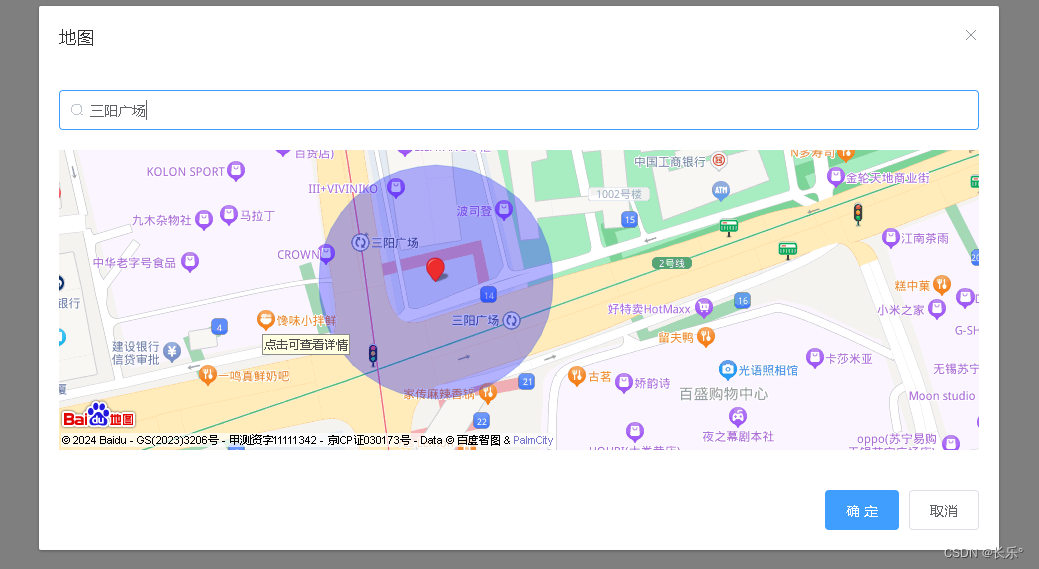
Creating a Baidu Map Account and Obtaining API Key
First, create a Baidu Map account via Baidu Map API Console.
Installing and Configuring the Plugin
1. Install vue-baidu-map
npm install vue-baidu-map --save
2. Configure in main.js
import Vue from 'vue'
import BaiduMap from 'vue-baidu-map'

Vue.use(BaiduMap, {
  ak: 'YOUR_BAIDU_MAP_API_KEY'
})
Implementation Example
Parent Component Usage
<template>
  <div>
    <location-map
      :initial-location="initialLocation"
      @location-selected="handleLocationSelection"
    />
  </div>
</template>

<script>
export default {
  data() {
    return {
      initialLocation: {
        longitude: 120.306731,
        latitude: 31.581733,
        address: 'Sanyang Plaza',
        radius: 50
      }
    }
  },
  methods: {
    handleLocationSelection(selectedLocation) {
      console.log('Selected location:', selectedLocation)
    }
  }
}
</script>
LocationMap Component Implementation
<template>
  <div>
    <el-button @click="openMapDialog">Open Map</el-button>

    <el-dialog
      title="Location Selection"
      :visible.sync="showDialog"
      v-if="showDialog"
    >
      <!-- Address Search Component -->
      <div>
        <el-autocomplete
          style="width: 100%"
          v-model="searchAddress"
          :fetch-suggestions="fetchAddressSuggestions"
          :trigger-on-focus="false"
          placeholder="Enter address to search"
          @select="handleAddressSelection"
        >
          <i slot="prefix" class="el-input__icon el-icon-search"></i>
          <template slot-scope="{ item }">
            <div class="address-item">
              <i class="el-icon-location" style="font-size:25px;color:#409eff"></i>
              <div class="address-details">
                <span class="address-title">{{ item.title }}</span>
                <span class="address-full">{{ item.address }}</span>
              </div>
            </div>
          </template>
        </el-autocomplete>
      </div>

      <!-- Baidu Map Component -->
      <div>
        <baidu-map
          class="map-container"
          :center="mapCenter"
          :zoom="zoomLevel"
          :scroll-wheel-zoom="true"
          @ready="initializeMap"
        />
      </div>

      <!-- Dialog Actions -->
      <span slot="footer" class="dialog-actions">
        <el-button @click="confirmSelection" type="primary">Confirm</el-button>
        <el-button @click="showDialog = false">Cancel</el-button>
      </span>
    </el-dialog>
  </div>
</template>

<script>
import { BaiduMap } from "vue-baidu-map";

export default {
  name: 'LocationMap',
  components: {
    BaiduMap
  },
  props: {
    initialLocation: {
      type: Object,
      default: () => ({
        longitude: 116.404,
        latitude: 39.915,
        address: '',
        radius: 50
      })
    }
  },
  data() {
    return {
      showDialog: false,
      searchAddress: '',
      mapCenter: {
        lng: 116.404,
        lat: 39.915
      },
      mapInstance: null,
      radius: 50,
      zoomLevel: 20,
      circleStyle: {
        fillColor: "blue",
        strokeWeight: 1,
        fillOpacity: 0.3,
        strokeOpacity: 0.3
      }
    }
  },
  mounted() {
    this.initializeCurrentLocation();
  },
  methods: {
    initializeCurrentLocation() {
      if (navigator.geolocation) {
        navigator.geolocation.getCurrentPosition(this.updateCurrentPosition);
      } else {
        console.warn("Geolocation is not supported by this browser.");
      }
    },
    updateCurrentPosition(position) {
      this.mapCenter = {
        lng: position.coords.longitude,
        lat: position.coords.latitude
      };
    },
    initializeMap({ BMap, map }) {
      this.mapInstance = map;

      // Apply initial location if provided
      if (this.initialLocation.address) {
        this.applyInitialLocation(BMap);
      } else {
        this.setupCurrentLocation(BMap);
      }
    },
    applyInitialLocation(BMap) {
      this.mapCenter = {
        lng: this.initialLocation.longitude,
        lat: this.initialLocation.latitude
      };
      this.searchAddress = this.initialLocation.address;
      this.radius = this.initialLocation.radius;

      const centerPoint = new BMap.Point(this.mapCenter.lng, this.mapCenter.lat);
      this.mapInstance.centerAndZoom(centerPoint, this.zoomLevel);

      this.addMarker(centerPoint);
      this.addRadiusCircle();
    },
    setupCurrentLocation(BMap) {
      const geolocation = new BMap.Geolocation();
      geolocation.getCurrentPosition((result) => {
        if (result) {
          const currentPoint = result.point;
          const currentLocation = [result.longitude, result.latitude];

          // Reverse geocode to get address
          const geocoder = new BMap.Geocoder();
          geocoder.getLocation(currentPoint, (addressResult) => {
            this.searchAddress = addressResult.address;
          });

          this.mapCenter = {
            lng: currentLocation[0],
            lat: currentLocation[1]
          };

          const centerPoint = new BMap.Point(currentLocation[0], currentLocation[1]);
          this.mapInstance.centerAndZoom(centerPoint, this.zoomLevel);

          this.addMarker(currentPoint);
          this.addRadiusCircle();
        }
      });
    },
    addMarker(point) {
      const marker = new BMap.Marker(point);
      this.mapInstance.addOverlay(marker);
    },
    addRadiusCircle() {
      const circle = new BMap.Circle(
        this.mapCenter,
        this.radius,
        this.circleStyle
      );
      this.mapInstance.addOverlay(circle);
    },
    openMapDialog() {
      this.showDialog = true;
    },
    fetchAddressSuggestions(query, callback) {
      const searchOptions = {
        onSearchComplete: (results) => {
          const suggestions = [];
          if (results.getStatus() === BMAP_STATUS_SUCCESS) {
            const poiCount = results.getCurrentNumPois();
            for (let i = 0; i < poiCount; i++) {
              suggestions.push(results.getPoi(i));
            }
          }
          callback(suggestions);
        }
      };

      const localSearch = new BMap.LocalSearch(this.mapInstance, searchOptions);
      localSearch.search(query);
    },
    handleAddressSelection(selectedItem) {
      this.searchAddress = `${selectedItem.address} - ${selectedItem.title}`;
      this.mapCenter = {
        lng: selectedItem.point.lng,
        lat: selectedItem.point.lat
      };

      // Clear existing overlays
      this.mapInstance.clearOverlays();

      // Add new marker and circle
      this.addMarker(selectedItem.point);
      this.mapInstance.panTo(selectedItem.point);
      this.addRadiusCircle();
    },
    confirmSelection() {
      const selectedLocation = {
        ...this.mapCenter,
        address: this.searchAddress,
        radius: this.radius
      };

      this.$emit('location-selected', selectedLocation);
      this.showDialog = false;
    }
  }
}
</script>

<style scoped>
.map-container {
  margin-top: 20px;
  width: 100%;
  height: 300px;
}

.address-item {
  display: flex;
  align-items: center;
  width: 100%;
  border-bottom: 1px solid #f5f5f5;
  padding: 8px 0;
}

.address-details {
  display: flex;
  flex-direction: column;
  margin-left: 15px;
}

.address-title {
  color: #409eff;
  font-weight: 500;
}

.address-full {
  color: #999;
  font-size: 12px;
}
</style>