Introduction
This article explains how to design and implement a hot-warm architecture in Elasticsearch to optimize resource usage based on data temperature.
Understanding Hot-Warm Architecture
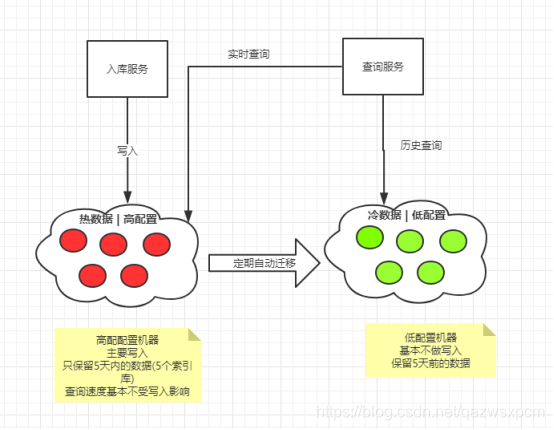
Hot-warm architecture is a popular deployment pattern for Elasticsearch clusters. It leverages the varying performance capabilities of cluster nodes (e.g., SSDs vs. HDDs) to allocate resources efficiently. The core idea is to store frequently accessed, real-time data (e.g., last 5 days) on fast hot nodes (typically SSD-backed) and move older, less-accessed data to warm nodes (typically HDD-backed). This approach reduces costs while maintaining performance for active data. Data migration can be automated based on index age, especially if you use time-based indices (e.g., daily indices).
A Practical Example
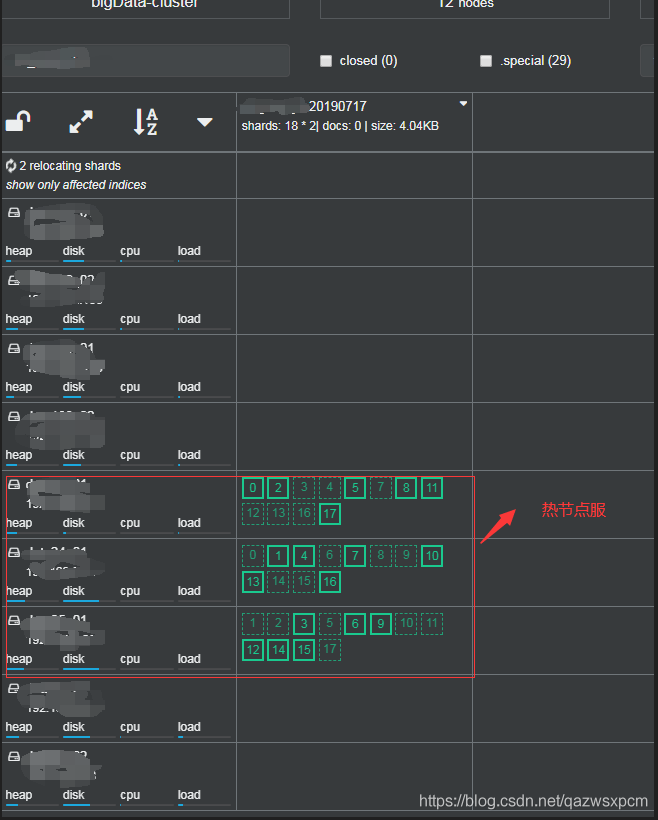
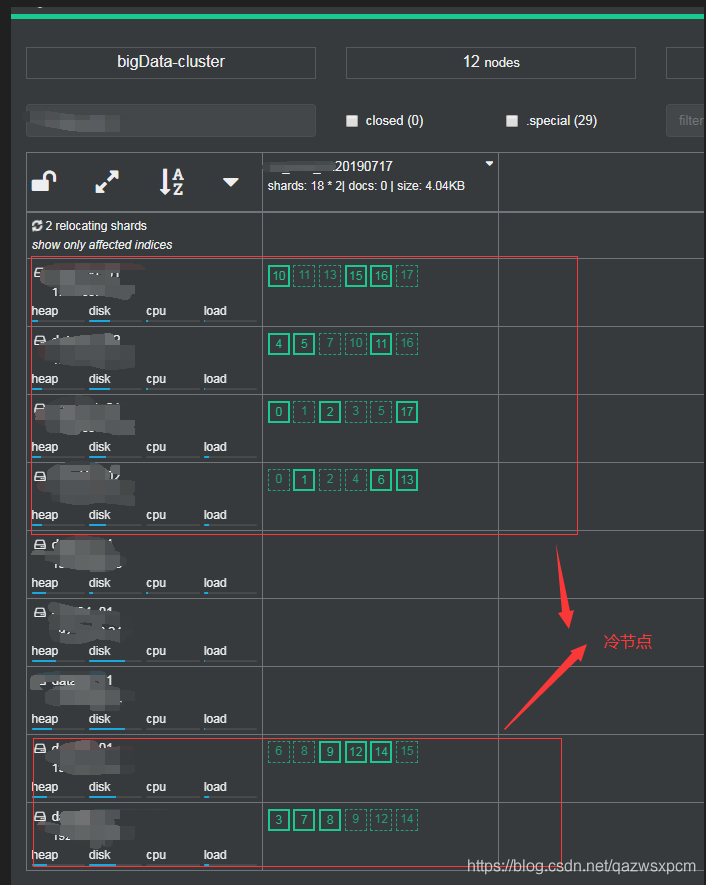
Consider a cluster with 6 hot nodes and 9 warm nodes. An index with approximately 500 GB of primary shards should be created with a shard count that balances distribution across the hot nodes. For instance, you might create an index with 18 shards, all allocated to hot nodes initially. After the data becomes "cold" (e.g., after 5 days), all shards are migrated to warm nodes, resulting in zero shards on hot nodes and 18 on warm nodes.
| Time | Index Name | Hot Node Shards | Warm Node Shards |
|---|---|---|---|
| 2019-07-07 | TEST_20190703 |
18 | 0 |
| 2019-07-08 | TEST_20190703 |
0 | 18 |
The screenshots below (taken from Cerebro) illustrate the initial allocation and subsequent migration.
Cerebro Screenshots:
Initial state – shards on hot nodes:
After migration – shards moved to warm nodes:
Implementing Hot-Warm Architecture in Elasticsearch
The implementation is based on Elasticsearch's routing allocation mechanism. You assign custom node attributes (e.g., box_type) and then use index-level routing settings to control shard allocation. Over time, you can update these settings to migrate indices from hot to warm nodes.
Node Configuration
Only data nodes need specific configuration. Other node types (master, ingest) remain unchanged. Below is a modification of a standard data node configuration for an Elasticsearch cluster.
Basic Data Node Configuration (elasticsearch.yml):
cluster.name: pancm
node.name: data1
path.data: /home/elk/datanode/data
path.logs: /home/elk/datanode/logs
network.host: 0.0.0.0
network.publish_host: 192.169.0.23
transport.tcp.port: 9300
http.port: 9200
discovery.zen.ping.unicast.hosts: ["192.169.0.23:9301","192.169.0.24:9301","192.169.0.25:9301"]
node.master: false
node.data: true
node.ingest: false
index.number_of_shards: 5
index.number_of_replicas: 1
discovery.zen.minimum_master_nodes: 1
bootstrap.memory_lock: true
http.max_content_length: 1024mb
To differentaite hot and warm nodes, add the following custom attributes:
node.attr.rack: Logical rack identifier (e.g.,r1,r9)node.attr.box_type: Node tier (hotorcool)
Hot Node Configuration Example:
cluster.name: pancm
node.name: data1
path.data: /home/elk/datanode/data
path.logs: /home/elk/datanode/logs
network.host: 0.0.0.0
network.publish_host: 192.169.0.23
transport.tcp.port: 9300
http.port: 9200
discovery.zen.ping.unicast.hosts: ["192.169.0.23:9301","192.169.0.24:9301","192.169.0.25:9301"]
node.master: false
node.data: true
node.ingest: false
index.number_of_shards: 5
index.number_of_replicas: 1
discovery.zen.minimum_master_nodes: 1
bootstrap.memory_lock: true
http.max_content_length: 1024mb
node.attr.rack: r1
node.attr.box_type: hot
Warm Node Configuration Example:
cluster.name: pancm
node.name: data2
path.data: /home/elk/datanode/data
path.logs: /home/elk/datanode/logs
network.host: 0.0.0.0
network.publish_host: 192.169.0.24
transport.tcp.port: 9300
http.port: 9200
discovery.zen.ping.unicast.hosts: ["192.169.0.23:9301","192.169.0.24:9301","192.169.0.25:9301"]
node.master: false
node.data: true
node.ingest: false
index.number_of_shards: 5
index.number_of_replicas: 1
discovery.zen.minimum_master_nodes: 1
bootstrap.memory_lock: true
http.max_content_length: 1024mb
node.attr.rack: r9
node.attr.box_type: cool
Note: The attribute box_type is used in routing settings below. You can choose any name, but the values (hot/cool) must match the node configuration.
Index Configuration
When creating an index, specify the routing allocation rule to place shards on hot nodes by default. If not specified, shards may be distributed evenly acrosss all data nodes.
Index Creation with Hot Routing:
PUT TEST_20190717
{
  "settings": {
    "number_of_shards" : 18,
    "number_of_replicas" : 1,
    "refresh_interval" : "10s",
    "index.routing.allocation.require.box_type": "hot"
  },
  "mappings": {
    "properties": {
      "accttype": {
        "type": "byte"
      }
    }
  }
}
Migrating an Index to Warm Nodes
Once the index data is no longer considered hot (e.g., after 5 days), update its routing settings to move all shards to warm nodes. This can be done via an API call or programmatically.
DSL Command (run in Kibana dev console):
PUT TEST_20190717/_settings
{
  "index.routing.allocation.require.box_type": "cool"
}
Java Code Example (using Elasticsearch low-level REST client):
import org.apache.http.HttpEntity;
import org.apache.http.entity.ContentType;
import org.apache.http.nio.entity.NStringEntity;
import org.elasticsearch.client.RestClient;

import java.io.IOException;
import java.util.Collections;
import java.util.Objects;

public class IndexMigration {

    public static void setCool(String index) throws IOException {
        RestClient restClient = null;
        try {
            Objects.requireNonNull(index, "index must not be null");
            restClient = client.getLowLevelClient();
            String source = String.format("{\"index.routing.allocation.require.box_type\": \"%s\"}", "cool");
            HttpEntity entity = new NStringEntity(source, ContentType.APPLICATION_JSON);
            restClient.performRequest("PUT", "/" + index + "/_settings", Collections.emptyMap(), entity);
        } catch (IOException e) {
            throw e;
        } finally {
            if (restClient != null) {
                restClient.close();
            }
        }
    }
}
Note: The full Java source code is available at GitHub.
Conclusion
Hot-warm architecture in Elasticsearch enables cost-effective resource utilization by aligning storage and performance with data access patterns. By using node attributes and index-level routing, you can control shard placement and automate migration as data ages. This pattern is especially effective when combined with time-based indices.
This article is part of the Elasticsearch Practical Series, which covers topics from cluster setup to advanced operations. Further articles will explore additional production features.