This lab requires implementing five user-space programs: sleep, pingpong, primes, find, and xargs.
Source code: https://github.com/InQing/xv6-operating-system/tree/util
(1) sleep
Requirements
Write a user program that takes one argument t and calls the sleep system call to sleep for t time units.
Approach
This lab does not require implementing how to sleep for t time units—that is handled by the sleep system call (you can look at its implementation in the kernel). We only need to except the argument and pass it to the system call.
How does a program accept arguments?
In C, the main function typically accepts arguments in two ways:
voidint argc, char* argv[]
Here, argc is the number of arguments, and argv is the list of arguments.
Note: argv[0] always represents the program's own name (or path), so the actual user arguments start from argv[1].
Argument Conversion
The passed argument is a string and needs to be converted to an integer using the atoi function.
With the above points understood, the program is straightforward to implement.
int main(int argc, char *argv[])
{
    if (argc != 2)
    {
        printf("Error num of arguments!");
        exit(-1); // exit is also a system call; non-zero indicates abnormal termination
    }

    int num_of_ticks = atoi(argv[1]);
    if (sleep(num_of_ticks) == -1) // sleep system call
    {
        printf("Error! Can't sleep!");
        exit(-1);
    }

    exit(0);
}
After implementing the program, there are a few additional points to consider:
Add sleep to the Makefile
A Makefile is a set of compilation rules for the project, describing which files need to be compiled, linked, etc. It specifies which files to compile, in what order, and whether they need to be rebuilt.
When using VC to write C++ programs, you may have encountered CMake, which is a cross-platform build tool that reads all source files and automatically generates a Makefile. The project author provides a CMakeLists.txt file, which users can use with CMake to set up the project.
make qemu
QEMU is software that emulates computer hardware—essentially a virtual machine. To run the xv6 operating system, you run it on QEMU.
(2) pingpong
Requirements
Write a pingpong program where the parent process forks a child process, and they communicate bidirectionally using two pipes.
How to create a process and achieve multiprocessing?
The fork system call creates a child process.
- In the child process,
forkreturns 0. - In the parent process,
forkreturns the child's PID.
So you can use if (pid == 0) to determine whether you are in the child or parent process.
After creating a child process, the child copies all information from the parent (including PCB), but their virtual address spaces are separate.
Note: Due to OS scheduling, it is unpredictable whether the parent or child runs first. They may interleave, and if both print, output may be interleaved. However, this does not affect program execution because most system calls use spinlocks internally.
How to use pipes for communication?
-
Pipe concept: A pipe is a basic IPC mechanism for communication between processes with a common ancestor. The
pipesystem call creates a pipe.- It is essentially a pseudo-file (actually a kernel buffer).
- It is referenced by two file descriptors: one for reading and one for writing.
- Data flows from the write end to the read end.
-
Pipe principle: Pipes use a circular queue mechanism in the kernel buffer (4KB).
-
Pipe limitations:
- A process cannot read from and write to the same pipe.
- Data is removed from the pipe once read, so it cannot be read again.
- Pipes are half-duplex: data flows in one direction at a time.
- Pipes can only be used between processes with a common ancestor.
-
Pipe implementation:
int pipe(int fd[2]);- Returns 0 on success, -1 on failure (setting errno).
- On success,
fd[0]is the read end,fd[1]is the write end. - No
openis needed, butclosemust be called manually.
-
Parent-to-child communication:
- Parent creates a pipe, getting
fd[0]andfd[1]. - Parent forks a child; both have the same file descriptors pointing to the pipe.
- Parent closes the read end, child closes the write end.
- Parent writes data to the pipe, child reads from it.
- Parent creates a pipe, getting
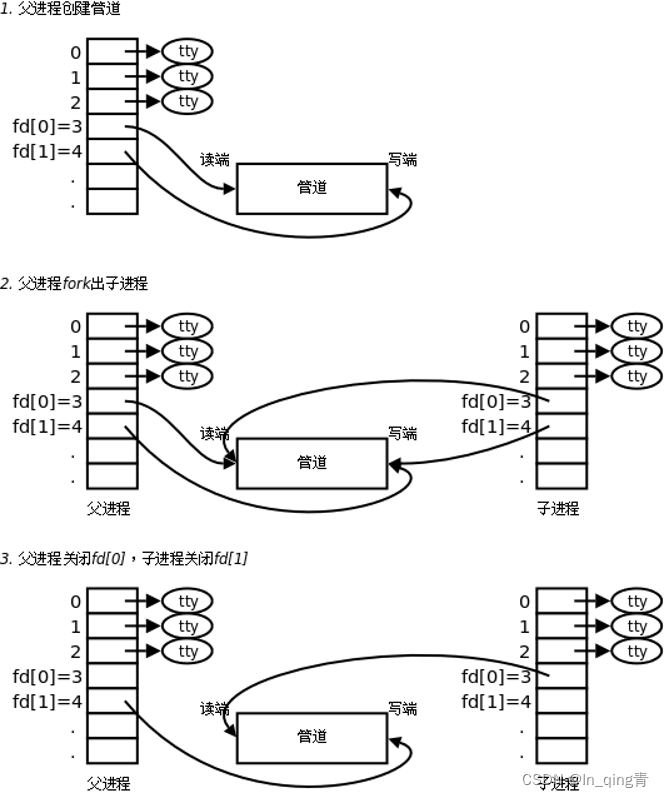
How to perform read/write operations?
-
write():ssize_t write(int fd, const void *buf, size_t count);Writescountbytes frombufto the file referenced byfd. -
read():ssize_t read(int fd, void *buf, size_t count);Readscountbytes from the file referenced byfdintobuf.
Now you have all the necessary background for pingpong.
int main(int argc, char *argv[])
{
    if (argc != 1)
        perror("extra arguments!");

    int fd_1[2]; // file descriptors for first pipe
    int fd_2[2]; // pipes are half-duplex; for bidirectional communication, create two pipes
    char buf[100]; // read/write buffer

    if (pipe(fd_1) == -1) // create first pipe
        perror("create pipe");
    if (pipe(fd_2) == -1) // create second pipe
        perror("create pipe");

    int pid = fork(); // create child process

    if (pid < 0)
    {
        perror("fork child");
    }
    else if (pid == 0)
    { // child process
        close(fd_1[1]);
        read(fd_1[0], buf, sizeof(buf));
        int pid_child = getpid();
        printf("%d:%s\n", pid_child, buf);

        close(fd_2[0]);
        write(fd_2[1], "received pong", 14);
    }
    else
    { // parent process
        close(fd_1[0]);
        write(fd_1[1], "received ping", 14);

        close(fd_2[1]);
        read(fd_2[0], buf, sizeof(buf));
        int pid_father = getpid();
        printf("%d:%s\n", pid_father, buf);
    }

    close(fd_1[0]);
    close(fd_2[1]);
    exit(0);
}
(3) primes
Requirements
Implement the Sieve of Eratosthenes using multiple processes.
Approach
This lab does not require new background knowledge; just understanding the algorithm is enough.
The sieve works by marking multiples of each prime as composite. In a multi-process setting:
- The parent process has an initial array
p = [2, 3, ..., 35]. Take the first elementx—it is a prime. - Remove all numbers from the array that are multiples of
x, producingp2. - Pass
p2to a child process via a pipe. - The child process becomes the new parent and repeats steps 1-4 until the array contains only one prime.
The following diagram helps illustrate:
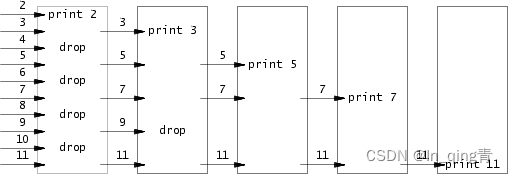
Clearly, this is a recursive process that can be easily implemented with DFS.
Code
int primes[35];

void dfs(int cnt)
{
    // Sieve: the first number in the process is prime; use it to filter out multiples
    int x = primes[0];
    printf("prime %d\n", x);

    if (cnt == 1)
        return;

    // Create pipe
    int p[2];
    pipe(p);

    int pid = fork();

    if (pid == 0)
    {   // child process
        int num = 0; // count of remaining numbers after filtering
        close(p[1]);
        while (read(p[0], &primes[num++], sizeof(int)))
            ;

        close(p[0]);
        dfs(num - 1); // last read returned 0, so num was incremented one extra time
        exit(0);
    }
    else
    {   // parent process
        close(p[0]);
        for (int i = 1; i < cnt; i++)
        {
            if (primes[i] % x != 0)
                write(p[1], primes + i, sizeof(int));
        }
        close(p[1]);
        wait(0); // parent must wait for child's recursive calls to finish before returning
    }
}

int main(void)
{
    for (int i = 0; i <= 33; i++)
        primes[i] = i + 2;

    dfs(34); // numbers 2 through 35

    exit(0);
}
Note: Since there are no locks in the recursion, the order in which processes in the recursion stack run is unpredictable. Therefore, we must call wait in the parent to ensure all child recursions finish before returning.
(4) find
This is arguably the most challenging program in lab1, requiring understanding of file system concepts.
Requirements
Write a find program that takes two arguments: a directory and a target filename. It should find all occurrences of the target file in the directory tree and print their paths. This is also a recursive program; we need to traverse all directories and files.
Background: user/ls.c
Reading and understanding the ls function provides the following techniques:
-
How to get file information, such as type (directory or file)? Just as a process has a PCB, a file has a FCB (File Control Block) that stores file information. The
fstat(fd, &st)function copies the FCB from file descriptorfdinto astatstructurest.st.typeholds the file type. -
How to iterate over all entries in a directory?
struct direntis a directory entry structure. In some OSs, the FCB equals the directory entry, but in Unix (and xv6), to simplify file search, a directory entry only contains the filenamename[DIRSIZ]and inode numberinum. The actual FCB is indexed byinum. Each directory entry isDIRSIZ(14 bytes) in xv6.while (read(fd, &de, sizeof(de)) == sizeof(de))reads each directory entry intode. -
How to construct paths and check if the target file is found? Use
strcmp(strings cannot be directly compared with==in C),strcpy, andmemmove. Path concatenation is already done inls.c; understand and replicate it.
Code
// Find `file` in directory `dir`
// For directories, recurse; for files, check if it matches
void find(char *dir, char *file)
{
    char new_path[512]; // file path
    int fd;
    struct dirent de;   // directory entry
    struct stat st;     // FCB

    if ((fd = open(dir, 0)) < 0)
    {
        fprintf(2, "find: cannot open %s\n", dir);
        return;
    }

    // fstat gets the FCB from file descriptor
    if ((fstat(fd, &st) < 0) || st.type != T_DIR)
    {
        fprintf(2, "find: cannot stat %s\n", dir);
        close(fd);
        return;
    }

    // Check if the concatenated path would exceed the buffer size
    if (strlen(dir) + 1 + DIRSIZ + 1 > sizeof(new_path))
    {
        printf("find:path too long\n");
        return;
    }

    // Iterate through all entries in the directory
    while (read(fd, &de, sizeof(de)) == sizeof(de))
    {
        if (de.inum == 0)
            continue;

        // Skip current and parent directory to avoid infinite loops
        if (!strcmp(de.name, ".") || !strcmp(de.name, ".."))
            continue;

        // Concatenate the new path
        strcpy(new_path, dir);
        char *ptr = new_path + strlen(dir);
        *ptr++ = '/';
        memmove(ptr, de.name, DIRSIZ);
        *(ptr + DIRSIZ) = 0; // null-terminate the string

        // stat gets the FCB from filename to determine file type
        if (stat(new_path, &st) < 0)
            continue;

        switch (st.type)
        {
        // If directory, recurse
        case T_DIR:
            find(new_path, file);
            break;

        // If file, check if it matches the target; do not return after finding one, as there may be multiple
        case T_FILE:
            if (!strcmp(de.name, file))
            {
                printf("%s\n", new_path);
                break;
            }
        }
    }

    close(fd);
}

int main(int argc, char *argv[])
{
    if (argc != 3)
    {
        fprintf(2, "usage: find [directory] [target filename]\n"); // output to stderr
        exit(1);
    }

    find(argv[1], argv[2]);
    exit(0);
}
Note: Use fprintf or perror to output error messages to stderr (file descriptor 2).
(5) xargs
Requirements
Use xargs to run a program (e.g., fork), reading multiple lines of arguments from standard input. For each line, append the line to the program's arguments and run it.
exec
exec(char* file, char** argv) replaces the current process with a new process (keeping the same PID). It takes two arguments: the executable file name and an array of string arguments.
The typical usage is to fork a child process, then call exec in the child.
Implementation
Parse the standard input line by line, and pass each line as an argument to exec (the first argument being the program to run).
int main(int argc, char *argv[])
{
    char command[12][50];
    char buf[512];
    int line = 0, num = 0;

    // Read standard input and split into lines
    int n = read(0, buf, sizeof buf);
    for (int i = 0; i < n; i++)
    {
        if (buf[i] == '\n')
        {
            command[line][num] = 0; // null-terminate the string
            line++;
            num = 0;
            continue;
        }
        command[line][num++] = buf[i];
    }

    char *arguments[64];
    int num_of_arg = 0;
    for (int i = 1; i < argc; i++)
        arguments[num_of_arg++] = argv[i];

    for (int i = 0; i < line; i++)
    {
        arguments[num_of_arg] = command[i];
        if (fork() == 0)
        {
            exec(argv[1], arguments);
            exit(0);
        }
        else
            wait(0); // wait for the child to finish before proceeding to the next line
    }

    exit(0);
}
(6) Summary
- Use of system cals:
fork,wait,exec - Pipe usage:
pipe - Multiprocess programming:
fork - File operations: FCB, directory entries, file traversal