In this post, we explore vector stores and embeddings, which are crucial components for building chatbots and performing semantic search on data corpora.
Workflow
Recall the entire workflow of Retrieval Augmented Generation (RAG):
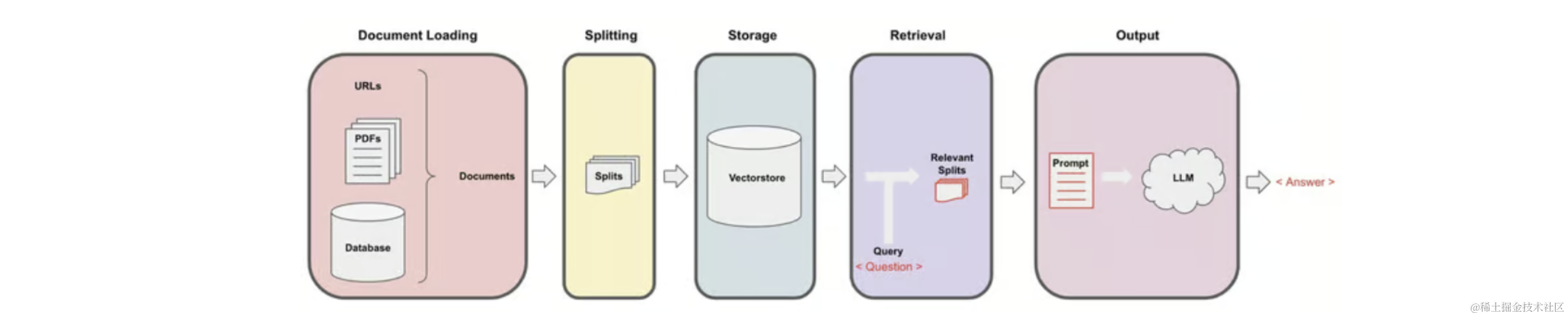
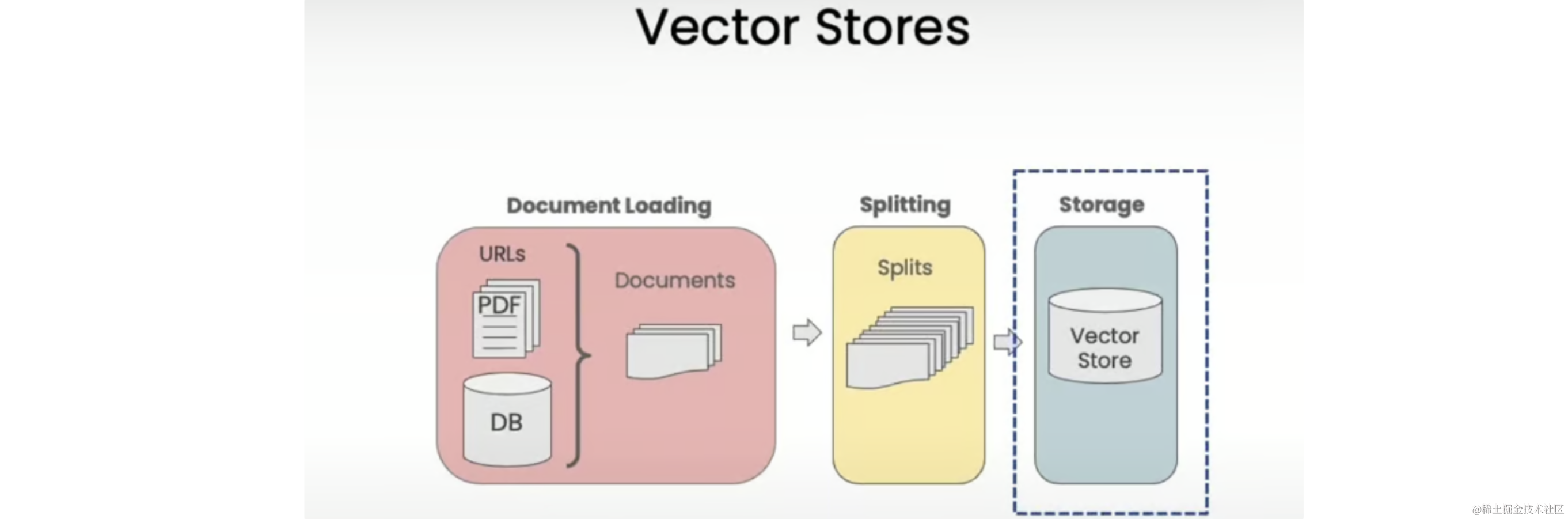
We start with documents, create smaller splits of these documents, generate embeddings for these splits, and store them in a vector store. A vector store is a database that allows easy lookup of similar vectors later.
Setup
Set the appropriate environment variables and load the documents we will be working with - cs229_lectures:
import os
from langchain_openai import OpenAI
from dotenv import load_dotenv, find_dotenv
from langchain_community.document_loaders.pdf import PyPDFLoader
from langchain.text_splitter import RecursiveCharacterTextSplitter

_ = load_dotenv(find_dotenv())
client = OpenAI(
    api_key=os.getenv("OPENAI_API_KEY")
)
loaders = [
    PyPDFLoader("docs/cs229_lectures/MachineLearning-Lecture01.pdf"), # Duplicate documents on purpose - messy data
    PyPDFLoader("docs/cs229_lectures/MachineLearning-Lecture01.pdf"),
    PyPDFLoader("docs/cs229_lectures/MachineLearning-Lecture02.pdf"),
    PyPDFLoader("docs/cs229_lectures/MachineLearning-Lecture03.pdf"),
]
docs = []
for loader in loaders:
    docs.extend(loader.load())
text_splitter = RecursiveCharacterTextSplitter(chunk_size=1500, chunk_overlap=150)
splits = text_splitter.split_documents(docs)
print("Length of splits: ", len(splits)) # Length of splits:  209
Embeddings
Now that we have split our documents into smaller, semantical meaningful chunks, it's time to create embeddings for them. Embeddings take a piece of text and create a numerical representation of that text, such that texts with similar content have similar vectors in this numerical space. This allows us to compare these vectors and find similar text snippets.
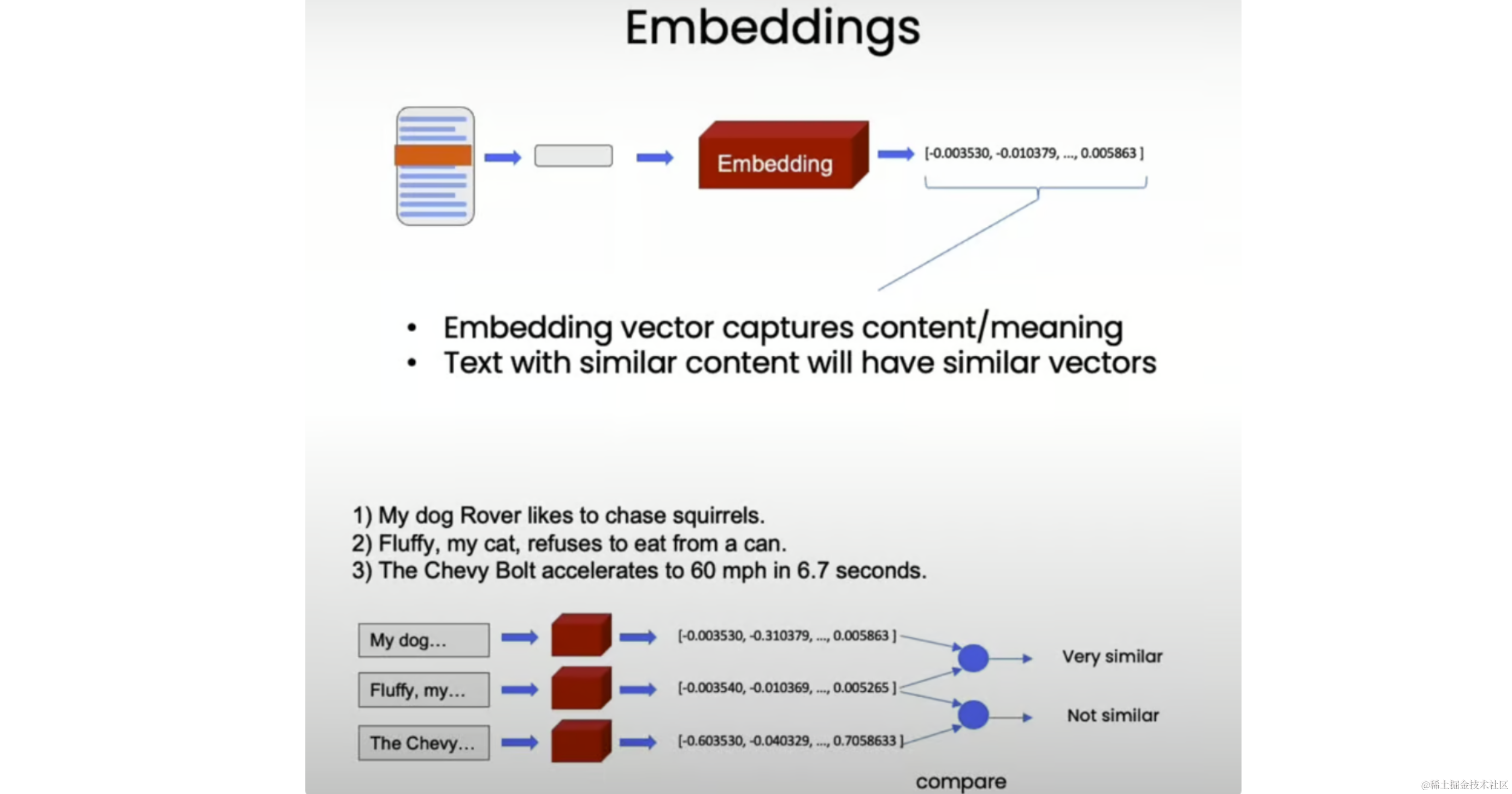
To illustrate, let's try some toy examples:
from langchain_openai import OpenAIEmbeddings
import numpy as np

embedding = OpenAIEmbeddings()
sentence1 = "i like dogs"
sentence2 = "i like canines"
sentence3 = "the weather is ugly outside"
embedding1 = embedding.embed_query(sentence1)
embedding2 = embedding.embed_query(sentence2)
embedding3 = embedding.embed_query(sentence3)
print(np.dot(embedding1, embedding2))  # 0.9631227500523609
print(np.dot(embedding1, embedding3))  # 0.7703257495981695
print(np.dot(embedding2, embedding3))  # 0.7591627401108028
As expected, the first two sentences about pets have very similar embeddings (dot product 0.96), while the sentence about weather is less similar to both pet-related sentences (dot products 0.77 and 0.76).
Vector Store
Next, we store these embeddings in a vector store, which will enable us to easily look up similar vectors later when trying to find relevant documents for a given question.
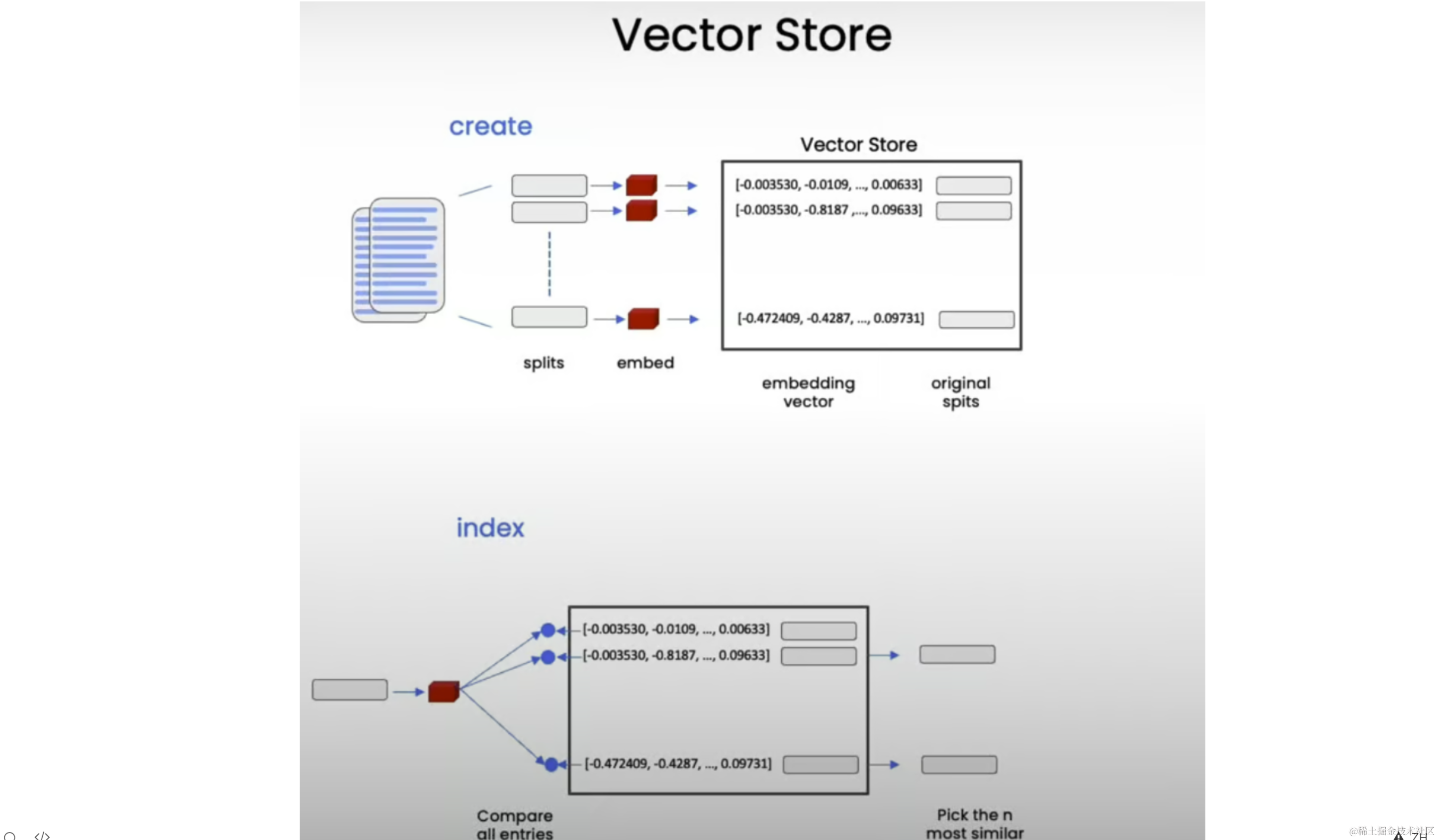
In this lesson, we'll use the Chroma vector store because it's lightweight and in-memory, making it easy to get started:
from langchain.vectorstores import Chroma

persist_directory = "docs/chroma/"
# this code is only for ipynb files
# !rm -rf ./docs/chroma  # remove old database files if any
vectordb = Chroma.from_documents(
    documents=splits, embedding=embedding, persist_directory=persist_directory
)
print(vectordb._collection.count())  # 209
Similarity Search
How similarity search works:
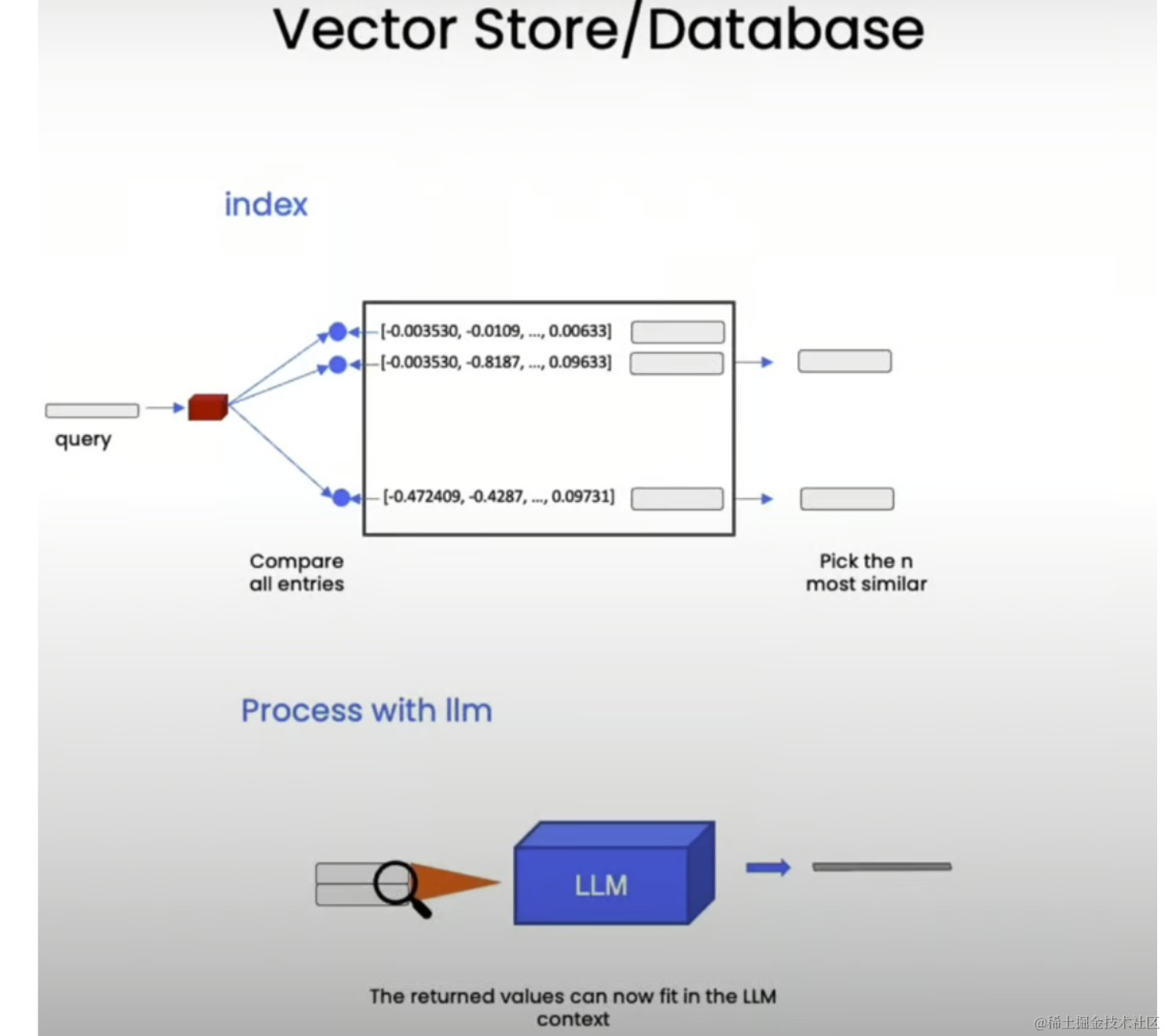
question = "is there an email i can ask for help"
docs = vectordb.similarity_search(question, k=3)
print("Length of context docs: ", len(docs))  # 3
print(docs[0].page_content)
Output:
cs229-qa@cs.stanford.edu. This goes to an acc ount that's read by all the TAs and me. So
rather than sending us email individually, if you send email to this account, it will
actually let us get back to you maximally quickly with answers to your questions.
If you're asking questions about homework probl ems, please say in the subject line which
assignment and which question the email refers to, since that will also help us to route
your question to the appropriate TA or to me  appropriately and get the response back to
you quickly.
Let's see. Skipping ahead — let's see — for homework, one midterm, one open and term
project. Notice on the honor code. So one thi ng that I think will help you to succeed and
do well in this class and even help you to enjoy this cla ss more is if you form a study
group.
So start looking around where you' re sitting now or at the end of class today, mingle a
little bit and get to know your classmates. I strongly encourage you to form study groups
and sort of have a group of people to study with and have a group of your fellow students
to talk over these concepts with. You can also  post on the class news group if you want to
use that to try to form a study group.
But some of the problems sets in this cla ss are reasonably difficult.  People that have
taken the class before may tell you they were very difficult. And just I bet it would be
more fun for you, and you'd probably have a be tter learning experience if you form a
This returns the relevant chunk mentioning the cs229-qa@cs.stanford.edu email address for asking questions about the course material.
After this, let's persist the vector database for future use:
vectordb.persist()
Failure Modes
While basic semantic search works well, there can be some edge cases and failure modes. Let's explore some of them.
Duplicate Documents
question = "what did they say about matlab?"
docs = vectordb.similarity_search(question, k=5)
print(docs[0].page_content)
# Document(page_content='...', metadata={'page': 8, 'source': 'docs/cs229_lectures/MachineLearning-Lecture01.pdf'})
print(docs[1].page_content)
# Document(page_content='...', metadata={'page': 8, 'source': 'docs/cs229_lectures/MachineLearning-Lecture01.pdf'})
Note that the first two results are identical. This is because we deliberately duplicated the PDF of the first lecture earlier, causing the same information to appear in two different chunks. Ideally, we want to retrieve distinct chunks.
Uncaptured Structured Information
question = "what did they say about regression in the third lecture?"
docs = vectordb.similarity_search(question, k=5)

for doc in docs:
    print(doc.metadata)
# {'page': 0, 'source': 'docs/cs229_lectures/MachineLearning-Lecture03.pdf'}
# {'page': 14, 'source': 'docs/cs229_lectures/MachineLearning-Lecture03.pdf'}
# {'page': 0, 'source': 'docs/cs229_lectures/MachineLearning-Lecture02.pdf'}
# {'page': 6, 'source': 'docs/cs229_lectures/MachineLearning-Lecture03.pdf'}
# {'page': 8, 'source': 'docs/cs229_lectures/MachineLearning-Lecture01.pdf'}
print(docs[4].page_content)
Output:
into his office and he said, "Oh, professo r, professor, thank you so much for your
machine learning class. I learned so much from it. There's this stuff that I learned in your
class, and I now use every day. And it's help ed me make lots of money, and here's a
picture of my big house."
So my friend was very excited. He said, "W ow. That's great. I'm glad to hear this
machine learning stuff was actually useful. So what was it that you learned? Was it
logistic regression? Was it the PCA? Was it the data ne tworks? What was it that you
learned that was so helpful?" And the student said, "Oh, it was the MATLAB."
So for those of you that don't know MATLAB yet, I hope you do learn it. It's not hard,
and we'll actually have a short MATLAB tutori al in one of the discussion sections for
those of you that don't know it.
Okay. The very last piece of logistical th ing is the discussion s ections. So discussion
sections will be taught by the TAs, and atte ndance at discussion sections is optional,
although they'll also be recorded and televi sed. And we'll use the discussion sections
mainly for two things. For the next two or th ree weeks, we'll use the discussion sections
to go over the prerequisites to this class or if some of you haven't seen probability or
statistics for a while or maybe algebra, we'll go over those in the discussion sections as a
refresher for those of you that want one.
In this case, we expected all retrieved documents to be from the third lecture as specified in the question. However, we see that results also include chunks from other lectures. The intuition here is that the structured information about querying only the third lecture is not captured in the semantic embeddings, which focus more on the concept of regression itself.
Summary
In this post, we covered the basics of using vector stores and embeddings for semantic search, along with some edge cases and failure modes that can arise. In the next post, we will discuss how to adress these failure modes and enhance our retrieval capabilities, ensuring we retrieve relevant and distinct chunks while incorporating structured information into the search process.