1. Stages of Java Class Loading (Distinguishing Classes from Instances)
1.1 Overview
Class Lifecycle: Loading, Linking (Verification, Preparation, Resolution), Initialization, Using, Unloading
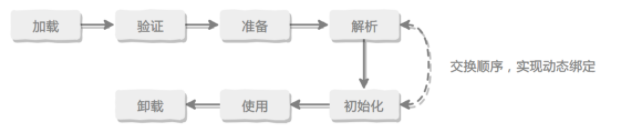
1.1.1 Three Basic Stages of Class Loading
Basic Steps of the Loading Process: The JVM dynamically loads, links, and initializes classes and interfaces. The process mainly consists of Loading, Linking, and Initialization. The Linking stage can be further divided into Verification, Preparation, and Resolution.
- Loading: Finding the binary representation of a class or interface type with a particular name and creating a class or interface from that binary representation.
Loading is the process of finding the binary representation of a class or interface type with a particular name and creating a class or interface from that binary representation.
- Linking: Taking a class or interface and combining it into the run-time state of the Java Virtual Machine sothat it can be executed.
Linking is the process of taking a class or interface and combining it into the run-time state of the Java Virtual Machine so that it can be executed.
- Initialization: Executing the class or interface initialization method
<clinit>.
Initialization of a class or interface consists of executing the class or interface initialization method <clinit>.
1.1.2 Java Class Unloading
Conditions for Class Unloading:
- All instances of the class have been reclaimed.
- The ClassLoader that loaded the class has been reclaimed.
- The
java.lang.Classobject corresponding to the class has no references anywhere.
Summary: Classes loaded by the three built-in class loaders of the JVM will not be unloaded throughout the JVM's lifetime. Only classes loaded by user-defined class loaders can be unloaded.
1.2 Stage 1: Loading
1.2.0 Loading Process Flow
Loading is a phase of class loading. Do not confuse them.
The loading process accomplishes the following three tasks:
- Obtain the binary byte stream that defines the class using its fully qualified name.
- Transform the static storage structure represented by this byte stream into the runtime data structure in the method area.
- Generate a
Classobject representing this class in memory, which serves as the access entry point to the various data of this class in the method area.
The binary byte stream can be obtained from the following sources:
- Reading from a ZIP package: Forms the basis for JAR, EAR, and WAR formats.
- Obtaining from the network: The most typical application is Applet.
- Generated at runtime: For example, dynamic proxy technology in
java.lang.reflect.ProxyusesProxyGenerator.generateProxyClassto generate the binary byte stream of the proxy class. - Generated from other files: For example, generating the corresponding Class file from a JSP file.
1.2.1 Content of Loading
After a class file is loaded into the method area, the Java class is described using C++'s instanceKlass. This class contains the following fields:
| Field | Description | Notes |
|---|---|---|
_java_mirror |
Java class mirror, used to expose klass to Java |
For example, for String, you access _java_mirror through String.class |
_super |
The parent class of this Java class | |
fields |
Member variables of this Java class | |
_methods |
Member methods of this Java class | |
_constants |
Constant pool information of this Java class | |
_class_loader |
Class loader | |
_vtable |
Virtual method table of this Java class, key to implementing polymorphism | |
_itable |
Interface table associated with this Java class |
Important notes:
- If the class being loaded has a parent class that hasn't been loaded, the parent class is loaded first.
- Loading and linking may run interleavedly.
1.2.2 Question: What is the difference between a Java class object and an instance object?
Class object: A class object is a Class object created by the JVM (class loader). It can be obtained via the getClass() method. Through a class object, you can inspect a series of information about the current class. Note that class objects also reside in the heap.
Instance object: An object created using the new keyword, generally also located in the heap.
1.2.3 Overall View of a Class File in Memory
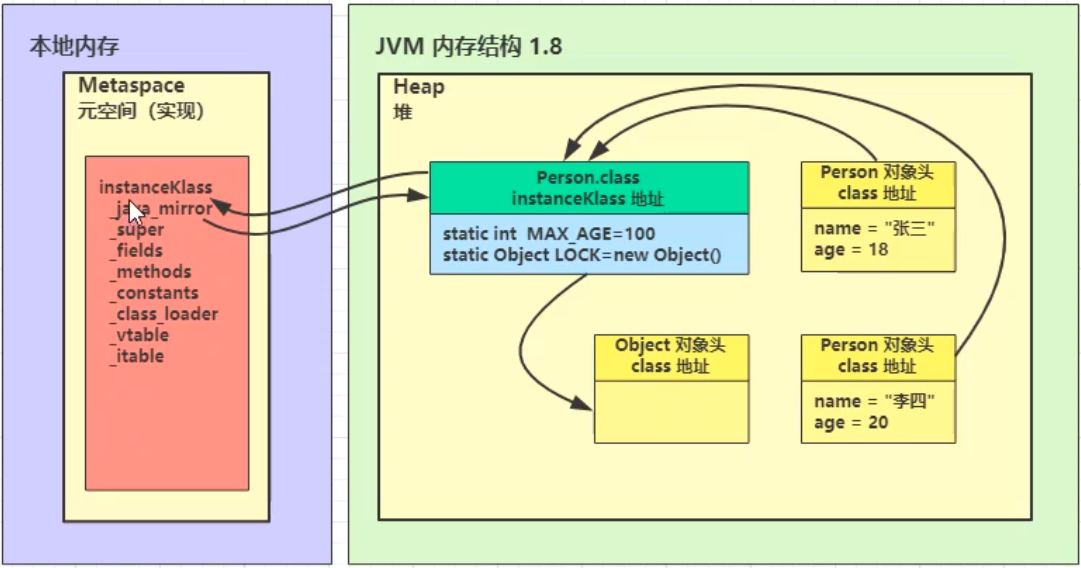
From the above diagram, we can see:
- Metadata like
instanceKlassis stored in the method area (metaspace after Java 8)._java_mirrorholds the address ofPerson.class, and the class objectPerson.classalso holds the address of theinstanceKlassin the method area. - In JDK 8, class objects reside in the heap, while the method area stores the class's structural information,
instanceKlass.
Scenario: How do instances of the Person class, created using the new keyword, invoke methods?
Key point: The object header of an instance contains the address of the class object and the mark word.
1) Obtain the address of the class object in heap memory from the object header of the instance.
2) From the class object, obtain the address of `instanceKlass` in the metaspace.
3) Call the relevant methods through `instanceKlass`.
1.3 Stage 2: Linking
During class loading, the linking stage can be roughly divided into three phases: 1) Verification, 2) Preparation, 3) Resolution.
1.3.1 Verification
Primarily checks if the class file conforms to format requirements. For example, if the magic number of the class file does not match the expected value, an error occurs.
1.3.2 Preparation (Allocating Space/Assigning Values for Static Variables)
Primarily allocates space for static variables and sets default values.
- Before JDK 7,
staticvariables were stored at the end ofinstanceKlass. From JDK 7 onwards, they are stored at the end of_java_mirror. - Allocating space and assigning values for
staticvariables are two steps: space allocation is done during the preparation phase, and assignment is done during the initialization phase.- Exception 1: If a
staticvariable isfinaland of a primitive type or a String constant, the assignment happens at compile-time (converted to bytecode), i.e., assignment occurs during the preparation phase.
- Exception 1: If a
- If a
staticvariable isfinalbut of a reference type, the assignment occurs during the initialization phase, as the constructor needs to be called.
Where are Java static variables stored?
- Before JDK 7, they were stored together with the class's structure in the method area.
- From JDK 7 onwards, they are stored together with the class object. For example, in JDK 8, static variables are located in the heap where the class object resides.
Example of static variables whose value can be determined during the preparation phase:
public class TestExample {
    static int a;                              // 1) Only space is allocated during preparation
    static int b = 10;                         // 2) Assignment and initialization completed during preparation
    static final int c = 20;                   // 3) Assignment and initialization completed during preparation
    static final String d = "hello";           // 4) Assignment and initialization completed during preparation
    static final Object e = new Object();      // 5) Only space allocated during preparation; assignment and initialization done in the initialization phase via constructor

    public static void main(String[] args) {
    }
}
Bytecode (abbreviated):
The bytecode shows that for c and d, the ConstantValue attribute directly stores the value. For b and e, the <clinit> method assigns the values.
1.3.3 Resolution (Important)
Purpose of Resolution: Resolve symbolic references in the constant pool to direct references (e.g., class A references class B. If class B is not resolved, class A cannot find the address of class B).
- The JVM does not assign a specific address to a class that hasn't been resolved. Only resolved classes have an address.
1.4 Stage 3: Initialization (Focus on the Timing of Class Initialization)
Concept of Initialization in the Loading Process: Initialization means invoking <clinit>()V. The JVM ensures thread safety for this 'constructor' method of the class.
- During the preparation phase of linking, class variables have been assigned system default values. During the initialization phase, they are assigned according to the programmer's logic, along with other resources.
- All class variable initialization statements and static code blocks are collected by the compiler into a special method called
<clinit>, i.e., the class/interface initialization method. This method can only be called by the JVM during class loading. - The order of collection is determined by the order of statements in the source file. Static blocks can only access variables defined before them.
- If the superclass hasn't been initialized, it is initialized first. However, the
<clinit>method does not explicitly call the superclass's<clinit>method; the JVM guarantees that the superclass's<clinit>method is executed before the current class's<clinit>method. - The JVM must ensure that if multiple threads try to initialize a class simultaneously, only one thread performs the initialization, while the others wait. Once the active thread completes initialization, it notifies the waiting threads. (Therefore, the static inner class pattern can be used to implement a thread-safe singleton.)
- If a class does not declare any class variables or static code blocks, it may not have a
<clinit>method.
1.4.1 Timing of Class Initialization in Java
Principle: Class initialization is lazy.
A: Cases that cause class initialization:
- When accessing a static variable or static method of a class for the first time.
- When a subclass is initialized, all its parent classes are guaranteed to be initialized first.
- When a subclass accesses a static variable of its parent class, only the parent class is initialized.
Class.forName()causes initialization by default.newcauses initialization.
B: Cases that do NOT cause class initialization:
- Accessing a
static finalconstant (primitive type or String) does not trigger initialization (because it's already assigned during the preparation phase). - Accessing
ClassObject.classdoes not trigger initialization. - Creating an array of the class does not trigger initialization.
- Using
ClassLoader.loadClass()method. Class.forName()with theinitializeparameter set tofalse.
1.4.2 Class Initialization Exercises
Exercise 1: Determine When Initialization Happens
public class TestInitialization {
    public static void main(String[] args) {
        System.out.println(Example.a);        // B1: final primitive, does not initialize
        System.out.println(Example.b);        // B1: final String, does not initialize
        System.out.println(Example.c);        // First access, initializes Example
    }
}

class Example {
    public static final int a = 10;
    public static final String b = "hello";
    public static final Integer c = 20;     // Integer.valueOf(20)
    static {
        System.out.println("Example initialized");
    }
}
Output:
10
hello
Example initialized
20
Exercise 2: Lazy Initialized Singleton
final class Singleton {
    private Singleton() { }

    // Inner class holds the singleton
    private static class LazyHolder {
        static final Singleton INSTANCE = new Singleton();
    }

    public static Singleton getInstance() {
        return LazyHolder.INSTANCE;
    }
}

public class TestSingleton {
    public static void main(String[] args) {
        // Class is not initialized until getInstance() is called
    }
}
2. Class Loaders
2.1 Overview of Class Loaders
| Name | Loaded Classes (Managed Area) | Description |
|---|---|---|
| Bootstrap ClassLoader | JAVA_HOME/jre/lib |
Cannot be accessed directly; implemented in C++ |
| Extension ClassLoader | JAVA_HOME/jre/lib/ext |
Parent is Bootstrap |
| Application ClassLoader | classpath |
Parent is Extension |
| Custom Class Loader | Custom | Parent is Application |
Important Notes:
- There is a hierarchical relationship between class loaders. For example, when
Application ClassLoaderloads a class, it first asks its parent,Extension ClassLoader, if the class has already been loaded. If not, it asks its parent,Bootstrap ClassLoader. Only after all parent class loaders have not found the class, does theApplication ClassLoaderattempt to load it.
Priority: Bootstrap ClassLoader > Extension ClassLoader > Application ClassLoader > Custom Class Loader
2.2 Examples of Bootstrap, Extension, and Application Class Loaders
2.2.1 Bootstrap Class Loader (Specified via JVM Parameters)
-Xbootclasspath      # Set the bootstrap class loading path
java -Xbootclasspath:<new bootclasspath>
java -Xbootclasspath/a:<append path>
java -Xbootclasspath/p:<prepend path>
// File: F.java
package example.load;
public class F {
    static {
        System.out.println("bootstrap F init");
    }
}
// File: Load5_1.java
package example.load;
public class Load5_1 {
    public static void main(String[] args) throws ClassNotFoundException {
        Class<?> aClass = Class.forName("example.load.F");
        System.out.println(aClass.getClassLoader());  // Output: null
    }
}
Output:
- By specifying the path to the class file via JVM parameters, it is added to the bootstrap classpath.
- Since the Bootstrap class loader is implemented in C++, it cannot be directly obtained as a Java object. Hence, the output is
null.
bootstrap F init
null
2.2.2 Application and Extension Class Loader Examples
package example.load;
public class TestClassLoader {
    public static void main(String[] args) throws ClassNotFoundException {
        Class<?> aClass = Class.forName("example.load.TestClassLoader");
        System.out.println(aClass.getClassLoader());
    }
}
Output:
The class is loaded by the Application ClassLoader, named AppClassLoader.
sun.misc.Launcher$AppClassLoader@18b4aac2
How to use the Extension ClassLoader?
Method: Package your class into a JAR file and place it in JAVA_HOME/jre/lib/ext.
If the Extension ClassLoader and the Application ClassLoader attempt to load a class with the same name, the Extension ClassLoader takes precedence.
2.3 Parent Delegation Model
2.3.1 loadClass Source Code Analysis
Parent Delegation Definition: The rules for finding classes when calling the loadClass method of a class loader.
loadClass Source Code Analysis (ClassLoader.java):
// Example usage
Class<?> cls = TestClassLoader.class.getClassLoader().loadClass("example.load.TestClassLoader");
public Class<?> loadClass(String name) throws ClassNotFoundException {
    return loadClass(name, false);
}

protected Class<?> loadClass(String name, boolean resolve) throws ClassNotFoundException {
    synchronized (getClassLoadingLock(name)) {
        // 1. Check if the class has already been loaded.
        Class<?> c = findLoadedClass(name);
        if (c == null) {
            try {
                if (parent != null) {
                    // 2. If there is a parent, delegate to the parent's loadClass.
                    c = parent.loadClass(name, false);
                } else {
                    // 3. If there is no parent (Extension ClassLoader), delegate to Bootstrap ClassLoader.
                    c = findBootstrapClassOrNull(name);
                }
            } catch (ClassNotFoundException e) {
                // ClassNotFoundException thrown if class not found from the parent class loader.
            }

            if (c == null) {
                // 4. If still not found, call findClass method (each class loader extends this) to load.
                c = findClass(name);
                // 5. Record stats (optional).
            }
        }
        if (resolve) {
            resolveClass(c);
        }
        return c;
    }
}
Summary of ClassLoader.loadClass() Method Flow:
- The parent delegation model is a convention for the order in which the three built-in class loaders attempt to load classes.
ClassLoader.javais designed for users to define their own class loaders, typically following this model, but not necessarily.
Assuming the loadClass method is called for the first time for an application class:
The process involves two calls to findClass and one exception catch.
The initial class loader only checks if it has already loaded the class; it doesn't attempt to load it itself until after delegation.
Step 1: The initial `loadClass` call is made by the Application ClassLoader. It checks its cache via `findLoadedClass(name)`.
Step 2: It gets its parent, the Extension ClassLoader, and recursively calls `loadClass`.
Step 3: The Extension ClassLoader checks its cache. If not found, it checks if the Bootstrap ClassLoader has loaded it.
Step 4: If the Bootstrap ClassLoader hasn't loaded it, the Extension ClassLoader attempts to load it itself using `findClass(name)`. Since the class is an application class, this fails, and a `ClassNotFoundException` is thrown, which is caught by the Application ClassLoader and ignored.
Step 5: Now, the Application ClassLoader uses `findClass(name)` to successfully load the application class and returns it.
Related Question: How is the uniqueness of class loading guaranteed in a multi-threaded environment?
- The parent delegation mechanism and synchronization on an object keyed by the class name ensure uniqueness.
synchronized (getClassLoadingLock(name))
protected Object getClassLoadingLock(String className) {
    Object lock = this;
    if (parallelLockMap != null) {
        Object newLock = new Object();
        lock = parallelLockMap.putIfAbsent(className, newLock);
        if (lock == null) {
            lock = newLock;
        }
    }
    return lock;
}
2.3.2 Breaking the Parent Delegation Model in JDBC
Example: When using JDBC, you need to load the JDBC driver. How is com.mysql.jdbc.Driver correctly loaded?
// From DriverManager.java annotations
Applications no longer need to explicitly load JDBC drivers using Class.forName(). Existing programs which currently load JDBC drivers using Class.forName() will continue to work without modification.
public class TestDriverManagerLoader {
    public static void main(String[] args) {
        System.out.println(DriverManager.class.getClassLoader());
    }
}
Output:
null
The DriverManager class is loaded by the Bootstrap ClassLoader. But the bootstrap classpath (JAVA_HOME/jre/lib) does not contain the JDBC driver JAR. So how is the driver class loaded?
Portion of DriverManager.java source code:
Step 1: In the static block, loadInitialDrivers() is called.
public class DriverManager {
    private final static CopyOnWriteArrayList<DriverInfo> registeredDrivers = new CopyOnWriteArrayList<>();
    // ...
    static {
        loadInitialDrivers();
        println("JDBC DriverManager initialized");
    }
    // ...
}
Step 2: The loadInitialDrivers() method is called.
Key points: 1) SPI is used to load driver classes. 2) The Application ClassLoader is used to load the driver classes.
private static void loadInitialDrivers() {
    String drivers;
    try {
        drivers = AccessController.doPrivileged(new PrivilegedAction<String>() {
            public String run() {
                return System.getProperty("jdbc.drivers");
            }
        });
    } catch (Exception ex) {
        drivers = null;
    }

    // Using SPI mechanism to load related classes
    AccessController.doPrivileged(new PrivilegedAction<Void>() {
        public Void run() {
            ServiceLoader<Driver> loadedDrivers = ServiceLoader.load(Driver.class);
            Iterator<Driver> driversIterator = loadedDrivers.iterator();
            try {
                while (driversIterator.hasNext()) {
                    driversIterator.next();
                }
            } catch (Throwable t) {
                // Do nothing
            }
            return null;
        }
    });

    // Load drivers using the driver names defined in the system property
    println("DriverManager.initialize: jdbc.drivers = " + drivers);
    if (drivers == null || drivers.equals("")) {
        return;
    }

    String[] driversList = drivers.split(":");
    println("number of Drivers:" + driversList.length);

    for (String aDriver : driversList) {
        try {
            println("DriverManager.Initialize: loading " + aDriver);
            Class.forName(aDriver, true, ClassLoader.getSystemClassLoader());
        } catch (Exception ex) {
            println("DriverManager.Initialize: load failed: " + ex);
        }
    }
}
Summary of JDBC Driver Class Loading:
DriverManageris loaded by the Bootstrap ClassLoader. InsideloadInitialDrivers(), the parent delegation model is broken to load driver classes.- First, the Service Provider Interface (SPI) mechanism is used with the thread context class loader (which is the Application ClassLoader) to load the drivers.
- Then, using the driver names obtained (e.g., from the
jdbc.driverssystem property), the Application ClassLoader loads the driver classes again.
2.3.3 SPI-Related Knowledge
Definition: SPI stands for Service Provider Interface. It is a set of interfaces provided by Java to be implemented or extended by third parties. It can be used to enable framework extensions and component replacements.
- The purpose of SPI is to find service implementations for these extended APIs.
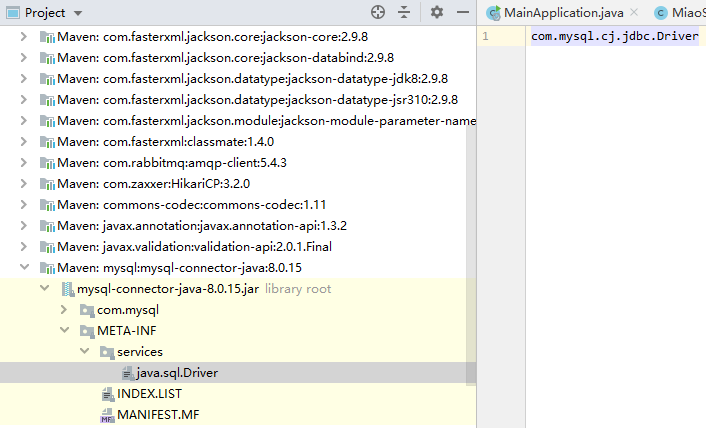
For example, mysql-connector-java creates a file named java.sql.Driver in the META-INF/services directory. The file contains the fully qualified name of the implementation class, e.g., com.mysql.cj.jdbc.Driver.
To use SPI, the following convention must be followed:
- The file name must be the fully qualified name of the service provider interface.
- The file content must be the fully qualified name of the implementation class.
Then, the ServiceLoader class can be used to discover and load the implementation:
ServiceLoader<Driver> loadedDrivers = ServiceLoader.load(Driver.class);
Iterator<Driver> driversIterator = loadedDrivers.iterator();
while (driversIterator.hasNext()) {
    driversIterator.next();
}
This reflects the interface-oriented programming + decoupling philosophy.
SPI is used in other frameworks like:
- JDBC
- Servlet Container Initializer
- Spring Container
- Dubbo (extends SPI)
Background: When loading implementation classes via SPI, the thread context class loader is used. Source code analysis shows that the thread context class loader is essentially the Application ClassLoader.
Definition of Thread Context Class Loader: The class loader used by the current thread. By default, it's the Application ClassLoader. When a thread starts, the JVM initializes its contextClassLoader.
// In Thread.java
private ClassLoader contextClassLoader;
ServiceLoader.java source code excerpt:
public static <S> ServiceLoader<S> load(Class<S> service) {
    ClassLoader cl = Thread.currentThread().getContextClassLoader();
    return ServiceLoader.load(service, cl);
}

public static <S> ServiceLoader<S> load(Class<S> service, ClassLoader loader) {
    return new ServiceLoader<>(service, loader);
}

// In the LazyIterator class
private S nextService() {
    // ...
    String cn = nextName;
    nextName = null;
    Class<?> c = null;
    try {
        c = Class.forName(cn, false, loader);  // loader is the thread context class loader, essentially Application ClassLoader
    } catch (ClassNotFoundException x) {
        // ...
    }
    // ...
}
Summary: The SPI mechanism does not follow the parent delegation model. It uses Class.forName() with a specified class loader (the thread context class loader) instead of ClassLoader.loadClass(). This effectively breaks the parent delegation model.
2.3.4 Difference Between Class.forName() and `ClassLoader.loadClass()
// Method 1: Using ClassLoader.loadClass()
Class<?> cls1 = SomeClass.class.getClassLoader().loadClass("fully.qualified.ClassName");

// Method 2: Using Class.forName()
Class.forName(String name, boolean initialize, ClassLoader loader)
-
ClassLoader.loadClass()(see source code analysis in 2.3.1)- It strictly follows the parent delegation model. It is suitable for most standard class loading scenarios where this model is desired.
-
Class.forName()- It has parameters: class name, whether to initialize, and the class loader to use.
- It is more flexible. It does not have to follow the parent delegation model. It can freely specify a class loader, thus breaking the parent delegation model.
Class.forName() source code in Class.java:
@CallerSensitive
public static Class<?> forName(String name, boolean initialize, ClassLoader loader) throws ClassNotFoundException {
    Class<?> caller = null;
    SecurityManager sm = System.getSecurityManager();
    if (sm != null) {
        // Reflective call to get caller class is only needed if a security manager is present.
        caller = Reflection.getCallerClass();
        if (sun.misc.VM.isSystemDomainLoader(loader)) {
            ClassLoader ccl = ClassLoader.getClassLoader(caller);
            if (!sun.misc.VM.isSystemDomainLoader(ccl)) {
                sm.checkPermission(SecurityConstants.GET_CLASSLOADER_PERMISSION);
            }
        }
    }
    return forName0(name, initialize, loader, caller);
}
Summary of Differences:
Class.forName()is more flexible and lower-level. It allows specifying a class loader and is often used to break the parent delegation model (e.g., in JDBC driver loading).ClassLoader.loadClass()provides a method that follows the parent delegation model and is suitable for most scenarios. It uses synchronization and parent delegation to ensure a class is loaded only once. (Custom class loaders can overrideloadClass()to break this model if needed.)
2.4 Implementing Custom Class Loaders
2.4.1 Use Cases for Custom Class Loaders
- Load class files from arbitrary paths that are not in the classpath.
- When using interfaces for implementation and wanting decoupling, common in framework design (SPI is based on this idea).
- When you want to isolate classes, allowing classes with the same name from different applications to be loaded without conflict, common in web containers like Tomcat (which allow running multiple web applications with the same class name).
2.4.2 Implementation of a Custom Class Loader (Basic Steps)
Basic Steps:
- Inherit the
ClassLoaderparent class. - To follow the parent delegation model, override the
findClass()method (not theloadClass()method, otherwise the delegation model will be bypassed). - Read the bytecode of the class file.
- Call the parent's
defineClass()method to load the class. - The user invokes the
loadClass()method of this custom class loader.
References
- Java SPI Detailed Explanation
- Difference betweeen Class.forName and ClassLoader in Java Reflection
- JVM Basics Course
- JDK8: Chapter 5. Loading, Linking, and Initializing
- Class Lifecycle