Objects
What is an Object?
In real life, everything can be considered an object—a concrete entity that is tangible and visible, such as a book, a car, or a person. Similarly, in programming, a database, a web page, or a connection to a remote server can also be regarded as an object.
In JavaScript, an object is an unordered collection of related properties and methods. Everything in JavaScript is an object, including strings, numbers, arrays, functions, and more.
An object consists of properties and methods:
- Properties: Characteristics of an object (usually nouns).
- Methods: Behaviors of an object (usually verbs).
Why Do We Need Objects?
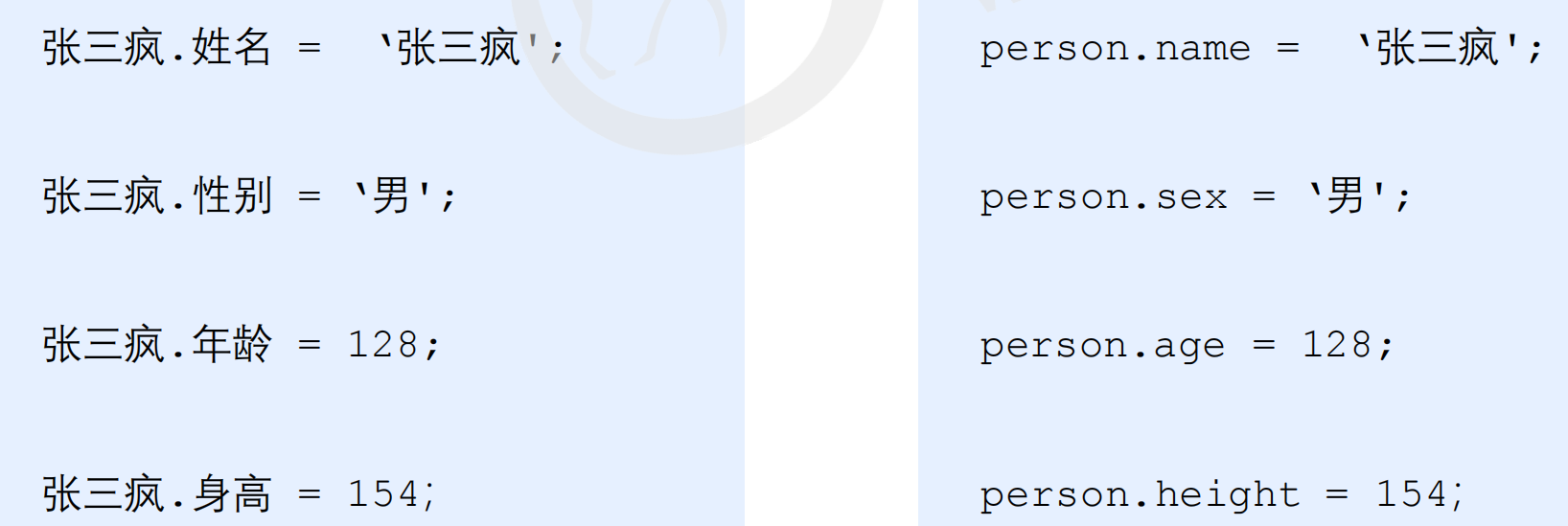
When we need to store a single value, we use a variable. To store multiple values, we use an array. However, if we need to store complete information about a person, such as 'Zhang Sanfeng', it becomes cumbersome with arrays:
var arr = ['Zhang Sanfeng', 'Male', 128, 154];
Objects in JS provide a clearer and more powerful structure. For example, the personal information of Zhang Sanfeng can be represented as an object:
Three Ways to Create Objects
In JavaScript, there are three ways to create objects:
- Using object literals
- Using the
new Object()syntax - Using constructor functions
1. Using Object Literals
An object literal is defined using curly braces {}, containing properties and methods in key-value pairs.
- Key: The property name.
- Value: The property value, which can be of any data type (number, string, boolean, function, etc.).
var star = {
    name: 'pink',
    age: 18,
    sex: 'male',
    sayHi: function() {
        alert('Hello everyone~');
    }
};
Accessing Object Members
- Access a property using
object.propertyName(dot notation) orobject['propertyName'](bracket notation). Note that the property name in brackets must be a string. - Access a method using
object.methodName(). Don't forget the parentheses.
console.log(star.name); // Output: pink
console.log(star['name']); // Output: pink
star.sayHi(); // Calls the sayHi method
Summary of Variables, Properties, Functions, and Methods
- Variable: Declared independently, exists alone.
- Property: A variable inside an object, no need to declare, describes the object's characteristics.
- Function: Declared independently, called by
functionName(). - Method: A function inside an object, no need to declare, called by
object.methodName(), describes the object's behavior.
2. Using new Object()
Similar to new Array(), you can create an object using the new Object() constructor.
Object()starts with a capital letter.- You must use the
newkeyword. - Properties are assigned using
object.property = value;.
var andy = new Object();
andy.name = 'pink';
andy.age = 18;
andy.sex = 'male';
andy.sayHi = function() {
    alert('Hello everyone~');
};
3. Using Constructor Functions
A constructor is a special function used to initialize objects. It typically starts with a capital letter and works with the new keyword.
function Person(name, age, sex) {
    this.name = name;
    this.age = age;
    this.sex = sex;
    this.sayHi = function() {
        alert('My name is: ' + this.name + ', age: ' + this.age + ', sex: ' + this.sex);
    };
}
var bigbai = new Person('Big White', 100, 'male');
var smallbai = new Person('Small White', 21, 'male');
console.log(bigbai.name);
console.log(smallbai.name);
Notes on Constructors:
- The first letter of the constructor name should be capitalized.
- Inside the constructor,
thisrefers to the current object. - The constructor does not need a
returnstatement. - You must use the
newkeyword to call a constructor.
Constructor vs. Object
- A constructor (e.g.,
Person()) abstracts common properties and methods, representing a class. - A specific object (e.g.,
new Person()) is created using thenewkeyword, which instantiates the object.
The new Keyword
When new is executed, it performs four steps:
- Creates a new empty object in memory.
- Makes
thispoint to the new object. - Executes the constructor code to add properties and methods to the new object.
- Returns the new object (so no explicit
returnis needed).
Iterating Over Object Properties
Use the for...in loop to iterate over object properties:
for (var key in obj) {
    // key represents the property name
    // obj[key] represents the property value
}
Example:
var obj = {
    name: 'Teacher Pink',
    age: 18,
    sex: 'male',
    fn: function() {}
};
for (var k in obj) {
    console.log(k); // Outputs property name
    console.log(obj[k]); // Outputs property value
}
Built-in Objects
JavaScript objects are categorized into three types: custom objects, built-in objects, and browser objects.
- Custom objects and built-in objects are part of ECMAScript.
- Browser objects are exclusive to JS and will be covered in JS API.
Built-in objects are objects that come with the JavaScript language, providing common and essential functionalities (properties and methods). The main advantage is rapid development.
Examples of built-in objects in JavaScript: Math, Date, Array, String.
Learning Built-in Objects
To learn a built-in object, you only need to know its commonly used members. You can look up documentation on MDN (Mozilla Developer Network).
Math Object
The Math object is not a constructor. It provides mathematical constants and functions.
Common Math Members:
Math.PI: Pi (π).Math.floor(): Rounds down.Math.ceil(): Rounds up.Math.round(): Rounds to the nearest integer (note:-3.5rounds to-3).Math.abs(): Absolute value.Math.max()/Math.min(): Find maximum/minimum values.
Example:
console.log(Math.PI); // 3.141592653589793
console.log(Math.max(1, 99, 3)); // 99
console.log(Math.max(-1, -10)); // -1
console.log(Math.max(1, 99, 'pink')); // NaN
console.log(Math.max()); // -Infinity
Custom Math Object:
var myMath = {
    PI: 3.141592653,
    max: function() {
        var max = arguments[0];
        for (var i = 1; i < arguments.length; i++) {
            if (arguments[i] > max) {
                max = arguments[i];
            }
        }
        return max;
    },
    min: function() {
        var min = arguments[0];
        for (var i = 1; i < arguments.length; i++) {
            if (arguments[i] < min) {
                min = arguments[i];
            }
        }
        return min;
    }
};
console.log(myMath.PI);
console.log(myMath.max(1, 5, 9));
console.log(myMath.min(1, 5, 9));
Math Methods for Absolute Values and Rounding:
console.log(Math.abs(1)); // 1
console.log(Math.abs(-1)); // 1
console.log(Math.abs('-1')); // 1 (implicit conversion)
console.log(Math.abs('pink')); // NaN

// Rounding methods
console.log(Math.floor(1.1)); // 1
console.log(Math.floor(1.9)); // 1
console.log(Math.ceil(1.1)); // 2
console.log(Math.ceil(1.9)); // 2
console.log(Math.round(1.1)); // 1
console.log(Math.round(1.5)); // 2
console.log(Math.round(1.9)); // 2
console.log(Math.round(-1.1)); // -1
console.log(Math.round(-1.5)); // -1 (note: rounds towards higher value)
Random Numbers:
console.log(Math.random()); // Returns a random number between 0 (inclusive) and 1 (exclusive)

function getRandomInt(min, max) {
    return Math.floor(Math.random() * (max - min + 1)) + min;
}
console.log(getRandomInt(1, 10));

// Random name picker
var arr = ['Zhang San', 'Zhang Sanfeng', 'Zhang Sanfeng Crazy', 'Li Si', 'Li Sisi', 'Teacher Pink'];
console.log(arr[getRandomInt(0, arr.length - 1)]);
Number Guessing Game: Generate a random number between 1 and 10, and let the user guess until correct.
function getRandomInt(min, max) {
    return Math.floor(Math.random() * (max - min + 1)) + min;
}
var random = getRandomInt(1, 10);
while (true) {
    var guess = parseInt(prompt('Guess a number between 1 and 10:'));
    if (guess > random) {
        alert('Too high!');
    } else if (guess < random) {
        alert('Too low!');
    } else {
        alert('Correct!');
        break;
    }
}
Date Object
The Date object is a constructor, so you need to instantiate it before use.
Creating a Date Object:
var now = new Date(); // Current date and time
console.log(now);

var specificDate = new Date('2021-10-1'); // Specific date
Getting Date Components:
var date = new Date();
console.log(date.getFullYear()); // Year
console.log(date.getMonth() + 1); // Month (0-indexed, so add 1)
console.log(date.getDate()); // Day of month
console.log(date.getDay()); // Day of week (0=Sunday, 1=Monday, ...)

var year = date.getFullYear();
var month = date.getMonth() + 1;
var day = date.getDate();
var days = ['Sunday', 'Monday', 'Tuesday', 'Wednesday', 'Thursday', 'Friday', 'Saturday'];
var weekDay = days[date.getDay()];
console.log('Today is: ' + year + '-' + month + '-' + day + ' ' + weekDay);
Getting Timestamps (Milliseconds since 1970-01-01 UTC):
var date = new Date();
console.log(date.valueOf()); // Milliseconds since 1970-01-01
console.log(date.getTime());

var timestamp = +new Date(); // Shortcut
console.log(timestamp);

console.log(Date.now()); // H5 method
Countdown Timer:
function countDown(targetTime) {
    var now = +new Date();
    var target = +new Date(targetTime);
    var diff = (target - now) / 1000; // Difference in seconds

    var days = Math.floor(diff / (60 * 60 * 24));
    var hours = Math.floor((diff / (60 * 60)) % 24);
    var minutes = Math.floor((diff / 60) % 60);
    var seconds = Math.floor(diff % 60);

    return days + ' days ' + hours + ' hours ' + minutes + ' minutes ' + seconds + ' seconds';
}
console.log(countDown('2021-10-1 18:00:00'));
Array Object
Creating Arrays:
- Literal:
var arr = [1, 2, 3]; - Constructor:
var arr = new Array();
Checking if a Variable is an Array:
var arr = [1, 23];
var obj = {};
console.log(arr instanceof Array); // true
console.log(obj instanceof Array); // false
console.log(Array.isArray(arr)); // true
console.log(Array.isArray(obj)); // false
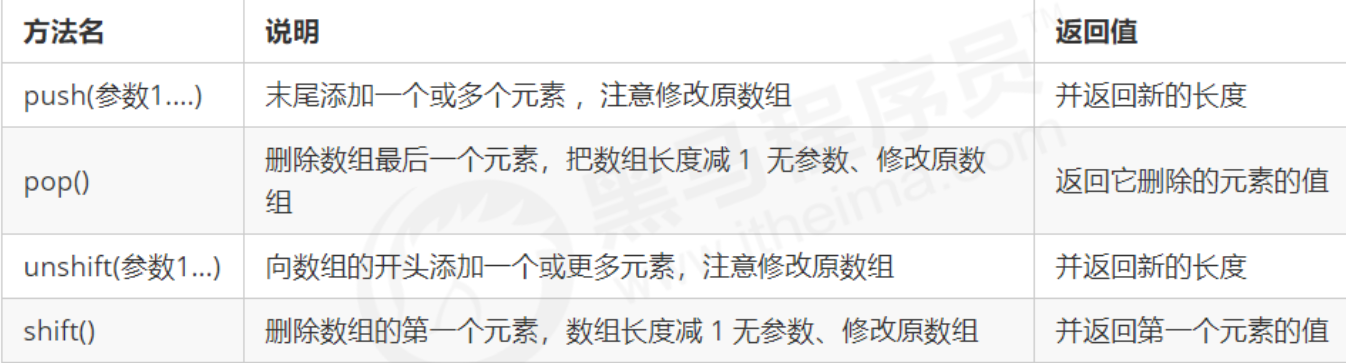
Adding and Removing Elements:
Example: Filtering Array
var salaries = [1500, 1200, 2000, 2100, 1800];
var filtered = [];
for (var i = 0; i < salaries.length; i++) {
    if (salaries[i] < 2000) {
        filtered.push(salaries[i]);
    }
}
console.log(filtered);
Sorting:
var arr = [1, 64, 9, 6];
arr.sort(function(a, b) {
    return b - a; // Descending order
});
console.log(arr);
Index Methods:

Array Deduplication:
function unique(arr) {
    var newArr = [];
    for (var i = 0; i < arr.length; i++) {
        if (newArr.indexOf(arr[i]) === -1) {
            newArr.push(arr[i]);
        }
    }
    return newArr;
}
var demo = unique(['blue', 'green', 'blue']);
console.log(demo);
Converting Array to String:
var arr = [1, 2, 3];
console.log(arr.toString()); // "1,2,3"

var arr1 = ['green', 'blue', 'pink'];
console.log(arr1.join()); // "green,blue,pink"
console.log(arr1.join('-')); // "green-blue-pink"
Other Methods:

slice()andsplice(): Manipulate array elements. Pay attention tosplice().
String Object
Basic Wrapper Types
JavaScript provides three special reference types: String, Number, and Boolean. These allow primitive types to have properties and methods.
var str = 'andy';
console.log(str.length); // Works because temporary wrapper object is created
Execution Process:
- A temporary object is created to wrap the primitive value.
- The temporary object's properties/methods are accessed.
- The temporary object is destroyed.
Immutability of Strings
Strings are immutable. Once created, their value cannot be changed. When you assign a new value, a new string is created in memory.
var str = 'abc';
str = 'hello'; // New string created, old 'abc' remains unchanged

// Inefficient concatenation
var result = '';
for (var i = 0; i < 100000; i++) {
    result += i; // Creates many intermediate strings
}
Index Methods

Example: Find All Occurrences of a Character
var str = 'oabcoefoxyozzopp';
var index = str.indexOf('o');
var count = 0;
while (index !== -1) {
    console.log(index);
    count++;
    index = str.indexOf('o', index + 1);
}
console.log('Occurrences: ' + count);
Character Retrieval by Position

var str = 'andy';
console.log(str.charAt(3)); // 'y'
console.log(str.charCodeAt(0)); // 97 (ASCII code of 'a')
console.log(str[0]); // 'a' (ES5+)
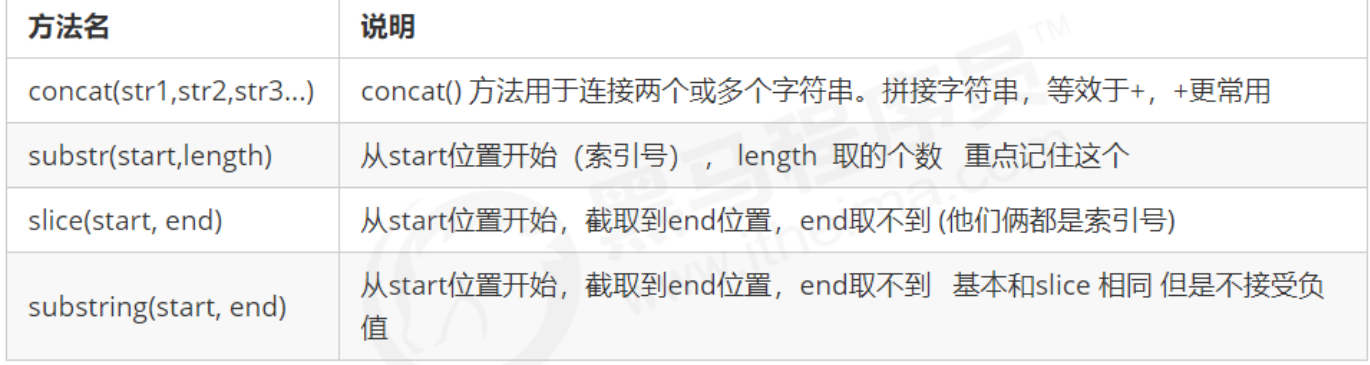
String Manipulation Methods
replace() Method
var str = 'hello';
var newStr = str.replace('l', 'x'); // 'hexlo' (replaces only first occurrence)
split() Method
Splits a string into an array based on a separator.
var str = 'a,b,c,d';
console.log(str.split(',')); // ['a', 'b', 'c', 'd']
Case Conversion
var str = 'Hello';
console.log(str.toUpperCase()); // 'HELLO'
console.log(str.toLowerCase()); // 'hello'
Primitive vs. Complex Types
- Value types (primitives):
string,number,boolean,undefined,null. Stored directly in stack memory. - Reference types (complex): Objects created with
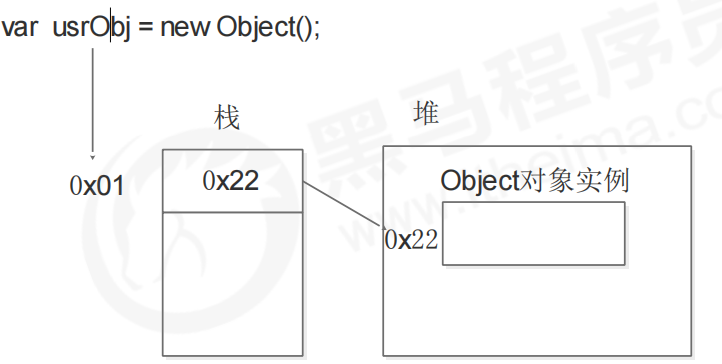
new, such asObject,Array,Date. Stored in heap memory; stack stores references.
var timer = null;
console.log(typeof timer); // 'object'
Heap and Stack Memory
- Stack: Automatically managed by the OS, stores primitives and function parameters.
- Heap: Dynamically allocated, stores complex objects; managed by garbage collector.
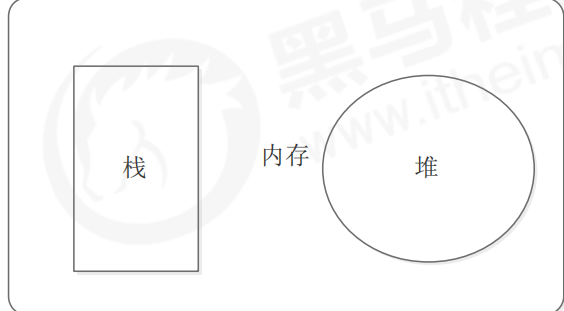
Passing Primitives vs. Reference Types
Passing a Primitive:
function fn(a) {
    a = 11;
    console.log(a); // 11
}
var x = 10;
fn(x);
console.log(x); // 10 (unchanged)
Passing a Reference Type:
function Person(name) {
    this.name = name;
}

function changeName(person) {
    console.log(person.name); // 'Liu Dehua'
    person.name = 'Zhang Xueyou';
    console.log(person.name); // 'Zhang Xueyou'
}
var p = new Person('Liu Dehua');
console.log(p.name); // 'Liu Dehua'
changeName(p);
console.log(p.name); // 'Zhang Xueyou' (changed)