In today's data-driven world, databases have become an indispensable tool. Python, as a popular programming language, comes with built-in support for several databases, one of which is SQLite. SQLite is a lightweight relational database management system with extensive application in Python. This article introduces how to use Python to operate SQLite databases, aiming to help readers improve their data processing skills.
1. Introduction to SQLite3
SQLite3 is a built-in Python module that can be used easily through the standard library without additional installation or configuration. It supports SQL statements and is simple and efficient for data base operations. Therefore, SQLite3 is well-suited for small projects and standalone applications, making it a common database solution in Python development.
2. Creating a SQLite Database
Create a new Python file in your IDE or text editor and name it python_database.py.
First, import the SQLite module:
import sqlite3
Since SQLite3 is built into Python, no external installation is required.
Next, create a database connection and a cursor object:
connection = sqlite3.connect('db.sqlite3')
cursor = connection.cursor()
The first variable connection calls sqlite3.connect() to connect to the file (the name inside the parentheses specifies the database file name). The cursor variable is set to connection.cursor(), which Python uses to read and write to database tables.
Now, create a table:
cursor.execute('''
    CREATE TABLE IF NOT EXISTS contacts(
        id INTEGER PRIMARY KEY,
        firstName TEXT,
        lastName TEXT,
        age TEXT,
        address TEXT,
        jobTitle TEXT
    )''')
connection.commit()
Explanation:
cursor.execute()writes a new table into thedb.sqlite3database file.- The table is named
contacts. CREATE TABLE IF NOT EXISTScreates the table only if it doesn't already exist.- The following lines define column names and their data types.
Common data types in SQLite:
NULL: NULL value.INTEGER: signed integer, stored in 1, 2, 3, 4, 6, or 8 bytes depending on magnitude.REAL: floating point value, stored as 8-byte IEEE floating number.TEXT: text string, stored using database encoding (UTF-8, UTF-16BE, or UTF-16LE).BLOB: binary large object, stored as raw data.
The id column is assigned INTEGER PRIMARY KEY, which is necessary for unique identification and auto-increment. SQLite automatically increments each new entry by 1. The other columns are firstName, lastName, age, address, and jobTitle—a simple contact database.
connection.commit() commits the table creation to the database file.
Now, insert some sample data:
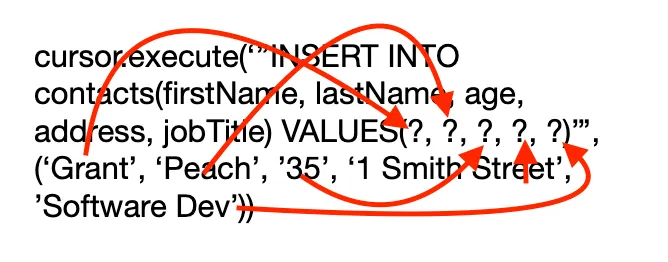
cursor.execute('''INSERT INTO contacts(firstName, lastName, age, address, jobTitle) VALUES (?, ?, ?, ?, ?)''', ('Grant', 'Peach', '35', '1 Smith Street', 'Software Dev'))
connection.commit()
Each ? is a placeholder for the values to be inserted into corresponding columns. Variables can also be used for dynamic input.
The following diagram illustrates the assignment:
3. SQLite Database Viewer
To verify the data, you can use external tools. Recommended viewers:
- macOS: Base (paid), DB Browser for SQLite (free)
- Windows: DB Browser for SQLite (free), SQLite Reader (paid upgrade)
- Linux: DB Browser for SQLite (free)
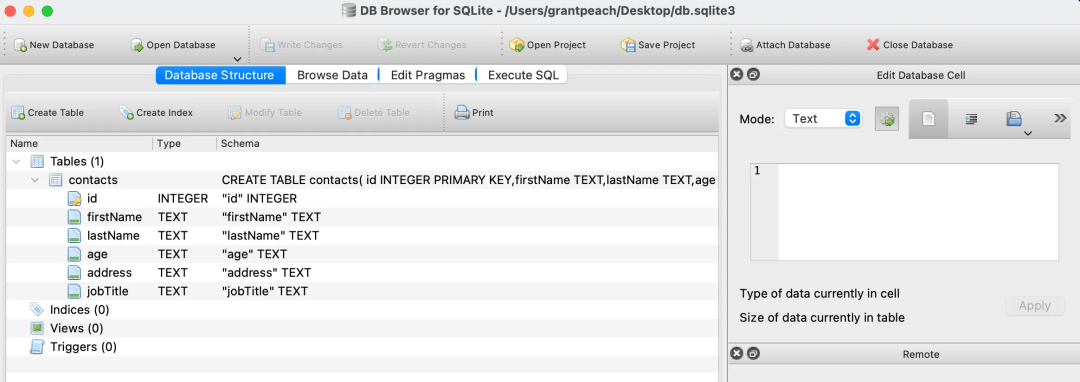
Install one of these and load the db.sqlite3 file. You should see a GUI similar to:
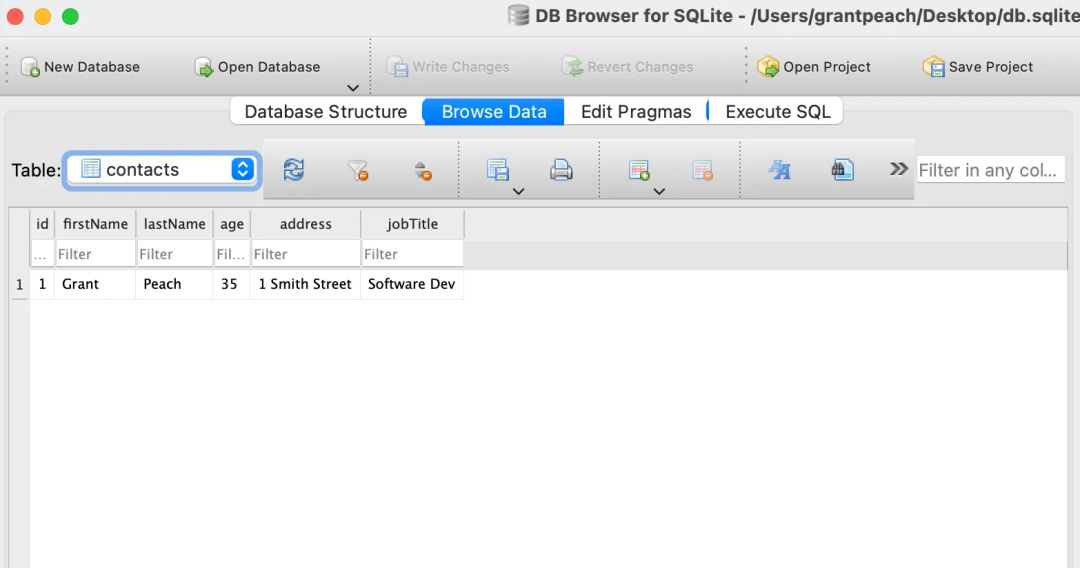
Click the Browse Data tab to see the inserted records:
DB Browser is also useful for editing data and importing large CSV files. Professional IDEs like PyCharm also provide database tools.
4. Searching Data
Now, let's create a function to search the database and display results. Remove or comment out the previous insertion code.
def search_db(first_name):
    cursor.execute("SELECT * FROM contacts WHERE firstName LIKE '%' || ? || '%'", (first_name,))
    results = cursor.fetchall()
    print('Results Found...\n')
    print(results)

search_db('Grant')
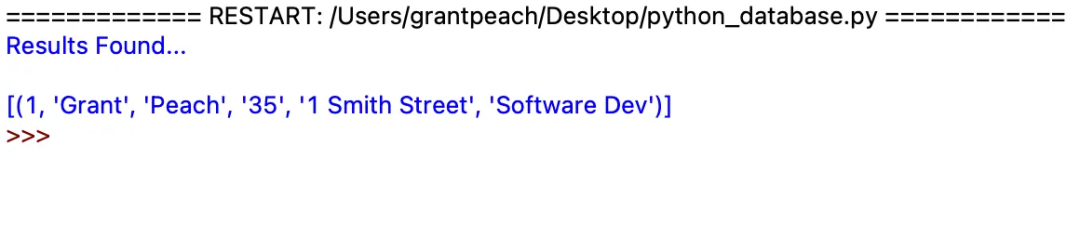
Running the above code outputs:
Explanation:
cursor.execute("SELECT * FROM contacts WHERE firstName LIKE '%' || ? || '%'", (first_name,))selects all rows fromcontactswhere thefirstNamecolumn contains the searched text.results = cursor.fetchall()fetches all matching rows.- The results are printed to the terminal.
This is just a small example to demonstrate what can be done with Python and SQLite3. There is much more to explore!