1. Introduction to Nginx
Nginx is a lightweight web server and reverse proxy server that also provides IMAP/POP3/SMTP services. It is suitable for various scenarios due to its low memory footprint, fast startup, and excellent concurrency handling capabilities. Nginx is widely used in internet projects and can handle up to 50,000 concurrent connections.
Key features:
- Reverse proxy
- Load balancing
- Static file serving and dynamic content processing (separation of static and dynamic resources)
- Hot deployment – simple startup, supports
7×24uninterrupted operation, often running for months without restart.
2. Forward Proxy vs Reverse Proxy
2.1 Forward Proxy
Due to firewall restrictions, you may use a VPN to access Google – this is a forward proxy. The forward proxy represents the client; the client knows the target server, but the target server does not know the client is accessing via the proxy.
2.2 Reverse Proxy
When we visit Taobao, the company runs many internal servers. If sessions were not shared, you would need to log in repeatedly when requests hit different servers. Taobao solves this by placing a proxy server in front that handles sessions transparently. This is a reverse proxy – the client is unaware of the proxy, requires no extra configuration, and simply sends requests to the reverse proxy server. The reverse proxy selects an appropriate backend server, fetches the data, and returns it to the client. The proxy server and backend servers appear as a single server to the client, with only the proxy address exposed.
To configure a reverse proxy for a specific path in Nginx, use the location directive:
location /api {
    proxy_pass http://backend/;
}
3. Load Balancing
3.1 Round Robin (default) – with optional weight (Weighted Round Robin)
Requests are distributed to backend servers in chronological order. If a server goes down, it is automatically removed from the pool. Suitable for stateless, short-lived services running on similarly configured servers, as well as image or static page server clusters.
Weight: Specify the weight to adjust the probability of requests being sent to each server, useful when backend servers have different capabilities. Higher weight means higher access probability.
3.2 IP Hash
Standard load balancing can cause session loss – a user may log in on one server but their next request hits another. The ip_hash directive solves this: it uses the client’s IP address as input to a hash algorithm, ensuring the same client always reaches the same backend server. This preserves session data.
3.3 Least Connections
New requests are forwarded to the server with the fewest active connections.
3.4 URL Hash
The client’s URL is hashed, and the request is routed to the server corresponding to that hash value.
Example configuration for an upstream block with various strategies:
upstream backend {
    server backend1.example.com;
    server backend2.example.com;
    server backend3.example.com;

    # IP hash
    ip_hash;

    # Least connections
    # least_conn;

    # URL hash
    # hash $request_uri consistent;
}
4. Separation of Static and Dynamic Content
In web development, some requests require backend processing (dynamic), while others (CSS, HTML, images, JavaScript) do not – these are static files. The static‑dynamic separation approach divides these resources so that static assets can be cached, improving response speed.
Nginx excels at serving static content but is less efficient for dynamic processing. Hence, sites often use Nginx for static files and pass dynamic requests to backends like PHP-FPM or Apache. This is achieved using location blocks with regular expressions in the server{} section.
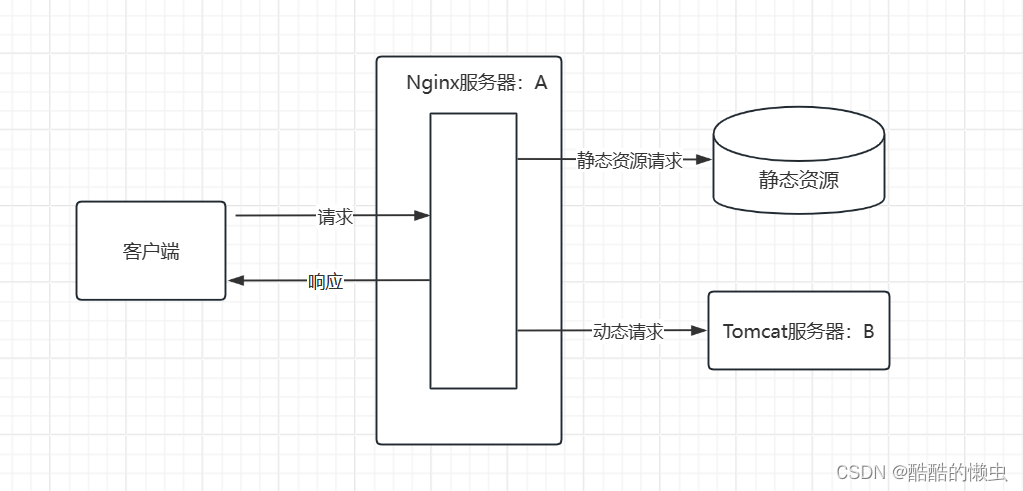
Example: serving static resources from a directory and falling back to 404 if not found:
server {
    listen 80 default_server;
    root /usr/share/nginx/html;
    index index.html;

    location / {
        try_files $uri $uri/ =404;
    }
}
5. Web Caching
Caching is a mechanism in Nginx to accelerate access speeds. In practice, enabling it is straightforward: specify a cache directory on disk where responses are stored for later reuse.
6. Installation
6.1 Windows
-
Download the stable version from the official website.
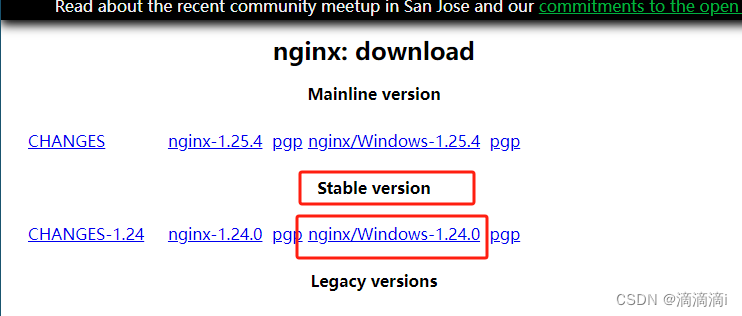
-
Start Nginx:
- Option A: Double‑click
nginx.exe(the window may disappear, but Nginx is running). - Option B: Open
cmd, navigate to the Nginx directory, and runnginx.exe.
- Option A: Double‑click
-
Verify by visiting
http://localhost:80.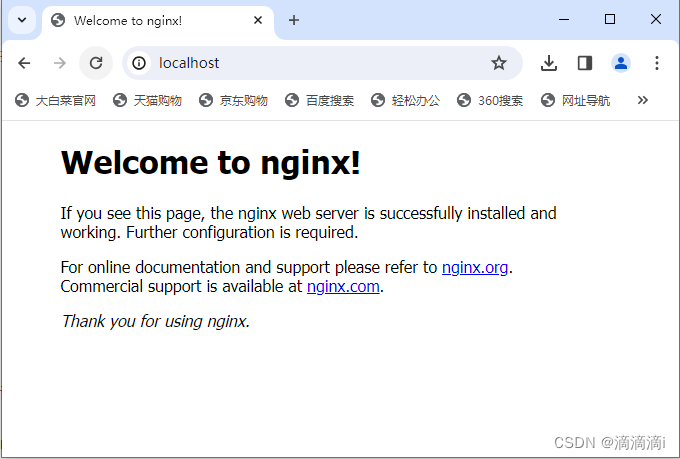
Port 80 is the default from the configuration file. You can change the port there and reload without restarting:
nginx -s reload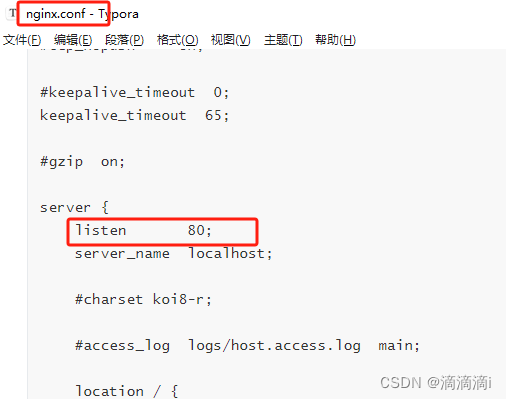
-
Shutdown:
- Fast:
nginx -s stop(may lose unsaved data). - Graceful:
nginx -s quit. - Force kill via Windows taskkill:
taskkill /f /t /im nginx.exe
- Fast:
6.2 Linux
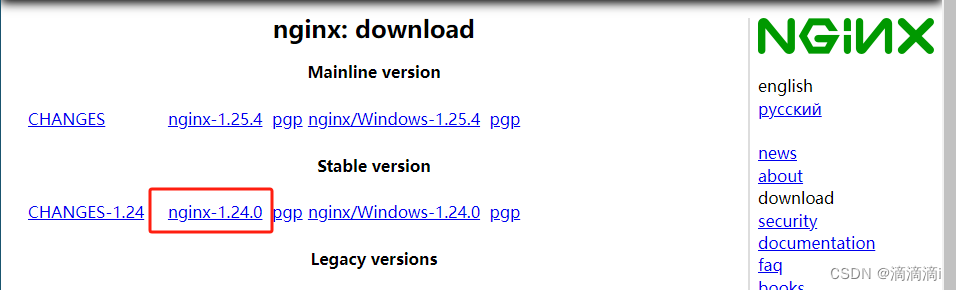
- Download the tarball.
- Upload to the server.
- Extract:
tar -zxvf nginx-1.24.0.tar.gz - Configure and install:
Find the installation location withcd nginx-1.24.0 ./configure make make installwhereis nginx.
- Start:
Access viacd /usr/local/nginx/sbin/ ./nginxhttp://<server-ip>:80.
If the server doesn't start, disable or configure the firewall:
# Start/restart/stop firewall
service firewalld start
service firewalld restart
service firewalld stop
# List all rules
firewall-cmd --list-all
# Check if a port is open
firewall-cmd --query-port=8080/tcp
# Open port 80
firewall-cmd --permanent --add-port=80/tcp
# Remove a port
firewall-cmd --permanent --remove-port=8080/tcp
# Reload to apply changes
firewall-cmd --reload
7. Common Commands
cd /usr/local/nginx/sbin/
./nginx # Start
nginx -s stop # Fast shutdown (may lose data)
nginx -s quit # Graceful shutdown
nginx -s reload # Reload configuration
nginx -s reopen # Reopen log files
nginx -c filename # Use a specific configuration file
nginx -t # Test configuration (syntax check)
nginx -v # Show version
nginx -V # Show version, compiler, and configuration parameters
# Pretty-print configuration parameters
2>&1 nginx -V | xargs -n1
2>&1 nginx -V | xargs -n1 | grep lua
8. Configuration File Reference
########### Each directive must end with a semicolon. #################
#user administrator administrators;  # Set user/group (default: nobody nobody)
#worker_processes 2;                # Number of worker processes (default: 1)
#pid /nginx/pid/nginx.pid;          # PID file location
error_log log/error.log debug;      # Log path and level: debug|info|notice|warn|error|crit|alert|emerg

events {
    accept_mutex on;       # Serialize network connections (default: on) – prevents thundering herd
    multi_accept on;       # Accept multiple connections per event (default: off)
    #use epoll;            # Event model: select|poll|kqueue|epoll|resig|/dev/poll|eventport
    worker_connections 1024;  # Max connections per worker (default: 512)
}

http {
    include       mime.types;               # File extension to MIME type mapping
    default_type  application/octet-stream;  # Default MIME type (default: text/plain)
    #access_log off;                         # Disable access log

    log_format myFormat '$remote_addr - $remote_user [$time_local] $request $status $body_bytes_sent $http_referer $http_user_agent $http_x_forwarded_for';
    access_log log/access.log myFormat;

    sendfile on;                  # Enable sendfile (default: off)
    sendfile_max_chunk 100k;      # Max data per sendfile call (default: 0 = no limit)
    keepalive_timeout 65;         # Keepalive timeout (default: 75s)

    upstream mysvr {
        server 127.0.0.1:7878;
        server 192.168.10.121:3333 backup;  # Backup server
    }

    error_page 404 https://www.baidu.com;  # Custom error page

    server {
        keepalive_requests 120;    # Max requests per keepalive connection
        listen 4545;               # Listen port
        server_name 127.0.0.1;     # Server name

        location ~* ^.+$ {        # URL filter with regex (~ = case-sensitive, ~* = case-insensitive)
            #root path;            # Document root
            #index vv.txt;         # Default index file
            proxy_pass http://mysvr;  # Forward requests to the upstream group
            deny 127.0.0.1;        # Denied IP addresses
            allow 172.18.5.54;     # Allowed IP addresses
        }
    }
}