- Basic Creation Methods
torch.tensor: Create a tensor from existing data.torch.Tensor: Create a tensor with a given shape, or from data if provided.torch.IntTensor,torch.FloatTensor,torch.DoubleTensor: Create a tensor of a specific data type.
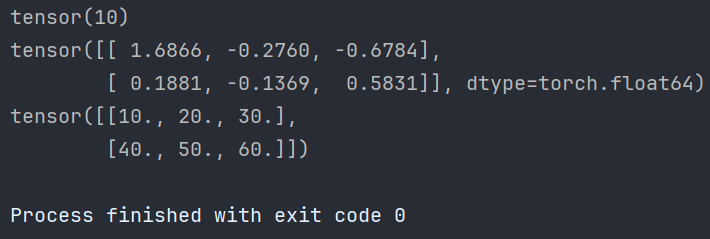
1.1 Create Tensor from Existing Data
# 1. Create tensor from existing data
def test01():
    # 1.1 Scalar tensor
    data = torch.tensor(10)
    print(data)
    # 1.2 From numpy array (float64)
    import numpy as np
    arr = np.random.randn(2, 3)
    data = torch.tensor(arr)
    print(data)
    # 1.3 From list (default float32)
    lst = [[10., 20., 30.], [40., 50., 60.]]
    data = torch.tensor(lst)
    print(data)
1.2 Create Tensor with Specified Shape
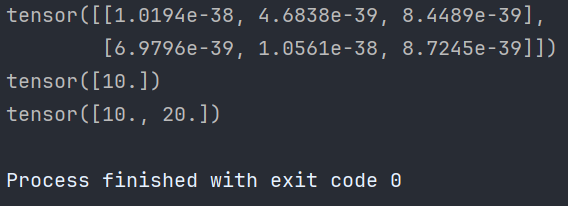
# 2. Create tensor of specified shape
def test02():
    # 2.1 2x3 tensor with default float32
    shape_tensor = torch.Tensor(2, 3)
    print(shape_tensor)
    # 2.2 If list is passed, it creates a tensor containing those elements
    list_tensor = torch.Tensor([10])
    print(list_tensor)
    list_tensor2 = torch.Tensor([10, 20])
    print(list_tensor2)
1.3 Create Tensor with Specific Type
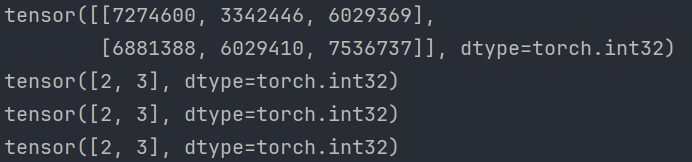
# 3. Create tensor with specific data type
def test03():
    # 3.1 Int32 tensor with shape 2x3
    int_tensor = torch.IntTensor(2, 3)
    print(int_tensor)
    # 3.2 Type conversion warning; prefer using torch.tensor with dtype
    # DeprecationWarning: Implicit conversion from float to int
    wrong_tensor = torch.IntTensor([2.5, 3.3])
    corrected_tensor = torch.IntTensor([int(2.5), int(3.3)])
    best_tensor = torch.tensor([2, 3], dtype=torch.int32)
    print(wrong_tensor)
    print(corrected_tensor)
    print(best_tensor)
    # 3.3 Other types
    short_tensor = torch.ShortTensor()  # int16
    long_tensor = torch.LongTensor()    # int64
    float_tensor = torch.FloatTensor()  # float32
    double_tensor = torch.DoubleTensor()# float64
- Creating Linear and Random Tensors
torch.arangeandtorch.linspace: Create linear tensors.torch.random.initial_seedandtorch.random.manual_seed: Set random seeds.torch.randn: Create random tensor.
- A linear tensor is typically generated in a sequential order, e.g., arithmetic progression.
- A random tensor has elements that are random numbers.
| Type | Method | Example Code | Description |
|---|---|---|---|
| Linear | torch.linspace |
linear_tensor = torch.linspace(0, 10, steps=5) |
Create a linear tensor from 0 to 10 with 5 elements. |
torch.arange |
linear_tensor = torch.arange(0, 10, step=2) |
Create a linear tensor from 0 to 10 (exclusive) with step 2. | |
| Random | torch.rand |
random_tensor = torch.rand(2, 3) |
Create 2x3 tensor with uniform distribution [0,1). |
torch.randn |
random_tensor = torch.randn(2, 3) |
Create 2x3 tensor with standard normal distribution. | |
torch.randint |
random_tensor = torch.randint(0, 10, (2, 3)) |
Create 2x3 tensor with random integers in [0,10). | |
torch.randperm |
random_tensor = torch.randperm(10) |
Create a random permutation of 0-9. |
2.1 Create Linear Space Tensor
# 1. Create linear space tensor
def test01():
    # 1.1 From start to end with given step (exclusive end)
    arange_tensor = torch.arange(0, 10, 2)
    print(arange_tensor)
    # 1.2 From start to end with given number of elements (inclusive end)
    linspace_tensor = torch.linspace(0, 11, 10)
    print(linspace_tensor)

2.2 Create Random Tensor
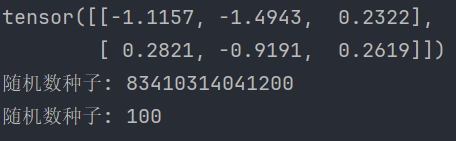
# 2. Create random tensor
def test02():
    # 2.1 Create 2x3 random tensor from normal distribution
    rand_tensor = torch.randn(2, 3)
    print(rand_tensor)
    # 2.2 Set random seed
    print('Initial seed:', torch.random.initial_seed())
    torch.random.manual_seed(100)
    print('After setting seed:', torch.random.initial_seed())
2.3 What is a Random Seed?
A random seed is an integer used to initialize the random number generator. The generator produces a deterministic sequence: given the same seed, the sequence is identical.
Purpose of Random Seed:
- Reproducibility: Ensures same random numbers across runs; vital for debugging and experiments.
- Debugging and Testing: Fixed seed helps reproduce conditions to locate issues.
- Consistency in Experiments: In ML, same seed yields same initial conditions, making results comparable.
- Consistency Across Multiple Runs: Reduces variance when averaging results.
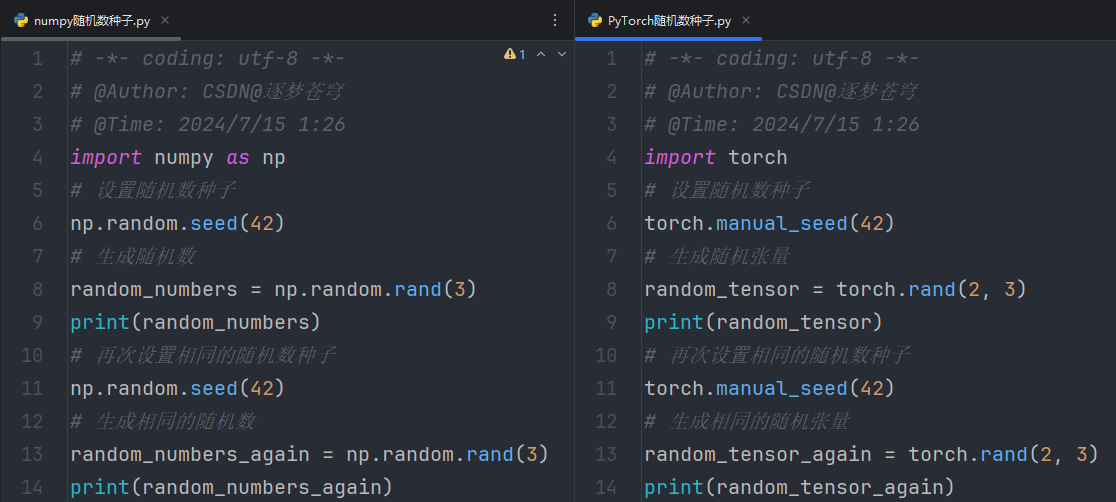
Summary:
- A random seed initializes the RNG.
- Benefits: reprodcuibility, easier debugging, consistent and comparable results, reduced variance.
2.4 initial_seed() vs manual_seed()
torch.random.initial_seedreturns the seed set by PyTorch at startup (usually random).torch.random.manual_seedexplicitly sets the seed for reproducibility.
- Creating Zero/One/Filled Tensors
torch.onesandtorch.ones_like: Create all-ones tensors.torch.zerosandtorch.zeros_like: Create all-zeros tensors.torch.fullandtorch.full_like: Create tensors filled with a specified value.
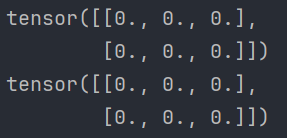
3.1 All-Zeros Tensor
def test01():
    # 1. Create zeros with shape
    zeros = torch.zeros(2, 3)
    print(zeros)
    # 2. Create zeros with same shape as another tensor
    zeros_like = torch.zeros_like(zeros)
    print(zeros_like)
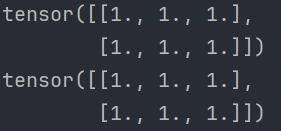
3.2 All-Ones Tensor
def test02():
    # 1. Create ones with shape
    ones = torch.ones(2, 3)
    print(ones)
    # 2. Create ones with same shape
    ones_like = torch.ones_like(ones)
    print(ones_like)
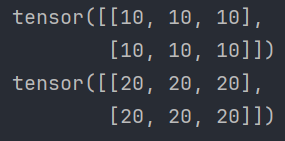
3.3 Filled with Specific Value
def test03():
    # 1. Create filled tensor with shape
    filled = torch.full([2, 3], 10)
    print(filled)
    # 2. Create filled tensor with same shape
    filled_like = torch.full_like(filled, 20)
    print(filled_like)
- Tensor Type Conversion ⭐
tensor.type(torch.DoubleTensor): Explicitly convert to a specified type.tensor.double(): Convert to double precision float.
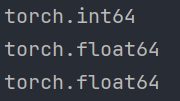
# Type conversion example
def test():
    # Create a tensor filled with 10
    data = torch.full([2, 3], 10)
    print("Original dtype:", data.dtype)
    # Method 1: use type()
    data = data.type(torch.DoubleTensor)
    print("After type():", data.dtype)
    # Other types: data.type(torch.ShortTensor), torch.IntTensor, etc.
    # Method 2: use .double()
    data = data.double()
    print("After double():", data.dtype)
    # Similar: .short(), .int(), .long(), .float()
Output:
- Random Number Generator Algorithms ⭐
A random seed is an integer that initializes a random number generator.
Common Pseudo-Random Number Generators (PRNGs):
5.1 Linear Congruential Generator (LCG)
LCG is one of the earliest PRNGs. The sequence is defined by:
\[ X_{n+1} = (a X_n + c) \mod m \]
Parameters:
- \( X \): sequence of pseudo-random numbers.
- \( X_n \): current random number.
- \( X_{n+1} \): next random number.
- \( a \): multiplier (large integer).
- \( c \): increment.
- \( m \): modulus (range of numbers).
- \( X_0 \): initial seed.
Steps:
- Choose parameters \( a, c, m, X_0 \).
- Compute \( X_1 = (a X_0 + c) \mod m \).
- Repeat using current \( X_n \) to generate more numbers.
Pros/Cons:
- Pros: Simple and easy to implement.
- Cons: Strong periodicity, lower quality randomness.
5.2 Mersenne Twister
Mersenne Twister (MT) is a widely used PRNG, especially in scientific computing. Its name comes from its period, \( 2^{19937} - 1 \), a Mersenne prime.
Simplified Description:
- State vector: 624 32-bit integers.
- Initialization:
- Set \( \text{state}[0] = \text{seed} \).
- For \( i = 1 \) to \( 623 \): \[ \text{state}[i] = f \cdot (\text{state}[i-1] \oplus (\text{state}[i-1] \gg (w-2))) + i \] where \( f = 1812433253 \), \( w = 32 \), \( \oplus \) is XOR, \( \gg \) is right shift.
- Generation: Generate 624 numbers at once and store in state; when exhausted, twist the state to produce new numbers.
- Twist operation: Rotate and mix bits to ensure high-quality randomness.
- Pros: Long period, good statistical properties.
- Cons: Complex, slower initialization.
Explanation of the Initialization Formula:
\[ \text{state}[0] = \text{seed} \] sets the first element to the seed.
\[ \text{state}[i] = f \cdot (\text{state}[i-1] \oplus (\text{state}[i-1] \gg (w-2))) + i \] fills the rest, using XOR and right shift for mixing.
5.3 Xorshift
Xorshift uses XOR and shift operations to generate numbers efficiently.
Pros: Very fast, suitable for embedded systems.
Cons: Relatively short period, quality depends on implementation.
5.4 Other Algorithms
- Lehmer Generator: An improved LCG with better parameters.
- PCG (Permuted Congruential Generator): Modern PRNG with excellent statistics and performance.