Software design patterns are a set of tried-and-tested code design experiences that are used repeatedly. They exist to promote reusable code, make code easier for others to understand, and ensure reliability. Good design leads to quality work. However, if certain design principles guide the software design process, our software can be refactored even better. Patterns and principles are profound topics that require extensive practice and summarization to truly grasp. This article first introduces the Observer pattern and its application in Windows Forms, and then details the five major design principles, known as the SOLID principles.
9.1 Software Design Patterns
9.1.1 The Observer Pattern
Program execution involves continuous data exchange between modules and objects. The Observer pattern emphasizes that when a target's state changes (or when a specific condition is met), it actively sends a notification to other objects interested in that change. If we call the notifier the "Subject" and the notified parties the "Observers," the structural diagram is as follows:

Figure 9-1: Observer Pattern Class Diagram
As shown in Figure 9-1, the logic for the subject and observer is abstracted into two interfaces: INotificationSource and IEventListener. The INotificationSource interface contains a BroadcastChange method for notifying observers, an AttachListener method for adding observers, and a DetachListener method for removing them. The IEventListener interface contains only a ReceiveUpdate method for accepting notifications. The relationship between INotificationSource and IEventListener is one-to-many: one subject can notify multiple observers.
The specific code implementation is as follows:
//Code 9-1

interface INotificationSource  //NO.1
{
    void BroadcastChange(string message);
    void AttachListener(IEventListener listener);
    void DetachListener(IEventListener listener);
}

interface IEventListener  //NO.2
{
    void ReceiveUpdate(string message);
}

class ConcreteSubject : INotificationSource
{
    //...
    ArrayList _activeListeners = new ArrayList();

    public void AttachListener(IEventListener listener)  //NO.3
    {
        if(!_activeListeners.Contains(listener))
        {
            _activeListeners.Add(listener);
        }
    }

    public void DetachListener(IEventListener listener)  //NO.4
    {
        if(_activeListeners.Contains(listener))
        {
            _activeListeners.Remove(listener);
        }
    }

    public void BroadcastChange(string message)  //NO.5
    {
        foreach(IEventListener listener in _activeListeners)
        {
            listener.ReceiveUpdate(message);
        }
    }

    public void ExecuteAction()
    {
        //...
        if(...)  //NO.6
        {
            BroadcastChange(...);
        }
    }
}

class ScreenObserver : IEventListener
{
    public void ReceiveUpdate(string message)
    {
        Console.WriteLine("Display notification: " + message);  //NO.7
    }
}

class MailObserver : IEventListener
{
    public void ReceiveUpdate(string message)
    {
        //send email to others  NO.8
    }
}
As shown in the code "Code 9-1" above, INotificationSource and IEventListener interfaces are defined at NO.1 and NO.2. Then, a concrete subject class ConcreteSubject is defined. It implements INotificationSource. In AttachListener and DetachListener, listeners are added to or removed from the _activeListeners collection (NO.3 and NO.4). Finally, in BroadcastChange, the collection is iterated, sending the notification to each listener (NO.5). Note that we can notify listeners from within the ExecuteAction method when a specific condition is met (NO.6). Using the IEventListener interface, two concrete observers, ScreenObserver and MailObserver, are defined. In their respective ReceiveUpdate methods, they process the notification according to their own logic (one prints the message to the console, the other sends it as an email) (NO.7 and NO.8).
We can now use an instance of ConcreteSubject as a specific subject and instances of ScreenObserver and MailObserver as specific observers. The code usage would be:
//Code 9-2

INotificationSource notifier = new ConcreteSubject();

notifier.AttachListener(new ScreenObserver());  //NO.1
notifier.AttachListener(new MailObserver());    //NO.2

notifier.BroadcastChange("it's a test!");  //NO.3

(notifier as ConcreteSubject).ExecuteAction();  //NO.4
As shown in "Code 9-2", we add two observers to the notifier subject (NO.1 and NO.2), and then use the INotificationSource.BroadcastChange method to notify them (NO.3). Alternatively, we can use the ConcreteSubject.ExecuteAction method to notify observers (when a condition is met). The two observers handle this differently: one prints the string "it's a test" to the console, and the other sends it as an email.
Note: In "Code 9-2", we cannot use the
INotificationSourceinterface to call theExecuteActionmethod. A cast to theConcreteSubjecttype is necessary becauseExecuteActionis not part of theINotificationSourceinterface.
The entire flow of the Observer pattern is shown in Figure 9-2:

Figure 9-2: Observer Pattern Execution Flow
As shown in Figure 9-2, in some cases, NO.2 performs filtering. In other words, the subject might notify only a subset of observers based on conditions. The dashed box at NO.4 is optional. If the subject cares about the observer's processing result, the observer should return its outcome to the subject. The Observer pattern is one of the most frequently used design patterns in all frameworks. The reason is simple: it separates framework code from the code written by the framework user. Its a concrete implementation of the Hollywood Principle ("don't call us, we will call you"), which all frameworks strictly adhere to.
In the Windows Forms framework, the Observer pattern is primarily implemented not through an "interface-concrete class" approach, but more often using .NET's "delegate-event" mechanism. This is detailed in the next subsection.
9.1.2 The Observer Pattern in Windows Forms
In the Windows Forms framework, the Observer pattern is ubiquitous. As mentioned in the chapter discussing Winform program structure, when a control handles Windows messages, it eventually notifies event subscribers in the form of "events." Here, the event subscriber is the "observer" in the Observer pattern, and the control is the "subject." Recall the code for the System.Windows.Forms.Control class:
//Code 9-3

class Control : Component
{
    //...
    public event EventHandler StateChanged1;
    public event EventHandler StateChanged2;

    protected virtual void WndProc(ref Message m)
    {
        switch(m.Msg)
        {
            case 1:  //NO.1
            {
                //...
                OnStateChanged1(...);
                break;
            }
            case 2:  //NO.2
            {
                OnStateChanged2(...);
                break;
            }
            //...
        }
    }

    protected virtual void OnStateChanged1(EventArgs e)
    {
        if(StateChanged1 != null)
        {
            StateChanged1(this, e); //NO.3
        }
    }

    protected virtual void OnStateChanged2(EventArgs e)
    {
        if(StateChanged2 != null)
        {
            StateChanged2(this, e);  //NO.4
        }
    }
}
As shown in "Code 9-3", within the WndProc window procedure's switch/case block, different events are raised based on different Windows messages (NO.1 and NO.2). Since WndProc is a virtual method, any derived class of Control can override it to handle Windows messages and then notify event subscribers in the form of "events".
If we register a Click event for a Button object named btn1 in Form1, then btn1 is the "subject" and the instance of Form1 is the "observer":
//Code 9-4

class Form1 : Form
{
    //...
    public Form1()
    {
        InitializeComponent();
        btn1.Click += new EventHandler(btn1_Click);  //NO.1
    }

    private void btn1_Click(object sender, EventArgs e)  //NO.2
    {
        //...
    }
}
As shown in "Code 9-4", we register the Click event of btn1 in the constructor of Form1 (NO.1). Here, btn1 is the "subject" and the instance of Form1 is the "observer". When btn1 needs to process a Windows message, it raises the event, notifying the Form1 instance.
The Windows Forms framework uses the Observer pattern to achieve a separation between framwork code and the code written by the framework user.
Note: We can consider the event publisher to be the "Subject" in the Observer pattern, and the event subscriber to be the "Observer".
9.2 Software Design Principles
9.2.1 Introduction to the SOLID Principles
The "SOLID principles" represent five common principles in software design:
(1) S: Single Responsibility Principle (SRP) A class should have only one reason to change, meaning it should be responsible for a single part of the functionality.
(2) O: Open/Closed Principle (OCP) Software entities should be open for extension but closed for modification. Prefer extending existing types over modifying them.
(3) L: Liskov Substitution Principle (LSP) Objects of a superclass shall be replaceable with objects of its subclasses without breaking the application. A derived class must be substitutable for its base class.
(4) I: Interface Segregation Principle (ISP) Clients should not be forced to depend on interfaces they do not use. In other words, interfaces should be cohesive and not "fat".
(5) D: Dependency Inversion Principle (DIP) High-level modules should not depend on low-level modules. Both should depend on abstractions. Abstractions should not depend on details; details should depend on abstractions.
Design patterns are relatively concrete, with each pattern often solving a specific real-world problem. Design principles are more abstract; they are behavioral guidelines for the software design process and cannot be applied to a single specific scenario. The five principles above are not intuitively understood by name alone, so examples are provided below to illustrate them.
9.2.2 Single Responsibility Principle (SRP)
"A class should have only one reason to change." The more responsibilities a class has, the higher the probability of errors or modifications. Consider a VIP customer class for a supermarket:
//Code 9-5

class VIP : IDataAccess
{
    public void Retrieve()
    {
        try
        {
            //read db here...
        }
        catch(Exception ex)
        {
            System.IO.File.WriteAllText(@"c:\errorlog.txt", ex.ToString());  //NO.1
        }
    }
}

interface IDataAccess  //NO.2
{
    void Retrieve();
}
As shown in "Code 9-5", an IDataAccess interface (NO.2) with a Retrieve method is defined. The VIP class implements this interface. In the Retrieve method, after catching a database access exception, the error message is written directly to a log file (NO.1). This code seems fine initially, but its design flaw becomes apparent later. If we want to output the log file to a different location, we would need to modify the source code of the VIP class. This happens because the VIP class is burdened with a task that is not its responsibility: logging.

Figure 9-3: A tool burdened with too many functions
As shown in Figure 9-3, a knife with too many functions requires the entire knife to be sent for repair if any single function breaks. The correct solution is to separate the logging logic from the VIP class:
//Code 9-6

class LogManager  //NO.1
{
    public void WriteLog(string error)
    {
        System.IO.File.WriteAllText(@"c:\errorlog.txt", error);
    }
}

class VIP : IDataAccess
{
    private LogManager _logManager = new LogManager();  //NO.2

    public void Retrieve()
    {
        try
        {
            //read db here...
        }
        catch (Exception ex)
        {
            _logManager.WriteLog(ex.ToString());  //NO.3
        }
    }
}
As shown in "Code 9-6", a LogManager class specifically responsible for logging is defined (NO.1). The VIP class uses LogManager to record error messages (NO.2 and NO.3). Consequently, when we need to modify the logging logic, we no longer need to change the VIP class's code.
The Single Responsibility Principle encourages us to decompose complex functionalities and assign them to individual types. There is no absolute standard for what constitutes complex functionality or the exact granularity of decomposition.
9.2.3 Open/Closed Principle (OCP)
"Software entities should be open for extension but closed for modification." Modifying existing code means retesting existing functionality, as any change can introduce bugs. If, on top of regular VIP customers, we need a Silver VIP type with different discounts:
//Code 9-7

class VIP : IDataAccess
{
    private int _membershipTier;  //vip type NO.1
    //...
    public virtual void Retrieve()
    {
        //...
    }

    public double CalculateDiscount(double totalSales)
    {
        if(_membershipTier == 1)  //vip
        {
            return totalSales - 10;  //NO.2
        }
        else  //silver vip
        {
            return totalSales - 50;  //NO.3
        }
    }
}
As shown in "Code 9-7", when defining the VIP class, a _membershipTier field is used to distinguish between regular and silver VIPs (NO.1). In the CalculateDiscount method, different discounted prices are returned based on the tier (NO.2 and NO.3). While this code works, it reveals a design flaw. If a Gold VIP type is added later, the if/else block in CalculateDiscount must be modified. Modification introduces the risk of bugs, requiring retesting of all code that uses the VIP type. The root problem is that the initial design did not account for future variants of the customer.
If we had applied object-oriented thinking from the start:
//Code 9-8

interface IDiscountable  //NO.1
{
    double CalculateDiscount(double totalSales);
}

class VIP : IDataAccess, IDiscountable
{
    //...
    public virtual void Retrieve()
    {
        //...
    }
    public virtual double CalculateDiscount(double totalSales)  //NO.2
    {
        return totalSales - 10;
    }
}

class SilverVIP : VIP
{
    //...
    public override double CalculateDiscount(double totalSales)
    {
        return totalSales - 50;  //NO.3
    }
}

class GoldVIP : SilverVIP
{
    //...
    public override double CalculateDiscount(double totalSales)
    {
        return totalSales - 100;  //NO.4
    }
}
As shown in "Code 9-8", an IDiscountable interface with a CalculateDiscount method is defined (NO.1). VIP implements this interface, and the method is marked virtual (NO.2). SilverVIP inherits from VIP, and GoldVIP inherits from SilverVIP, each overriding CalculateDiscount to return the appropriate discounted total (NO.3 and NO.4). Adding new member types no longer requires modifying the VIP class or affecting code that uses VIP.
Figure 9-4 illustrates the difference before and after redesigning the VIP class:

Figure 9-4: Design after applying inheritance
As shown in Figure 9-4, the left side depicts the non-inheritance approach, requiring modification of the VIP class for each new member type. The right side shows the inheritance approach. Each member type is its own class, responsible for its own discount logic.
Note: Derived classes only need to override the discount logic. They do not need to redefine the database reading logic, as that logic remains unchanged between the base and derived classes.
9.2.4 Liskov Substitution Principle (LSP)
"Objects of a superclass shall be replaceable with objects of its subclasses without breaking the application." If B is a child of A, then B must be able to substitute for A in any situation; otherwise, B should not be a child of A. During type design, we often force inheritance simply to adhere to "OO" principles. Suppose we have a Manager class; because a manager also needs to read from the database, it is made to inherit from VIP:
//Code 9-9

class Manager : VIP
{
    //...
    public override void Retrieve()
    {
        //...
    }
    public override double CalculateDiscount(double totalSales)
    {
        throw new Exception("This operation is not supported!");  //NO.1
    }
}
As shown in "Code 9-9", the Manager class inherits from VIP. Since Manager has no discount logic, the CalculateDiscount override throws an exception (NO.1). This can lead to code like the following:
//Code 9-10

List<VIP> vips = new List<VIP>();  //NO.1
vips.Add(new VIP());
vips.Add(new SilverVIP());
vips.Add(new GoldVIP());
vips.Add(new Manager());
//...

foreach(VIP v in vips)
{
    /...
    double d = v.CalculateDiscount(...);  //NO.2
    //...
}
As shown in "Code 9-10", a generic list of type VIP is defined (NO.1). Instances of VIP, SilverVIP, GoldVIP, and Manager are added. Iterating through the list and calling CalculateDiscount (NO.2) compiles fine because the compiler trusts that a derived class can substitute for a base class. However, at runtime, an exception is thrown when the Manager instance's method is called. The problem occurs because Manager is not logically a subtype of VIP, even though it needs to perform a database read.

Figure 9-5: Incorrect inheritance relationship for Manager
As shown in Figure 9-5, Manager needs to read the database but has no business with discounts and is not a kind of VIP. The correct approach is for Manager to implement the IDataAccess interface directly:
//Code 9-11

class Manager : IDataAccess
{
    //...
    public void Retrieve()
    {
        //...
    }
}
After implementing IDataAccess directly, Manager is no longer associated with VIP. The previous "Code 9-10" would then fail at compile time:
//Code 9-12

List<VIP> vips = new List<VIP>();  //NO.1
vips.Add(new VIP());
vips.Add(new SilverVIP());
vips.Add(new GoldVIP());
vips.Add(new Manager());  //NO.2 Compile error!
As shown in "Code 9-12", the compiler will report an error at NO.2 because Manager is no longer a derivative of VIP and cannot substitute for it.
If two classes have no logical derivation relationship, they should not inherit from one another.

Figure 9-6: Two entities with no derivation relationship
As shown in Figure 9-6, a dog and a cat have no derivation relationship. A Dog class cannot inherit from a Cat class, and vice versa. However, both can inherit from an Animal class.
9.2.5 Interface Segregation Principle (ISP)
"Clients should not be forced to depend on interfaces they do not use." If all methods are placed in a single interface, any class implementing that interface must implement all methods, even if it doesn't need them. Similarly, in a stable system, existing interfaces should not be modified, as this would affect all existing implementations. If a new VIP type (SuperVIP) that is allowed to modify the database is needed, one might be tempted to modify the IDataAccess interface:
//Code 9-13

interface IDataAccess
{
    void Retrieve();
    void Persist();  //NO.1
}
As shown in "Code 9-13", the existing IDataAccess interface is modified to include a Persist method (NO.1) to satisfy SuperVIP's need. While this works, it forces changes to all other classes that implement IDataAccess, like VIP. Any change to VIP requires retesting the entire system. The correct approach is to introduce a new interface IWriteableDataAccess containing the database writing method and have SuperVIP implement it:
//Code 9-14

interface IWriteableDataAccess : IDataAccess  //NO.1
{
    void Persist();
}

class SuperVIP : IWriteableDataAccess, IDataAccess
{
    public void Retrieve()
    {
        //...
    }
    public void Persist()
    {
        //...
    }
}
As shown in "Code 9-14", a new interface IWriteableDataAccess (NO.1) containing a Persist method is defined. SuperVIP implements this interface. This approach leaves the existing VIP class untouched and stable.
9.2.6 Dependency Inversion Principle (DIP)
"High-level modules should not depend on low-level modules. Both should depend on abstractions." The goal is to reduce coupling between modules. Observe the VIP and LogManager classes in the SRP example. VIP depends directly on LogManager. If we want to change the logging method, we must modify LogManager's code. If VIP instead depends on an abstraction ILogger, and all logging types also depend on this ILogger interface, the system becomes much more flexible.
//Code 9-15

interface ILogger  //NO.1
{
    void Log(string error);
}

class FileLogger : ILogger  //NO.2
{
    public void Log(string error)
    {
        //write error log to local file
    }
}

class EmailLogger : ILogger  //NO.3
{
    public void Log(string error)
    {
        //send error log as email
    }
}

class NotificationLogger : ILogger  //NO.4
{
    public void Log(string error)
    {
        //notify other modules
    }
}

class VIP : IDataAccess, IDiscountable  //NO.5
{
    //...
    ILogger _errorLogger;

    public VIP(ILogger logger)  //NO.6
    {
        _errorLogger = logger;
    }

    public virtual void Retrieve()
    {
        try
        {
            //...read db here
        }
        catch(Exception ex)
        {
            _errorLogger.Log(ex.ToString());  //NO.7
        }
    }

    public virtual double CalculateDiscount(double totalSales)
    {
        return totalSales - 10;
    }
}
As shown in "Code 9-15", an ILogger interface serves as the abstraction layer (NO.1). Various low-level logging modules are defined (NO.2, NO.3, and NO.4), all depending on (implementing) this abstraction. When defining VIP, it no longer depends on a specific logger. The high-level VIP module now depends on the ILogger abstraction (NO.6). When using the VIP class, we can pass it different logger objects as needed. The error log will be recorded accordingly (NO.7).
The VIP class can be used like this:
//Code 9-16

IDataAccess v = new VIP(new FileLogger());
v.Retrieve();  //NO.1

IDataAccess v2 = new VIP(new EMailLogger());
v2.Retrieve();  //NO.2

IDataAccess v3 = new VIP(new NotificationLogger());
v3.Retrieve();  //NO.3
As shown in "Code 9-16", if an exception occurs at NO.1, the error log is saved to a file. At NO.2, the error log is sent as an email. At NO.3, the error information is automatically notified to other modules.
The Dependency Inversion Principle advocates that there should be no direct dependency between modules.
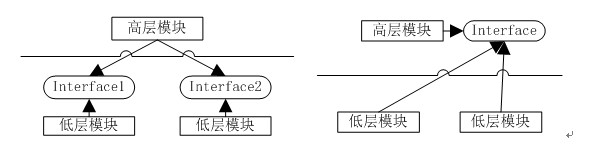
Figure 9-7: Before and after applying Dependency Inversion
As shown in Figure 9-7, the left side represents the dependency relationship between high-level and low-level modules before inversion. The right side shows the relationship after inversion. High-level modules are no longer controlled directly by low-level modules. There is no concrete coupling; flexibility increases and coupling decreases.
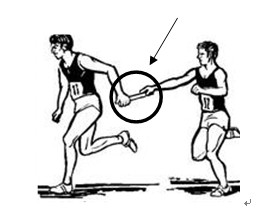
Figure 9-8: The baton in a relay race
As shown in Figure 9-8, the two individuals in a relay pass have no specific, direct relationship with each other.
Note: The Dependency Inversion Principle is a must for any framework. A framework, as a "high-level module," must not depend on the user's code (low-level modules). Both should depend on an abstraction. This is why, when using a framework to write code, we often base our work on existing framework types or interfaces (abstractions) to derive new types.
9.3 The Significance of Design Patterns and Principles to Frameworks
In the IT context, a framework is a supporting structure with certain constraints, designed to solve a set of open-ended problems. On this structure, more components can be extended and plugged in to build complete problem-solving solutions more quickly and conveniently.
From this description, we understand two things. First, each framework is limited in its problem-solving scope. For example, the Windows Forms framework helps us complete Windows desktop application development; this is its "constraint." Second, the framework itself doesn't solve a specific problem. It provides a pluggable and composable foundation for modules or components that address specific issues, offering "support."
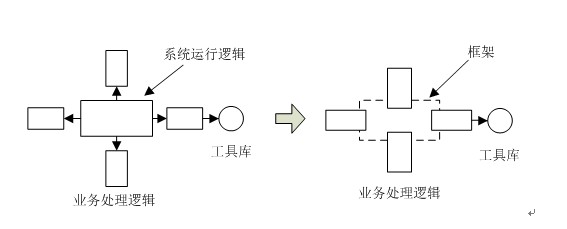
Figure 9-9: Development before and after using a framework
As shown in Figure 9-9, the left side depicts the code structure before using a framework, where developers are responsible for both "System Runtime Logic" and "Business Logic." The entire application flow is controlled by the developer's code. The right side shows the structure after using a framework. The "System Runtime Logic" is taken over by the framework, allowing the developer to focus solely on "Business Logic Processing" (the Windows Forms framework takes over the message loop, message processing, etc., managing the whole Winform application's operation). Besides this, there is a significant change: developers no longer call their own code; the code they write is called by the framework, transferring control of the application to the framework. This is the "Hollywood Principle" ("don't call us, we'll call you"), which is similar to the Inversion of Control (IoC) principle.
When using a framework to develop applications that solve real, concrete problems, the framework inevitably interacts with the code we write. This raises the question of how to manage the relationship between framework code and user code – what we often call "high cohesion, low coupling." The demands for "high cohesion, low coupling" are even higher in a framework because its audience and scope are much larger than that of an ordinary system. For a good framework to have a long lifespan and good reputation, it must be easy to upgrade and extend with new features to meet various user needs. Much of this depends on the initial design quality of the framework. Correctly applying various design patterns and strictly adhering to design principles are key factors that determine whether a framework can handle future changes, upgrades, and extensions.