This article discusses the built-in
@EnableSchedulingand@Scheduledannotations in Spring Boot for implementing scheduled tasks.
1. Setting Up the Basic Environment
Basic dependencies:
<parent>
    <artifactId>spring-boot-parent</artifactId>
    <groupId>org.springframework.boot</groupId>
    <version>2.7.2</version>
</parent>
<dependencies>
    <dependency>
        <groupId>org.springframework.boot</groupId>
        <artifactId>spring-boot</artifactId>
    </dependency>
    <dependency>
        <groupId>org.springframework.boot</groupId>
        <artifactId>spring-boot-starter</artifactId>
    </dependency>
    <dependency>
        <groupId>org.springframework.boot</groupId>
        <artifactId>spring-boot-starter-web</artifactId>
    </dependency>
    <dependency>
        <groupId>org.projectlombok</groupId>
        <artifactId>lombok</artifactId>
    </dependency>
</dependencies>
Create a startup class and a scheduled task:
@SpringBootApplication
public class ScheduleApplication {

    public static void main(String[] args) {
        SpringApplication.run(ScheduleApplication.class, args);
    }
}
@Slf4j
@Component
@EnableScheduling
public class TaskService {

    @Scheduled(cron = "0/5 * * * * ?")
    public void runTask() {
        log.info("Current thread ID: {}", Thread.currentThread().getId());
    }
}
2. Issues: Execution Delay and Single-Thread Execution
With the given cron expression @Scheduled(cron = "0/5 * * * * ?"), the task should execute every 5 seconds. Ideally, the last five executions would be:
2024-07-06 00:21:10
2024-07-06 00:21:15
2024-07-06 00:21:20
2024-07-06 00:21:25
2024-07-06 00:21:30
If the task executes very quickly, there is no noticeable delay.
Actual output for the simple task:
2024-07-06 19:42:10.018  INFO 24496 --- [scheduling-1] c.e.service.TaskService : Current thread ID: 64
2024-07-06 19:42:15.015  INFO 24496 --- [scheduling-1] c.e.service.TaskService : Current thread ID: 64
2024-07-06 19:42:20.001  INFO 24496 --- [scheduling-1] c.e.service.TaskService : Current thread ID: 64
2024-07-06 19:42:25.005  INFO 24496 --- [scheduling-1] c.e.service.TaskService : Current thread ID: 64
2024-07-06 19:42:30.007  INFO 24496 --- [scheduling-1] c.e.service.TaskService : Current thread ID: 64
However, real business logic often takes longer. Let's simulate a 10-second delay:
@Scheduled(cron = "0/5 * * * * ?")
public void runTask() {
    try {
        Thread.sleep(10000);
        log.info("Current thread ID: {}", Thread.currentThread().getId());
    } catch (Exception e) {
        e.printStackTrace();
    }
}
Output:
2024-07-06 19:46:50.019  INFO 27236 --- [scheduling-1] c.e.service.TaskService : Current thread ID: 64
2024-07-06 19:47:05.024  INFO 27236 --- [scheduling-1] c.e.service.TaskService : Current thread ID: 64
2024-07-06 19:47:20.016  INFO 27236 --- [scheduling-1] c.e.service.TaskService : Current thread ID: 64
2024-07-06 19:47:35.005  INFO 27236 --- [scheduling-1] c.e.service.TaskService : Current thread ID: 64
2024-07-06 19:47:50.006  INFO 27236 --- [scheduling-1] c.e.service.TaskService : Current thread ID: 64
Two problems emerge:
- Execution Delay: The task no longer runs every 5 seconds; it is significantly delayed.
- Single-Thread Execution: Only one thread executes all tasks, causing blocking.
3. Why Do These Issues Occur?
Root cause: Tasks are executed in a blocking manner with too few threads.
The @EnableScheduling annotation triggers auto-configuration via TaskSchedulingAutoConfiguration. Let's examine its code:
@ConditionalOnClass(ThreadPoolTaskScheduler.class)
@Configuration(proxyBeanMethods = false)
@EnableConfigurationProperties(TaskSchedulingProperties.class)
@AutoConfigureAfter(TaskExecutionAutoConfiguration.class)
public class TaskSchedulingAutoConfiguration {

    @Bean
    @ConditionalOnBean(name = TaskManagementConfigUtils.SCHEDULED_ANNOTATION_PROCESSOR_BEAN_NAME)
    @ConditionalOnMissingBean({ SchedulingConfigurer.class, TaskScheduler.class, ScheduledExecutorService.class })
    public ThreadPoolTaskScheduler taskScheduler(TaskSchedulerBuilder builder) {
        return builder.build();
    }
    // ...
}
The build() method creates a ThreadPoolTaskScheduler:
public ThreadPoolTaskScheduler build() {
    return configure(new ThreadPoolTaskScheduler());
}
Inside ThreadPoolTaskScheduler, the default pool size is 1:
private volatile int poolSize = 1;
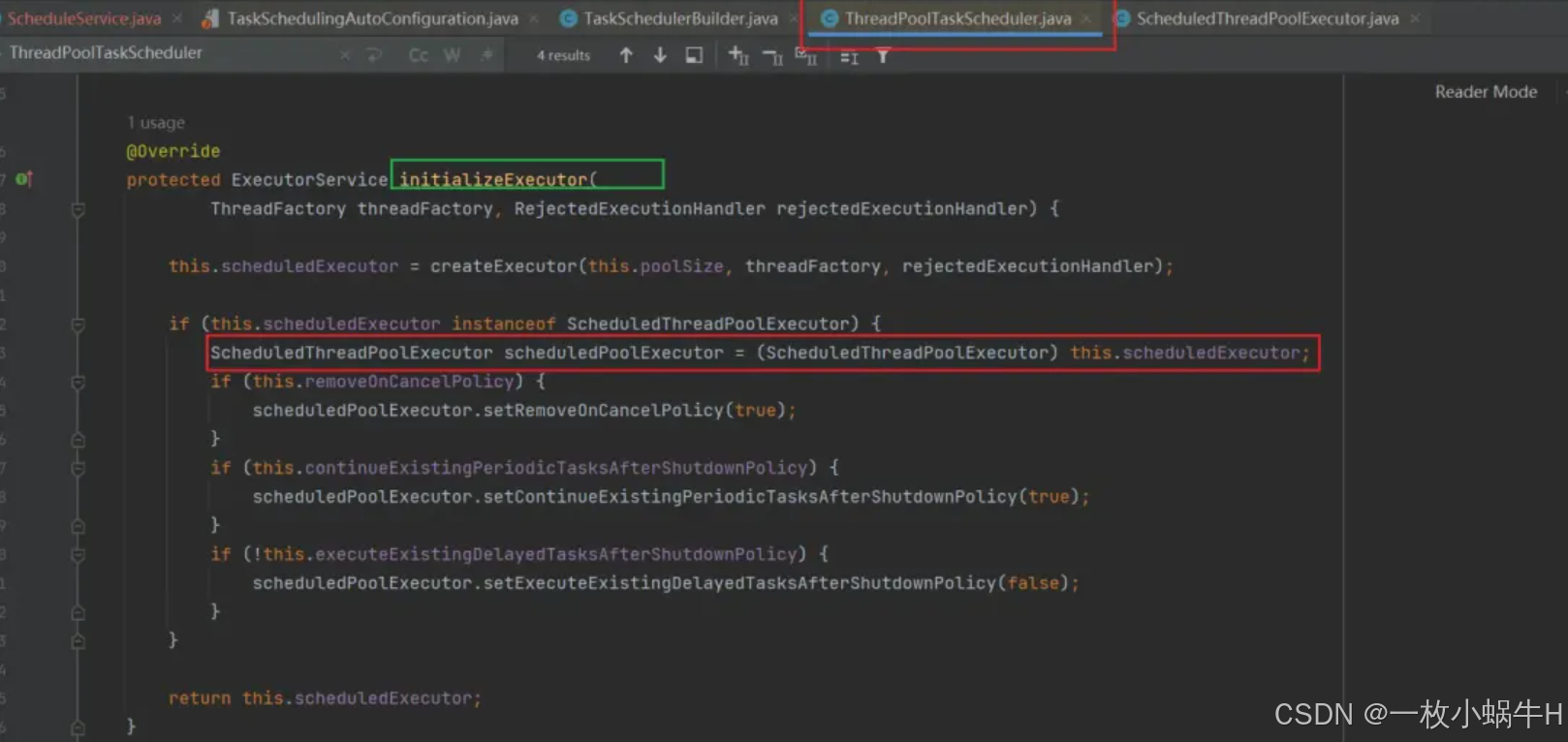
The executor creation only uses these three parameters, relying on ScheduledExecutorService defaults:
protected ScheduledExecutorService createExecutor(
    int poolSize, ThreadFactory threadFactory, RejectedExecutionHandler rejectedExecutionHandler)
These defaults are problematic for production. The Alibaba Java Development Guide explicitly states to manually create thread pools with appropriate parameters. Why? Because the default thread pool allows Integer.MAX_VALUE for both max pool size and work queue capacity.

If something goes wrong, the system will inevitab crash.
4. Solutions
- Configure properties via
TaskSchedulingProperties: Allows setting core pool size and prefix, but cannot set max pool size or queue capacity. This is insufficient. - Manually use asynchronous execution with a custom thread pool.
- Add
@Asyncto the scheduled method and define a custom thread pool.
4.1 Configuration File
You can configure the following:
spring:
  task:
    scheduling:
      thread-name-prefix: custom-schedule-
      pool:
        size: 10
Output:
2024-07-06 20:49:15.015  INFO 7852 --- [custom-schedule-1] c.e.service.TaskService : Current thread ID: 64
2024-07-06 20:49:30.004  INFO 7852 --- [custom-schedule-2] c.e.service.TaskService : Current thread ID: 66
2024-07-06 20:49:45.024  INFO 7852 --- [custom-schedule-1] c.e.service.TaskService : Current thread ID: 64
2024-07-06 20:50:00.025  INFO 7852 --- [custom-schedule-3] c.e.service.TaskService : Current thread ID: 67
2024-07-06 20:50:15.023  INFO 7852 --- [custom-schedule-2] c.e.service.TaskService : Current thread ID: 66
2024-07-06 20:50:30.008  INFO 7852 --- [custom-schedule-4] c.e.service.TaskService : Current thread ID: 68
Note: This configuration may not always take effect; the success rate varies.
Now multiple threads are used.
4.2 Asynchronous Execution via CompletableFuture
First, inject a custom thread pool:
@Configuration
public class ThreadPoolConfig {

    @Bean
    public TaskExecutor taskExecutor() {
        ThreadPoolTaskExecutor executor = new ThreadPoolTaskExecutor();
        executor.setCorePoolSize(10);
        executor.setMaxPoolSize(20);
        executor.setQueueCapacity(200);
        executor.setKeepAliveSeconds(60);
        executor.setThreadNamePrefix("custom-schedule-");
        executor.setRejectedExecutionHandler(new ThreadPoolExecutor.CallerRunsPolicy());
        executor.setWaitForTasksToCompleteOnShutdown(true);
        return executor;
    }
}
Then use it in the task:
@Slf4j
@Component
@EnableScheduling
public class TaskService {

    @Autowired
    private TaskExecutor taskExecutor;

    @Scheduled(cron = "0/5 * * * * ?")
    public void runTask() {
        CompletableFuture.runAsync(() -> {
            try {
                Thread.sleep(10000);
                log.info("Current thread ID: {}", Thread.currentThread().getId());
            } catch (Exception e) {
                e.printStackTrace();
            }
        }, taskExecutor);
    }
}
Output:
2024-07-06 21:00:00.019  INFO 18356 --- [custom-schedule-1] c.e.service.TaskService : Current thread ID: 66
2024-07-06 21:00:05.022  INFO 18356 --- [custom-schedule-2] c.e.service.TaskService : Current thread ID: 67
2024-07-06 21:00:10.013  INFO 18356 --- [custom-schedule-3] c.e.service.TaskService : Current thread ID: 68
2024-07-06 21:00:15.020  INFO 18356 --- [custom-schedule-4] c.e.service.TaskService : Current thread ID: 69
2024-07-06 21:00:20.026  INFO 18356 --- [custom-schedule-5] c.e.service.TaskService : Current thread ID: 70
The task now runs every 5 seconds without delay.
4.3 Asynchronous Scheduled Task with @Async
Add @EnableAsync and @Async to the class and method:
@Slf4j
@Component
@EnableAsync
@EnableScheduling
public class TaskService {

    @Autowired
    private TaskExecutor taskExecutor;

    @Async(value = "taskExecutor")
    @Scheduled(cron = "0/5 * * * * ?")
    public void runTask() {
        try {
            Thread.sleep(10000);
            log.info("Current thread ID: {}", Thread.currentThread().getId());
        } catch (Exception e) {
            e.printStackTrace();
        }
    }
}
Output:
2024-07-06 21:10:15.022  INFO 22760 --- [custom-schedule-1] c.e.service.TaskService : Current thread ID: 66
2024-07-06 21:10:20.021  INFO 22760 --- [custom-schedule-2] c.e.service.TaskService : Current thread ID: 67
2024-07-06 21:10:25.007  INFO 22760 --- [custom-schedule-3] c.e.service.TaskService : Current thread ID: 68
2024-07-06 21:10:30.020  INFO 22760 --- [custom-schedule-4] c.e.service.TaskService : Current thread ID: 69
2024-07-06 21:10:35.007  INFO 22760 --- [custom-schedule-5] c.e.service.TaskService : Current thread ID: 70
This approach also works. Note that @EnableAsync activates TaskExecutionAutoConfiguration, which has its own properties (TaskExecutionProperties). The default core pool size is 8, but max pool size and queue capacity default to Integer.MAX_VALUE, again not recommended.
4.4 Summary
Scheduled Tasks
@EnableScheduling: enables scheduling@Scheduled: marks a method as scheduled- Auto-configuration:
TaskSchedulingAutoConfiguration
Asynchronous Tasks
@EnableAsync: enables async execution@Async: marks a method as asynchronous- Auto-configuration:
TaskExecutionAutoConfiguration
5. Distributed Considerations
The above solutions work for single-node applications. In a distributed environment, running the same scheduled task on multiple nodes can cause issues, such as duplicate messages or data corruption.
Using Redisson Distributed Lock
Add dependencies:
<dependency>
    <groupId>org.springframework.boot</groupId>
    <artifactId>spring-boot-starter-data-redis</artifactId>
</dependency>
<dependency>
    <groupId>org.redisson</groupId>
    <artifactId>redisson-spring-boot-starter</artifactId>
    <version>3.17.6</version>
</dependency>
Configure RedissonClient:
@Configuration
public class RedissonConfig {

    @Bean(destroyMethod = "shutdown")
    public RedissonClient redissonClient() throws IOException {
        Config config = new Config();
        config.useSingleServer()
            .setAddress("redis://xxx.xxx.xxx.xxx:6379")
            .setPassword("yourpassword"); // omit if no password
        return Redisson.create(config);
    }
}
Modify the scheduled task to use the lock:
@Slf4j
@Component
@EnableAsync
@EnableScheduling
public class TaskService {

    @Autowired
    private TaskExecutor taskExecutor;

    @Autowired
    private RedissonClient redissonClient;

    private static final String SCHEDULE_LOCK = "schedule:lock";

    @Async(value = "taskExecutor")
    @Scheduled(cron = "0/5 * * * * ?")
    public void runTask() {
        RLock lock = redissonClient.getLock(SCHEDULE_LOCK);
        try {
            // Lock with 10-second lease time; disables Redisson's watchdog
            lock.lock(10, TimeUnit.SECONDS);
            Thread.sleep(10000);
            log.info("Current thread ID: {}", Thread.currentThread().getId());
        } catch (Exception e) {
            e.printStackTrace();
        } finally {
            lock.unlock();
        }
    }
}
This is a basic implementation. Optimization ideas include using a flag to skip execution if another node already holds the lock.