1. Using Selector in a Multithreaded Environment
1-1 Why Multi-threading Optimization?
Although a single thread with a selector can manage multiple channels' events, it has the following drawbacks:
Drawback 1: Multi-core CPUs are wasted.
Drawback 2: A time-consuming event can delay the processing of other events.
- Single-threaded event processing is suitable when each event is brief.
Note: Redis uses a single thread for processing. If an operation takes a long time, it affects other operations, so the time complexity of individual Redis operations must not be high.
1-2 Multi-threaded Architecture Model
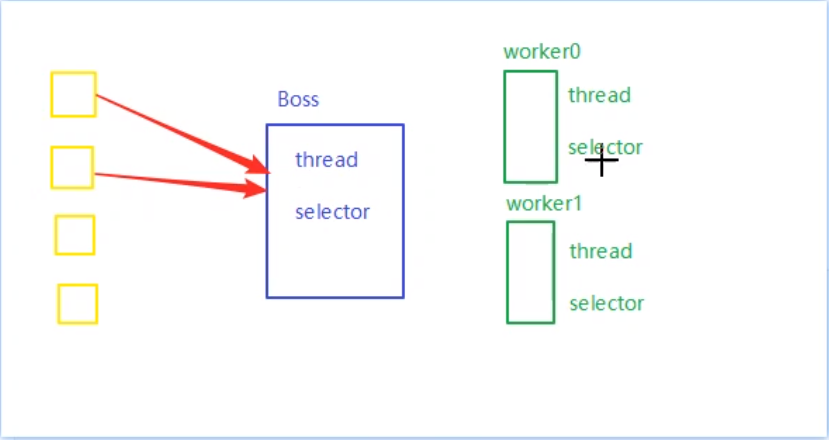
Based on the principle of division of labor, the overall design is divided into two parts: the boss module and the worker module (typically one boss thread with multiple worker threads):
Boss Module (Responsible only for accepting connections): A multi-threaded mechanism (each thread has its own selector), specifically designed to handle client connection events.
Worker Module (Responsible only for reading/writing): Multiple workers, each worker is a thread with a selector, dedicated to data read and write operations.
- The number of threads usually matches the number of CPU cores.
1-3 Network Communication with Selector in a Multithreaded Environment
1-3-1 Why Readable Events Cannot Be Obtained in a Multithreaded Environment
import lombok.extern.slf4j.Slf4j;
import java.io.IOException;
import java.net.InetSocketAddress;
import java.net.Socket;
import java.nio.ByteBuffer;
import java.nio.channels.SelectionKey;
import java.nio.channels.Selector;
import java.nio.channels.ServerSocketChannel;
import java.nio.channels.SocketChannel;
import java.nio.charset.StandardCharsets;
import java.util.Iterator;

@Slf4j
public class Server7 {
    public static void main(String[] args) throws IOException {
        Thread.currentThread().setName("boss");
        ServerSocketChannel ssc = ServerSocketChannel.open();
        ssc.configureBlocking(false);
        /*boss selector exclusively for handling accept events*/
        Selector boss = Selector.open();
        SelectionKey bossKey = ssc.register(boss, 0, null);
        bossKey.interestOps(SelectionKey.OP_ACCEPT);
        ssc.bind(new InetSocketAddress(8080));

        // 1. Create a fixed number of workers and initialize them
        Worker worker = new Worker("worker-0");
        worker.register();
        while (true) {
            boss.select();
            Iterator<SelectionKey> iter = boss.selectedKeys().iterator();
            while (iter.hasNext()) {
                SelectionKey key = iter.next();
                iter.remove();
                if (key.isAcceptable()) {
                    log.debug("accept event happen!");
                    SocketChannel sc = ssc.accept();
                    sc.configureBlocking(false);
                    log.debug("before register...{}", sc.getRemoteAddress());
                    // 2. Associate with the selector
                    sc.register(worker.selector, SelectionKey.OP_READ, null);
                    log.debug("after register...{}", sc.getRemoteAddress());
                }
            }
        }
    }

    // Only inner classes can be static
    static class Worker implements Runnable {
        private Thread thread;
        private Selector selector;
        private String name;
        private volatile boolean start = false;

        public Worker(String name) {
            this.name = name;
        }

        // Initialize thread and selector
        public void register() throws IOException {
            if (!start) { // Ensure this code runs only once
                selector = Selector.open();
                thread = new Thread(this, name);
                thread.start();
                start = true;
            }
        }

        @Override
        public void run() {
            while (true) {
                try {
                    log.debug("begin select!");
                    selector.select();
                    Iterator<SelectionKey> iter = selector.selectedKeys().iterator();
                    while (iter.hasNext()) {
                        SelectionKey key = iter.next();
                        iter.remove();
                        /* Reading and writing here must consider message boundaries, large data sizes, and normal/abnormal connection closures. See the single-threaded version for details */
                        if (key.isReadable()) {
                            ByteBuffer buffer = ByteBuffer.allocate(16);
                            SocketChannel channel = (SocketChannel) key.channel();
                            channel.read(buffer);
                            buffer.flip();
                            printBytebuffer(buffer);
                        }
                    }
                } catch (IOException e) {
                    e.printStackTrace();
                }
            }
        }
    }

    static void printBytebuffer(ByteBuffer tmp) { // Note: The incoming ByteBuffer must be in write mode
        System.out.println(StandardCharsets.UTF_8.decode(tmp).toString());
    }
}
Execution result after client connects and sends data
14:44:05.969 [worker-0] DEBUG Server.Server7 - begin select!
14:44:14.910 [boss] DEBUG Server.Server7 - accept event happen!
14:44:14.911 [boss] DEBUG Server.Server7 - before register.../127.0.0.1:14363   // Cannot obtain readable event
Problem: The server's boss module selector can handle accept events, but the worker module cannot obtain readable events.
Reason Analysis:
- The main reason is that after the worker thread executes the
selectmethod, theregistermethod in the main thread becomes ineffective. This causes the selector to not monitor read/write events (a problem arising from thread asynchronicity).
Code Block 1: The main thread registers the readable channel with the worker's selector (the main thread executes this method!!!)
sc.register(worker.selector, SelectionKey.OP_READ, null);
Code Block 2: The select method inside the run method of the worker thread (executed by the worker-0 thread!!)
public void run() {
    while (true) {
        try {
            selector.select();
Complete logic for handling readable events in a single-threaded version
1-3-2 Solving the Issue of Unobtainable Readable Events with Task Queues and Wakeup
Solution: Let the worker thread execute the registration task by passing a task object to the worker thread via a task queue.
Server Code
import lombok.extern.slf4j.Slf4j;
import java.io.IOException;
import java.net.InetSocketAddress;
import java.nio.ByteBuffer;
import java.nio.channels.*;
import java.nio.charset.StandardCharsets;
import java.util.Iterator;
import java.util.concurrent.ConcurrentLinkedQueue;

@Slf4j
public class Server8 {
    public static void main(String[] args) throws IOException {
        Thread.currentThread().setName("boss");
        ServerSocketChannel ssc = ServerSocketChannel.open();
        ssc.configureBlocking(false);
        Selector boss = Selector.open();
        SelectionKey bossKey = ssc.register(boss, 0, null);
        bossKey.interestOps(SelectionKey.OP_ACCEPT);
        ssc.bind(new InetSocketAddress(8080));
        Worker worker = new Worker("worker-0");
        while (true) {
            boss.select();
            Iterator<SelectionKey> iter = boss.selectedKeys().iterator();
            while (iter.hasNext()) {
                SelectionKey key = iter.next();
                iter.remove();
                if (key.isAcceptable()) {
                    log.debug("accept event happen!");
                    SocketChannel sc = ssc.accept();
                    sc.configureBlocking(false);
                    worker.register(sc); // First call starts the thread and registers, subsequent calls only register
                }
            }
        }
    }

    // Only inner classes can be static
    static class Worker implements Runnable {
        private Thread thread;
        private Selector selector;
        private String name;
        private volatile boolean start = false;
        private ConcurrentLinkedQueue<Runnable> queue = new ConcurrentLinkedQueue<>();

        public Worker(String name) {
            this.name = name;
        }

        // Initialize thread and selector
        /*====== Improvement 1: After an accept event occurs in the boss thread, this method is called, and a Runnable object is placed into the message queue ==============================*/
        public void register(SocketChannel sc) throws IOException {
            if (!start) { // Ensure only one worker thread exists
                selector = Selector.open();
                thread = new Thread(this, name);
                thread.start();
                start = true;
            }
            // Add a registration task to the queue (Runnable task). When the worker thread runs, it gets the task from this queue and executes it.
            // Ensure that channel registration happens before select.
            queue.add(() -> {
                try {
                    sc.register(selector, SelectionKey.OP_READ, null);
                    selector.selectNow();
                } catch (IOException e) {
                    e.printStackTrace();
                }
            });
            /*
             * Make the subsequent select operation non-blocking.
             * Causes the first selection operation that has not yet returned to return immediately.
             */
            selector.wakeup(); // This method call causes the select method to return immediately once, ensuring registration completes
            log.debug("Wake up for to register new read/write channel for the selector!");
        }

        @Override
        public void run() {
            while (true) {
                try {
                    selector.select();
                    /*====== Improvement 1: Take the Runnable object from the message queue and complete the registration ==============================*/
                    Runnable task = queue.poll();
                    if (task != null) {
                        task.run(); // Executes sc.register(selector, SelectionKey.OP_READ, null)
                        log.debug("Register successfully!");
                    }
                    Iterator<SelectionKey> iter = selector.selectedKeys().iterator();
                    while (iter.hasNext()) {
                        SelectionKey key = iter.next();
                        /* Reading and writing here must consider message boundaries and large data sizes. See the single-threaded version for details */
                        /* For readable events, three cases must be considered:
                         * 1) Normal readable event
                         * 2) Abnormal client closure (needs exception handling)
                         * 3) Normal client closure, where the number of readable bytes is 0, requiring a cancel operation.
                         * Ignoring the second case can cause the server program to crash. Ignoring the third case can cause the server to enter an infinite loop.
                         */
                        if (key.isReadable()) {
                            try {
                                ByteBuffer buffer = ByteBuffer.allocate(16);
                                SocketChannel channel = (SocketChannel) key.channel();
                                int read = channel.read(buffer);
                                if (read == -1) {
                                    key.cancel();
                                    channel.close();
                                } else {
                                    buffer.flip();
                                    printBytebuffer(buffer);
                                }
                            } catch (IOException e) {
                                e.printStackTrace();
                            }
                        }
                        iter.remove();
                    }
                } catch (IOException e) {
                    e.printStackTrace();
                }
            }
        }
    }

    static void printBytebuffer(ByteBuffer tmp) { // Note: The incoming ByteBuffer must be in write mode
        System.out.println(StandardCharsets.UTF_8.decode(tmp).toString());
    }
}
Key Points:
- Calling the
wakeupmethod causesselector.select()to return immediately once. - Using
ConcurrentLinkedQueue, the boss thread passes aRunnableobject to the worker thread, enabling the worker thread to perform bothselectandregisteroperations.
Java Note on Writable Events: There are three cases that can trigger a readable event:
 1) Normal readable event
 2) Abnormal client closure (needs exception handling)
 3) Normal client closure, where the number of readable bytes is 0, requiring a cancel operation (otherwise the key will not be removed from the event set).
The unified template for handling these three cases is as follows:
while (iter.hasNext()) {
    SelectionKey key = iter.next();
    /* Reading and writing here must consider message boundaries and large data sizes. See the single-threaded version for details */
    /* For readable events, three cases must be considered:
     * 1) Normal readable event
     * 2) Abnormal client closure (needs exception handling)
     * 3) Normal client closure, where the number of readable bytes is 0, requiring a cancel operation.
     * Ignoring the second case can cause the server program to crash. Ignoring the third case can cause the server to enter an infinite loop.
     */
    if (key.isReadable()) {
        try {
            ByteBuffer buffer = ByteBuffer.allocate(16);
            SocketChannel channel = (SocketChannel) key.channel();
            int read = channel.read(buffer);
            if (read == -1) {
                key.cancel();
                channel.close();
            } else {
                buffer.flip();
                printBytebuffer(buffer);
            }
        } catch (IOException e) {
            e.printStackTrace();
        }
    }
    iter.remove();
}
1-4 Complete Usage of Selector in a Multithreaded Environment
Program functionality:
- Define a boss, whose selector specifically monitors client accept events.
- Define a worker class implementing
Runnable, whose selector monitors client read/write events. - Use one boss and multiple workers to handle client connections.
- The number of workers is usually set based on the number of CPU cores.
- Use a round-robin mechanism to let multiple workers evenly monitor the read/write events of client connections.
- In a multithreaded environment, implemented using an atomic integer.
Server Implementation Code
import lombok.extern.slf4j.Slf4j;
import java.io.IOException;
import java.net.InetSocketAddress;
import java.nio.ByteBuffer;
import java.nio.channels.*;
import java.nio.charset.StandardCharsets;
import java.util.Iterator;
import java.util.Set;
import java.util.concurrent.ConcurrentLinkedQueue;
import java.util.concurrent.atomic.AtomicInteger;

public class Server9 {
    public static void main(String[] args) throws IOException {
        new BossEventLoop().register();
    }

    @Slf4j
    static class BossEventLoop implements Runnable {
        /*============================01 Important Properties=============================================*/
        /*Create a boss and multiple workers*/
        private Selector boss;
        private WorkerEventLoop[] workers;
        private volatile boolean start = false;
        /*Create a counter; when a connection is established, poll available workers and bind the channel to an idle worker's selector*/
        AtomicInteger index = new AtomicInteger();

        /*============================02 Initialize the boss thread to listen for client connection events===========================*/
        public void register() throws IOException {
            if (!start) {
                ServerSocketChannel ssc = ServerSocketChannel.open();
                ssc.bind(new InetSocketAddress(8080));
                ssc.configureBlocking(false);
                boss = Selector.open();
                SelectionKey ssckey = ssc.register(boss, 0, null);
                ssckey.interestOps(SelectionKey.OP_ACCEPT);
                workers = initEventLoops();
                new Thread(this, "boss").start();
                log.debug("boss start...");
                start = true;
            }
        }

        /*============================03 Initialize worker threads===========================*/
        public WorkerEventLoop[] initEventLoops() {
            // Runtime.getRuntime().availableProcessors() can get the current CPU core count.
            // This method has a bug: it cannot get the allocated CPU cores in a Docker environment.
            WorkerEventLoop[] workerEventLoops = new WorkerEventLoop[2];
            for (int i = 0; i < workerEventLoops.length; i++) {
                workerEventLoops[i] = new WorkerEventLoop(i);
            }
            return workerEventLoops;
        }

        /*============================04 Actual running code: The boss's selector listens for accept events ==============
         * When a new connection arrives, assign a worker in a round-robin fashion.
         * This worker's selector is dedicated to monitoring this connection's read/write events.
         * The round-robin strategy ensures that each worker monitors an even number of connections.
         ===========================*/
        @Override
        public void run() {
            while (true) {
                try {
                    boss.select();
                    Iterator<SelectionKey> iter = boss.selectedKeys().iterator();
                    while (iter.hasNext()) {
                        SelectionKey key = iter.next();
                        iter.remove();
                        if (key.isAcceptable()) {
                            ServerSocketChannel c = (ServerSocketChannel) key.channel();
                            SocketChannel sc = c.accept();
                            sc.configureBlocking(false);
                            log.debug("{} connected", sc.getRemoteAddress());
                            workers[index.getAndIncrement() % workers.length].register(sc);
                        }
                    }
                } catch (IOException e) {
                    e.printStackTrace();
                }
            }
        }
    }

    /*=============================04 Definition of Worker Class for Handling Read/Write Events============================== */
    @Slf4j
    static class WorkerEventLoop implements Runnable {
        private Selector worker;
        private volatile boolean start = false;
        private int index;
        private final ConcurrentLinkedQueue<Runnable> tasks = new ConcurrentLinkedQueue<>();

        public WorkerEventLoop(int index) {
            this.index = index;
        }

        public void register(SocketChannel sc) throws IOException {
            if (!start) {
                worker = Selector.open();
                new Thread(this, "worker-" + index).start();
                start = true;
            }
            tasks.add(() -> {
                try {
                    SelectionKey sckey = sc.register(worker, 0, null);
                    sckey.interestOps(SelectionKey.OP_READ);
                    worker.selectNow();
                } catch (IOException e) {
                    e.printStackTrace();
                }
            });
            worker.wakeup();
        }

        @Override
        public void run() {
            while (true) {
                try {
                    worker.select();
                    Runnable task = tasks.poll();
                    if (task != null) {
                        task.run();
                    }
                    Set<SelectionKey> keys = worker.selectedKeys();
                    Iterator<SelectionKey> iter = keys.iterator();
                    while (iter.hasNext()) {
                        SelectionKey key = iter.next();
                        if (key.isReadable()) {
                            SocketChannel sc = (SocketChannel) key.channel();
                            ByteBuffer buffer = ByteBuffer.allocate(128);
                            try {
                                int read = sc.read(buffer);
                                if (read == -1) {
                                    key.cancel();
                                    sc.close();
                                } else {
                                    buffer.flip();
                                    log.debug("{} message:", sc.getRemoteAddress());
                                    printBytebuffer(buffer);
                                }
                            } catch (IOException e) {
                                e.printStackTrace();
                                key.cancel();
                                sc.close();
                            }
                        }
                        iter.remove();
                    }
                } catch (IOException e) {
                    e.printStackTrace();
                }
            }
        }
    }

    static void printBytebuffer(ByteBuffer tmp) { // Note: The incoming ByteBuffer must be in write mode
        System.out.println(StandardCharsets.UTF_8.decode(tmp).toString());
    }
}
2. Basic Concepts of NIO and BIO
2-1 Differences between Stream and Channel in Java
Definition
Stream: Classes to support functional-style operations on streams of elements, such as map-reduce transformations on collections.
Channel: A channel represents an open connection to an entity such as a hardware device, a file, a network socket, or a program component that is capable of performing one or more distinct I/O operations, for example reading or writing.
A channel is either open or closed. A channel is open upon creation, and once closed it remains closed. Once a channel is closed, any attempt to invoke an I/O operation upon it will cause a ClosedChannelException to be thrown. Whether or not a channel is open may be tested by invoking its isOpen method. Channels are, in general, intended to be safe for multithreaded access as described in the specifications of the interfaces and classes that extend and implement this interface.
In summary: A stream is a more abstract concept, generally referring to a flow of entities, while a channel represents a connection to a specific entity (hardware device, file, network socket).
Differences:
- Streams do not automatically buffer data, while channels use the system's send and receive buffers (more low-level).
- Streams only support blocking APIs, channels support both blocking and non-blocking APIs. Network channels can work with a selector for multiplexing (file channels do not support multiplexing).
Similarities:
- Both are full-duplex, meaning reading and writing can happen simultaneously.
2-2 IO Models
2-2-1 Analyzing Blocking/Non-blocking IO from the Read Method
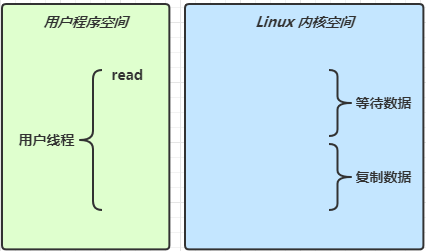
When channel.read() or stream.read() is called, the execution switches to the operating system kernel mode to perform the actual data reading. Reading involves two phases:
- Waiting for data phase
- Copying data phase
In summary, read operations require support from the operating system. Java's read operations need operating system support.
The waiting phase is the period when the operating system switches to kernel mode and retrieves data from hardware into memory.
| Name | Call | Distinguishing Between Two Data Reading Phases |
|---|---|---|
| Blocking IO | read |
Blocking IO causes the user thread to stop running (block) during both the waiting for data phase and the copying data phase |
| Non-blocking IO | read |
Non-blocking IO does not block during the waiting for data phase (returns immediately if no data), but the thread is still blocked during the copying data phase. |
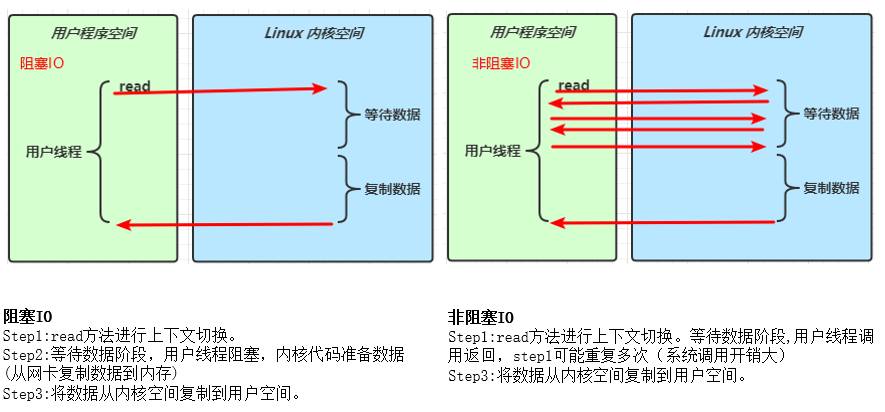
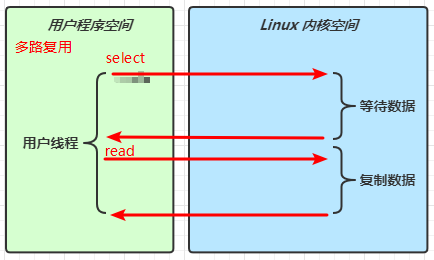
It can be seen that the blocking IO model and the multiplexed IO model behave very similarly in the diagram. Both are blocked in the waiting and copying data phases. The main difference between them is shown below:
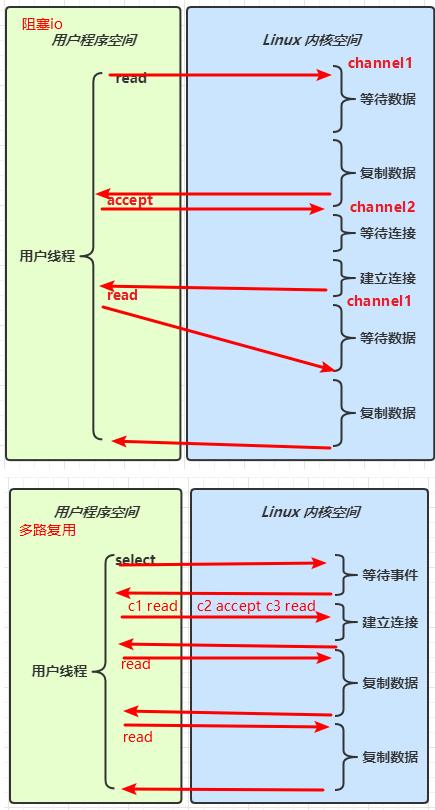
The main difference between selectors and blocking IO:
- A selector returns when any type of event is ready; if multiple events are ready, it returns multiple events.
- Blocking IO can only process different types of events (accept/read/write) one by one.
2-2-2 Viewing IO Models from a Synchronous/Asynchronous Perspective
- Synchronous: The thread fetches the result itself (one thread).
- Asynchronous: The thread does not fetch the result itself; another thread delivers the result (atleast two threads).
Synchronous blocking, synchronous non-blocking, synchronous multiplexing, asynchronous blocking (this case does not exist), asynchronous non-blocking (understand these concepts from the network IO model).
| Name / IO Model | Synchronous/Asynchronous Distinction | Blocking/Non-blocking Distinction | |
|---|---|---|---|
| Synchronous Blocking (Blocking IO) | Calls the read method itself to get the result, but the waiting process blocks the user thread. |
Stops running during both the waiting and copying data phases (blocked). | |
| Synchronous Non-blocking (Non-blocking IO) | Calls the read method itself to get the result, but the waiting process does not block the user thread. |
Does not block during the waiting data phase but blocks during the copying data phase. | |
| Synchronous Multiplexing (IO Multiplexing) | Calls the read method itself to get the result. Returns to process events when an event occurs; blocked otherwise. |
Stops running during both the waiting and copying data phases (blocked). | |
| Asynchronous Non-blocking (Asynchronous IO) | Calls a method but does not get the result itself; the result is delivered by another thread via a callback function. | Does not block during either the waiting or copying data phases. |
Note: There is no such thing as asynchronous blocking!
- Asynchronous already means another thread delivers the result, so there is no need to block.
Understanding Callback Methods
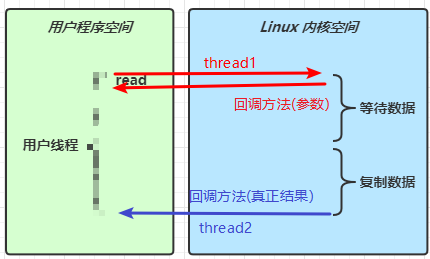
The diagram above shows Asynchronous IO. Key points:
1) The user thread provides a callback method as a parameter to another thread.
2) The other thread, when conditions are met, calls the callback function to deliver the result to the user thread.
2-3 Zero-Copy in IO Models
2-3-1 Method 1: Data Copy Count in Traditional IO Model
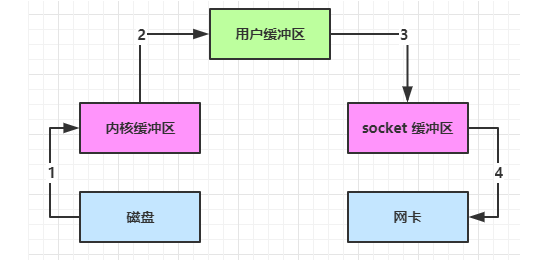
File f = new File("helloword/data.txt");
RandomAccessFile file = new RandomAccessFile(f, "r");
byte[] buf = new byte[(int)f.length()];
file.read(buf);
Socket socket = ...;
socket.getOutputStream().write(buf);
Scenario: Read content from a disk file and send it over a network socket.
Data Copy Count (4 times): Disk => Kernel Buffer (DMA, kernel mode), Kernel Buffer => User Buffer (CPU, user mode), User Buffer => Socket Buffer (CPU, user mode), Socket Buffer => Network Card (DMA, kernel mode)
- After calling the
readmethod, it switches from the Java program's user mode to kernel mode to call the operating system's (Kernel) read capability, reading data from the disk into the kernel buffer. During this time, the user thread is blocked. The operating system uses DMA (Direct Memory Access) for file reading, which does not use the CPU.DMA can also be understood as a hardware unit used to free the CPU for file IO.
- Switches back from kernel mode to user mode, reading data from the kernel buffer into the user buffer (i.e.,
byte[] buf). During this process, the CPU is involved in copying and cannot use DMA. - Calls the
writemethod, which writes data from the user buffer (byte[] buf) to the socket buffer. The CPU is involved in copying. - To write data to the network card, it switches again from user mode to kernel mode, calls the operating system's write capability, and uses DMA to write data from the socket buffer to the network card, without using the CPU.
2-3-2 Method 2: Direct Memory Optimization
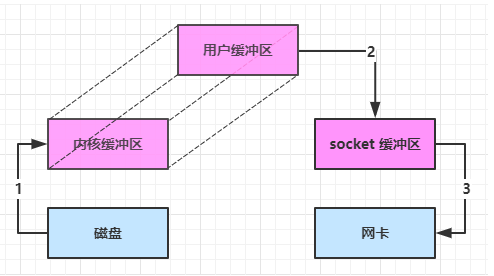
By allocating direct memory, the kernel buffer and user buffer are merged together, reducing one copy of file data during reading.
- Data is copied 3 times.
- There are 2 mode switches between user mode and kernel mode.
2-3-3 Method 3: Further Optimization
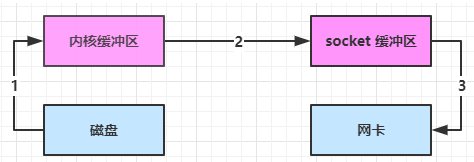
- After Java calls the
transferTo()method, it switches from the Java program's user mode to kernel mode, uses DMA to read data into the kernel buffer, without using the CPU. - Data is transferred from the kernel buffer to the socket buffer, the CPU is involved in copying.
- Finally, DMA is used to write data from the socket buffer to the network card, without using the CPU.
As you can see:
- Only one user-to-kernel mode switch occurs.
- Data is copied 3 times.
2-3-4 Method 4: Further Optimization (Hardware Optimization)
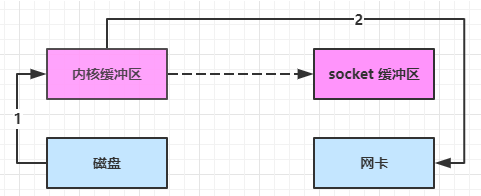
- After Java calls the
transferTo()method, it switches from the Java program's user mode to kernel mode, uses DMA to read data into the kernel buffer, without using the CPU. - Only some offset and length information is copied to the socket buffer, which consumes almost nothing.
- DMA is used to write data from the kernel buffer to the network card, without using the CPU (data is copied without passing through the socket buffer).
As you can see:
- One user-to-kernel mode switch.
- Data is copied 2 times.
2-3-5 Summary of Four Methods
| Data Copy Count | User/Kernel Mode Switch Count | Feature | |
|---|---|---|---|
| Method 1: Traditional IO | 4 | 2 | Disk -> Kernel Buffer -> User Buffer -> Socket Buffer -> Network Card |
| Method 2: Java Direct Memory Optimization | 3 | 2 | Disk -> Direct Memory -> Socket Buffer -> Network Card |
| Method 3 | 3 | 1 | Disk -> Kernel Buffer -> Socket Buffer -> Network Card |
| Method 4 | 2 | 1 | Disk -> Kernel Buffer -> Network Card |
Summary:
- Methods 3 and 4 are both zero-copy. Data is not placed into the user buffer. The biggest feature is that only one user-to-kernel mode switch is needed (saving context switching overhead).
- Methods 4 and 3 have their own applicable scenarios. Method 4 copies data one less time than Method 3.
2-3-6 Sumary of Zero-Copy
Zero-copy: It is not truly no copying, but it avoids copying duplicate data into the JVM memory (user buffer). (Methods 3 and 4 are both zero-copy).
Advantages of Zero-Copy:
- Fewer user-to-kernel mode switches.
- Does not use CPU computation, reducing CPU cache false sharing.
- Zero-copy is suitable for frequent small file transfers.
2-4 Introduction to Asynchronous IO
- Netty 5 has been deprecated. Linux support is not very good, Windows support is better. This is just for understanding.
AIO is used to solve the blocking problem during the data copying phase.
- Synchronous means that during read/write operations, the thread must wait for the result, which is still idling.
- Asynchronous means that during read/write operations, the thread does not have to wait for the result; instead, the operating system will deliver the result via a callback from another thread in the future.
Asynchronous models require support from the underlying operating system (Kernel).
- The Windows system implements true asynchronous IO through IOCP.
- Asynchronous IO in the Linux system was introduced in version 2.6, but its underlying implementation still uses multiplexing to simulate asynchronous IO, which has no performance advantage.
💡 Daemon Threads
The threads used by the default file AIO are daemon threads, so System.in.read() must be executed at the end to prevent the daemon threads from ending unexpectedly.
References
01 Netty Basic Course