Vue Frontend Framework Learning: V2 → V3, JS → TS
Install Vue snippet plugins: Vue3 Snippets and Vetur. Quickly generate Vue templates using <v+enter.
**Arrow functions bind this to the outer lexical scope. Functions managed by Vue should be written as regular functions (not arrow). For non-Vue-managed callbacks (e.g., timers, Ajax, Promises), use arrow functions sothat this resolves to the Vue instance when possible.**
Data reactive system: All properties in the data object are traversed and given getter/setter methods. When a value changes, the setter intercepts the change, updates the data, and re-renders the template.
To dynamically bind an attribute value, prefix the attribute with : (e.g., :src="url").
nanoid is a lightweight alternative to uuid.
Important: v-model cannot be directly bound to a prop passed from a parent; you must not mutate props directly.
After changing configuration, restart the server.
**Third-party CSS libraries are usually placed in assets/css and imported in App.vue. However, if the third-party library itself depends on other third-party resources, it's better to place them in public/css and link in index.html.**
this.obj = { ...this.obj, ...this.obj2 } merges two objects using the spread operator. Properties with the same name are overwritten by the later source.
BootCDN website for third-party libraries.
Cookie-Editor plugin for bulk import/export of cookies.
Vue key features:
- Progressive framework
- Component-based (each
.vuefile is a component containing HTML, CSS, JS) – improves code reuse and encapsulation - Declarative coding – no direct DOM manipulation, more efficient. Contrast with imperative JS where loops and string concatenation were needed; now a
v-forsuffices - Virtual DOM + Diff algorithm – reuses DOM nodes
Prerequisites in JavaScript:
- ES6 syntax and modules
- Package manager (npm)
- Prototypes and prototype chain
- Common array methods
- Axios
- Promises
Official site: https://cn.vuejs.org/
Vue 2 (Vue 2 area)
Vue-devtools installation (GitHub → build → Chrome extension)
Steps:
- Remove
yarn.lockandnode_modules - Install yarn:
npm install yarn -g - Install dependencies:
yarn install - Build:
yarn run build - Select folder
packages\shell-chrome
Vue.config
Global configuration object. Example: productionTip: false (since 2.2.0) to suppress the production tip on startup.
Container DIV and Vue instance: one-to-one relationship
One Vue instance corresponds to exactly one container DIV, and vice versa.
Template syntax
Interpolation {{ }}
Directives v-xxx
Data binding
One-way binding v-bind
v-bind:value="" → shorthand :value=""
Two-way binding v-model
v-model:value="" → shorthand v-model=""
Two ways to define el and data
el: specifies the container for the Vue instance. Alternatively, use $mount.
data: can be an object or a function (function preferred in components: data() { }).
Important: Functions managed by Vue must not be arrow functions (they lose this); use regular functions.
MVVM (Model-View-ViewModel)
- Model: data
- View: DOM
- ViewModel: Vue instance – uses Data Bindings (model → view) and DOM Listeners (view → model)
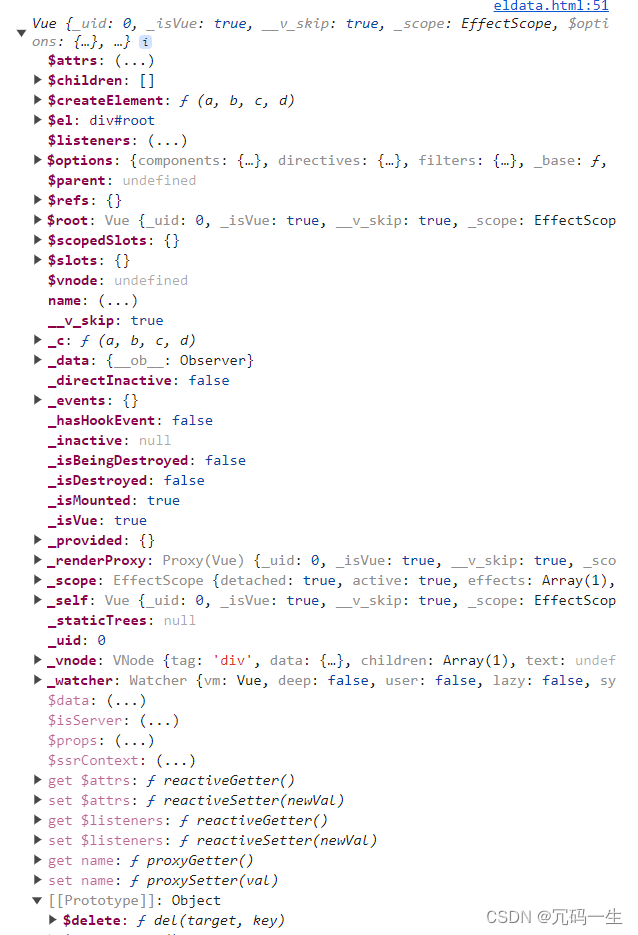
All properties defined in data become properties on the Vue instance (vm). The same applies to properties on Vue.prototype.
Object.defineProperty
Core method for reactivity.
Data proxy: one object proxies property access on another object
In Vue, the data object is stored internally as _data. The Vue instance proxies all properties of _data via getters/setters, so vm.xxx is equivalent to vm._data.xxx.
Event handling v-on
Shorthand: @ (e.g., @click).
Event modifiers
Chain modifiers like .prevent, .stop, .once, etc., to simplify common event operations.
Keyboard events
Aliases for common keys:
enterdelete(Delete and Backspace)escspacetab(use keydown, not keyup)up,down,left,right
For keys without aliases, use the raw key name converted to kebab-case (e.g., caps-lock for CapsLock).
System modifier keys (ctrl, alt, shift, meta):
- With
keyup: must be held while pressing another key, then released. - With
keydown: normal trigger.
You can also use keyCode (deprecated) or define custom aliases via Vue.config.keyCodes. Multiple keys can be chained (e.g., @keyup.ctrl.67).
Computed properties (computed)
Used to derive values from existing data.
Watchers (watch)
Monitor changes in data or computed properties.
Comparison: watch vs computed
Use watch when you need to perform asynchronous operations or respond to changes with side effects. computed cannot perform async operations.
Style binding
Bind inline styles or CSS classes dynamically.
Conditional rendering
v-show, v-if, v-else-if, v-else. Use <template> with v-if for grouping.
List rendering v-for
The key attribute and its role
Without a key, Vue uses the index by default. Using index as key can cause DOM mismatches when the list order changes (especially with input elements). The virtual DOM's diff algorithm compares keys.
Filtering lists
Use computed properties or methods to filter displayed data.
How Vue monitors data changes
Internally, _data is processed by the Observer to make all properties reactive.
Using Vue.set (and vm.$set)
Adds a new reactive property to an object. Note: Vue.set cannot add properties directly to the root data object, only to nested objects.
Form data collection
Different input types require different handling (e.g., checkboxes, radios, selects).
Filters
Transform displayed values (deprecated in Vue 3).
Other built-in directives
v-text, v-html, v-cloak, v-once, v-pre.
Custom directives (directives)
Functional or object-based.
Lifecycle hooks (8 total, in 4 pairs)
Standard lifecycle.
Vue Component-Based Programming
A component encapsulates HTML, CSS, and JS for reuse.
Non-single-file components
Multiple components defined in one file.
Single-file components (.vue)
Each file contains one component, which must be compiled by webpack or Vue CLI.
Vue CLI (Scaffold)
Standard development tool provided by Vue.
npm install -g @vue/cli
# OR
yarn global add @vue/cli

# Create project
vue create my-project

# OR use UI
vue ui

# Run development server
npm run serve
During installation, Babel (ES6→ES5) and ESLint (linting) are included.
Project structure
babel.config.js: Babel configurationpackage.jsonandpackage-lock.json: package managementsrc/main.js: entry pointsrc/App.vue: root componentsrc/assets: static assetssrc/components: single-file componentspublic: HTML and favicon
The main.js entry
// Entry point for the application
import Vue from 'vue'
import RootComponent from './App.vue'

Vue.config.productionTip = false

new Vue({
 render: createElement => createElement(RootComponent)
}).$mount('#app')
Why render function?
The default build of Vue (vue.runtime.esm.js) excludes the template compiler. The render function is used to compile the component.
Modifying default CLI configuration
Use vue inspect > output.js to see all webpack config. You cannot change certain folders (public, src, main.js) by default. Use vue.config.js to override settings.
Ref attribute (ref)
Gives a unique reference to a DOM element or component. Access via $refs.
Props
Allow parent components to pass data to child components.
Mixins
Share configuration between components. Lifecycle hooks execute in both; data conflicts are resolved in favor of the component's own data.
Global mixin: Vue.mixin({...}).
Plugins
An object with an install method that extends Vue functionality.
Scoped styles
Use <style scoped> to limit CSS to the current component.