WXML Templates
WXML requires tags to be strictly closed. Failing to close a tag will cause a compilation error. Attributes in WXML are case-sensitive.
Data Binding
In order to dynamically change the rendering interface during program execution, WXML uses {{variableName}} (variable names are case-sensitive) to bind properties from the data object in the corresponding JavaScript file (similar to Vue).
Attribute values can also be changed dynamically, but unlike Vue, attribute values must be enclosed in double quotes.
<text data-test="{{testValue}}">hello world</text>
Variables that are not defined or are set to undefined will not be synchronized to the WXML.
Logical Syntax
Simple logical operations can also be performed in side {{ }},
such as ternary operations, mathematical calculations, and placing numbers, strings, arrays.
Conditional Logic
<view wx:if="{{condition}}"> ... </view>
<view wx:elif="{{condition}}"> ... </view>
<view wx:else> ... </view>

<!-- array is an array of objects -->
<view wx:for="{{array}}">
  {{index}}: {{item}}
</view>

<!-- Use wx:for-index and wx:for-item to bind index and item to local variables -->
<view wx:for="{{array}}" wx:for-index="idx" wx:for-item="itemName">
  {{idx}}: {{itemName}}
</view>

<!-- wx:key specifies a unique identifier for items in the list -->
<!-- It is a string and its value must be unique (string or number) and cannot be changed dynamically -->
<view wx:for="{{array}}" wx:key="unique"> ... </view>
Templates
Code snippets can be defined in templates and then called in different places.
Use the name attribute as the template name, and define the code snippet inside <template/>.
<template name="messageItem">
  <text>{{index}}: {{message}}</text>
</template>
Using Templates: Use the is attribute to declare the template to be used, and pass the required data via the data attribute.
<template is="messageItem" data="{{index, message}}"/>
References
WXML provides two file referencing methods: import and include.
import allows the current file to use templates defined in the target file (imports templates).
import has scope: it only imports the templates defined in the target file, and is not recursive.
<import src="item.wxml"/>
include copies the entire code of the target file except for <template/> and <wxs/> into the include position, essentially copying and pasting.
<include src="header.wxml"/>
<view> body </view>
<include src="footer.wxml"/>
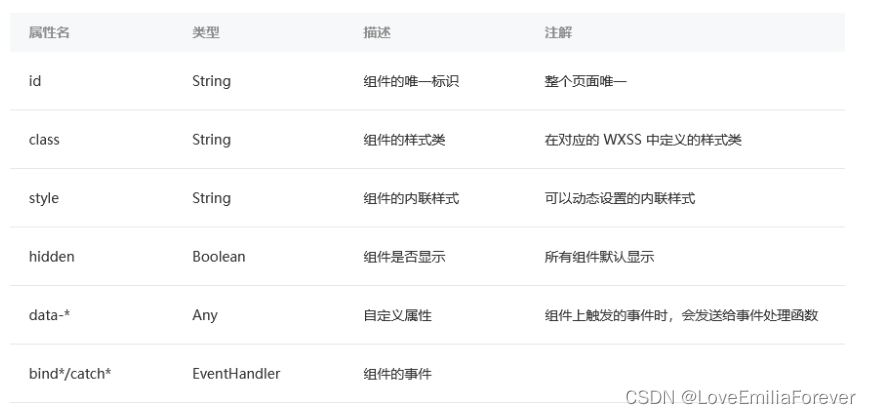
Common Attributes
Attributes supported by all WXML tags are called common attributes.
WXSS Styles
WXSS is similar to CSS in web development, but with some modifications and additions to better suit Mini Program development.
/app.wxss– project-wide styles/pages/xxx/xxx.wxss– page-specific styles/*/*.wxss– others
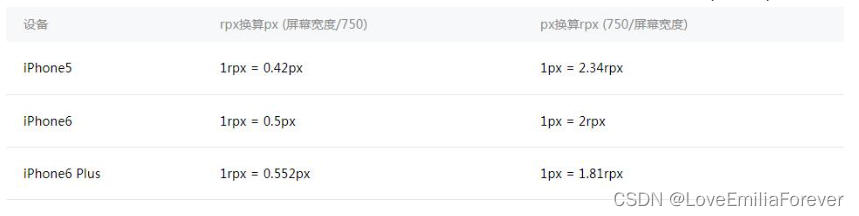
Dimension Unit rpx
WXSS introduces the rpx dimension unit to adapt to screens of different widths, making development simpler.
After compilation, rpx is converted to px (a relative unit relative to screen width / 750).
The conversion is based on 750 physical pixels, meaning on a screen with a width of 750 physical pixels, 1rpx = 1px.
WXSS Imports
Similar to CSS imports:
@import './test_0.wxss';
Since WXSS is ultimately compiled and bundled into the target file, users only need to download it once, and no additional file requests are generated due to style imports during use. In other words, it is a logical import; at runtime, everything is already bundled.
Inline Styles
Just like CSS, but WXSS allows changing styles via variables.
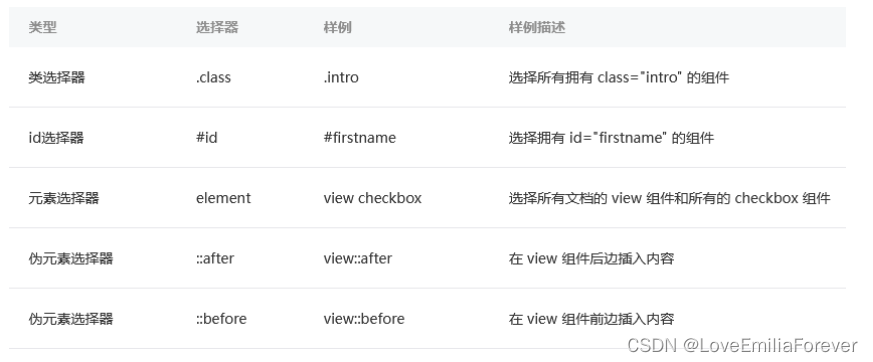
Selectors
WXSS does not fully support CSS selectors.
Selector specificity:
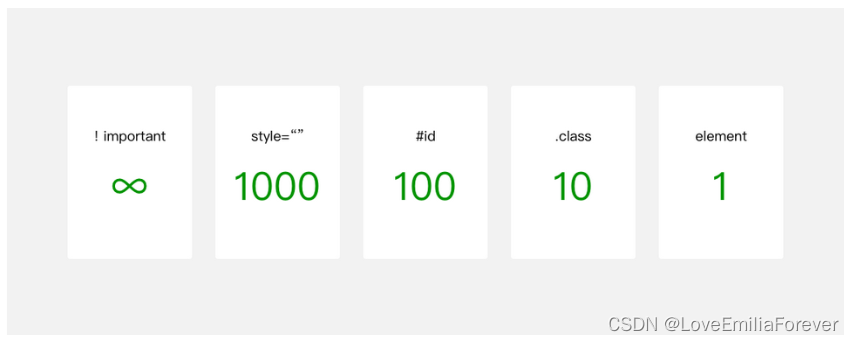
Like CSS, WXSS is cascading (later overrides earlier).
Official Style Library
WeUI is a basic style library that matches WeChat's native visual experience, designed by WeChat's official design team for WeChat web pages and Mini Programs, providing a consistent user experience. WeUI on GitHub
Mini Program JavaScript
The JavaScript composition in a Mini Program is shown below:
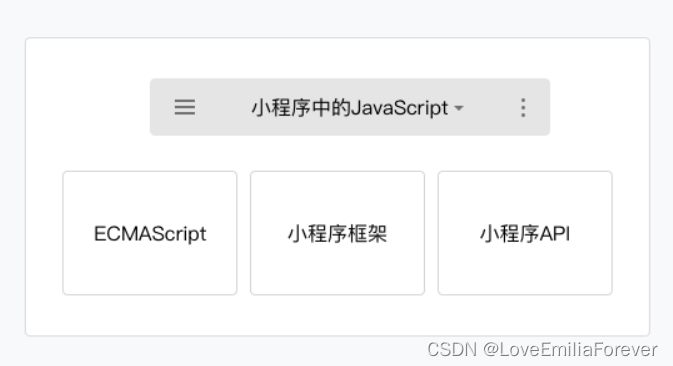
The script execution environment varies across platforms (IDE, Android, iOS). Some platforms do not support ES6. The Mini Program IDE provides a syntax transpiler to convert ES6 code to ES5.
Modularization
Any JavaScript file in a Mini Program can be treated as a module, exposing interfaces via module.exports or exports.
// moduleA.js
module.exports = { }

// B.js
var multiplyBy2 = require('./moduleA')
Similar to the standard ES6 module system.
Script Execution Order
The entry file of a Mini Program is app.js, and the order of execution is determined by the order of require modules in it.
After app.js finishes executing, the Mini Program executes pages in the order defined in the pages array in app.json.
Scope
The scope of scripts in a Mini Program is similar to NodeJS. Variables and functions declared in a file are only effective within that file. Files can declare variibles and functions with the same name without affecting each other.
When global variables are needed, use the global function getApp() to obtain the global instance and set related property values.
That is: get the global object, then define properties on it.
// a.js
var global = getApp()
global.globalValue = 'globalValue'

// b.js
var global = getApp()
console.log(global.globalValue) // Output: globalValue