1. Introduction to TF Tree
In robotic systems, there exist kinematic and dynamic models. For rigid-body robots, the dynamic model is based on rigid body dynamics and represents the relationship between forces/torques and motion states during robot motion. The kinematic model, on the other hand, consists of a series of coordinate frames attached to different positions and represents only the robot's motion states. For example, for a multi-degree-of-freedom robotic arm, the kinematic model is the coordinate transformation from the end-effector to each joint angle; for a rotorcraft UAV, the main kinematic relationship is the transformation between the body-fixed frame and the world frame.
The TF tree in ROS corresponds to the transformation relationships between these coordinate frames, visualizing the robot's motion states. The basic writing patterns for TF tree broadcasters and listeners can be analyzed through practical examples, showing how to extract and apply TF transformation information. In summary, the TF tree is a crucial component in ROS that maintains the coordinate transformation relationships for the entire robot or even the map.
For a complete robot, there can be many coordinate frames, as shown in the figure below:
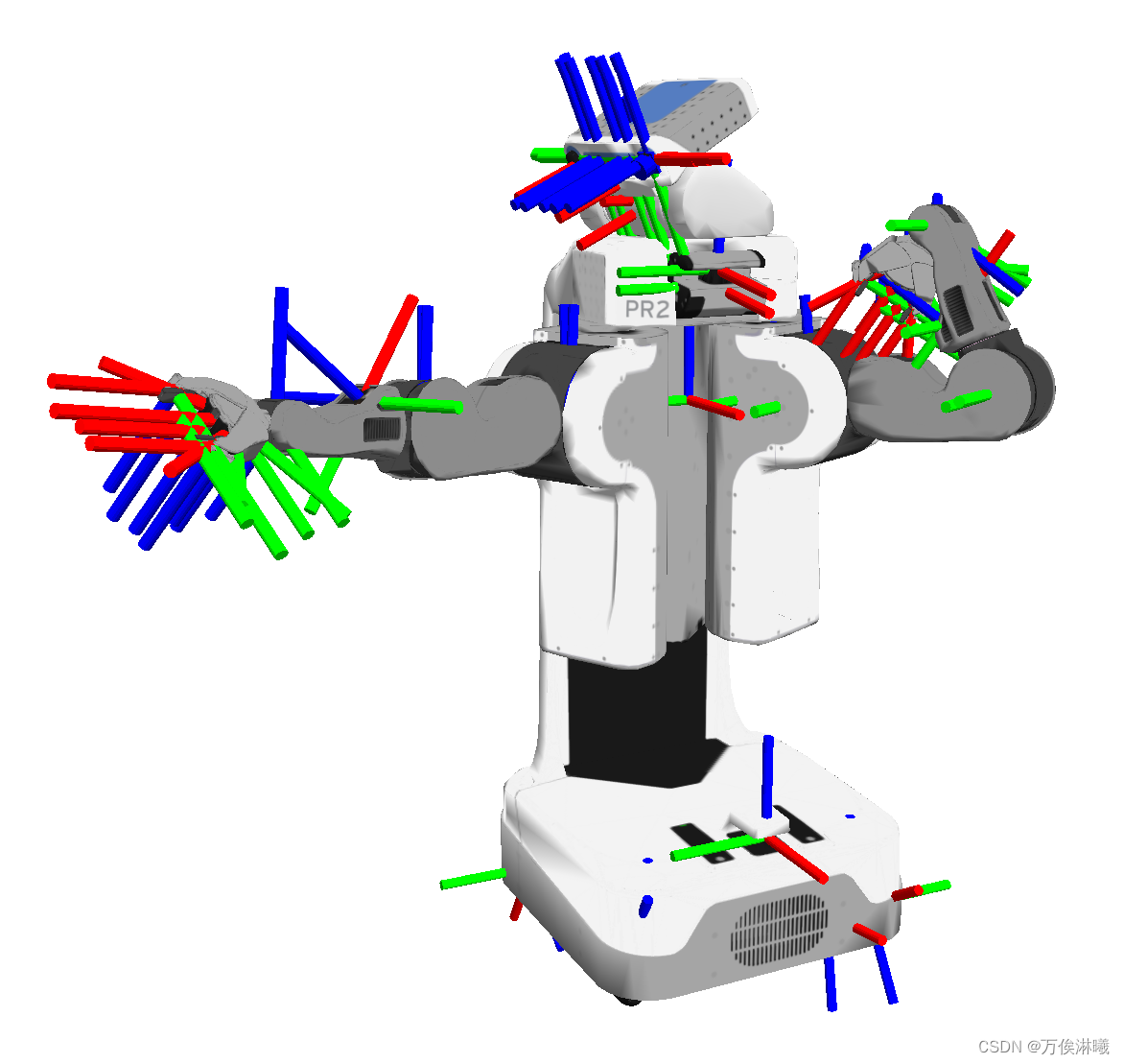
Each time a coordinate relationship is broadcast, ROS adds it to a list for maintenance, which is the TF tree. The TF tree is a data structure in ROS for managing coordinate frame transformations, representing the transformations between frames attached to different parts of the robot to display its motion state. The essence of TF is a tree-like data structure, hence the name TF tree.
Additionally, the TF library is an important component of ROS that allows users to record and manage transformations between multiple coordinate frames at any time. The tf library maintains relationships between coordinate frames and buffers them over time, enabling users to transform points, vectors, etc., between any two frames at any desired time point.
2. TF2 vs TF
TF is mainly used for tasks like motion and perception control and navigation of robots in different coordinate frames. However, TF2 has replaced TF and is a superset of it. Therefore, for new users, its recommended to learn TF2 rather than TF.
In ROS, tf and tf2 are two different libraries for tracking transformations between multiple coordinate frames. The main differences between tf and tf2 are as follows:
Timestamp
tf: Thetflibrary uses a fixed time window (usually one second) to store coordinate transformation information, meaning you can query past or future transformations but within a limited range.tf2: Thetf2library can query transformations at any point in time because it uses timestamps to store transformation information.
API Design
tf: The API design oftfis relatively simple but may lack flexibility in some aspects.tf2: The API design oftf2is more modern, providing more functionality and flexibility, such as handling non-linear transformations.
Data Structures
tf:tfusesTransformandStampedTransformdata structures to store coordinate transformation information.tf2:tf2usesTransform,StampedTransform, andTimePointdata structures, offering richer time-related features.
Buffering Mechanism
tf:tfhas a buffer (Buffer) for storing coordinate transformation information.tf2:tf2has two buffers:BufferCoreandBuffer.BufferCoreis a lightweight buffer that only stores transformation information, whileBufferis a more advanced buffer that provides additional features such as time caching and callback mechanisms.
Message Types
tf:tfusestf::Transformandtf::StampedTransformmessage types.tf2:tf2uses thegeometry_msgs::TransformStampedmessage type.
Performance
tf2offers performance improvements overtf, especially when handling a large number of coordinate frames and transformations.
Features
tf2provides new features not available intf, such as tracking acceleration and velocity.
In summary, tf2 is an improved version of tf with more functionality and higher flexibility.
3. Building a TF Tree
To save the TF tree as a PDF document, use the following command (if tf2_tools is not installed, first install it with sudo apt install ros-noetic-tf2-tools):
rosrun tf2_tools view_frames.py
After execution, you will see logs similar to:
[INFO] [1704000786.800796]: Listening to tf data during 5 seconds...
[INFO] [1704000791.808397]: Generating graph in frames.pdf file...
Experiment steps:
- Run the static coordinate transformation node compiled earlier:
rosrun tf2_learning tf2_learning_broadcast - Run the dynamic coordinate transformation node compiled earlier:
rosrun tf2_learning tf2_learning_dynamic_broadcast - Start the turtlesim to publish the world coordinate pose of the turtle:
rosrun turtlesim turtlesim_node - Save the TF tree as PDF:
rosrun tf2_tools view_frames.py - View the PDF:
evince frames.pdf(or double-click to open)
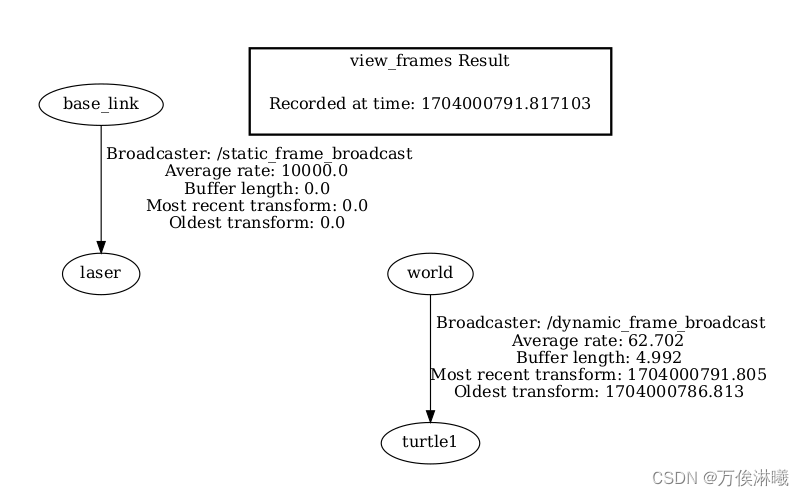
It can be observed that we have published two sets of coordinate relationships: base_link -> laser and world -> turtle1. The coordinate relationship between base_link and world has not been published, resulting in two separate TF trees. Now let's publish the relationship between base_link and world to see the effect.
ROS provides a node for publishing a single static coordinate relationship. Usage:
rosrun tf2_ros static_transform_publisher param0 param1 param2 param3 param4 param5 param6 param7
The eight parameters are:
x_offset y_offset z_offset z_yaw y_pitch x_roll parent_frame child_frame
We publish the relationship between base_link and world:
- Position offset: (0.5, 0.8, 0)
- Rotation offset: (1.57, 0.0, 0.0) in radians
Command:
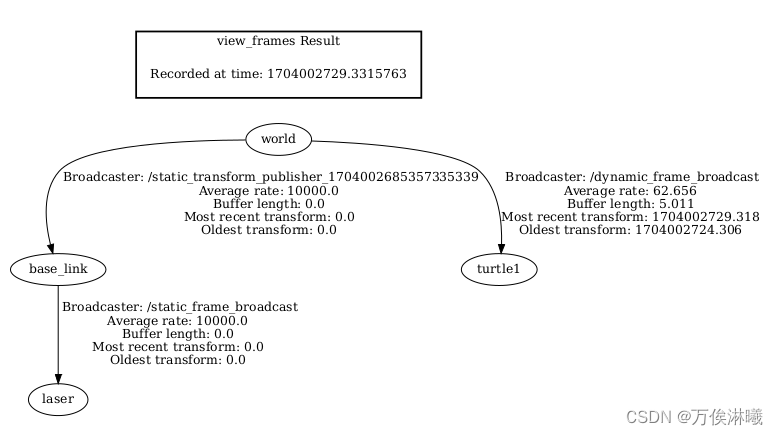
rosrun tf2_ros static_transform_publisher 0.5 0.8 0 0 0 1.5 /world /base_link
View the TF tree:
4. Viewing TF Coordinate Relationships in rviz
- Run the command:
rviz - In the launched rviz, set
Fixed Frametoworld - Click the
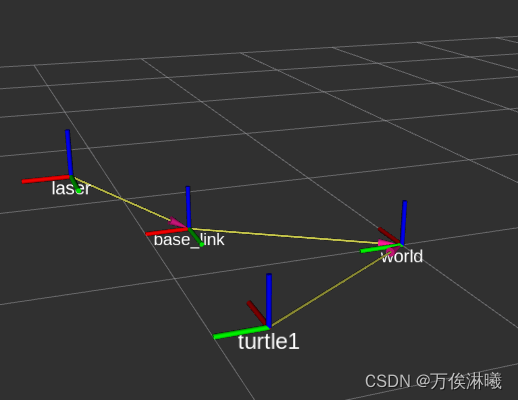
Addbutton at the bottom left, select theTFcomponent in the pop-up window, and the coordinate relationships will be displayed.
Result: